
VQ VQ-WREN-CKBEE
VQ Wren True Wireless Bluetooth Earbuds User Manual
Model: VQ-WREN-CKBEE
Brand: VQ
1. Introduction
The VQ Wren True Wireless Bluetooth Earbuds are designed to provide a high-quality audio experience with the convenience of wireless connectivity. Featuring Bluetooth 5.1, an HD microphone, and a compact charging case, these earbuds are suitable for various activities, from listening to music to making hands-free calls.
This manual will guide you through the setup, operation, and maintenance of your VQ Wren earbuds to ensure optimal performance and longevity.

Figure 1.1: VQ Wren True Wireless Bluetooth Earbuds and Charging Case. The earbuds are shown nestled within their compact charging case, which features a distinctive Cath Kidston bee pattern. The design emphasizes portability and style.
2. Package Contents
Please ensure all items are present in your package:
- VQ Wren True Wireless Bluetooth Earbuds (Left and Right)
- Portable Charging Case
- User Manual (this document)
- Charging Cable
3. Setup
3.1 Initial Charging
Before first use, fully charge the earbuds and the charging case. Place the earbuds into the charging case. Connect the charging case to a power source using the provided charging cable. The indicator light on the case will show charging status.
3.2 Pairing with a Device
The VQ Wren earbuds feature one-step pairing for convenience:
- Ensure the earbuds are fully charged.
- Open the lid of the charging case. The earbuds will automatically power on and enter pairing mode.
- On your smartphone, tablet, or other Bluetooth-enabled device, navigate to the Bluetooth settings.
- Search for available devices and select "VQ Wren" from the list.
- Once connected, you will hear an audio prompt, and the earbuds will be ready for use.
The earbuds have a transmission range of up to 20 meters from your device.

Figure 3.1: One-Step Pairing. This image visually explains the simple pairing process: the earbuds automatically turn on and begin pairing when the charging case lid is opened, making connection to a device quick and effortless.
4. Operating the Earbuds
4.1 Power On/Off
- Power On: Open the charging case lid. The earbuds will automatically power on.
- Power Off: Place the earbuds back into the charging case and close the lid. They will automatically power off and begin charging.
4.2 Music Playback
The earbuds feature touch controls for music management:
- Play/Pause: Tap either earbud once.
- Next Track: Double-tap the right earbud.
- Previous Track: Double-tap the left earbud.
4.3 Call Management
The integrated HD microphone allows for clear hands-free calls:
- Answer/End Call: Tap either earbud once.
- Reject Call: Press and hold either earbud for 2 seconds.
4.4 Sound Quality
The VQ Wren earbuds are engineered for superior sound quality, delivering deep, warm bass, powerful mid-tones, and clear highs. They feature a 14mm dynamic driver to ensure a rich and immersive audio experience.
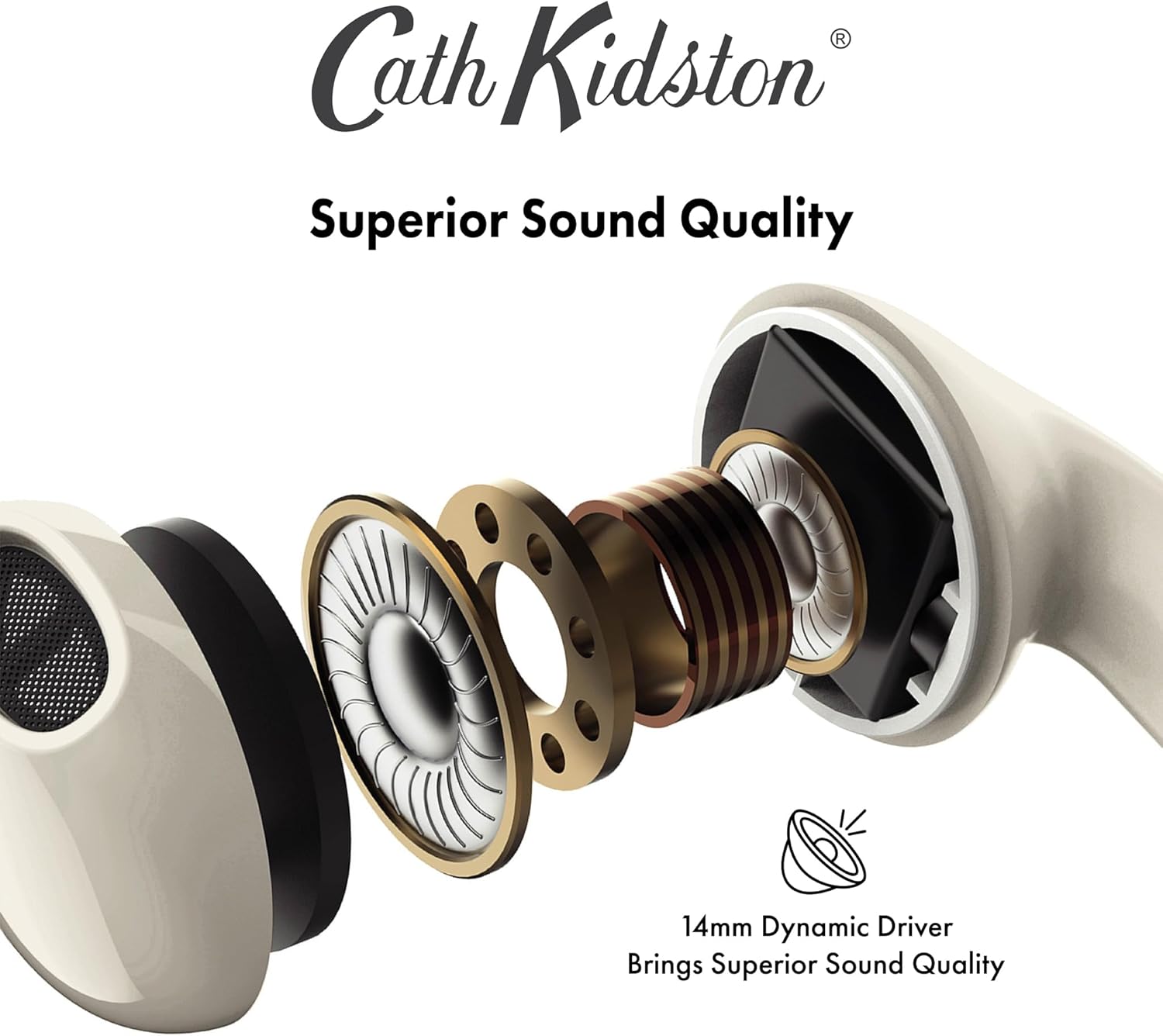
Figure 4.1: Superior Sound Quality. This image provides an exploded view of an earbud, showcasing its internal components, particularly emphasizing the 14mm dynamic driver responsible for delivering high-fidelity audio with rich bass and clear highs.
5. Maintenance and Care
5.1 Charging the Case and Earbuds
The compact charging case automatically recharges the earbuds when they are placed inside and the lid is closed. A full charge of the earbuds provides approximately 8 hours of continuous playback (music and calls). The charging case provides an additional 40 hours of battery life, extending total usage time significantly.

Figure 5.1: Portable Battery Case Features. This image highlights the key features of the charging case, including its ability to provide up to 8 hours of talking time, 150 hours of standby time, and 8 hours of music playback from the earbuds, along with its sweat and waterproof capabilities.
5.2 Cleaning
To maintain optimal performance and hygiene, regularly clean your earbuds and charging case. Use a soft, dry, lint-free cloth. Do not use abrasive cleaners or immerse the devices in liquid.
5.3 Storage
When not in use, store the earbuds in their charging case to protect them and keep them charged. Store in a cool, dry place away from direct sunlight and extreme temperatures.
6. Troubleshooting
| Problem | Possible Cause | Solution |
|---|---|---|
| Earbuds not pairing | Low battery; not in pairing mode; device Bluetooth off. | Ensure earbuds and case are charged. Open case lid to activate pairing mode. Turn on Bluetooth on your device and search for "VQ Wren". |
| No sound from earbuds | Not connected; volume too low; media paused. | Check Bluetooth connection. Increase volume on your device. Tap earbud to play/unpause media. |
| Poor call quality | Weak signal; microphone obstructed. | Move closer to your connected device. Ensure microphone on earbuds is not covered. |
| Earbuds not charging | Improper placement in case; faulty cable/charger. | Ensure earbuds are correctly seated in the charging case. Try a different charging cable and power adapter. |
7. Specifications
- Model: VQ-WREN-CKBEE
- Connectivity: Bluetooth 5.1
- Wireless Range: Up to 20 meters
- Earbud Playback Time: Up to 8 hours (music and calls)
- Earbud Standby Time: Up to 150 hours
- Charging Case Additional Battery Life: Up to 40 hours
- Microphone: Integrated HD Microphone
- Driver Size: 14mm Dynamic Driver
- Battery Composition: Lithium-polymer
- Material: Faux Leather (case)
- Dimensions: 4.43 x 2.2 x 5.47 cm (Product); 90 g (Weight)
- Special Features: Sport and Exercise suitability, Built-in microphone, Rechargeable batteries included.
8. Warranty and Support
For warranty information and customer support, please refer to the official VQ website or contact your retailer. Keep your proof of purchase for any warranty claims.
For further assistance, you may visit the VQ Store on Amazon.
Related documentsVQ-WREN-CKBEE

Ask a question about this manual
Ask about setup, troubleshooting, compatibility, parts, safety, or missing instructions. Manuals+ will review the question and use this page’s manual context to help answer it.