1. Introduction
The Rakstore KCX-BT002 is a compact and versatile Bluetooth audio receiver module designed to integrate wireless audio capabilities into existing sound systems. This module supports Bluetooth 4.2 for stable and lossless audio transmission, making it an ideal solution for upgrading home speakers, car audio systems, and computer speakers to support wireless streaming from Bluetooth-enabled devices.
Typical applications include:
- Converting traditional home speakers into Bluetooth-enabled speakers.
- Maintenance and upgrade of existing sound boxes.
- Adding Bluetooth functionality to car audio players.
- Upgrading computer speakers for wireless audio input.
2. Safety Information
Please read and understand the following safety precautions before installing and operating the KCX-BT002 module:
- Ensure the power supply voltage is within the specified range (3.3V~5.5V). Incorrect voltage can damage the module.
- Observe correct polarity when connecting power and audio lines.
- Avoid exposing the module to moisture, extreme temperatures, or static electricity.
- Handle the module with care to prevent damage to components or solder joints.
- If you are unsure about any connection, consult a qualified technician.
3. Package Contents
The package typically includes:
- 1 x Rakstore KCX-BT002 Bluetooth Audio Receiver Module
- 1 x Connection Cable Set (multi-colored wires)
4. Specifications
| Feature | Specification |
|---|---|
| Model Name | KCX-BT002 |
| Supply Voltage | 3.3V ~ 5.5V |
| Power Supply Current | 30mA ~ 50mA |
| Operating Frequency | 2400MHz ~ 2485MHz |
| RF Output Power | Max 2dbm |
| Receiving Sensitivity | -85dbm |
| Dynamic Range | 91dB |
| THD+N (Total Harmonic Distortion + Noise) | -70dB |
| Crosstalk | -86dB |
| Signal to Noise Ratio (SNR) | 90dB |
| Audio Output Impedance | 32Ω |
| DAC Output Power | 150mW |
| Bluetooth Version | 4.2 |
5. Setup and Connections
Carefully identify the pins on the KCX-BT002 module before making any connections. Refer to the diagram below for pin identification.

Figure 1: Back view of the KCX-BT002 module with pin labels. This image shows the various connection points including power, audio output, and control pins.
5.1 Pin Description
| Pin Label | Description |
|---|---|
| +5V | Positive power supply input (3.3V - 5.5V DC) |
| PGND | Power Ground |
| P/P | Play/Pause control input |
| NEXT | Next track control input |
| PREV | Previous track control input |
| VOL+ | Volume Up control input |
| VOL- | Volume Down control input |
| MIC+ | Microphone positive input |
| MIC- | Microphone negative input |
| OUTR | Right channel audio output |
| OUTL | Left channel audio output |
| AGND | Audio Ground |
5.2 Connection Steps
- Power Connection: Connect the +5V pin to a stable DC power source between 3.3V and 5.5V. Connect the PGND pin to the power supply's ground.
- Audio Output Connection: Connect the OUTL pin to the left audio input of your amplifier or active speaker. Connect the OUTR pin to the right audio input. Connect the AGND pin to the audio ground of your amplifier/speaker. Ensure proper grounding to minimize noise.
- Optional Control Connections: If desired, connect external buttons or switches to the P/P, NEXT, PREV, VOL+, and VOL- pins for playback control. These pins typically require momentary contact to ground to trigger their respective functions.
- Optional Microphone Connection: If microphone functionality is required, connect a compatible microphone to the MIC+ and MIC- pins.
- Initial Power Up: Double-check all connections before applying power. Once confirmed, power on the module.
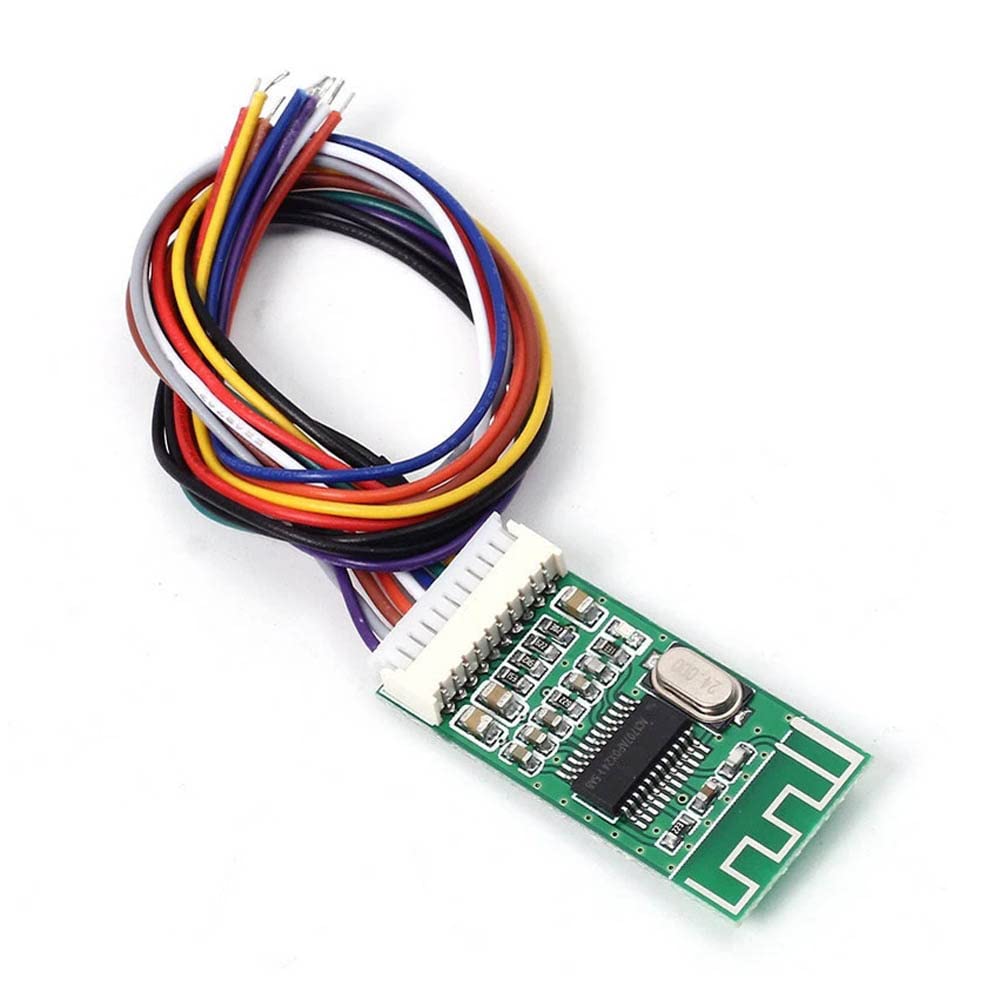
Figure 2: Front view of the KCX-BT002 module with its multi-colored connection wires. This illustrates the module's compact size and the attached wiring harness.
6. Operating Instructions
- Power On: After successful wiring, apply power to the module. An indicator LED (if present) may light up or flash, indicating it is ready for pairing.
- Bluetooth Pairing:
- On your Bluetooth-enabled device (smartphone, tablet, computer), navigate to the Bluetooth settings.
- Scan for available devices.
- Locate and select the device named "KCX-BT002" (or similar, depending on firmware) from the list.
- Once connected, your device should indicate a successful pairing.
- Audio Playback:
- Start playing audio on your paired device.
- The audio will be transmitted wirelessly to the KCX-BT002 module and output through its audio pins to your connected amplifier/speakers.
- Adjust volume from your source device or via the optional VOL+ / VOL- control pins.
- Using Control Pins (Optional): If you have connected external buttons:
- Press the button connected to P/P to play or pause audio.
- Press the button connected to NEXT to skip to the next track.
- Press the button connected to PREV to go to the previous track.
- Press the button connected to VOL+ to increase volume.
- Press the button connected to VOL- to decrease volume.
7. Maintenance
The KCX-BT002 module is designed for reliable operation with minimal maintenance. Follow these guidelines to ensure its longevity:
- Keep Dry: Protect the module from water and moisture.
- Cleanliness: Keep the module free from dust and debris. Use a soft, dry brush or compressed air for cleaning if necessary.
- Temperature: Operate and store the module within typical room temperatures. Avoid extreme heat or cold.
- Physical Protection: If integrating into a larger system, ensure the module is securely mounted and protected from physical impact.
8. Troubleshooting
| Problem | Possible Cause | Solution |
|---|---|---|
| Module does not power on. | Incorrect power supply voltage or polarity; loose power connections. | Verify power supply is within 3.3V-5.5V and connected correctly (+5V to positive, PGND to ground). Check all power connections for secure contact. |
| Cannot find "KCX-BT002" in Bluetooth device list. | Module not powered on; module too far from source device; source device's Bluetooth is off. | Ensure module is powered. Bring source device closer to the module. Turn on Bluetooth on your source device and rescan. |
| No audio output after pairing. | Incorrect audio output connections; low volume on source device or amplifier; module not selected as audio output. | Check OUTL, OUTR, and AGND connections to your amplifier/speakers. Increase volume on both the source device and the connected audio system. Ensure "KCX-BT002" is selected as the audio output on your paired device. |
| Poor audio quality (static, distortion). | Interference; poor grounding; loose audio connections; module too far from source. | Ensure proper grounding for AGND. Keep the module away from other electronic devices that may cause interference. Check audio cable quality and connections. Reduce distance between module and source device. |
| Control pins (P/P, NEXT, PREV, VOL+, VOL-) not working. | Incorrect wiring of control buttons; faulty buttons. | Verify that buttons are correctly wired to the respective pins and provide a momentary contact to ground when pressed. Test buttons for functionality. |
9. Warranty and Support
For warranty information, technical assistance, or further inquiries regarding the KCX-BT002 Bluetooth Audio Receiver Module, please contact your point of purchase or the manufacturer, Rakstore, directly. Please have your purchase details and model number (KCX-BT002) available when seeking support.


