
Black Shark Lucifer T2
Black Shark Lucifer T2 Wireless Gaming Earbuds
User Manual
Model: Lucifer T2 | Brand: Black Shark
Introduction
This manual provides comprehensive instructions for the Black Shark Lucifer T2 Wireless Gaming Earbuds. Please read this manual carefully before using the product to ensure proper operation and to maximize your gaming and audio experience. Keep this manual for future reference.
Package Contents
Upon opening the Black Shark Lucifer T2 package, please verify that all items listed below are present and in good condition:
- Black Shark Lucifer T2 Wireless Gaming Earbuds (Left and Right)
- Charging Case
- USB-C Charging Cable
- User Manual
- Multiple sizes of ear tips for optimal fit

Image: Contents of the Black Shark Lucifer T2 package, including the earbuds, charging case, USB-C cable, user manual, and various ear tip sizes.
Setup Guide
1. Initial Charging
Before first use, fully charge the Black Shark Lucifer T2 earbuds and their charging case. Connect the provided USB-C cable to the charging port on the case and plug the other end into a compatible USB power source (e.g., computer, wall adapter). The charging indicators on the case will illuminate to show charging status.
- Earbuds Playtime: Approximately 5 hours on a single charge.
- Total Playtime with Charging Case: Up to 20 hours.
- Charging Time: Approximately 5 hours for a full charge of the case and earbuds.

Image: The Black Shark Lucifer T2 earbuds and their charging case, connected via a USB-C cable for charging.
2. Pairing with Your Device
- Ensure the earbuds are in the charging case and the case has sufficient battery.
- Open the charging case lid. The earbuds will automatically enter pairing mode, indicated by flashing lights.
- On your device (smartphone, tablet, laptop, gaming console), navigate to the Bluetooth settings.
- Turn on Bluetooth and search for available devices.
- Select "Black Shark Lucifer T2" from the list of found devices.
- Once connected, the earbud lights will stop flashing, and your device will confirm the connection.
The Lucifer T2 earbuds utilize Bluetooth 5.2 for a stable and efficient connection, with a wireless range of up to 10 meters (33 feet).

Image: A smartphone displaying its Bluetooth settings, with 'Black Shark Lucifer T2' highlighted as a connected device.
Operating Instructions
Touch Controls
The Black Shark Lucifer T2 earbuds feature intuitive touch controls on each earbud. Refer to the table below for common functions:
| Action | Function |
|---|---|
| Triple tap L/R touch control | Switch between Gaming Mode / Music Mode |
| Double tap L/R touch control | Play / Pause music |
| Hold Left touch control for 2 seconds | Previous Track |
| Hold Right touch control for 2 seconds | Next Track |
| Double tap L/R touch control | Answer / End Call |
| Triple tap Left touch control | Activate Voice Assistant |
Image: Visual guide to the touch controls on the Black Shark Lucifer T2 earbuds, along with battery level indicators on the charging case.
Gaming Mode and Music Mode
The Lucifer T2 earbuds feature a Dual-Mode Design, allowing you to switch between Gaming Mode and Music Mode for optimized performance based on your activity.
- Gaming Mode: Provides an ultra-low latency of 35ms, ensuring synchronized audio and visuals for a competitive gaming experience. This minimizes audio delay, crucial for fast-paced games.
- Music Mode: Delivers premium sound quality with deeper bass and higher frequency detail, ideal for an immersive audio listening experience.

Image: A visual representation of the 35ms ultra-low latency gaming mode, highlighting its benefit for synchronized gaming experiences compared to regular earbuds.
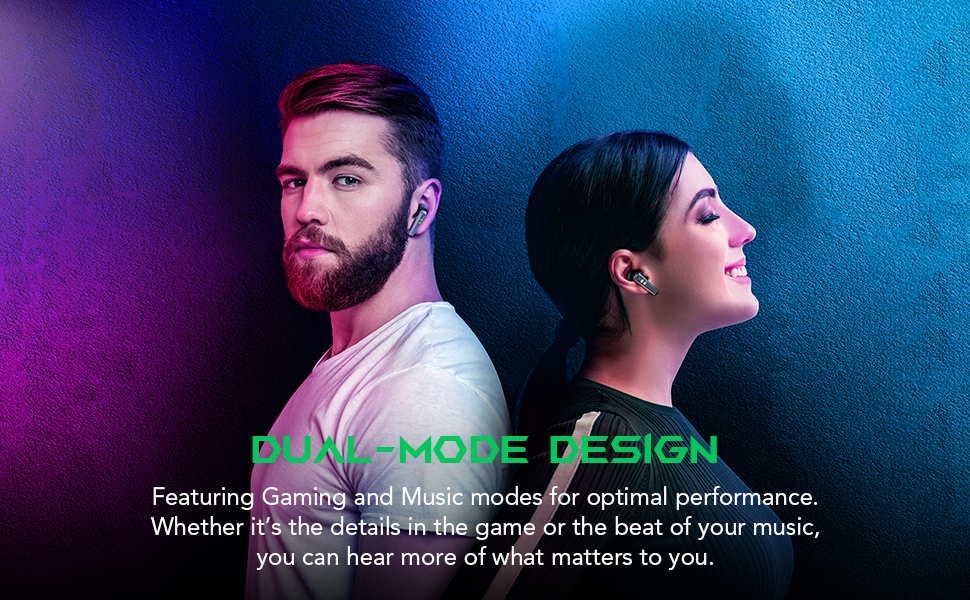
Image: Two people wearing the Black Shark Lucifer T2 earbuds, emphasizing the versatility of the dual-mode design for both gaming and music.
Audio Features
- 10mm Dynamic Drivers: Expertly tuned 10mm drivers provide rich, clear audio with pronounced bass and crisp highs for superior sound clarity in both music and gaming.
- Hyperclear Microphones: Equipped with 4 microphones for ultra-clear voice communication, ensuring your voice is heard clearly during gaming sessions and voice calls.

Image: An internal view of an earbud highlighting the 10mm dynamic driver, illustrating how it produces sound with deeper bass and higher frequency detail.

Image: A person wearing a Black Shark Lucifer T2 earbud, visually representing the ultra-clear microphone feature for enhanced vocal clarity.
Maintenance and Care
Cleaning Your Earbuds
To ensure optimal performance and hygiene, regularly clean your Black Shark Lucifer T2 earbuds:
- Use a soft, dry, lint-free cloth to wipe the earbuds and charging case.
- For ear tips, remove them from the earbuds and clean with a mild soap solution and water. Ensure they are completely dry before reattaching.
- Gently remove any earwax or debris from the earbud mesh using a small, soft brush or cotton swab.
- Avoid using abrasive materials, alcohol, or chemical cleaners, as these can damage the product.
Water Resistance
The Black Shark Lucifer T2 earbuds are rated IPX5 Water Resistant, meaning they are protected against low-pressure water jets from any direction. This makes them suitable for use during workouts or in light rain. However, they are not designed for submersion in water or for use during swimming.
- Do not intentionally submerge the earbuds in water.
- If the earbuds get wet, wipe them dry thoroughly before placing them back in the charging case.

Image: The Black Shark Lucifer T2 earbuds with water droplets on their surface, demonstrating their IPX5 water resistance against sweat and rain.
Storage
When not in use, store the earbuds in their charging case to protect them from dust, damage, and to keep them charged. Store the case in a cool, dry place away from extreme temperatures.
Troubleshooting
If you encounter issues with your Black Shark Lucifer T2 earbuds, try the following troubleshooting steps:
Earbuds Not Pairing/Connecting
- Check Battery: Ensure both earbuds and the charging case are sufficiently charged.
- Re-pair: Place both earbuds back into the charging case, close the lid, wait a few seconds, then open the lid. Go to your device's Bluetooth settings, forget/delete "Black Shark Lucifer T2" if previously paired, and then attempt to pair again.
- Device Proximity: Ensure the earbuds are within 10 meters (33 feet) of your device.
- Interference: Move away from other strong wireless signals (Wi-Fi routers, other Bluetooth devices) that might cause interference.
No Sound or Low Volume
- Volume Level: Increase the volume on both your connected device and the earbuds.
- Earbud Fit: Ensure the earbuds are properly seated in your ears and that you are using the correct size ear tips for a good seal.
- Clean Earbuds: Check for any debris or earwax blocking the earbud speakers and clean them if necessary.
- Re-connect: Disconnect and reconnect the earbuds from your device's Bluetooth settings.
Charging Issues
- Check Cable and Adapter: Ensure the USB-C charging cable and power adapter are working correctly. Try a different cable or adapter.
- Clean Charging Ports: Check for any debris in the charging port of the case or on the charging contacts of the earbuds.
- Proper Placement: Ensure the earbuds are correctly seated in the charging case. The indicator lights on the case should confirm charging.
Touch Controls Not Responding
- Clean Surface: Ensure the touch sensitive area on the earbuds is clean and dry.
- Firm Taps: Ensure you are tapping or holding the touch area firmly and accurately as per the operating instructions.
- Restart: Place the earbuds back in the case, close the lid, and then take them out again to reset them.
Product Specifications
| Feature | Detail |
|---|---|
| Model Name | Lucifer T2 |
| Brand | Black Shark |
| Connectivity Technology | Wireless (Bluetooth) |
| Bluetooth Version | 5.2 |
| Bluetooth Range | 10 Meters |
| Audio Driver Type | Dynamic Driver (10mm) |
| Frequency Range | 20 Hz - 20,000 Hz |
| Microphones | 4 Hyperclear Mics |
| Latency | 35ms (Gaming Mode) |
| Earbuds Battery Life | Up to 5 Hours |
| Total Playtime (with Case) | Up to 20 Hours |
| Charging Time | Approx. 5 Hours |
| Water Resistance Level | IPX5 Water Resistant |
| Control Method | Touch, Voice |
| Material | PVC, Plastic (Case) |
| Item Weight | 5.99 Ounces (Earbuds) / 6 Ounces (Total) |
| Compatible Devices | Laptops, Desktops, Gaming Consoles, Tablets, Telephones, Smart Speaker, Television, Cellphones |
Warranty and Support
Return Policy
This product is subject to a 30-day return policy from the date of purchase, allowing for refund or replacement in accordance with the seller's terms and conditions.
Customer Support
For further assistance, technical support, or warranty inquiries, please visit the official Black Shark store or contact their customer service:
- Black Shark Official Store: Visit Store
- Refer to the contact information provided on the product packaging or the official Black Shark website for direct support channels.
Important Safety Information
- Do not disassemble, repair, or modify the product.
- Keep the product away from extreme temperatures, direct sunlight, and open flames.
- Avoid exposing the product to excessive moisture or corrosive liquids.
- Use only approved chargers and cables.
- Prolonged exposure to high volume levels may cause hearing damage. Adjust volume to a safe level.
- Dispose of the product and its battery responsibly according to local regulations.
Ask a question about this manual
Ask about setup, troubleshooting, compatibility, parts, safety, or missing instructions. Manuals+ will review the question and use this page’s manual context to help answer it.