1. Introduction
The WiZ Connected Remote Control provides convenient and intuitive control over your WiZ smart lighting products. This remote allows you to manage your lights without needing a smartphone or voice assistant, offering quick access to essential functions like turning lights on/off, adjusting brightness, activating night light mode, and selecting from four customizable favorite light modes. It operates with a wide control range and functions even when your Wi-Fi network is unavailable.
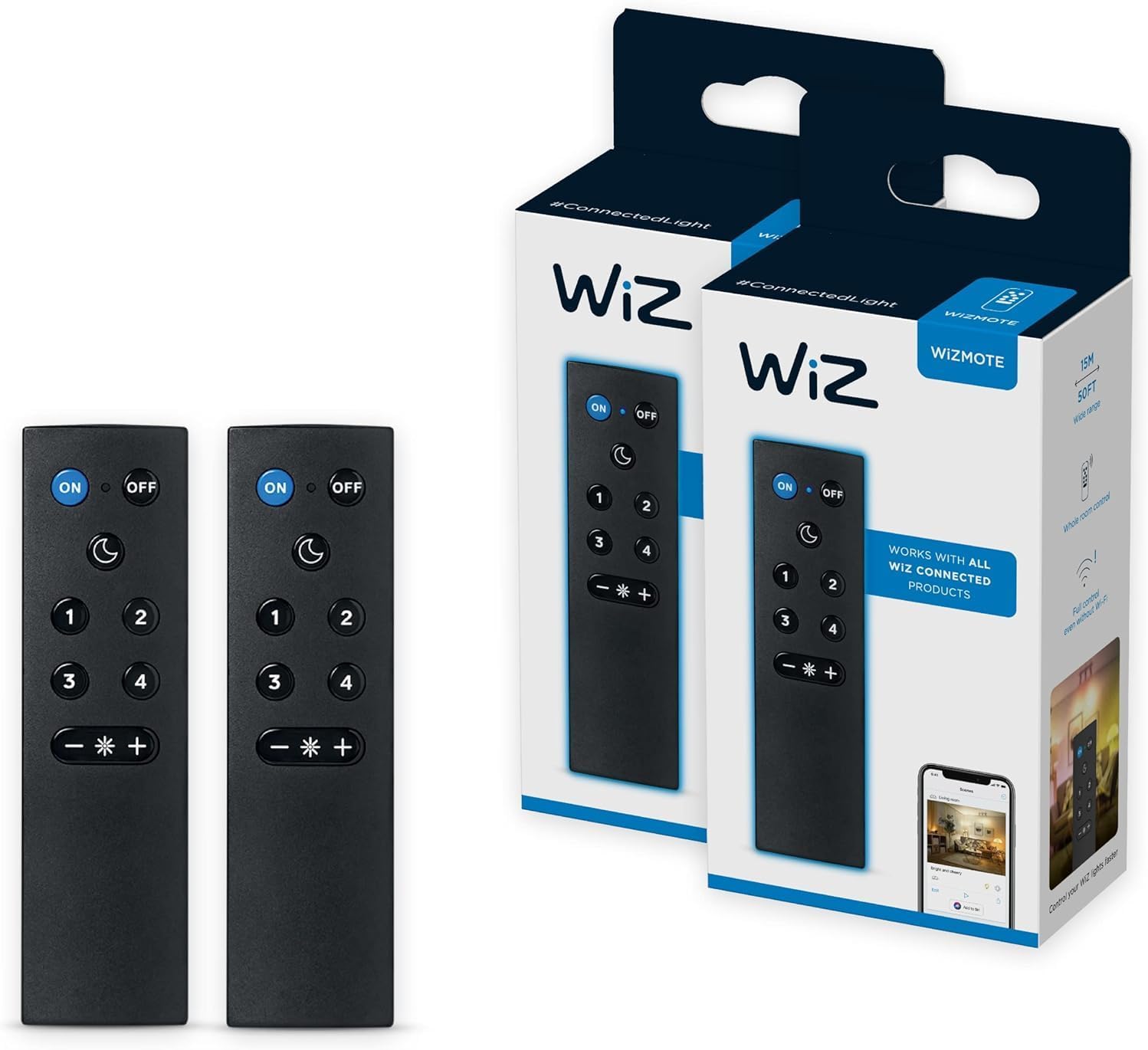
2. What's in the Box
- 2 x WiZ Connected Remote Controls
3. Product Overview
The WiZ Remote Control features a compact design with clearly labeled buttons for easy operation. It is designed to control all WiZ lights within a designated room.

Remote Control Buttons:
- ON Button: Powers on the connected WiZ lights.
- OFF Button: Powers off the connected WiZ lights.
- Moon Icon Button: Activates Night Light mode.
- 1, 2, 3, 4 Buttons: Activate pre-programmed favorite light modes. These modes are customizable via the WiZ Connected app.
- - Button: Decreases light brightness.
- + Button: Increases light brightness.

4. Setup
4.1. Battery Installation
The WiZ Remote Control requires 2 AAA alkaline batteries (not included). To install:
- Locate the battery compartment cover on the back of the remote.
- Slide the cover off.
- Insert two AAA batteries, ensuring correct polarity (+/-).
- Replace the battery compartment cover.
4.2. Pairing with WiZ Connected App
To fully utilize the remote's features, including customizing favorite modes, it must be paired with your WiZ Connected app and associated with a room containing WiZ lights.
- Ensure your WiZ lights are already set up and connected to your 2.4GHz Wi-Fi network via the WiZ Connected app.
- Open the WiZ Connected app on your smartphone or tablet.
- Navigate to the room where you intend to use the remote.
- In the app, go to the room settings and select the option to add a new accessory or device.
- Follow the on-screen instructions to discover and pair the WiZ Remote Control. The app will guide you through the process, which typically involves pressing a button on the remote to initiate pairing.
- Once paired, you can customize the four favorite mode buttons (1-4) within the app to activate specific scenes or light settings.
5. Operating Instructions
The WiZ Remote Control offers straightforward operation for your smart lights.

5.1. Basic On/Off Control
- Press the ON button to turn on all lights in the paired room.
- Press the OFF button to turn off all lights in the paired room.
5.2. Adjusting Brightness
- Press the + button to increase the brightness of the lights.
- Press the - button to decrease the brightness of the lights.

5.3. Activating Night Light Mode
- Press the Moon Icon button to activate the Night Light mode. Note: Lights must be on for Night Light mode to activate.
5.4. Using Favorite Modes
The four numbered buttons (1-4) can be programmed to activate specific light scenes or settings that you configure in the WiZ Connected app.
- Press buttons 1, 2, 3, or 4 to switch between your customized favorite light modes.

5.5. Control Without Wi-Fi
The WiZ Remote Control can operate your lights even if your Wi-Fi network is temporarily down, provided the remote has been previously paired with the lights in the room.
6. Maintenance
6.1. Battery Replacement
When the remote's performance degrades or it stops responding, it may be time to replace the batteries. Follow the battery installation steps in Section 4.1.
7. Troubleshooting
- Remote not responding:
- Check if the batteries are correctly installed and have sufficient charge. Replace if necessary.
- Ensure the remote is within the 15-meter operating range of the WiZ lights.
- Verify that the remote is paired with the correct room in the WiZ app.
- Remote only controls one room:
- The WiZ Remote Control is designed to control all lights within a single designated room. If you have multiple rooms with WiZ lights and wish to control them independently with a remote, a separate remote is required for each room.
- Favorite modes not working:
- Ensure the favorite modes (buttons 1-4) have been configured and saved within the WiZ Connected app for the paired room.
- Night Light button not working:
- The lights must be turned ON before the Night Light mode can be activated.
8. Specifications
| Model Number | R603597 |
| Product Dimensions | 1.41 x 1.41 x 1.41 inches |
| Item Weight | 1.31 ounces |
| Color | Black |
| Power Source | 2 x AAA Alkaline Batteries (not included) |
| Control Range | Up to 15 meters |
| Compatible Devices | All WiZ Connected Products |
| Special Feature | Easy To Control, Works without Wi-Fi (after initial setup) |
9. Warranty & Support
For warranty information and technical support, please refer to the official WiZ Connected website or contact WiZ Connected customer service. Keep your purchase receipt for warranty claims.
You can visit the WiZ Connected Store for more product information and support resources.


