
Ariete 00B080700AREU
Contents
Ariete Ciclope Evaporative Cooler User Manual
Model: 00B080700AREU | Brand: Ariete
Introduction
Thank you for purchasing the Ariete Ciclope Evaporative Cooler. This manual provides essential information for the safe and efficient operation, maintenance, and troubleshooting of your new appliance. Please read this manual thoroughly before use and keep it for future reference.

Figure 1: Front view of the Ariete Ciclope Evaporative Cooler.
Safety Information
Always observe the following safety precautions to reduce the risk of fire, electric shock, or injury.
- Ensure the power supply voltage matches the rating label on the appliance.
- Do not immerse the appliance, cord, or plug in water or other liquids.
- Unplug from the outlet when not in use, before cleaning, or before moving.
- Keep the appliance out of reach of children and pets.
- Do not operate with a damaged cord or plug.
- Place the appliance on a stable, flat surface.
- Do not block air inlets or outlets.
- Only use clean water in the water tank.
Package Contents
Verify that all items are present in the package:
- Ariete Ciclope Evaporative Cooler Unit
- Remote Control
- User Manual (this document)

Figure 2: Included remote control for convenient operation.
Setup
- Unpacking: Carefully remove the evaporative cooler from its packaging. Retain the packaging for future storage or transport.
- Placement: Place the unit on a firm, level surface. Ensure there is adequate space around the unit for proper airflow (at least 20 cm from walls or furniture). The unit is equipped with wheels for easy movement.
- Filling the Water Tank:
- Locate the water tank at the bottom of the unit.
- Pull out the water tank gently.
- Fill the tank with clean, cool water. Do not exceed the "MAX" fill line.
- Carefully push the water tank back into its position until it clicks securely.
- Power Connection: Plug the power cord into a suitable 220V electrical outlet.

Figure 3: Product dimensions for proper placement: 38.2 cm (width) x 29.01 cm (depth) x 95.4 cm (height).
Operating Instructions
The Ariete Ciclope Evaporative Cooler can be operated using the LED touchscreen display on the unit or the included remote control.
Control Panel Overview

Figure 4: Top-mounted LED touchscreen control panel.
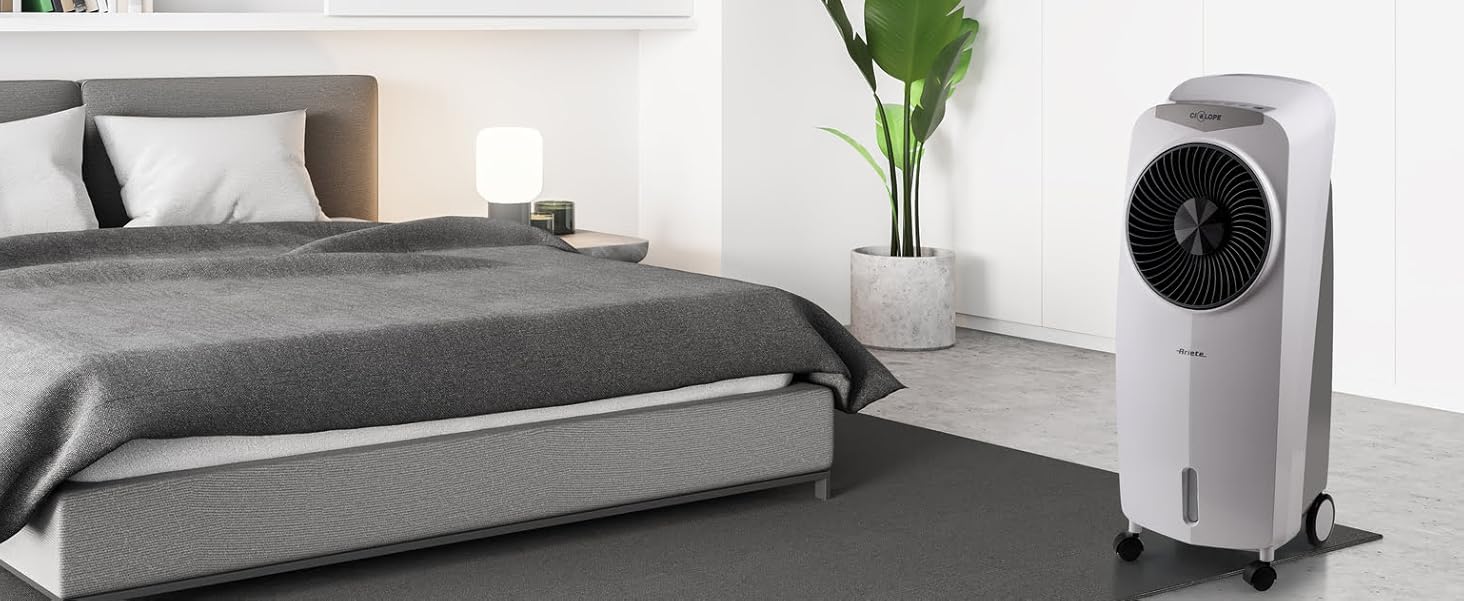
Figure 5: Detailed view of the control panel buttons, including Light, Mode, Cool, Swing, Timer, Speed, and On/Off.
Functions
- ON/OFF: Press to turn the unit on or off.
- Speed: Adjusts the fan speed (Low, Medium, High).
- Timer: Sets an operating time after which the unit will automatically turn off.
- Swing: Activates or deactivates the automatic oscillation of the air vents for wider air distribution.
- Cool: Engages the evaporative cooling function. Ensure the water tank is filled.
- Mode: Cycles through different operating modes (e.g., Normal, Natural, Sleep).
- Light: Controls the LED display light.
Using the Remote Control
The remote control duplicates all functions available on the main control panel, allowing for convenient operation from a distance. Ensure the remote control has working batteries (not included).
Figure 6: Remote control layout, mirroring the unit's functions.
Maintenance
Regular maintenance ensures optimal performance and extends the lifespan of your evaporative cooler.
- Cleaning the Exterior: Wipe the exterior surfaces with a soft, damp cloth. Do not use abrasive cleaners or solvents.
- Water Tank Cleaning:
- Empty the water tank regularly, especially if the unit will not be used for an extended period.
- Clean the tank with mild soap and water, then rinse thoroughly.
- Allow the tank to air dry completely before reinserting.
- Cooling Pad/Filter Cleaning: Refer to the specific instructions in the full manual for cleaning or replacing the cooling pad/filter, typically located behind the rear grille. Regular cleaning prevents mold and maintains cooling efficiency.
- Storage: When storing the unit for an extended period, ensure the water tank is empty and clean. Store in a cool, dry place, preferably in its original packaging.
Troubleshooting
Before contacting customer support, please refer to the following common issues and solutions:
| Problem | Possible Cause | Solution |
|---|---|---|
| Unit does not turn on. | No power supply. | Check if the power cord is securely plugged in and the outlet is functional. |
| No cool air. | Water tank is empty or cooling function is not activated. | Fill the water tank and press the "Cool" button. |
| Weak airflow. | Air filter/cooling pad is dirty or fan speed is too low. | Clean the air filter/cooling pad. Increase the fan speed. |
| Unusual noise. | Unit is not on a level surface or internal components are loose. | Ensure the unit is on a flat surface. If noise persists, contact customer support. |
Specifications
| Feature | Detail |
|---|---|
| Brand | Ariete |
| Model | 00B080700AREU |
| Color | White |
| Product Dimensions (L x W x H) | 38.2 x 29 x 95.4 cm |
| Item Weight | 7.5 kg |
| Water Tank Capacity | 8 Liters |
| Wattage | 110 watts |
| Voltage | 220 Volt |
| Material | Plastic |
| Energy Efficiency Class | A to G |
| Annual Energy Consumption | 27.63 Kilowatt-hours |
| Noise Level | 67.7 dB |
| Special Features | Cooling, LED Touchscreen Display, Remote Control |
| Power Source | Corded Electric |
| Form Factor | Tower |
Warranty and Support
This product comes with a standard manufacturer's warranty. For detailed warranty information, please refer to the warranty card included with your purchase or visit the official Ariete website. For technical support, spare parts, or service inquiries, please contact Ariete customer service through their official channels.
You can find more information and contact details on the Ariete Store on Amazon.
Ask a question about this manual
Ask about setup, troubleshooting, compatibility, parts, safety, or missing instructions. Manuals+ will review the question and use this page’s manual context to help answer it.