
Introduction
Thank you for choosing the Ariete Polar 10 Portable Air Conditioner. This manual provides essential information for the safe and efficient operation, installation, and maintenance of your appliance. Please read it thoroughly before use and keep it for future reference.
The Ariete Polar 10 is a versatile portable air conditioner designed to cool, dehumidify, and circulate air in your home. It features a 10000 BTU/h cooling capacity, two fan speeds, a timer, sleep function, child lock, and Smart Wi-Fi control via a dedicated app.
Safety Information
Please observe the following safety precautions to reduce the risk of fire, electric shock, or injury:
- Always connect the unit to a properly grounded power outlet.
- Do not operate the unit with a damaged power cord or plug.
- Do not block air inlets or outlets. Maintain at least 30 cm clearance around the unit.
- Do not insert objects into the air vents.
- Keep the unit away from heat sources and direct sunlight.
- Ensure the unit is placed on a flat, stable surface to prevent tipping.
- This appliance uses R290 refrigerant. Do not puncture the refrigerant circuit.
- Unplug the unit before cleaning or performing any maintenance.
- Do not use chemical solvents or flammable liquids for cleaning.
Product Overview
Familiarize yourself with the components of your Ariete Polar 10 Portable Air Conditioner.

Figure 1: Ariete Polar 10 Portable Air Conditioner. This image shows the overall design of the portable air conditioner, highlighting its compact and modern appearance.

Figure 2: Digital Touch Control Panel. This close-up view displays the intuitive digital touch controls for power, mode selection, fan speed, and timer settings.

Figure 3: Full Control Remote. The remote control allows convenient operation of all air conditioner functions from a distance, including temperature, mode, and fan speed adjustments.
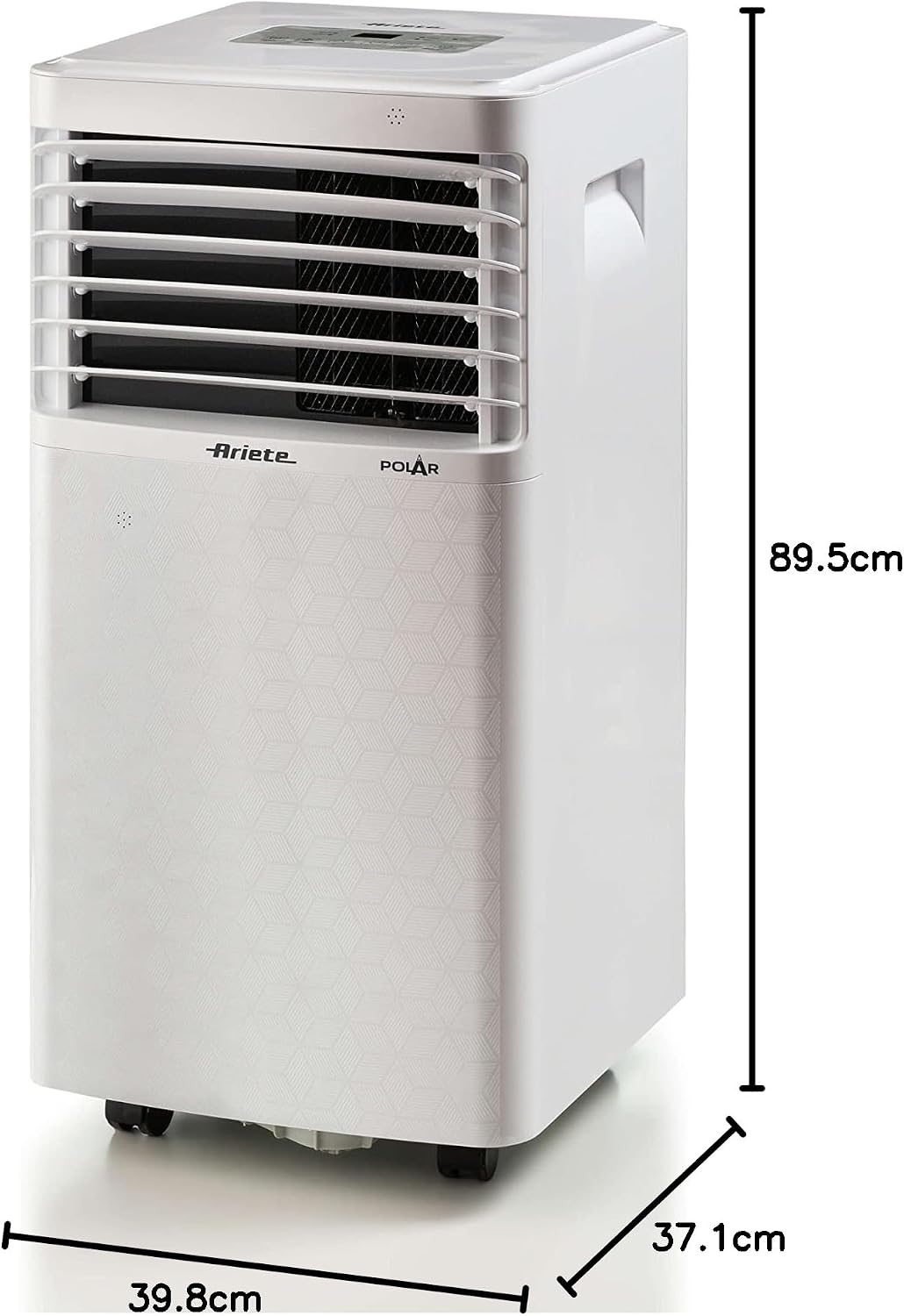
Figure 4: Product Dimensions. This image illustrates the compact dimensions of the unit: 37.1 cm (depth) x 39.8 cm (width) x 89.5 cm (height), making it suitable for various room sizes.
Key Features:
- Cooling Capacity: 10000 BTU/h
- Operating Modes: Cooling, Dehumidifying, Fan
- Fan Speeds: 2 levels
- Control Methods: Digital touch panel, Remote control, Smart Wi-Fi App
- Special Functions: Timer, Sleep mode, Child lock
- Refrigerant: Natural Gas R290
- Energy Efficiency: Class A
Video 1: Aridis Portable Air Conditioner Features. This video demonstrates various features of a portable air conditioner, including adjustable air direction and remote control functionality, providing a visual overview of similar product capabilities.
Setup
Follow these steps for proper installation and initial setup of your portable air conditioner.
1. Placement
- Place the unit on a firm, level surface in the room you wish to cool.
- Ensure there is at least 30 cm of space around the unit for proper airflow.
- Avoid placing the unit near heat-generating appliances or in direct sunlight.
- The unit is suitable for rooms up to 28 square meters.
2. Exhaust Hose Installation
- Attach the exhaust hose connector to the air outlet on the back of the unit.
- Extend the exhaust hose and attach the window kit adapter to the other end.
3. Window Kit Installation
- Install the pre-assembled window kit into your window opening (suitable for sliding windows).
- Connect the exhaust hose with the adapter to the opening in the window kit.
- Close the window as much as possible to seal the opening around the kit and hose, minimizing air leakage.
Video 2: Quick Installation Tutorial. This video provides a step-by-step guide on how to quickly install a portable air conditioner, including attaching the exhaust hose and setting up the window kit.
Operating Instructions
Learn how to operate your Ariete Polar 10 using the control panel, remote control, or the Smart Wi-Fi app.
1. Power On/Off
Press the ON/OFF button on the control panel or remote to turn the unit on or off.
2. Mode Selection
Press the MODE button to cycle through the available operating modes:
- Cooling Mode: For active cooling. Adjust the temperature using the + and - buttons.
- Dehumidifying Mode: To reduce humidity in the room.
- Fan Mode: For air circulation without cooling.
3. Fan Speed Adjustment
In Cooling or Fan mode, press the FAN SPEED button to select between two fan speeds (low, high).
4. Timer Function
Press the TIMER button to set a delay for the unit to turn on or off. Use the + and - buttons to adjust the desired time.
5. Sleep Function
Activate the SLEEP function for quieter operation and gradual temperature adjustment during the night.
6. Smart Wi-Fi Control
Download the dedicated Ariete app on your smartphone to control the air conditioner remotely. Follow the in-app instructions for pairing the device.
Video 3: Portable Air Conditioner 4-in-1. This video showcases the multi-functional capabilities of a portable air conditioner, including cooling, dehumidifying, and fan modes, demonstrating its versatility in different environments.
Maintenance
Regular maintenance ensures optimal performance and extends the lifespan of your air conditioner.
1. Cleaning the Air Filter
The air filter should be cleaned every two weeks, or more frequently depending on usage and air quality.
- Turn off and unplug the unit.
- Locate and remove the air filter from the back or side of the unit.
- Clean the filter with a vacuum cleaner or wash it with warm, soapy water. Rinse thoroughly.
- Allow the filter to dry completely before reinstalling it.
2. Draining Condensed Water
During dehumidifying or cooling operations, water will condense inside the unit. The unit has an internal water tank (61 Liters capacity). When the tank is full, the unit may stop operating and display an indicator. You will need to drain the water manually.
- Turn off and unplug the unit.
- Place a shallow pan or container under the drainage outlet at the bottom rear of the unit.
- Remove the drain plug to allow water to flow out.
- Once drained, replace the drain plug securely.
Video 4: OKYUK Portable Air Conditioner. This video demonstrates the water drainage process for a portable air conditioner, showing how to empty the condensed water from the unit.
3. Storage
If storing the unit for an extended period:
- Drain all condensed water.
- Clean the air filter.
- Store the unit in a dry, cool place, preferably in its original packaging.
Troubleshooting
Refer to this section for common issues and their solutions.
| Problem | Possible Cause | Solution |
|---|---|---|
| Unit does not turn on | No power; Power cord not plugged in; Water tank full | Check power supply; Plug in power cord; Drain water tank |
| No cooling or insufficient cooling | Windows/doors open; Air filter dirty; Exhaust hose not properly installed; Room size too large | Close windows/doors; Clean air filter; Ensure exhaust hose is sealed; Use in recommended room size (up to 28 sqm) |
| Unit is noisy | Unit not on a level surface; Air filter dirty | Place on a level surface; Clean air filter |
| Water leakage | Drain plug not secured; Unit tilted | Ensure drain plug is tightly closed; Place unit on a level surface |
If the problem persists after checking the above, please contact customer support.
Specifications
| Feature | Specification |
|---|---|
| Brand | Ariete |
| Model Name | Polar 10 |
| Model Number | 9021 |
| Cooling Power | 10000 BTU/h |
| Electric Power | 1100 Watts |
| Voltage | 220 Volt |
| Energy Efficiency Class | A |
| Refrigerant | R-290 |
| Noise Level | 63 Decibel |
| Product Dimensions (DxWxH) | 37.1 x 39.8 x 89.5 cm |
| Item Weight | 26 Kilograms |
| Recommended Area | Up to 28 square meters |
| Control Methods | App, Remote, Touch |
| Included Components | Battery Set, Remote Control |
| Country of Origin | China |
Warranty and Support
Your Ariete Polar 10 Portable Air Conditioner comes with a 2-year manufacturer's warranty from the date of purchase. This warranty covers defects in materials and workmanship under normal use.
The warranty does not cover:
- Damage caused by improper installation or use.
- Damage caused by accidents, abuse, or unauthorized modifications.
- Normal wear and tear.
For warranty claims, technical support, or service inquiries, please refer to the contact information provided in your purchase documentation or visit the official Ariete website.