
MONODEAL MD102FM
MONODEAL Portable CD Player User Manual
Model: MD102FM | Brand: MONODEAL
Introduction
The MONODEAL MD102FM Portable CD Player is a versatile audio device designed for on-the-go music listening and audiobook playback. Featuring a built-in FM transmitter, anti-skip protection, and a rechargeable battery, it offers multiple connectivity options for various environments, including car use. This manual provides detailed instructions for setup, operation, maintenance, and troubleshooting to ensure optimal performance of your device.
What's in the Box
- CD Player
- Earphones
- USB Charging Cable
- Aux Cable
- User Manual

Figure 1: MONODEAL Portable CD Player and included accessories.
Product Features
- Built-in FM Transmitter: Allows wireless connection to car radio systems, compatible with almost 99% of cars.
- Rechargeable Battery: Integrated 1400mAh Li-ion battery provides over 10 hours of playback on a single charge (approx. 4 hours charging time via USB-C).
- Large LCD Backlit Display: Enhanced visibility, especially in low light conditions, with larger buttons for easy operation.
- Anti-Skip & Resume Function: Ensures uninterrupted playback even during movement and allows resuming from the last stopped point.
- Wide Compatibility: Supports CD, MP3, HDCD, CD-R formats and includes a TF card slot for MP3 file playback (TF card not included).
- Sound Effects & Playback Modes: Features 5 sound effects (BBS, POP, JAZZ, ROCK, CLASSIC) and 5 playback modes (Play in order, Repeat one song, Repeat all songs, Shuffle, Play first 10 seconds of per track).
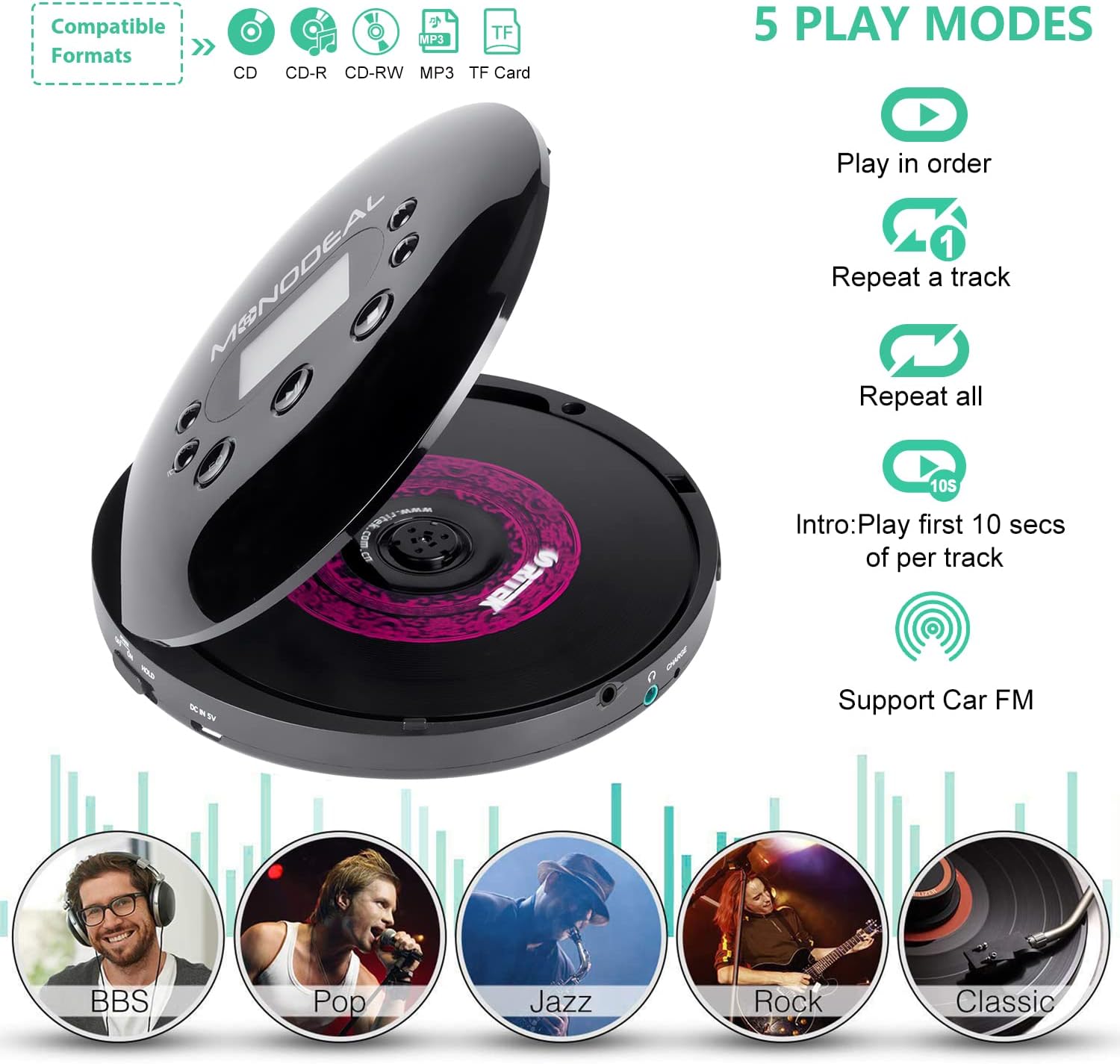
Figure 2: Compatible formats and playback modes.
Setup
1. Charging the Device
Before first use, fully charge the CD player. Connect the included USB-C charging cable to the DC 5V port on the device and the other end to a USB power source (e.g., wall charger, power bank, car charger, or computer USB port). The charging indicator light will illuminate during charging and turn off when fully charged.

Figure 3: Charging the CD Player.
2. Inserting a CD
- Ensure the "HOLD" switch is in the OFF position.
- Press the "OPEN" button to open the CD compartment lid.
- Carefully place a CD (CD, MP3, HDCD, CD-R format) onto the spindle, label side up, ensuring it clicks into place.
- Close the CD compartment lid firmly until it latches.
3. Connecting Headphones or External Speakers
The CD player does not have built-in speakers. You must use headphones or external speakers for audio output.
- Headphones: Plug the included earphones or your preferred 3.5mm headphones into the headphone jack on the side of the device.
- External Speakers: Use the included 3.5mm AUX cable to connect the CD player's headphone jack to the AUX input of external speakers or a car audio system.
Operating Instructions
Device Controls Overview
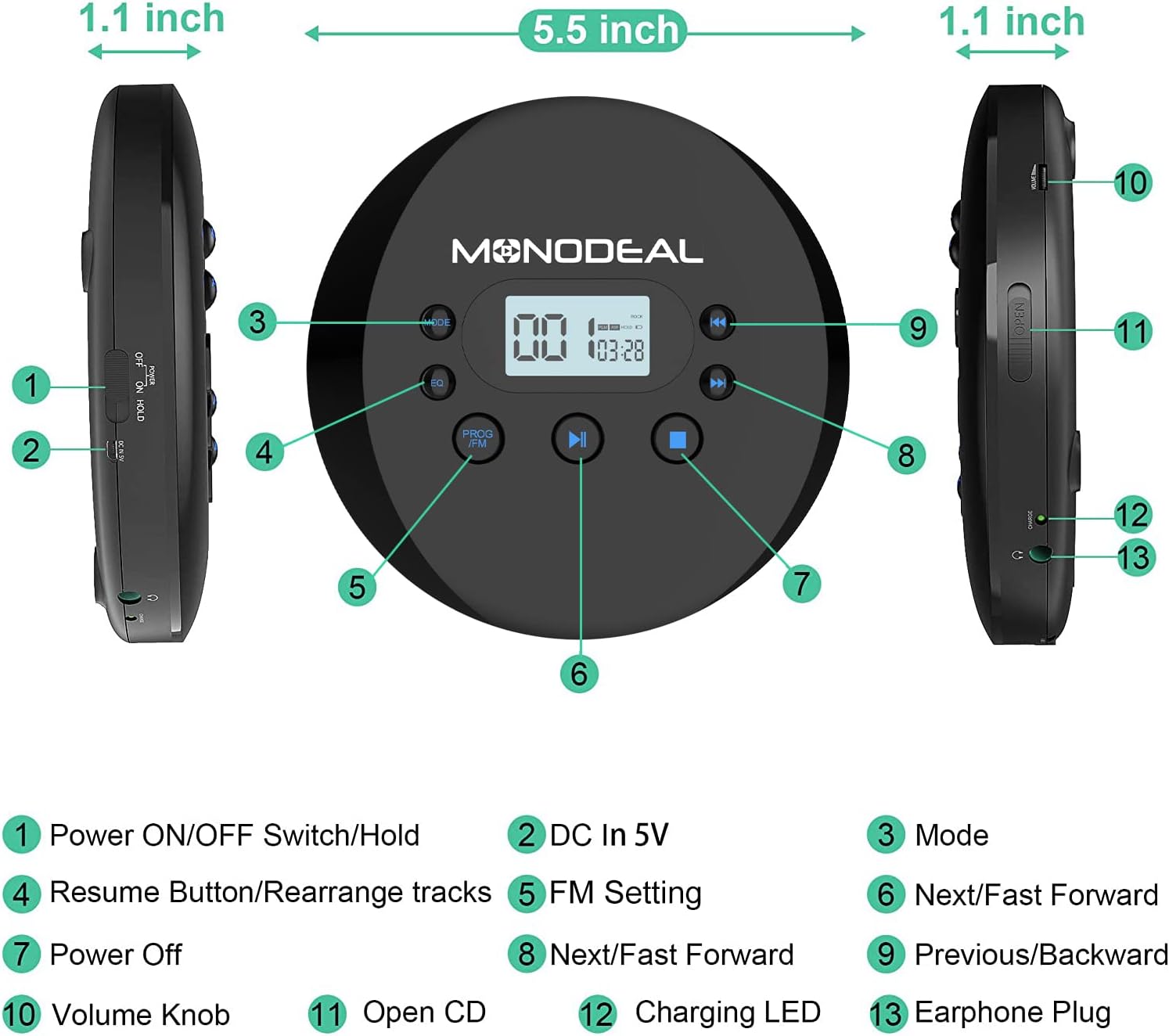
Figure 4: MONODEAL CD Player Controls and Ports.
- Power ON/OFF Switch/Hold: Slide to turn the device on/off or to lock buttons (HOLD function).
- DC In 5V: USB-C charging port.
- Mode: Cycles through playback modes (Play in order, Repeat one song, Repeat all songs, Shuffle, Intro).
- PROG/FM: Press to activate FM transmitter mode or program tracks.
- Play/Pause (►▮▮): Starts or pauses playback.
- Stop (■): Stops playback.
- Next/Fast Forward (►►): Skips to the next track or fast forwards during playback.
- Previous/Rewind (◄◄): Skips to the previous track or rewinds during playback.
- Volume Knob: Adjusts the audio output volume.
- OPEN: Button to open the CD compartment.
- TF Card Slot: Insert a TF (MicroSD) card containing MP3 audio files into the TF card slot.
- Headphone Jack: 3.5mm audio output for headphones or AUX cable.
Basic Playback
- Insert a CD and connect your audio output device.
- Slide the Power ON/OFF switch to "ON".
- Press the Play/Pause button (►▮▮) to begin playback.
- Use the Next/Fast Forward (►►) and Previous/Rewind (◄◄) buttons to navigate tracks. Hold them down to fast forward or rewind.
- Adjust volume using the Volume Knob.
- Press the Stop button (■) to stop playback.
FM Transmitter Function (for Car Use)
The built-in FM transmitter allows you to play CD audio through your car's FM radio without an AUX input.
- While a CD is playing, press the PROG/FM button. The FM transmission frequency will appear on the display.
- Press PROG/FM again to cycle through available FM frequencies (78.1, 79.3, 87.5, 88.5, 93.6, 103, 107.1, OFF). Select a frequency that is clear and not in use by a local radio station.
- Tune your car's FM radio to the exact same frequency selected on the CD player.
- You should now hear the CD audio through your car's speakers.

Figure 5: Connecting to car audio via AUX or FM.
Video 1: This video demonstrates how to connect the MONODEAL MD102FM Portable CD Player to your car's FM radio system.
Anti-Skip Protection
The device features anti-skip and anti-shock technology to ensure continuous playback even when subjected to movement or vibrations, making it ideal for use in cars or during travel.

Figure 6: The CD player's anti-skip feature ensures smooth playback even in a moving vehicle.
Resume Function
The CD player remembers the last stopped point on a CD, allowing you to resume playback from where you left off. This is particularly useful for audiobooks.
TF Card Playback
Insert a TF (MicroSD) card containing MP3 audio files into the TF card slot. The player will automatically detect and play the MP3 files. Use the navigation buttons to select tracks.
Maintenance
- Cleaning: Use a soft, dry cloth to clean the exterior of the device. For the lens, use a specialized CD lens cleaner. Do not use abrasive cleaners or solvents.
- Storage: Store the CD player in a cool, dry place away from direct sunlight and extreme temperatures. When not in use for extended periods, ensure the battery is partially charged (around 50%) to prolong its lifespan.
- Handling: Handle CDs by their edges to avoid fingerprints and scratches. Avoid dropping the device.
Troubleshooting
| Problem | Possible Cause | Solution |
|---|---|---|
| Device does not power on. | "HOLD" switch is ON. Battery is depleted. | Ensure the "HOLD" switch is in the OFF position. Charge the device fully. |
| "DISC" appears on the screen. | Invalid disc format or no disc inserted. | Insert a supported CD (CD, MP3, HDCD, CD-R). Ensure the disc is clean and properly seated. |
| No sound from headphones/speakers. | Volume too low. Headphones/speakers not properly connected. Faulty headphones/speakers. | Increase volume. Ensure connections are secure. Test with another pair of headphones/speakers. |
| FM transmission static or poor quality. | Interference from other FM stations. Frequency mismatch. | Try a different FM frequency on both the CD player and car radio. Ensure both are set to the exact same frequency. |
Specifications
- Product Dimensions: 5.6 x 5.6 x 0.75 inches
- Item Weight: 8.5 ounces
- Model Number: MD102FM
- Batteries: 1 Lithium Ion battery (included)
- Manufacturer: MONODEAL
- Supported Formats: CD, MP3, HDCD, CD-R, TF Card (MP3)
- Playback Time: Up to 10+ hours (at medium volume)
- Charging Time: Approximately 4 hours
Warranty and Support
MONODEAL offers a lifetime warranty for this product upon registration. For detailed warranty information, product support, or technical assistance, please refer to the official MONODEAL website or contact their customer service. A digital version of this user manual is also available for download at https://manuals.plus/m/689e6823379a72b77bb686ceafb54cd40d65b981d8de1cbe56e7da681af1c659.
Related documentsMD102FM


Ask a question about this manual
Ask about setup, troubleshooting, compatibility, parts, safety, or missing instructions. Manuals+ will review the question and use this page’s manual context to help answer it.