
1. Introduction
This manual provides detailed instructions for the safe and effective use of your Flashpoint Zoom Li-on III R2 TTL On-Camera Flash for Fujifilm cameras. Please read this manual thoroughly before operation to ensure proper functionality and to prevent damage to the unit or injury to yourself.
The Flashpoint Zoom Li-on III R2 is a high-performance speedlight designed for Fujifilm cameras, featuring a powerful 76Ws output, 2.4GHz wireless R2 system, 1/8000s High-Speed Sync (HSS), and a quick manual-TTL switch for versatile lighting control. It is powered by a 7.2V/2600mAh Li-ion battery, providing up to 450 full-power flashes with a rapid 1.5s recycle time.

Image: The Flashpoint Zoom Li-on III R2 TTL On-Camera Flash unit.
2. Safety Information
- Do not disassemble or modify the flash unit. High voltage components are present.
- Keep the unit dry. Do not expose to rain or moisture.
- Do not touch the flash tube after firing, as it can be hot.
- Avoid direct eye exposure to the flash, especially at close range, as it can impair vision.
- Keep out of reach of children.
- Use only the specified battery and charger.
- Ensure the flash is securely mounted to the camera or stand to prevent accidental drops.
3. Product Components
The Flashpoint Zoom Li-on III R2 package typically includes the following items:
- Flashpoint Zoom Li-on III R2 TTL On-Camera Flash Unit
- Li-ion Battery (7.2V/2600mAh)
- Battery Charger
- USB Charging Cable
- Mini Stand
- Protective Case
- Instruction Manual (this document)

Image: Contents of the Flashpoint Zoom Li-on III R2 package, including the flash unit, battery, charger, cable, mini stand, and case.
4. Setup
4.1 Battery Installation and Charging
- Open the battery compartment cover on the flash unit.
- Insert the 7.2V/2600mAh Li-ion battery, ensuring correct polarity.
- Close the battery compartment cover securely.
- To charge, connect the battery to the charger and plug the charger into a power outlet. The indicator light will show charging status.

Image: Close-up of the Flashpoint Zoom Li-on III R2 showing the battery compartment and the 2600mAh Li-ion battery.
4.2 Mounting the Flash
- Slide the flash's mounting foot into your Fujifilm camera's hot shoe.
- Tighten the locking knob or lever on the flash unit to secure it firmly in place.
- Alternatively, mount the flash onto a light stand using the included mini stand or a compatible cold shoe adapter.

Image: The Flashpoint Zoom Li-on III R2 flash mounted on a camera hot shoe.
5. Operating the Flash
5.1 Power On/Off and Interface
Press and hold the power button to turn the flash on or off. The backlit matrix LCD provides clear information and settings. Use the multipurpose buttons and dial for navigation and adjustments.
Image: The control panel of the Flashpoint Zoom Li-on III R2, showing the backlit LCD and multipurpose buttons.
5.2 Flash Modes
The flash supports various modes for different shooting scenarios:
- TTL (Through-The-Lens) Mode: The flash automatically adjusts its output based on the camera's metering system. Use the Quick Manual-TTL switch for fast transitions.
- Manual (M) Mode: Allows you to manually set the flash power output from 1/1 to 1/256.
- Multi (Stroboscopic) Mode: Fires a series of rapid flashes during a single exposure to capture multiple movements of a subject.
- High-Speed Sync (HSS): Enables flash synchronization with shutter speeds up to 1/8000s, useful for overpowering ambient light or using wide apertures in bright conditions.

Image: Visual representation of different flash modes including TTL, Manual, Stroboscopic, and High-Speed Sync (HSS) capabilities.
5.3 Flash Head Adjustment
The flash head offers flexible positioning for bounce flash or direct lighting:
- Horizontal Rotation: The flash head rotates 0 to 330 degrees.
- Vertical Tilt: The flash head tilts from -7 to 120 degrees.
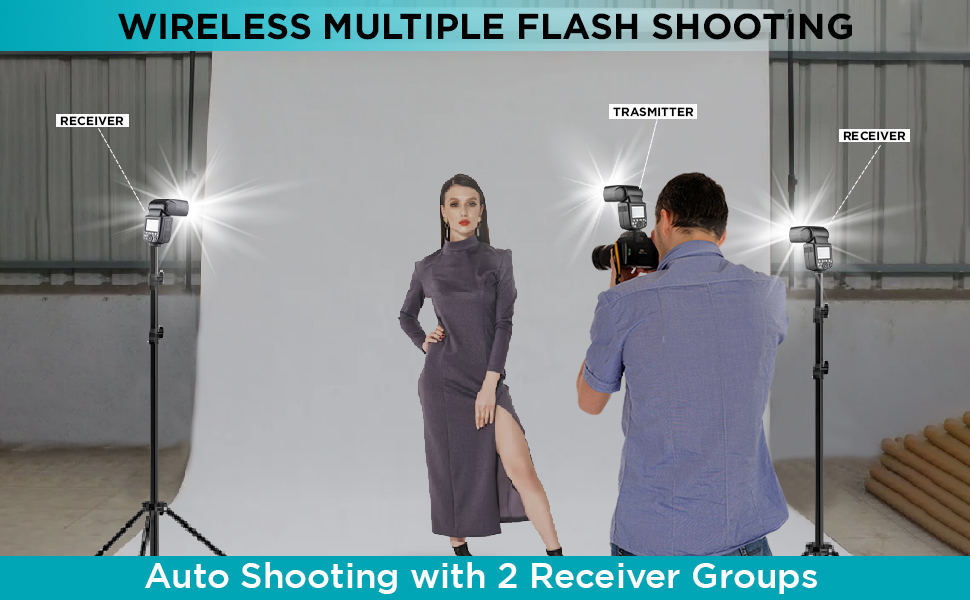
Image: Diagram illustrating the horizontal rotation (330 degrees) and vertical tilt (120 degrees) capabilities of the flash head.
6. Wireless Control (R2 System)
The Flashpoint Zoom Li-on III R2 features a built-in 2.4GHz R2 wireless system, allowing for reliable remote triggering and multi-flash setups.
6.1 Master and Slave Modes
- Master Mode: The flash can act as a master unit to control other Fujifilm compatible flashes with built-in R2 receivers.
- Slave Mode: The flash can be triggered wirelessly by a master unit or transmitter, allowing for off-camera lighting.

Image: Illustration of the flash operating in both Master and Slave modes for wireless multi-flash setups.
6.2 Wireless Transmission
The 2.4GHz wireless transmission offers 32 channels and a range of up to 100 meters, providing robust connectivity for complex lighting arrangements.

Image: Diagram showing the 2.4GHz wireless transmission capabilities of the Flashpoint Zoom Li-on III R2, including channel and range information.
7. Maintenance
- Clean the flash unit regularly with a soft, dry cloth. Do not use solvents or abrasive cleaners.
- Ensure the hot shoe contacts are clean and free of debris for proper communication with the camera.
- Store the flash in its protective case when not in use to prevent dust and damage.
- If storing for extended periods, remove the battery and store it separately in a cool, dry place.
8. Troubleshooting
| Problem | Possible Cause | Solution |
|---|---|---|
| Flash does not fire. | Battery low or depleted; incorrect mode; flash not securely mounted; camera settings incorrect. | Charge or replace battery; check flash mode (TTL/M); ensure flash is fully seated in hot shoe; verify camera flash settings. |
| Flash output is inconsistent. | Low battery; environmental interference (wireless); dirty contacts. | Ensure battery is fully charged; change wireless channel; clean hot shoe contacts. |
| Wireless triggering fails. | Incorrect channel/group settings; distance too far; obstructions; master/slave not properly set. | Verify matching channel and group settings on all units; reduce distance; ensure clear line of sight; confirm master/slave roles. |
| Flash recycle time is slow. | Battery is low; high power output setting. | Recharge battery; use lower power settings if possible. |
9. Specifications
| Feature | Detail |
|---|---|
| Guide Number | 197ft/60m @ISO 100 |
| Power Output | 76Ws |
| Flash Modes | TTL, Manual, Multi (Stroboscopic) |
| High-Speed Sync (HSS) | Up to 1/8000s |
| Recycle Time | Approx. 1.5 seconds |
| Full Power Flashes | Approx. 450 |
| Battery | 7.2V/2600mAh Li-ion |
| Wireless System | 2.4GHz R2 Wireless |
| Wireless Channels | 32 |
| Wireless Range | Up to 100 meters |
| Flash Head Rotation | 0 to 330 degrees (horizontal) |
| Flash Head Tilt | -7 to 120 degrees (vertical) |
| Modeling Lamp | 2W integrated |
| Dimensions | 9 x 8.3 x 4 inches |
10. Warranty and Support
Flashpoint products are designed for reliability and performance. For warranty information and technical support, please refer to the official Flashpoint website or contact your authorized dealer. Keep your purchase receipt as proof of purchase for warranty claims.
For further assistance, you may visit the Flashpoint store online: Flashpoint Store


