Introduction
This manual provides essential information for the safe and efficient operation of your Olimpia Splendid Aquaria S1 16 P Dehumidifier. Please read it thoroughly before use and retain it for future reference.
Safety Instructions
- Ensure the power supply matches the unit's requirements (220-240V, 50Hz).
- Do not operate the unit with a damaged power cord or plug.
- Keep the unit away from water and other liquids.
- Do not block air inlets or outlets.
- This appliance is not intended for use by persons (including children) with reduced physical, sensory or mental capabilities, or lack of experience and knowledge, unless they have been given supervision or instruction concerning use of the appliance by a person responsible for their safety.
- Children should be supervised to ensure that they do not play with the appliance.
- For indoor use only.
Product Components
Familiarize yourself with the main parts of your dehumidifier.
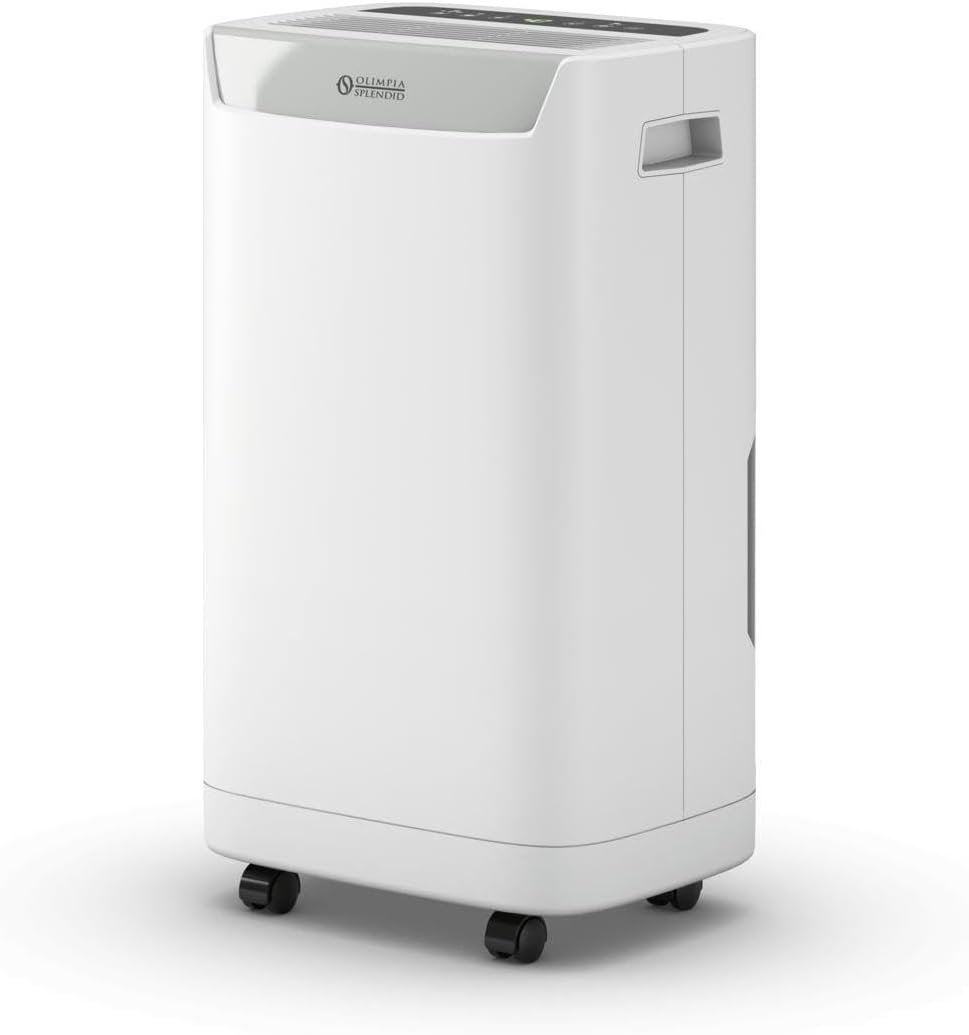
Figure 1: Front view of the Olimpia Splendid Aquaria S1 16 P Dehumidifier, showing its compact white design with the brand logo.

Figure 2: Close-up of the top control panel with digital display and various function buttons.

Figure 3: Image showing the transparent water collection tank being removed from the side of the dehumidifier.
Setup Instructions
- Unpacking: Carefully remove the dehumidifier from its packaging. Retain all packaging materials for future transport or storage.
- Placement: Place the unit on a flat, stable surface. Ensure there is at least 20 cm (8 inches) of clear space around the air inlet and outlet for proper airflow. The unit is equipped with castors for easy movement.
- Power Connection: Plug the power cord into a grounded electrical outlet (220-240V, 50Hz).
- Water Tank: Ensure the water tank is correctly inserted into the unit. The unit will not operate if the tank is full or improperly seated.
Operating the Dehumidifier
Control Panel Overview
The control panel (refer to Figure 2) features a digital display and various buttons for controlling the unit's functions.
Basic Operation
- Power On/Off: Press the power button (⏻) to turn the unit on or off.
- Setting Humidity Level: Use the humidity control buttons (usually '+' and '-') to set your desired relative humidity level. The unit will operate until this level is reached.
- Fan Speed: Select from 3 available fan speeds to adjust the dehumidification rate and noise level.
- Timer Function: The integrated 24-hour timer allows you to schedule the unit to turn on or off automatically. Consult the full manual for detailed timer programming instructions.
Special Functions
- Laundry Mode: Activate the Laundry Mode for optimized fan speed and dehumidification to quickly dry clothes. This function is ideal for use in laundry rooms.
Maintenance
Emptying the Water Tank
When the water tank is full, the unit will automatically stop operating, and the full tank indicator will illuminate. (Refer to Figure 3 for tank removal).
- Gently pull out the water tank from the side of the unit.
- Carefully empty the collected water.
- Reinsert the empty water tank firmly into its position. The unit will resume operation once the tank is correctly seated.
Cleaning the Air Filters
The Aquaria S1 16 P features a double filtration system (anti-dust, anti-pollen, and active carbon filters). Regular cleaning is essential for optimal performance.
- Turn off and unplug the dehumidifier before cleaning.
- Locate and remove the air filter(s) as per the specific instructions in the full product manual (usually located behind a removable grille).
- Clean the anti-dust/anti-pollen filter with a vacuum cleaner or wash it gently with lukewarm water and mild detergent. Allow it to air dry completely before reinstallation.
- The active carbon filter typically requires replacement rather than cleaning. Refer to the manufacturer's guidelines for replacement intervals.
- Reinstall the dry filter(s) and close the grille.
Troubleshooting
| Problem | Possible Cause | Solution |
|---|---|---|
| Unit does not turn on. | No power supply; Power button not pressed; Water tank full or improperly seated. | Check power cord connection; Press power button; Empty and reinsert water tank correctly. |
| Unit is running but not dehumidifying. | Air filters are clogged; Room temperature is too low; Humidity setting is too high. | Clean or replace air filters; Dehumidifiers are less effective below 5°C (41°F); Lower the desired humidity setting. |
| Water is leaking. | Water tank is not properly installed; Unit is tilted. | Ensure water tank is securely in place; Place the unit on a flat, level surface. |
| Unusual noise. | Unit not on a level surface; Obstruction in fan. | Place on a level surface; Turn off and unplug, then check for obstructions. If noise persists, contact support. |
Technical Specifications
- Model Name: Aquaria S1 16 P
- Dehumidification Capacity: 16 L/24 H
- Water Tank Capacity: 2 Liters
- Recommended Room Size: Up to 75 m³
- Noise Level: 40 dB
- Fan Speeds: 3
- Air Flow: 120 m³/h
- Power Consumption: 250 W (Max 350 W)
- Voltage: 220-240 V
- Frequency: 50 Hz
- Refrigerant: R290 (430g)
- Dimensions (W x D x H): 293 mm x 218 mm x 512 mm
- Weight: 11 kg
- Features: Integrated Display, Timer (24h), Full Tank Indicator, Castors, Double Filter (Anti-dust, Anti-pollen, Active Carbon), Laundry Mode.
- Certification: CE
Warranty and Support
For detailed warranty information and customer support, please refer to the warranty card included with your product or visit the official Olimpia Splendid website. Do not attempt to repair the unit yourself.


