
1. Introduction
This manual provides detailed instructions for the proper use and maintenance of the Autel MaxiSys MS906S Vehicle Diagnostic Tablet. The MS906S is a professional diagnostic scan tool designed for comprehensive vehicle system analysis, service functions, ECU coding, and bi-directional control. It operates on Android 4.4 and features an 8-inch touchscreen with a powerful 6-core processor.

Image 1.1: The Autel MaxiSys MS906S diagnostic tablet and its VCI (Vehicle Communication Interface) Mini.
2. Setup
2.1. Unboxing and Package Contents
Upon opening the package, verify that all components are present according to the packing list. The MS906S comes with various OBD2 connectors for different vehicle brands, a VCI Mini, and essential accessories.
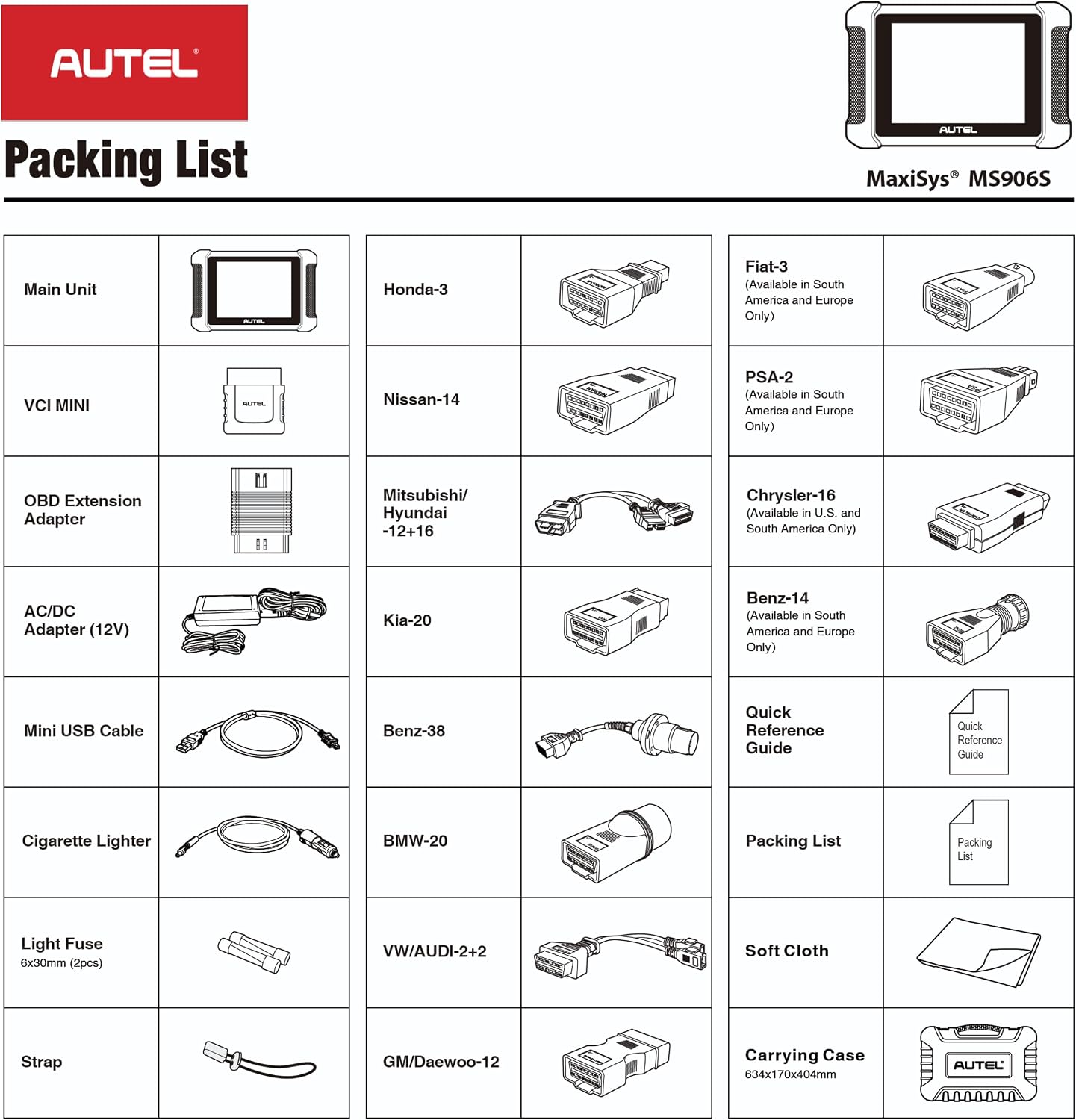
Image 2.1: A visual representation of the Autel MaxiSys MS906S packing list, showing the main unit, VCI Mini, various adapters, cables, and accessories.
Included Items:
- Main Unit (Diagnostic Tablet)
- VCI Mini (Vehicle Communication Interface)
- OBD Extension Adapter
- AC/DC Adapter (12V)
- Mini USB Cable
- Cigarette Lighter Adapter
- Light Fuse (6x30mm, 2pcs)
- Strap
- Various OBD2 Connectors (e.g., Honda-3, Nissan-14, Mitsubishi/Hyundai-12+16, Kia-20, Benz-38, BMW-20, VW/AUDI-2+2, GM/Daewoo-12, Fiat-3, PSA-2, Chrysler-16, Benz-14)
- Quick Reference Guide
- Packing List Document
- Soft Cloth
- Carrying Case
2.2. Initial Power On and Charging
Before first use, ensure the tablet is fully charged. Connect the AC/DC adapter to the tablet and a power outlet. The tablet will indicate charging status. Press and hold the power button to turn on the device.
2.3. Connecting the VCI Mini
The VCI Mini facilitates wireless communication between the tablet and the vehicle. Plug the VCI Mini into the vehicle's OBD-II port. Ensure a secure connection. The VCI Mini communicates with the tablet via Bluetooth, allowing for wireless diagnosis up to 50 meters.
3. Operating Instructions
3.1. Main Interface Overview
The tablet's main screen provides access to key functions:
- Diagnostics: For performing vehicle system scans and retrieving diagnostic trouble codes.
- Service: Accesses various maintenance and reset functions.
- Shop Manager: Manages customer and vehicle information.
- Data Manager: Stores and reviews diagnostic data.
- Settings: Configures device preferences and system settings.
- Update: Manages software updates for the tablet and vehicle software.
3.2. Full System Diagnostics
The MS906S can access all available vehicle modules to read and clear Diagnostic Trouble Codes (DTCs), retrieve live data streams, and view ECU information. This includes systems such as Engine, Transmission, Airbag, ABS, ESP, TPMS, SRS, BMS, Immobilizer, Gateway, and Steering.

Image 3.1: Illustration of the Autel MaxiSys MS906S performing all systems diagnostics on a vehicle, highlighting various accessible electronic and on-board systems.
Using AutoVIN:
The Smart AutoVIN technology automatically identifies vehicle information for efficient diagnosis. If AutoVIN does not work on a specific vehicle, manual VIN entry may be required.
3.3. Special Functions
The device supports over 31 service functions for various maintenance tasks. Examples include:
- Oil Reset
- Electronic Parking Brake (EPB) Reset
- Steering Angle Sensor (SAS) Calibration
- Battery Management System (BMS) Reset
- Throttle Reset
- Suspension Calibration
- ABS Bleeding
- Transmission Adaptation
- Injector Coding
- VGT Turbo Calibration
- Power Balance
- Idle Relearn
Compatibility for specific functions varies by vehicle make and model. It is recommended to verify compatibility by providing the vehicle's VIN to Autel support if unsure.
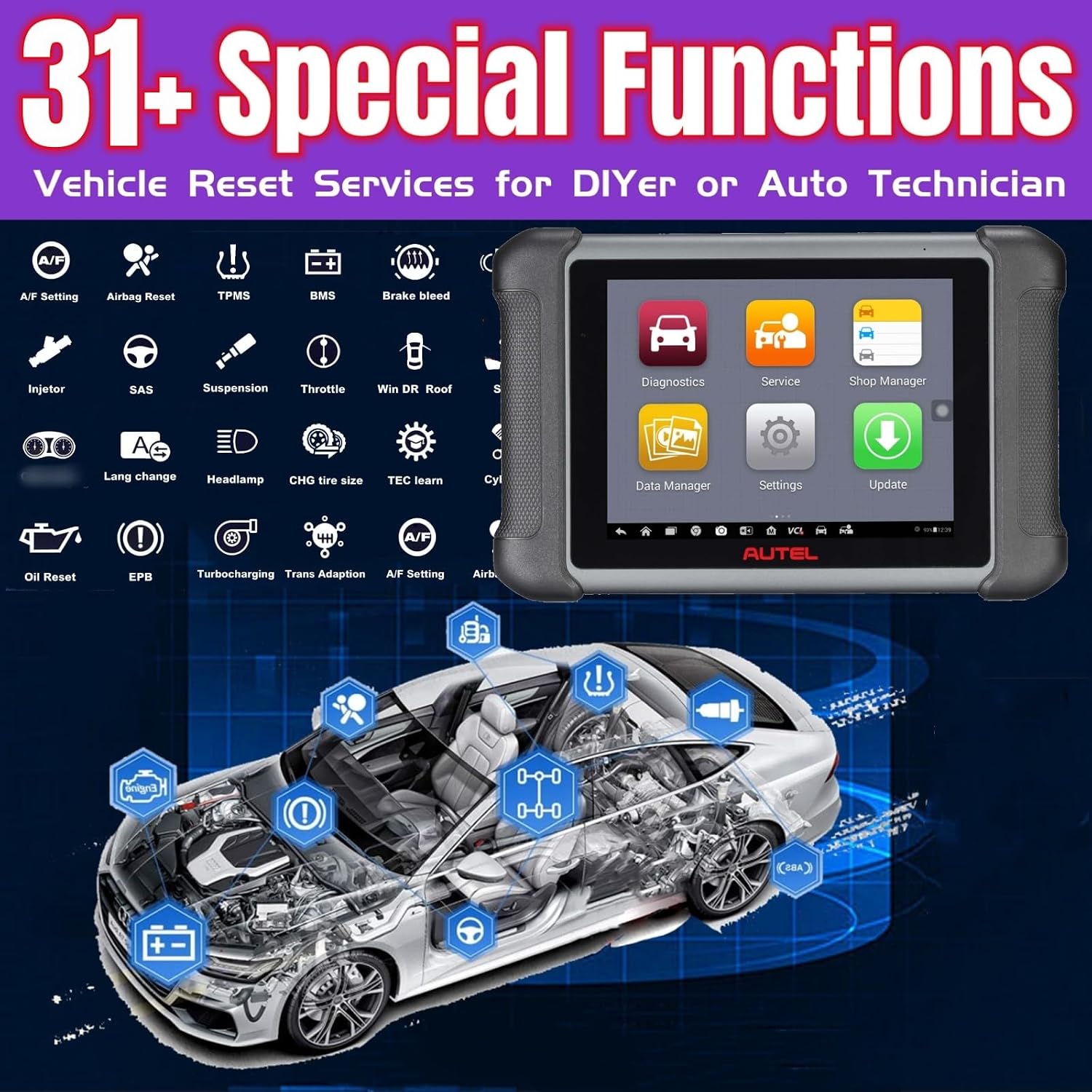
Image 3.2: Overview of the 31+ special functions available on the Autel MaxiSys MS906S, including various vehicle reset services.
3.4. ECU Coding and Adaptation
ECU coding allows for repairing and maintaining modern vehicles by modifying pre-programmed options. This function can optimize vehicle performance and efficiency by adjusting parameters within the Engine Control Unit (ECU), which controls various vehicle functions like the engine, transmission, and brakes.

Image 3.3: Visual representation of ECU coding and adaptations capabilities of the MS906S, illustrating how it can improve vehicle performance and simulate high-end car functions by changing preprogrammed options.
3.5. Bi-directional Control (Active Tests)
The MS906S features bi-directional control, enabling active tests to assess the integrity of systems or components. This involves sending commands to the vehicle's ECU to operate actuators, such as:
- Opening/Closing windows and doors
- Turning on/off headlamps
- Testing door lock actuators
- Opening mirrors
- Operating the windscreen wiper
These tests help in diagnosing issues by monitoring the operation of actuators or reading ECU data.

Image 3.4: Depiction of the MS906S performing bi-directional control, sending commands to a vehicle's ECU to activate various components for active testing.
4. Maintenance
4.1. Software Updates
The MS906S includes a one-year free software upgrade period. During this period, you will receive new software updates and enhancements for vehicle models and technologies. After this period, the device will continue to function with its existing software. To receive further updates, an additional one-year upgrade card or subscription can be purchased.
4.2. Battery Care
The tablet is equipped with a 10,000mAh Lithium Ion battery. To prolong battery life:
- Avoid extreme temperatures.
- Do not allow the battery to fully discharge frequently.
- Store the device with a partial charge if not used for extended periods.
4.3. Cleaning
Use a soft, damp cloth to clean the tablet screen and body. Avoid abrasive cleaners or solvents that could damage the device.
5. Troubleshooting
5.1. General Issues
- Device not powering on: Ensure the battery is charged. Connect the AC adapter and attempt to power on.
- VCI Mini not connecting: Verify the VCI Mini is securely plugged into the vehicle's OBD-II port and that Bluetooth is enabled on the tablet.
- Diagnostic functions not working: Ensure the vehicle's ignition is on. Check for proper VCI connection. Verify vehicle compatibility for the specific function.
5.2. Compatibility
The Autel MS906S is compatible with a wide range of vehicles (from 1996 and newer with OBD2 protocols) but may not work on all cars for every function. If you encounter compatibility issues, please provide your vehicle's VIN to Autel customer support for verification.
6. Specifications
6.1. Hardware
- Processor: 6-core processor
- Memory: 64GB
- Display: 8-inch touchscreen
- Battery: 10,000mAh Lithium Ion (included)
- Camera: 8MP Rear Camera
- Connectivity: Wi-Fi (for software updates), Bluetooth (for wireless diagnosis up to 50 meters), HDMI interface
- Item Weight: 2 pounds
- Product Dimensions: 10 x 7 x 2 inches
6.2. Software
- Operating System: Android 4.4
- Language: English
- Software Updates: 1-year free upgrade included

Image 6.1: An overview of the Autel MaxiSys MS906S, highlighting its upgraded hardware, expanded software features, and cloud services.
7. Warranty and Support
For warranty information and technical support, please refer to the official Autel website or contact Autel customer service directly. Keep your purchase receipt for warranty claims. Software updates are provided free for one year from activation; continued updates require a subscription.


