
Introduction
This user manual provides essential information for the proper use and maintenance of your NKF RM-PJ8 replacement remote control. This remote is designed to be fully compatible with various Sony Data Projectors, offering a seamless replacement for your original remote.
The RM-PJ8 remote control functions as a direct replacement, requiring no complex setup or programming. Simply insert the batteries, and it is ready for use.
Product Overview
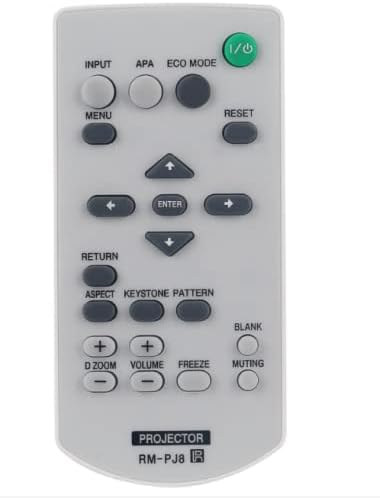
Figure 1: Top-down view of the NKF RM-PJ8 replacement remote control. This image displays the layout of all buttons, including power, input, menu, navigation, volume, and projector-specific functions.
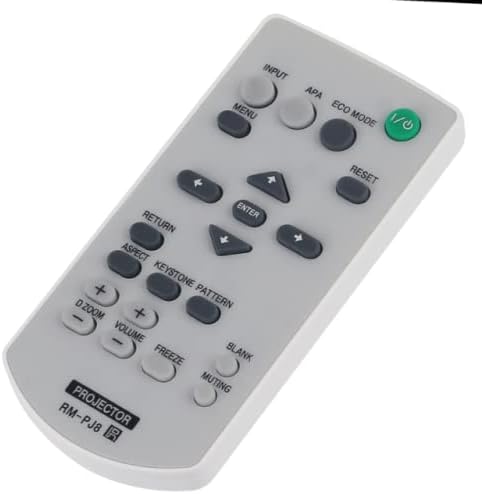
Figure 2: Angled view of the NKF RM-PJ8 replacement remote control. This perspective highlights the remote's form factor and button placement from a side angle.
Setup and Battery Installation
The RM-PJ8 remote control is designed for immediate use upon battery insertion. No programming or pairing is required.
Battery Requirements:
- Power Supply: 2 x 1.5V AAA Alkaline Batteries (not included)
Installation Steps:
- Locate the battery compartment on the back of the remote control.
- Slide open the battery compartment cover.
- Insert two (2) AAA alkaline batteries, ensuring the positive (+) and negative (-) terminals align correctly with the markings inside the compartment.
- Close the battery compartment cover securely until it clicks into place.
Note: Always use new alkaline batteries for optimal performance. Do not mix old and new batteries, or different types of batteries.
Operating Instructions
The RM-PJ8 remote control provides full functionality for compatible Sony Data Projectors. Below is a general guide to common button functions.
| Button Name | Function |
|---|---|
| Power (I/O) | Turns the projector on or off. |
| INPUT | Selects the input source (e.g., HDMI, VGA). |
| MENU | Opens or closes the projector's on-screen menu. |
| Navigation Arrows (Up, Down, Left, Right) | Navigates through menu options. |
| ENTER | Confirms a selection in the menu. |
| RETURN | Goes back to the previous menu or screen. |
| VOLUME (+/-) | Adjusts the audio volume. |
| Muting | Mutes or unmutes the audio. |
| D ZOOM (+/-) | Adjusts digital zoom. |
| RESET | Resets certain projector settings. Consult your projector's manual for specific functions. |
| ECO MODE | Activates or deactivates the projector's eco mode for power saving. |
| ASPECT | Changes the aspect ratio of the projected image. |
| KEYSTONE PATTERN | Displays a test pattern for keystone correction adjustment. |
| BLANK | Temporarily blanks the screen. |
| FREEZE | Freezes the current image on the screen. |
For detailed functions of specific buttons, please refer to the user manual of your Sony Data Projector model.
Maintenance
To ensure the longevity and proper functioning of your RM-PJ8 remote control, follow these simple maintenance guidelines:
- Cleaning: Wipe the remote control with a soft, dry cloth. Do not use abrasive cleaners, solvents, or alcohol, as these can damage the surface and internal components.
- Battery Replacement: Replace batteries when the remote's response becomes sluggish or stops working. Remove batteries if the remote will not be used for an extended period to prevent leakage.
- Storage: Store the remote in a cool, dry place, away from direct sunlight, high temperatures, and humidity.
- Handling: Avoid dropping the remote control or subjecting it to strong impacts, which can damage internal circuitry.
Troubleshooting
If you experience issues with your RM-PJ8 remote control, please consult the following troubleshooting steps before seeking further assistance:
- Remote Not Responding:
- Ensure batteries are inserted correctly with the correct polarity (+/-).
- Replace old batteries with new AAA alkaline batteries.
- Check for any obstructions between the remote control and the projector's infrared receiver.
- Ensure you are within the effective operating range and line of sight of the projector.
- Some Buttons Not Working:
- This may indicate low battery power. Replace batteries.
- Ensure the remote is clean and free of debris that might be obstructing button presses.
- Projector Not Responding to Specific Functions:
- Verify that your projector model supports the specific function you are trying to use. While the RM-PJ8 is a replacement, some projector models may have unique features not universally supported by all replacement remotes.
- Refer to your projector's original user manual for specific function compatibility.
If the problem persists after trying these steps, please contact the manufacturer or seller for support.
Specifications
| Feature | Detail |
|---|---|
| Model Number | RM-PJ8 |
| Brand | NKF |
| Compatible Devices | Sony Data Projectors (e.g., VPL-VW295ES, VPL-VW260ES, VPL-CX235, VPL-CX275, etc.) |
| Connectivity Technology | Infrared (IR) |
| Power Supply | 2 x 1.5V AAA Alkaline Batteries |
| Special Feature | No Programming Required |
| Max Number of Supported Devices | 1 (Direct replacement for specific projector models) |
| Product Dimensions | 7 x 2 x 0.79 inches (approximately) |
| Item Weight | 3.2 ounces (approximately, without batteries) |
Warranty and Support
This product is typically covered by a standard manufacturer's warranty. For specific warranty details, please refer to the documentation provided at the time of purchase or contact the seller directly.
If you encounter any issues or have questions regarding your RM-PJ8 remote control, please reach out to the seller or manufacturer for assistance. Providing your purchase details and a clear description of the issue will help expedite support.
Note: The package content includes 1X RM-PJ8 Remote Control. Batteries and a separate user manual are typically not included with the physical product, as this document serves as the primary guide.

