
1. Introduction
Thank you for choosing the AMBITFUL FL80RGB 80W RGB Full Color LED Video Light. This professional lighting solution is designed for photography studios, video production, and various creative shooting scenarios. It features high color rendering (CRI ≥96, TLCI ≥95), a wide color temperature range (2800K-10000K), full RGB color adjustment, and 10 special effects modes. With Bluetooth app control and a Bowens mount, the FL80RGB offers versatility and ease of use for both indoor and outdoor applications.

2. Package Contents
Please verify that all items listed below are included in your package. If any items are missing or damaged, please contact your retailer.
- AMBITFUL FL80RGB LED Video Light
- Standard Reflector
- Power Adapter
- Power Cable
- Handle (for handheld operation)
- Cleaning Cloth

3. Product Overview
The AMBITFUL FL80RGB is a versatile 80W LED video light designed for professional use. Key features include:
- High Color Accuracy: CRI ≥96 and TLCI ≥95 for precise color reproduction.
- Wide Color Temperature Range: Adjustable from 2800K to 10000K.
- Full RGB Color Mode (HSL): 360 hues and 100 saturation levels for creative lighting.
- 10 Special Lighting Effects: Pre-programmed effects for dynamic scenes.
- Bluetooth App Control: Remote control via mobile application (iOS and Android).
- Bowens Mount Compatibility: Allows attachment of various light modifiers.
- Large LCD Panel: Intuitive display for easy setting adjustments.
- Efficient Cooling System: Built-in heat sink and fan for stable operation.
4. Setup
Follow these steps to set up your AMBITFUL FL80RGB LED Video Light:
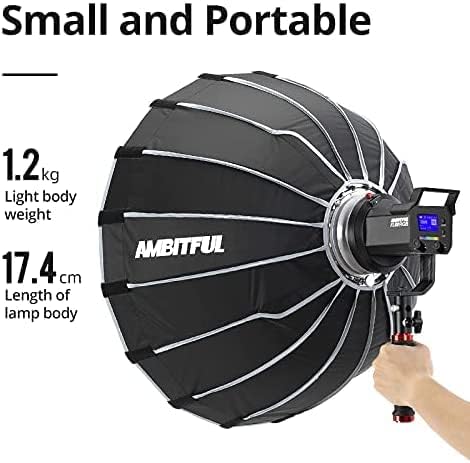
- Attach the Reflector: Align the standard reflector with the Bowens mount on the front of the light. Rotate it clockwise until it locks securely into place.
- Mount the Light: Attach the light to a light stand using the integrated mounting bracket. Secure it by tightening the knob on the bracket.
- Connect Power: Insert the power cable into the power adapter, then connect the adapter to the DC input port on the light. Plug the power cable into a suitable electrical outlet.
- (Optional) Attach Handle: For handheld operation, attach the provided handle to the side of the light's mounting bracket.
- (Optional) Battery Power: For outdoor use, the light supports 2 NP970 batteries (not included). Insert the batteries into the designated slots on the optional battery plate (if purchased separately).
5. Operating Instructions
5.1 Power On/Off
Press the power button located on the back of the light to turn it on or off. The LCD screen will illuminate upon power-on.
5.2 CCT Mode (Color Temperature)
In CCT mode, you can adjust the color temperature and brightness.
- Select CCT Mode: Use the mode button to navigate to CCT mode.
- Adjust Color Temperature: Use the dedicated knob to adjust the color temperature from 2800K (warm) to 10000K (cool).
- Adjust Brightness: Use the brightness knob to set the desired light intensity from 0% to 100%.

5.3 HSL Mode (RGB Full Color)
The HSL mode allows for full color adjustment with 360 hues and 100 saturation levels.
- Select HSL Mode: Use the mode button to navigate to HSL mode.
- Hue Adjustment: Use the corresponding knob to select a hue from 0-360 degrees.
- Saturation Adjustment: Use the knob to adjust saturation from 0-100%.
- Brightness Adjustment: Use the brightness knob to set the light intensity.

5.4 Special Effects Mode
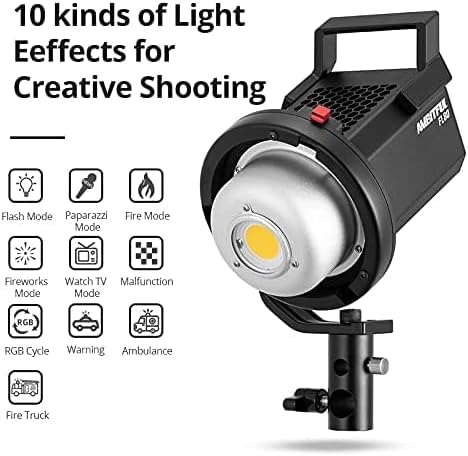
The FL80RGB includes 10 pre-programmed special effects to enhance your creative shooting.
- Select FX Mode: Use the mode button to navigate to FX (Effects) mode.
- Choose Effect: Use the knob to cycle through the 10 available effects: Flash, Paparazzi, Fire, Fireworks, Watch TV, Malfunction, RGB Cycle, Warning, Ambulance, and Fire Truck.
- Adjust Parameters: Some effects allow for adjustment of frequency or intensity using the control knobs.
5.5 App Control
The AMBITFUL FL80RGB can be controlled remotely via a mobile application, compatible with both iOS and Android systems.
- Download App: Search for the 'AMBITFUL' app in your device's app store.
- Enable Bluetooth: Ensure Bluetooth is enabled on your mobile device.
- Connect to Light: Open the app and follow the on-screen instructions to connect to your FL80RGB light via Bluetooth 5.0.
- Remote Control: Once connected, you can adjust all light settings, including CCT, HSL, FX modes, and brightness, directly from your phone.


6. Maintenance
Proper maintenance ensures the longevity and optimal performance of your AMBITFUL FL80RGB LED Video Light.
- Cleaning: Use the provided cleaning cloth or a soft, dry cloth to wipe the light body and lens. Avoid using harsh chemicals or abrasive materials.
- Storage: When not in use, store the light in a dry, dust-free environment. It is recommended to use the original packaging or a padded case for protection during transport and storage.
- Ventilation: Ensure the ventilation holes are clear of obstructions to allow for proper heat dissipation.
- Power Cable Care: Avoid bending or crimping the power cable excessively. Always grasp the plug, not the cable, when disconnecting from power.
7. Troubleshooting
If you encounter issues with your AMBITFUL FL80RGB, refer to the following common problems and solutions:
| Problem | Possible Cause | Solution |
|---|---|---|
| Light does not power on | Power adapter faulty; power cable not connected; no power from outlet. | Check power cable connections. Ensure the power adapter is functioning. Test the outlet with another device. If using batteries, ensure they are charged and correctly inserted. |
| Light overheats or shuts down | Poor ventilation; prolonged use at high intensity in hot environment. | Ensure ventilation holes are clear. Reduce brightness or allow the light to cool down. Operate in a well-ventilated area. |
| App cannot connect to light | Bluetooth not enabled; light not in pairing mode; app issue. | Ensure Bluetooth is active on your phone. Restart the light and the app. Try re-pairing the device in the app. |
| Bowens mount accessory difficult to attach | Misalignment; debris in mount. | Ensure the accessory is correctly aligned with the mount. Check for any obstructions in the mount. Apply gentle, even pressure while rotating to lock. |
8. Specifications
Detailed technical specifications for the AMBITFUL FL80RGB LED Video Light:
| Feature | Detail |
|---|---|
| Brand | AMBITFUL |
| Model Number | X60RGB |
| Power Output | 80W |
| Color Temperature | 2800K-10000K |
| CRI | ≥96 |
| TLCI | ≥95 |
| RGB Mode | 360 Hues, 100 Saturation Levels |
| Special Effects | 10 Modes |
| Connectivity Technology | Bluetooth 5.0 |
| Mount Type | Bowens Mount |
| Item Weight | 5.57 pounds (2.53 kg) |
| Package Dimensions | 14.13 x 13.89 x 9.13 inches |
| Date First Available | November 17, 2021 |
9. Warranty and Support
AMBITFUL products are manufactured to high-quality standards. For information regarding warranty coverage, please refer to the warranty card included with your product or visit the official AMBITFUL website. If you require technical assistance or have questions about your FL80RGB LED Video Light, please contact AMBITFUL customer support through their official channels.