
1. Introduction
Thank you for choosing the Godox TT685II-C Flash. This instruction manual provides detailed information on the setup, operation, and maintenance of your new speedlite. The TT685II-C is a powerful TTL-compatible flash designed specifically for Canon cameras, featuring a Guide Number (GN) of 60, 2.4GHz wireless capabilities, and High-Speed Sync (HSS) up to 1/8000s. Please read this manual thoroughly before use to ensure proper function and optimal performance.
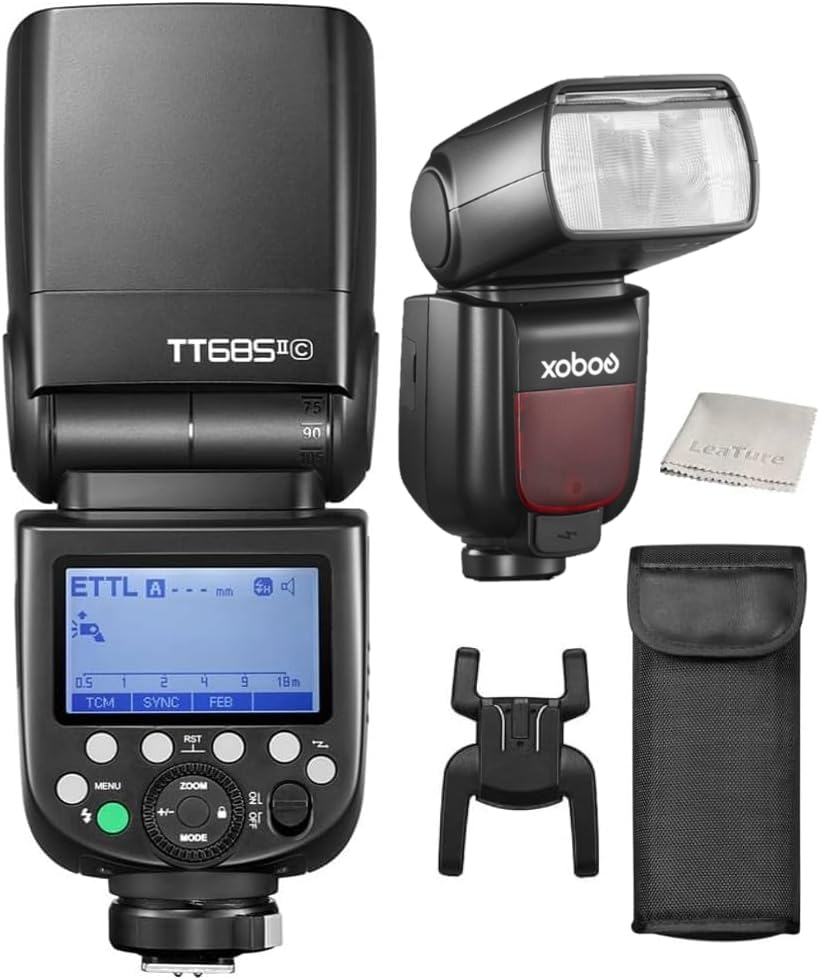
Figure 1.1: The Godox TT685II-C Flash unit.
2. Setup
2.1. Battery Installation
- Open the battery compartment cover located on the side of the flash unit.
- Insert four AA batteries (alkaline or Ni-MH recommended) according to the polarity indicators inside the compartment.
- Close the battery compartment cover securely.

Figure 2.1: Open battery compartment for AA battery insertion.
2.2. Mounting to Camera
- Slide the flash hot shoe into your Canon camera's hot shoe mount.
- Rotate the quick-release lock clockwise until it is firmly secured.

Figure 2.2: Quick-release lock for secure camera mounting.
2.3. Powering On/Off
Press and hold the power button for approximately 2 seconds to turn the flash on or off. The LCD screen will illuminate upon power-on.
3. Operating the Flash
3.1. Flash Modes
The TT685II-C supports various flash modes:
- TTL (Through-The-Lens) Mode: The flash automatically adjusts its output for correct exposure. This mode supports HSS (High-Speed Sync up to 1/8000s), FEC (Flash Exposure Compensation), FEB (Flash Exposure Bracketing), and rear-curtain sync.
- Manual Mode: Allows you to manually set the flash power output from 1/1 (full power) to 1/128 in 22 steps.
- Multi Flash Mode: Fires a series of rapid flashes during a single exposure to capture multiple movements of a subject.
3.2. TCM Instant Conversion
The TCM (TTL Converted to Manual) function allows for instant conversion of a TTL exposure value to a manual power setting. This helps in locking the proper exposure value for consistent lighting across shots.

Figure 3.1: TCM function displayed on the flash unit's LCD screen.
3.3. FEB (Flash Exposure Bracketing) Function
FEB allows the flash to fire three consecutive shots with different exposure values (underexposed, correct exposure, overexposed). To use:
- Short press the FEB button.
- Turn the dial to set the desired FEB amount.

Figure 3.2: Visual representation of FEB function results.
3.4. Godox 2.4G Wireless X System
The TT685II-C has a built-in Godox 2.4G wireless X system, enabling seamless connectivity with compatible flashes or flash triggers. This system offers a wide selection of groups and channels, ensuring reliable shooting without interference, with a lighting coverage up to 100 meters.

Figure 3.3: The Godox 2.4G Wireless X System in action with a compatible trigger.
3.5. Bounce Flash (Tilt and Rotation)
The flash head offers a broader tilt angle from -7° to 120° and is rotatable by 330°. This flexibility allows for various bounce flash angles, enabling you to achieve soft and diffused lighting both on and off-camera.

Figure 3.4: Flash head tilt and rotation capabilities.
3.6. External Power Supply
The TT685II-C includes a Type-C port and a sync cord jack. The power port allows connection to an external Lithium-Ion power pack, such as the Godox PB960 (sold separately), to enhance flash performance and recycle times.

Figure 3.5: Connecting the flash to an external power supply.

Figure 3.6: Type-C port and sync cord jack.
4. Maintenance
- Keep the device dry. Do not handle with wet hands or immerse in water.
- Avoid sudden temperature changes, which may cause condensation.
- Clean the flash head and body with a soft, dry cloth. Do not use harsh chemicals or solvents.
- Remove batteries when the flash is not in use for extended periods to prevent leakage.
- Store the device in a cool, dry place, away from direct sunlight and excessive heat.
5. Troubleshooting
| Problem | Possible Cause | Solution |
|---|---|---|
| Flash does not fire. | Low battery, incorrect mode, flash not securely mounted, camera settings. | Check battery level, ensure batteries are inserted correctly. Verify flash mode (TTL/M) and camera flash settings. Re-mount flash securely. |
| Exposure is too dark/bright. | Incorrect flash power, FEC setting, ambient light. | Adjust flash power in Manual mode. Check and adjust FEC (Flash Exposure Compensation). Consider ambient light conditions. |
| Wireless trigger not working. | Incorrect channel/group, distance, interference. | Ensure flash and trigger are set to the same channel and group. Reduce distance between units. Check for potential 2.4GHz interference. |
6. Specifications
| Feature | Detail |
|---|---|
| Model Number | TT685II-C |
| Brand | GODOX |
| Compatible Mountings | Canon |
| Flash Sync Speed | 1/8000s (HSS) |
| Connectivity Technology | USB-C (for firmware updates) |
| Item Weight | 1.28 pounds |
| Package Dimensions | 8.03 x 3.62 x 3.23 inches |
7. Warranty and Support
For warranty information, please refer to the warranty card included with your product or visit the official Godox website. If you encounter any issues not covered in this manual or require technical assistance, please contact Godox customer support or your authorized dealer.
Online Resources:
- Godox Official Website: www.godox.com
- Product Support Page (if available): Refer to the official website for specific product support pages or FAQs.