
Introduction
This manual provides essential information for the safe and effective use of your DEWENWILS 6-Outlet Heavy Duty Power Strip. Please read all instructions carefully before operation and retain this manual for future reference.
Safety Information
Observe the following safety precautions to prevent injury or damage:
- Do not exceed the maximum electrical rating of 125V/15A/1875W. Overloading can cause the circuit breaker to trip or lead to electrical hazards.
- This power strip is designed for indoor and outdoor use, but do not use it in wet conditions or immerse it in water. Protect it from rain and moisture.
- Ensure all plugs are fully inserted into the outlets. Loose connections can cause overheating.
- Keep children away from the power strip and its outlets. Utilize the swivel safety covers when outlets are not in use.
- Do not disassemble or modify the power strip. Refer servicing to qualified personnel.
- Avoid running the cord under carpets, rugs, or furniture, as this can cause overheating or damage to the insulation.
Product Features
- 6-Outlet Design: Provides six widely spaced outlets (125V/15A/1875W) to accommodate multiple devices and bulky adapters simultaneously.
- 15A Circuit Breaker: Integrated circuit breaker protects connected devices from overload and short circuits. It automatically cuts off power if the total current exceeds 15A.
- 25ft Heavy-Duty Cord: Features a durable 14/3C gauge SJTW cord, resistant to wear, aging, and sunlight, suitable for various environments.
- Swivel Safety Covers: Twist-to-close covers on each outlet prevent dust and foreign objects from entering, enhancing safety when not in use.
- Durable Construction: Made from sturdy rubberized polycarbonate material, designed for rigid environments like workshops or garages.
- Compact and Lightweight: Portable design for easy transport and storage.

Image: Overview of the DEWENWILS 6-Outlet Heavy Duty Power Strip, highlighting the 15A 125VAC 1875W rating and the 15A Circuit Breaker Reset Button.

Image: The 25-foot extension cord, detailing its 14/3C gauge and SJTW (Standard Junior Thermoplastic Weather-resistant) rating for indoor/outdoor use.

Image: A close-up view of the swivel safety covers on the outlets, demonstrating their twist-to-close mechanism to protect against dust and foreign objects.
Setup
- Unpack: Carefully remove the power strip from its packaging.
- Inspect: Check the power strip and cord for any signs of damage. Do not use if damaged.
- Placement: Position the power strip on a stable, dry surface, away from heat sources or flammable materials. Ensure the cord can reach the wall outlet without tension.
- Connect to Power: Plug the power strip's main plug into a standard 125V AC wall outlet.
- Connect Devices: Plug your devices into the available outlets. The wide spacing accommodates larger power adapters.

Image: The power strip in a workshop environment, demonstrating its wide-spaced outlets accommodating multiple power tools and chargers simultaneously.
Operating Instructions
- Power Indicator: A red power indicator light on the unit will illuminate when the power strip is receiving power and is in regular working status.
- Connecting Devices: Insert the plugs of your electronic devices firmly into any of the six available outlets.
- Using Swivel Safety Covers: When an outlet is not in use, twist its cover to the closed position to protect it from dust and accidental contact.
- Circuit Breaker Operation: If the total current of connected devices exceeds 15A, the built-in circuit breaker will automatically trip, cutting off power to protect your devices.
- Resetting the Circuit Breaker: If the circuit breaker trips, unplug some devices to reduce the load. Then, press the reset button located on the power strip to restore power.
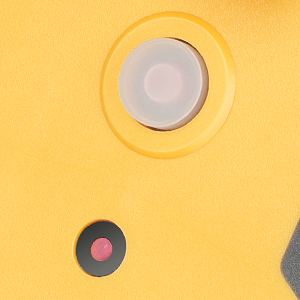
Image: A detailed view of the circuit breaker reset button on the power strip.
Maintenance
- Cleaning: Disconnect the power strip from the wall outlet before cleaning. Use a dry, soft cloth to wipe the exterior. Do not use liquid cleaners or solvents.
- Storage: When not in use, store the power strip in a cool, dry place, away from direct sunlight and moisture.
- Cord Care: Avoid bending or kinking the power cord sharply. Do not place heavy objects on the cord.
Troubleshooting
| Problem | Possible Cause | Solution |
|---|---|---|
| No power to devices | Circuit breaker tripped | Unplug some devices to reduce the load, then press the reset button. |
| No power to devices | Power strip not plugged into wall outlet | Ensure the power strip's main plug is securely inserted into a functioning wall outlet. |
| No power to devices | Wall outlet is not functioning | Test the wall outlet with another device to confirm it is working. |
| Outlets feel loose | Normal wear over time | Ensure plugs are fully inserted. If excessive looseness occurs, discontinue use and replace the unit. |
Specifications
| Feature | Detail |
|---|---|
| Model | B09LYL1WTJ |
| Brand | DEWENWILS |
| Total Power Outlets | 6 |
| Electrical Rating | 125V AC, 15A, 1875W |
| Circuit Breaker | 15A |
| Cord Length | 25 feet |
| Cord Gauge | 14/3C SJTW |
| Product Dimensions | 5.11 x 3.14 x 1.18 inches |
| Item Weight | 3.56 pounds |
| Material | Rubberized Polycarbonate |
| Certifications | ETL Listed |
Warranty and Support
DEWENWILS products are designed for reliability and performance. For warranty information, technical support, or assistance with your product, please contact DEWENWILS customer service directly. Refer to the product packaging or the official DEWENWILS website for contact details.
Please have your model number (B09LYL1WTJ) available when contacting support.
