1. Introduction
Thank you for choosing the DEWALT 20V MAX Jobsite Fan (DCE512B). This manual provides important information on the safe operation, maintenance, and specifications of your fan. Please read this manual thoroughly before using the product and keep it for future reference.
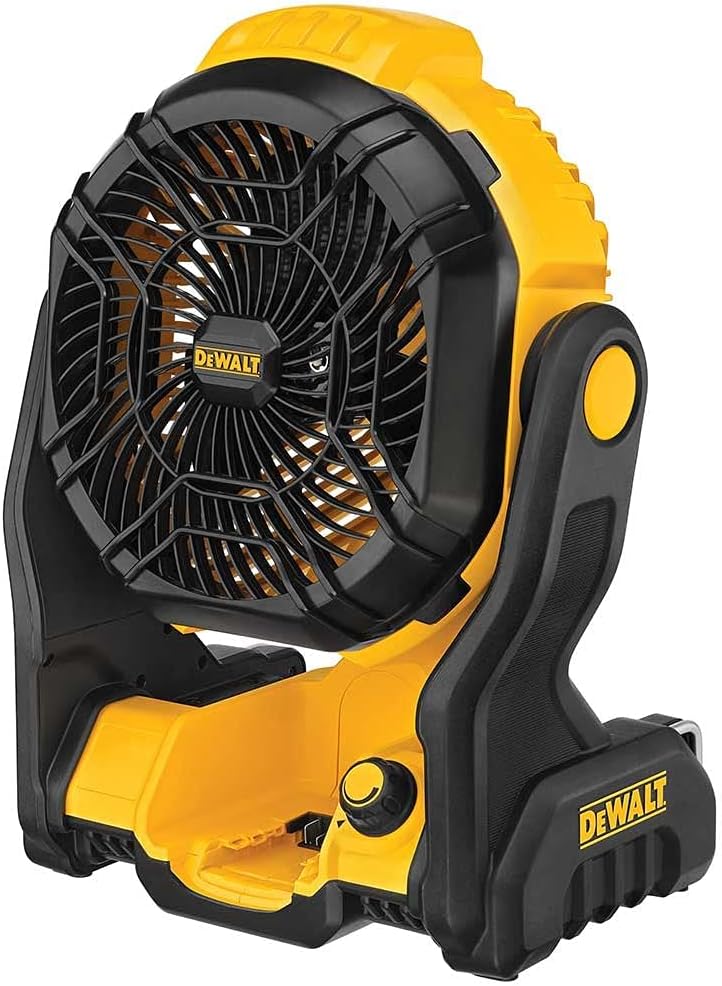
Figure 1: DEWALT 20V MAX Jobsite Fan (DCE512B)
This image shows the DEWALT 20V MAX Jobsite Fan (DCE512B) in its upright position, highlighting its yellow and black robust design. The fan features a protective grille over the blades and a sturdy base for stability. The DEWALT logo is visible on the fan grille and the base.
2. Important Safety Information
WARNING: Read all safety warnings and all instructions. Failure to follow the warnings and instructions may result in electric shock, fire, and/or serious injury.
- Always disconnect the fan from the power source before cleaning or performing any maintenance.
- Do not operate the fan with a damaged cord or plug.
- Do not immerse the fan in water or other liquids.
- Keep children and pets away from the fan during operation.
- Use only DEWALT 20V MAX batteries and chargers with this fan.
- Ensure the fan is placed on a stable, level surface to prevent tipping.
- Do not insert fingers or any objects through the grille when the fan is operating.
3. Product Features
- Powerful Upgraded Motor: Provides up to 650 CFM (Cubic Feet per Minute) airflow.
- IP 54 Rated: Offers protection against dust and splashing water, making it suitable for jobsite environments.
- Multiple Hanging Options: Can be used freestanding, hung with integrated hooks, or wall-mounted for versatile placement.
- Wide-Range, Variable Speed Control: Allows for precise adjustment of airflow intensity.
- Extended Runtime: Up to 4.5 hours runtime on MAX airspeed when using a DEWALT 5.0Ah Battery.
- Voltage: Operates on 20.0 volts.
4. Setup and Power Options
4.1 Battery Installation
- Ensure the fan is turned off.
- Locate the battery slot on the base of the fan.
- Align a charged DEWALT 20V MAX battery (sold separately) with the slot.
- Slide the battery into the slot until it clicks securely into place.
- To remove the battery, press the release button on the battery pack and slide it out.
4.2 AC Power Connection
The fan can also be powered by an AC adapter (sold separately or included with some kits).
- Ensure the fan is turned off.
- Locate the AC power input port on the fan.
- Connect the AC adapter to the fan's power input port.
- Plug the AC adapter into a standard electrical outlet.
5. Operating Instructions
5.1 Powering On/Off and Speed Control
- After installing the battery or connecting to AC power, locate the variable speed control knob on the front of the fan's base.
- Turn the knob clockwise to power on the fan and increase the fan speed.
- Turn the knob counter-clockwise to decrease the fan speed and turn off the fan.
5.2 Adjusting Fan Head Angle
The fan head can be manually adjusted to direct airflow where needed.
- Grasp the fan head firmly on both sides.
- Tilt the fan head up or down to the desired angle. The fan head will hold its position once released.
6. Mounting Options
The DEWALT Jobsite Fan offers multiple ways to position it for optimal airflow.
- Freestanding: Place the fan on any flat, stable surface.
- Hang Hooks: Utilize the integrated hooks on the fan's frame to hang it from rafters, pipes, or other suitable structures.
- Wall Mount: The fan can be securely mounted to a wall using appropriate fasteners (not included) through designated mounting holes on the base.
7. Maintenance
7.1 Cleaning
- Always unplug the fan or remove the battery before cleaning.
- Use a soft, damp cloth to wipe down the exterior surfaces of the fan.
- To clean the fan blades, carefully remove the front grille (if applicable and designed for removal) and wipe the blades with a soft cloth. Ensure the grille is securely reattached before use.
- Do not use abrasive cleaners or solvents, as these may damage the fan's finish.
7.2 Storage
- Store the fan in a clean, dry place when not in use.
- If storing for an extended period, remove the battery pack.
8. Troubleshooting
| Problem | Possible Cause | Solution |
|---|---|---|
| Fan does not turn on. | No power (battery or AC). | Ensure battery is charged and properly inserted, or AC adapter is securely plugged into a working outlet. |
| Weak airflow. | Low battery charge; fan speed set too low; obstructed grille. | Charge or replace battery; increase fan speed; clear any obstructions from the grille. |
| Unusual noise during operation. | Loose parts; foreign object in fan blades. | Turn off and unplug the fan. Inspect for loose parts or foreign objects and remove them. If noise persists, contact customer support. |
9. Specifications
| Feature | Detail |
|---|---|
| Brand | DEWALT |
| Model Name | DCE512B |
| Power Source | Battery Powered (20V MAX) / AC Adapter |
| Voltage | 20 Volts |
| Airflow (Max) | 650 CFM |
| IP Rating | IP 54 |
| Item Weight | 8.3 pounds |
| Package Dimensions | 20 x 14 x 14 inches |
| Mounting Type | Freestanding, Hang Hooks, Wall Mount |
| Included Components | Tool Only (Battery and charger sold separately) |
10. Warranty and Support
This DEWALT product comes with a 90 days limited warranty. For detailed warranty information, service, or technical support, please refer to the official DEWALT website or contact their customer service directly.
For further assistance, please visit the Amazon Renewed Store or contact the seller, CPO Outlets, for product-specific inquiries.


