
K&F CONCEPT SA254M1
Contents
K&F Concept SA254M1 62-inch DSLR Camera Tripod with Monopod Instruction Manual
Model: SA254M1
Brand: K&F CONCEPT
1. Introduction
This manual provides comprehensive instructions for the safe and effective use of your K&F Concept SA254M1 62-inch DSLR Camera Tripod with Monopod. Please read this manual thoroughly before operating the product and retain it for future reference. This tripod is designed for photographers and videographers seeking a versatile, stable, and portable support solution for DSLR cameras, mirrorless cameras, and smartphones.
2. Package Contents
Verify that all items listed below are included in your package:
- K&F Concept SA254M1 Tripod with Ball Head
- Detachable Monopod (integrated into one leg)
- 2-in-1 Quick Release Plate (for camera and smartphone)
- Carrying Bag
- Instruction Manual
- Hex Wrench (for adjustments)
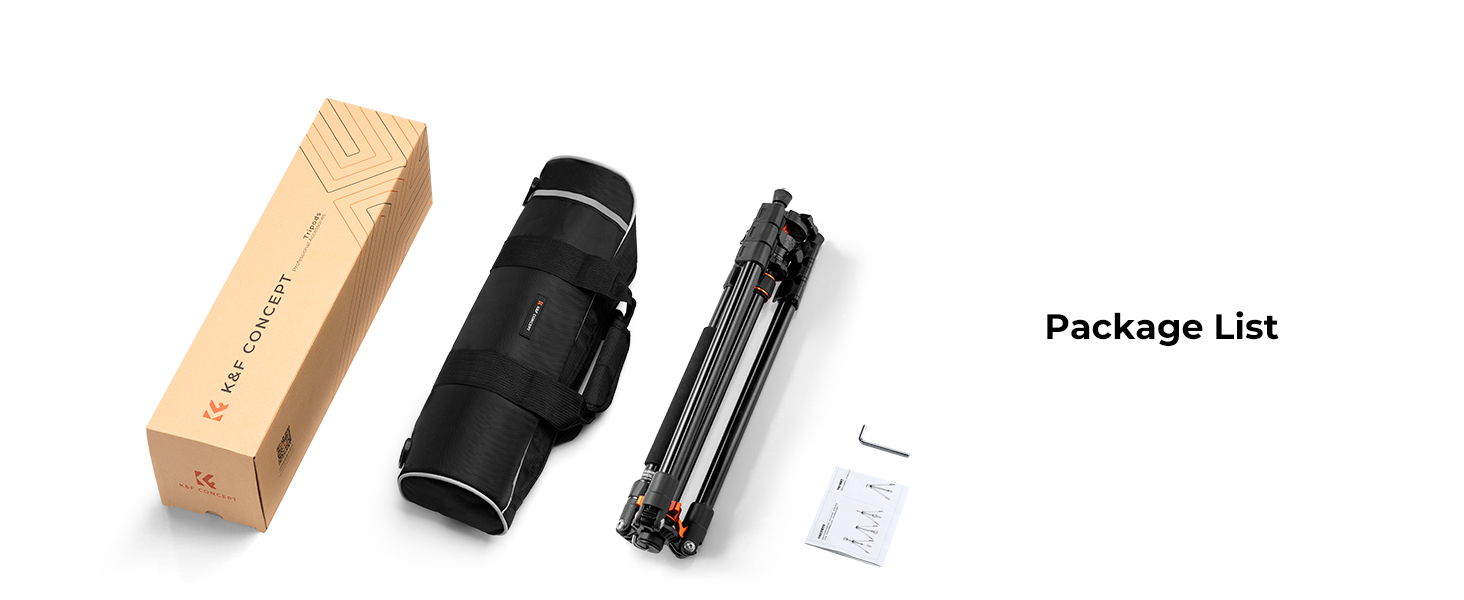
The image displays the items included in the K&F Concept SA254M1 tripod package: the tripod itself, a carrying bag, and an instruction manual.
3. Setup Instructions
3.1 Unfolding the Tripod
- Remove the tripod from its carrying bag.
- Gently extend the tripod legs outwards until they lock into position.
- Adjust the leg angles by pressing the spring self-locking foot tube angle adjustment button on each leg and setting it to one of the three available angles.
- Extend each leg section by twisting the flip leg locks counter-clockwise to loosen, pulling the leg section to the desired length, and then twisting clockwise to secure.
3.2 Attaching the Quick Release Plate
The 2-in-1 quick release plate allows for mounting both cameras and smartphones.
- For Cameras: Attach your camera to the quick release plate using the standard 1/4" screw. Ensure it is securely tightened.
- For Smartphones: The quick release plate features an integrated smartphone clamp. Extend the clamp and secure your smartphone within it.
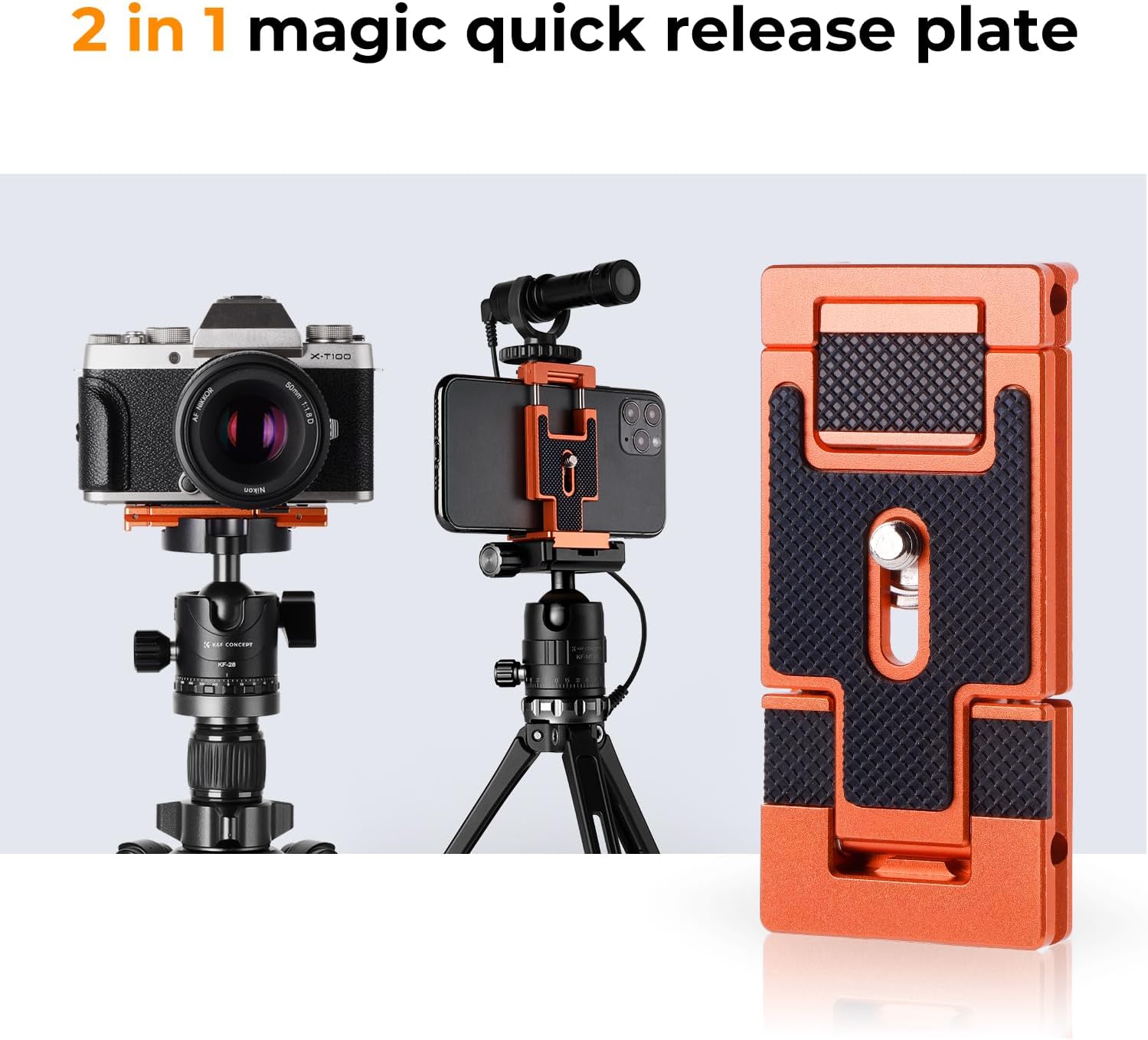
A detailed view of the K&F Concept 2-in-1 quick release plate. It shows how a camera can be mounted, how a smartphone can be mounted, and the plate itself in its folded state.
This video illustrates how to attach a smartphone to the K&F Concept 2-in-1 quick release plate, showcasing its use for mobile videography and photography with a microphone accessory.
3.3 Attaching to the Ball Head
- Ensure the quick release plate is securely attached to your camera or smartphone.
- Align the quick release plate with the clamp on the ball head.
- Slide the plate into the clamp and tighten the locking knob until the plate is firmly secured.
4. Operating Instructions
4.1 Adjusting Tripod Height
The tripod features 4-section tube legs and a 2-section center column for height adjustment. The maximum height with the center column extended is 62 inches (158cm).
- To adjust leg height, unlock the flip leg locks, extend or retract the leg sections, and then firmly lock them back into place.
- To adjust the center column height, loosen the center column locking knob, raise or lower the column, and then tighten the knob to secure.

An illustration demonstrating the K&F Concept SA254M1 tripod's versatility, including its folded state (41cm/16.1"), monopod configurations (up to 165cm/64.9"), and tripod setups at different heights (up to 158cm/62.2").
4.2 Using the Ball Head (BH-28L)
The 28mm KF-28 metal ball head provides a 10kg (22lbs) load capacity and 360-degree rotation for panoramic shooting.
- Pan Adjustment: Loosen the panoramic locking knob to rotate the camera horizontally for panoramic shots. Tighten to secure.
- Tilt/Swivel Adjustment: Loosen the main locking knob to adjust the camera's tilt and swivel angle. Tighten to secure the desired position.

A close-up of the K&F Concept BH-28L ball head, highlighting its design and control knobs. Specifications are listed: 10kg/22lbs load capacity, 3/8 inch bottom connection, 2.8cm/1.1 inch ball diameter, 8cm/3.15 inch height, 0.26kg/0.58lbs net weight, and aluminum alloy material.

A camera mounted on the tripod's ball head, demonstrating its ability to rotate 360 degrees for panoramic photography, set against a scenic coastal background.
4.3 Detachable Monopod Function
One of the tripod legs can be detached and used as a standalone monopod.
- Identify the leg with the foam grip.
- Unscrew this leg from the tripod chassis.
- The detached leg can now be used as a monopod. The ball head can be transferred to the monopod if desired.

This image illustrates the process of detaching one of the tripod legs to convert it into a standalone monopod, shown being used by a person hiking in a mountainous landscape.
4.4 Multi-Angle Shooting
The tripod supports various creative shooting angles:
- Low-Angle Shooting: Adjust the leg angles to their widest spread and shorten the leg sections for stable low-angle shots.
- Inverted Shooting: The center column can be inverted to position the camera below the tripod chassis, ideal for macro photography or unique perspectives.
- Overhead Shooting: Extend the center column and adjust the ball head for overhead camera positioning.

The tripod is adjusted to a low position for creative low-angle photography, with an inset image of a penguin on a rock, demonstrating a possible subject.

The tripod's central column is inverted, allowing the camera to be positioned below the tripod for unique perspectives, with an inset image of a long-exposure seascape.

The tripod is set up to position the camera for an overhead shot, with an inset image showing a group of seagulls on rocks, illustrating a potential use case.
5. Maintenance
- Regularly clean the tripod legs and joints with a soft, dry cloth to remove dust and debris.
- Avoid exposing the tripod to extreme temperatures or harsh chemicals.
- If used in wet or sandy conditions, clean thoroughly afterwards to prevent corrosion or jamming.
- Store the tripod in its carrying bag in a dry, cool place when not in use.
6. Troubleshooting
- Problem: Tripod legs do not extend or retract smoothly.
Solution: Check for debris in the leg locks. Clean and ensure the locks are fully disengaged before adjusting. - Problem: Camera feels unstable on the ball head.
Solution: Ensure the quick release plate is securely attached to both the camera and the ball head clamp. Verify the ball head locking knobs are fully tightened. - Problem: Monopod leg is difficult to detach.
Solution: Ensure the leg is fully unscrewed from the tripod chassis. If resistance persists, check for any obstructions.
7. Specifications
| Feature | Specification |
|---|---|
| Model | SA254M1 (K254A1+BH-28L) |
| Material | Aluminum Alloy |
| Maximum Height | 62 inches (158 cm) |
| Folded Length | 16.1 inches (41 cm) |
| Leg Sections | 4 |
| Max Tube Diameter | 25 mm |
| Load Capacity | 22 lbs (10 kg) |
| Item Weight | 3.5 lbs (1.59 kg) |
| Ball Head Type | BH-28L (KF-28) |
| Compatible Devices | Cameras with Standard 1/4" Male Screw, Cellphones |

The K&F Concept SA254M1 tripod supporting a DSLR camera on a rocky beach. An overlay displays specifications: 4 leg sections, 2.5cm max tube diameter, 62.2 inches max height, 16.1 inches folded length, 10kg/22lbs load capacity, and 1.59kg/3.51lbs weight.
8. Warranty and Support
For warranty information and customer support, please refer to the official K&F Concept website or contact their customer service directly. Keep your purchase receipt as proof of purchase.
Ask a question about this manual
Ask about setup, troubleshooting, compatibility, parts, safety, or missing instructions. Manuals+ will review the question and use this page’s manual context to help answer it.