
AILESSOM US Version
AILESSOM 5G WiFi Bluetooth Projector User Manual
Model: US Version
Introduction
Thank you for purchasing the AILESSOM 5G WiFi Bluetooth Projector. This manual provides detailed instructions for setting up, operating, maintaining, and troubleshooting your new projector. Please read this manual thoroughly before use to ensure optimal performance and longevity of your device.

Figure 1: AILESSOM 5G WiFi Bluetooth Projector
Setup Guide
Follow these steps to set up your projector for the first time:
- Unpacking: Carefully remove the projector and all accessories from the packaging. Verify that all components listed in the 'What's in the Box' section are present.
- Placement: Place the projector on a stable, flat surface. Ensure there is adequate ventilation around the device. For optimal viewing, position the projector perpendicular to the projection surface.
- Power Connection: Connect the power cord to the projector's power input and then to a power outlet.
- Initial Power On: Press the power button on the projector or the remote control to turn on the device.
- Focus Adjustment: Rotate the focus ring on the projector lens until the projected image is clear and sharp.
- Keystone Correction: If the image appears trapezoidal, adjust the keystone correction dial or setting to achieve a rectangular image. The projector supports ±15° keystone adjustment.

Figure 2: Projector setup showing large screen projection and keystone adjustment.
Operating Instructions
Connectivity Options
Your AILESSOM projector offers various ways to connect to your devices:
- 5G WiFi Connection:
Navigate to the WiFi settings on the projector. Select your 2.4G or 5G WiFi network and enter the password. Once connected, you can use screen mirroring or AirPlay functions to project content from your smartphone or tablet. This supports 4K video input. - Bluetooth 5.0 Audio:
Enable Bluetooth on the projector and your external Bluetooth speaker or headphones. Select the desired audio device from the projector's Bluetooth menu to pair. This allows for enhanced audio experience. - Wired Connections:
The projector features 2 HDMI ports, 1 AV port, 2 USB ports, 1 VGA port, and 1 Audio Jack. Connect your devices (e.g., laptops, TV sticks, gaming consoles, DVD players) using the appropriate cables. Select the correct input source from the projector's menu.

Figure 3: Wireless screen mirroring via 5G WiFi.

Figure 4: Bluetooth 5.0 connection for immersive sound.
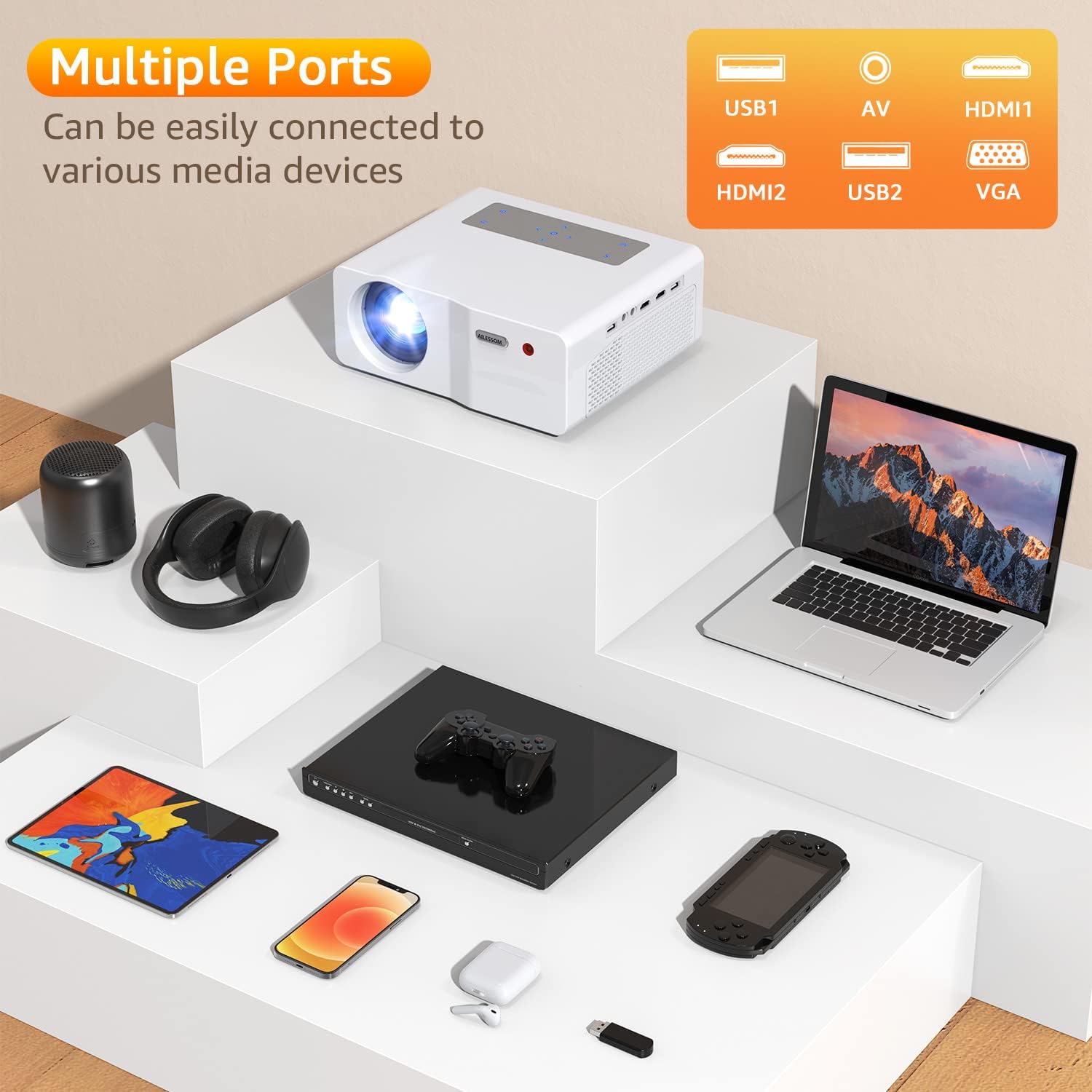
Figure 5: Multiple connectivity ports for various media devices.
Image Adjustment
- Zoom Function: Adjust the image size from 100% to 75% using the zoom function in the projector's settings.
- Native 1080P Display: Experience full HD native 1080P resolution with 9800 lumens brightness and a 10,000:1 contrast ratio for vivid and clear images.

Figure 6: Comparison of Native 1080P clarity.
Maintenance
Proper maintenance ensures the longevity and performance of your projector:
- Lens Cleaning: Use a soft, lint-free cloth specifically designed for optical lenses to gently wipe the projector lens. Avoid using abrasive cleaners or excessive force.
- Dust Prevention: The projector features a fully-sealed optical engine designed to prevent dust accumulation, which helps reduce black spots on the image. However, regularly clean the exterior of the projector with a dry, soft cloth.
- Ventilation: Ensure the projector's ventilation openings are not blocked to prevent overheating. Do not place the projector on soft surfaces that may obstruct airflow.
- Storage: When not in use for extended periods, store the projector in a cool, dry place, preferably in its original packaging or a protective case.
Troubleshooting
This section addresses common issues you might encounter:
- No Image/Poor Image Quality:
- Check power connections and ensure the projector is turned on.
- Adjust the focus ring and keystone correction.
- Verify the input source is correctly selected.
- Ensure the projection surface is suitable and clean.
- If the image has burnt spots or blurriness, this may indicate a hardware issue. Contact customer support.
- No Sound/Poor Sound Quality:
- Check the volume settings on both the projector and the connected device.
- If using Bluetooth speakers, ensure they are properly paired and within range. Note that some Bluetooth speakers may experience audio delay, and the projector may not have an internal setting to adjust this. Consider a wired audio connection if this issue persists.
- Ensure audio cables are securely connected for wired setups.
- WiFi Connection Issues:
- Ensure your WiFi network is active and the password is correct.
- Try connecting to both 2.4G and 5G networks if available.
- Restart the projector and your router.
- Projector Overheating:
- Ensure all ventilation vents are clear and unobstructed.
- Operate the projector in a well-ventilated area.
- Lenses Falling Out:
If the projector lenses become dislodged, this indicates a significant hardware malfunction. Do not attempt to reassemble them yourself as this can cause further damage. Contact customer support immediately for repair or replacement.
If you encounter issues not covered here, please refer to the Warranty & Support section for assistance.
Specifications
| Feature | Detail |
|---|---|
| Brand Name | AILESSOM |
| Model Number | US Version |
| Item Weight | 4.27 pounds |
| Product Dimensions | 8.6 x 3.5 x 7.4 inches |
| Display Resolution | 1920 x 1080 (Native 1080P) |
| Brightness | 9800 Lumens |
| Contrast Ratio | 10,000:1 |
| Connectivity Technology | VGA, Wi-Fi (2.4G/5G), USB, HDMI, 3.5mm Jack, Bluetooth 5.0 |
| Speaker Type | Surround, Stereo, Built-In (SRS sound system) |
| Lamp Life | 10,000 hours |
| Recommended Uses | Home Cinema, Gaming |
| Visible Screen Diagonal | Up to 450 inches / 1143 cm |
Warranty and Support
AILESSOM is committed to providing excellent customer service. Your projector comes with the following support:
- One-Year Return Policy: Details regarding product returns within one year of purchase.
- Three-Year Repair Service: Comprehensive repair service for up to three years from the date of purchase.
- Lifetime Technical Support: Access to professional technical assistance for the lifetime of the product.
For any inquiries, technical assistance, or warranty claims, please contact AILESSOM customer service through the official channels provided at the time of purchase or on the AILESSOM website.
Ask a question about this manual
Ask about setup, troubleshooting, compatibility, parts, safety, or missing instructions. Manuals+ will review the question and use this page’s manual context to help answer it.