
1. Introduction
This manual provides detailed instructions for the safe and efficient operation of your LEOTEC LT-1808 Portable AM/FM Radio. Please read this manual thoroughly before using the product and retain it for future reference.
2. Safety Information
- Do not expose the unit to rain or moisture to prevent fire or electric shock.
- Do not expose the unit to direct sunlight, high temperatures, or high humidity.
- Keep the unit away from heat sources such as radiators, heat registers, stoves, or other apparatus (including amplifiers) that produce heat.
- Use only attachments/accessories specified by the manufacturer.
- Refer all servicing to qualified service personnel.
3. Package Contents
- 1 x LEOTEC LT-1808 AM/FM Radio
- 1 x AC Power Cord
- 1 x User Guide (This Manual)
4. Product Overview
4.1 Key Features
- Good AM/FM Reception: Retractable copper telescopic antenna for strong and stable reception. Frequency range: FM 87.5-108MHz and AM 520-1600KHz.
- Easy to Use: Large, easy-to-read clear radio dial for precise tuning. Big tuning knob for simple operation.
- Clear and Loud Sound: Features a large external speaker for powerful audio output.
- Headphone Jack: Includes a 3.5 mm headphone jack for private listening.
- Two Power Source Options: Operates with the included 120V AC Power Cable for indoor use or 2x D Size Batteries (not included) for portable use.
- Portable Design: Handheld radio with a carrying strap, sized L8.11 x H2.87x W5.11 inches, ideal for various activities.
4.2 Component Identification
Refer to the image below for a visual guide to the radio's components.

Image: Front view of the LEOTEC LT-1808 radio, showing the speaker grille, tuning dial, tuning knob, and volume/power knob.

Image: Rear view of the LEOTEC LT-1808 radio, illustrating the battery compartment and AC power input.
5. Setup
5.1 Powering the Radio
- AC Power: Connect the included AC power cord to the AC input jack on the back of the radio and then plug it into a standard 120V AC wall outlet.
- Battery Power: Open the battery compartment cover on the back of the radio. Insert two (2) D-size batteries (not included), ensuring correct polarity (+/-). Close the battery compartment cover securely.
5.2 Antenna Adjustment
For optimal FM reception, extend the telescopic antenna fully. For AM reception, the internal antenna is generally sufficient, but you may need to rotate the radio for best signal.
6. Operating Instructions
6.1 Turning On/Off and Volume Control
Rotate the VOLUME knob clockwise to turn the radio ON and increase the volume. Rotate counter-clockwise to decrease the volume and turn the radio OFF.
6.2 Tuning to a Station
- Select the desired band (FM or AM) using the band selector switch, usually located on the side or top of the radio.
- Rotate the TUNING knob to scan through the frequencies. The frequency scale will indicate the current station.
- Adjust the tuning knob slowly until you achieve clear reception for your desired station.
6.3 Using the Headphone Jack
Plug any standard 3.5mm headphones into the headphone jack located on the side of the radio for private listening. The external speaker will automatically mute when headphones are connected.
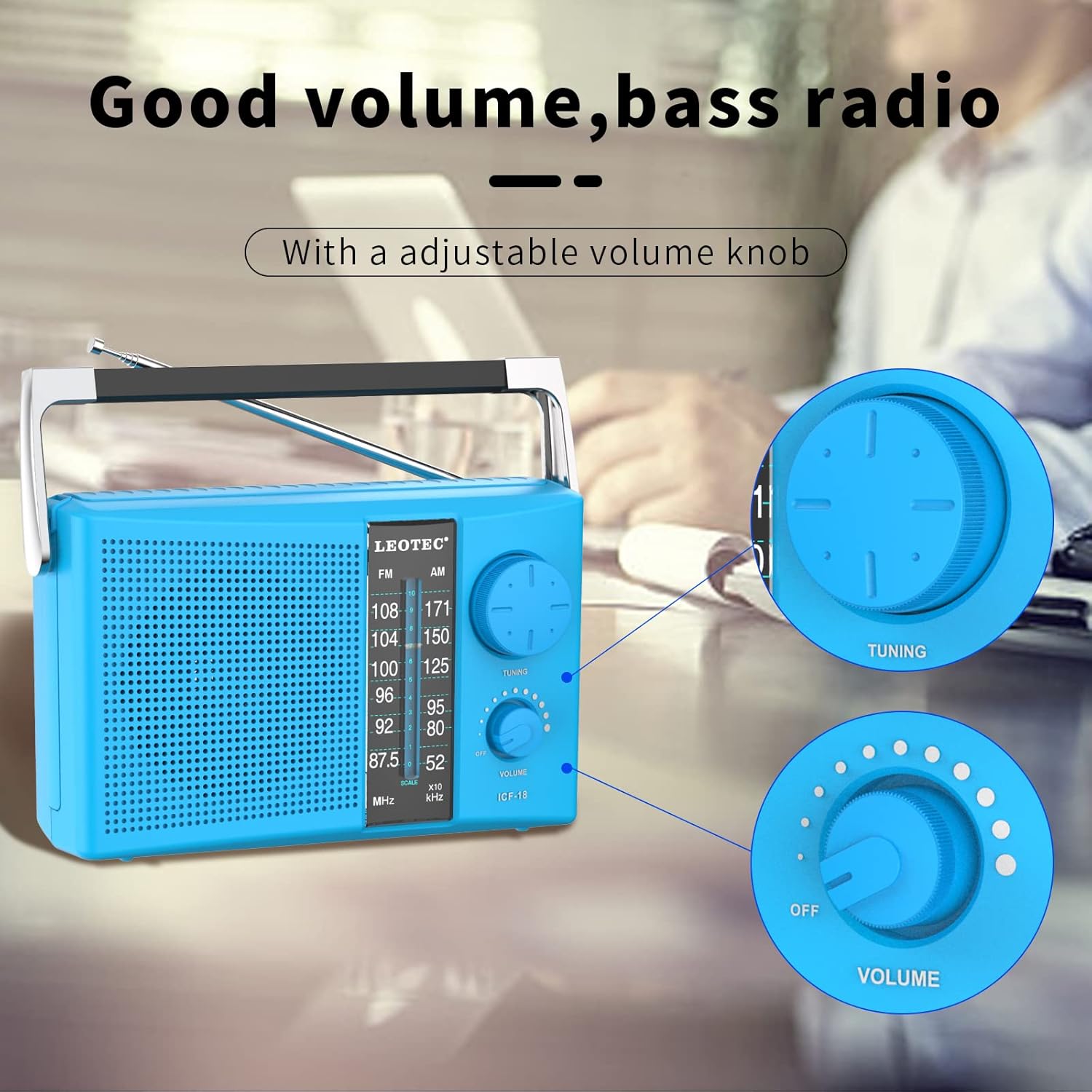
Image: A person using the LEOTEC LT-1808 radio with headphones, demonstrating the headphone jack feature.
7. Maintenance
- Clean the radio with a soft, dry cloth. Do not use abrasive cleaners or solvents.
- If not using the radio for an extended period, remove the batteries to prevent leakage.
- Keep the radio away from strong magnetic fields.
8. Troubleshooting
8.1 No Power
- Ensure the AC power cord is securely plugged into both the radio and a working wall outlet.
- If using batteries, check if they are inserted correctly with the right polarity and are not depleted. Replace with fresh batteries if necessary.
- Confirm the VOLUME knob is turned ON (rotated clockwise).
8.2 Poor Reception/Static
- Fully extend and adjust the telescopic antenna for FM stations.
- For AM stations, try rotating the radio to find the best signal.
- Move the radio away from other electronic devices that may cause interference.
- Check if you are in an area with weak signal strength.
8.3 No Sound from Speaker/Headphones
- Ensure the volume is turned up.
- If headphones are plugged in, ensure they are fully inserted and functioning correctly. Unplug headphones to check the speaker.
- Verify the radio is tuned to an active station.
9. Specifications
| Feature | Specification |
|---|---|
| Model Number | LT-1808 |
| Brand | LEOTEC |
| Product Dimensions | 8.11"L x 2.87"W x 5.11"H (approx. 8 x 3 x 5 inches) |
| Item Weight | 1.7 pounds |
| Tuner Technology | AM/FM |
| Frequency Response FM | 87.5-108MHz |
| Frequency Response AM | 520-1600KHz |
| Power Source | AC 120V or 2 x D Size Batteries (not included) |
| Connectivity Technology | AM/FM |
| Special Feature | Portable |
| Included Components | AM/FM Radio, AC Cord, User Guide |
10. Warranty and Support
For warranty information or technical support, please refer to the contact details provided on the product packaging or visit the official LEOTEC website. Keep your purchase receipt as proof of purchase.
11. Product Videos
11.1 LEOTEC Portable AM FM Radio
Video: An overview of the LEOTEC Portable AM FM Radio, highlighting its features and design. This video is provided by the seller.
11.2 AM FM Radio
Video: A demonstration of the AM FM Radio's functionality and sound quality. This video is provided by the seller.