
PARIS RHÔNE TF005
Contents
PARIS RHÔNE Tower Fan User Manual
Model: TF005 | Brand: PARIS RHÔNE
Introduction
Thank you for choosing the PARIS RHÔNE Tower Fan. This manual provides essential information for the safe operation, maintenance, and troubleshooting of your new fan. Please read it thoroughly before use and retain it for future reference.

Image: The PARIS RHÔNE Tower Fan, showcasing its sleek design, remote control, and illustrative airflow.
Product Features
- Customized Airflow: Offers 3 operating modes (Normal, Natural, Sleep) and 5 fan speeds for personalized air circulation.
- Wide Oscillation: Features 90° oscillation to distribute cool air across a wider area.
- Adjustable Height: Can be set to 36 inches or 42 inches by adding or removing an extension bracket, allowing for targeted cooling.
- Quiet Operation: Operates at a low noise level of 35 dB, suitable for bedrooms and offices.
- Programmable Timer: Includes a 12-hour programmable timer for automatic on/off scheduling.
- Easy Control: Can be operated via a user-friendly control panel on the fan or a full-featured remote control.
- Space-Saving Design: Slim and ultra-thin tower design fits easily in various spaces.

Image: Illustration of the fan's 90-degree oscillation, providing wider air circulation in a room.

Image: Visual representation of the fan's flexible airflow control, detailing 3 wind modes (Normal, Natural, Sleep) and 5 speed settings.
Setup
- Unboxing: Carefully remove all components from the packaging. Ensure all parts are present: fan body, base sections, power cord, and remote control.
- Base Assembly:
- Unscrew the cap from the bottom of the fan body.
- Align the two base sections and snap them together to form a complete circular base.
- Feed the power cord through the center hole of the assembled base.
- Attach the base to the bottom of the fan body, ensuring it is securely fastened by screwing the cap back on.
- Height Adjustment (Optional): The fan can be adjusted to 36 inches or 42 inches. Refer to the included extension bracket for instructions on how to add or remove it to achieve your desired height.
- Placement: Place the fan on a firm, level surface, away from curtains or other objects that could obstruct airflow.
- Power Connection: Plug the power cord into a standard electrical outlet (220 Volts AC).

Image: Unboxed components of the fan, showing the main unit, two base halves, remote, and power cord, ready for assembly.

Image: A visual guide demonstrating the easy height adjustment feature of the fan, allowing users to switch between 36-inch and 42-inch configurations.
Operating Instructions
Your PARIS RHÔNE Tower Fan can be controlled using the touch panel on top of the unit or the included remote control.
Control Panel & Remote Functions:

Image: Detailed view of the fan's top control panel, featuring a digital display and touch-sensitive buttons for various functions.

Image: The fully functional remote control for the tower fan, allowing convenient operation from a distance.
- Power Button (⏻): Press to turn the fan On or Off.
- Fan Speed (⇋): Cycle through 5 available fan speeds (1-5). The current speed will be displayed on the LED screen.
- Mode Button (⊞): Select from 3 operating modes:
- Normal Mode: Constant airflow at the selected speed.
- Natural Mode: Simulates natural breeze by varying fan speed.
- Sleep Mode: Gradually decreases fan speed and dims the display for undisturbed sleep.
- Oscillation Button (↻): Activate or deactivate the 90° oscillation feature.
- Timer Button (◷): Set the auto-off timer from 1 to 12 hours. Each press increases the timer by one hour.
- Night Light Button (☀): Turn the integrated night light On or Off.
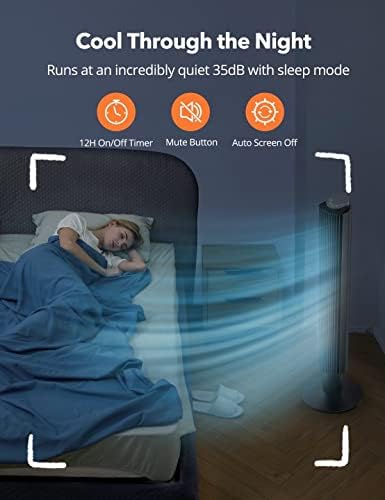
Image: The fan operating in a bedroom, highlighting its quiet 35dB operation and sleep mode for comfortable night use, along with the 12-hour timer and auto screen off features.
Maintenance
Regular maintenance ensures optimal performance and longevity of your fan.
- Cleaning:
- Always unplug the fan before cleaning.
- Use a soft, damp cloth to wipe the exterior surfaces. Do not use abrasive cleaners or solvents.
- For dust accumulation on the air intake/outlet grilles, use a vacuum cleaner with a brush attachment or compressed air.
- The internal components are not user-serviceable.
- Storage: If storing the fan for an extended period, unplug it, clean it thoroughly, and store it in its original packaging or a dust-free environment.
- Care Instructions: Hand wash only for any removable parts that come into contact with water (if applicable, though for this fan, it's primarily external cleaning).

Image: An illustration suggesting that certain components of the fan are washable, aiding in easy maintenance.
Troubleshooting
| Problem | Possible Cause | Solution |
|---|---|---|
| Fan does not turn on. | No power supply; Power button not pressed. | Ensure the power cord is securely plugged into a working outlet. Press the power button. |
| Weak airflow. | Fan speed too low; Air intake/outlet blocked. | Increase fan speed. Clear any obstructions from the grilles. |
| Fan is noisy. | Fan not on a level surface; Internal dust accumulation. | Place the fan on a stable, flat surface. Clean the air grilles. If noise persists, contact customer support. |
| Remote control not working. | Batteries are dead or incorrectly inserted; Obstruction between remote and fan. | Replace batteries (ensure correct polarity). Remove any obstructions. Ensure remote is pointed at the fan's receiver. |
| Oscillation not working. | Oscillation feature is off. | Press the oscillation button to activate. |
Specifications
- Brand: PARIS RHÔNE
- Model Name: TF005
- Color: Black
- Product Dimensions: 12.6"D x 41.34"W x 12.6"H (Adjustable height)
- Item Weight: 1 pounds (approx. 0.45 kg)
- Power Source: AC
- Voltage: 220 Volts (AC)
- Wattage: 50 Watts
- Noise Level: 35 dB
- Number of Power Levels/Speeds: 5
- Special Features: Portable, Bladeless (tower design), Oscillating, 12H Timer, Sleep Mode
- Control Method: Remote, Touch Panel
- Included Components: Remote Control
- Indoor/Outdoor Usage: Indoor
- Material: Plastic
- UPC: 719710507302
Warranty & Support
This PARIS RHÔNE product comes with a 1-year warranty from the date of purchase.
For technical support, warranty claims, or any questions regarding your product, please contact PARIS RHÔNE customer service through their official website or the contact information provided with your purchase documentation.
Please retain your proof of purchase for warranty validation.
Ask a question about this manual
Ask about setup, troubleshooting, compatibility, parts, safety, or missing instructions. Manuals+ will review the question and use this page’s manual context to help answer it.