
1. Introduction
Thank you for purchasing the Pyle PDA22BT Compact Home Audio Amplifier. This device is designed to provide powerful and clear audio amplification for your home speaker system, featuring versatile connectivity options including Bluetooth 5.0 and RCA input. This manual will guide you through the setup, operation, and maintenance of your new amplifier to ensure optimal performance and longevity.

Figure 1.1: Front view of the Pyle PDA22BT Compact Home Audio Amplifier, showcasing its compact design and front panel controls.
2. Safety Instructions
Please read these safety instructions carefully before operating the device. Keep this manual for future reference.
- Power Source: Only use the provided power adapter. Ensure the voltage matches the requirements of the amplifier.
- Ventilation: Do not block any ventilation openings. Install in accordance with the manufacturer's instructions.
- Water and Moisture: Do not expose this apparatus to rain or moisture. Do not place objects filled with liquids, such as vases, on the apparatus.
- Heat: Do not install near any heat sources such as radiators, heat registers, stoves, or other apparatus (including amplifiers) that produce heat.
- Cleaning: Clean only with a dry cloth. Unplug the device before cleaning.
- Servicing: Do not attempt to service this product yourself. Refer all servicing to qualified service personnel.
3. Package Contents
Verify that all items are included in your package:
- Pyle PDA22BT Compact Home Audio Amplifier
- 24V/4.5A Power Adapter
- AC Power Cord
- Bluetooth Antenna
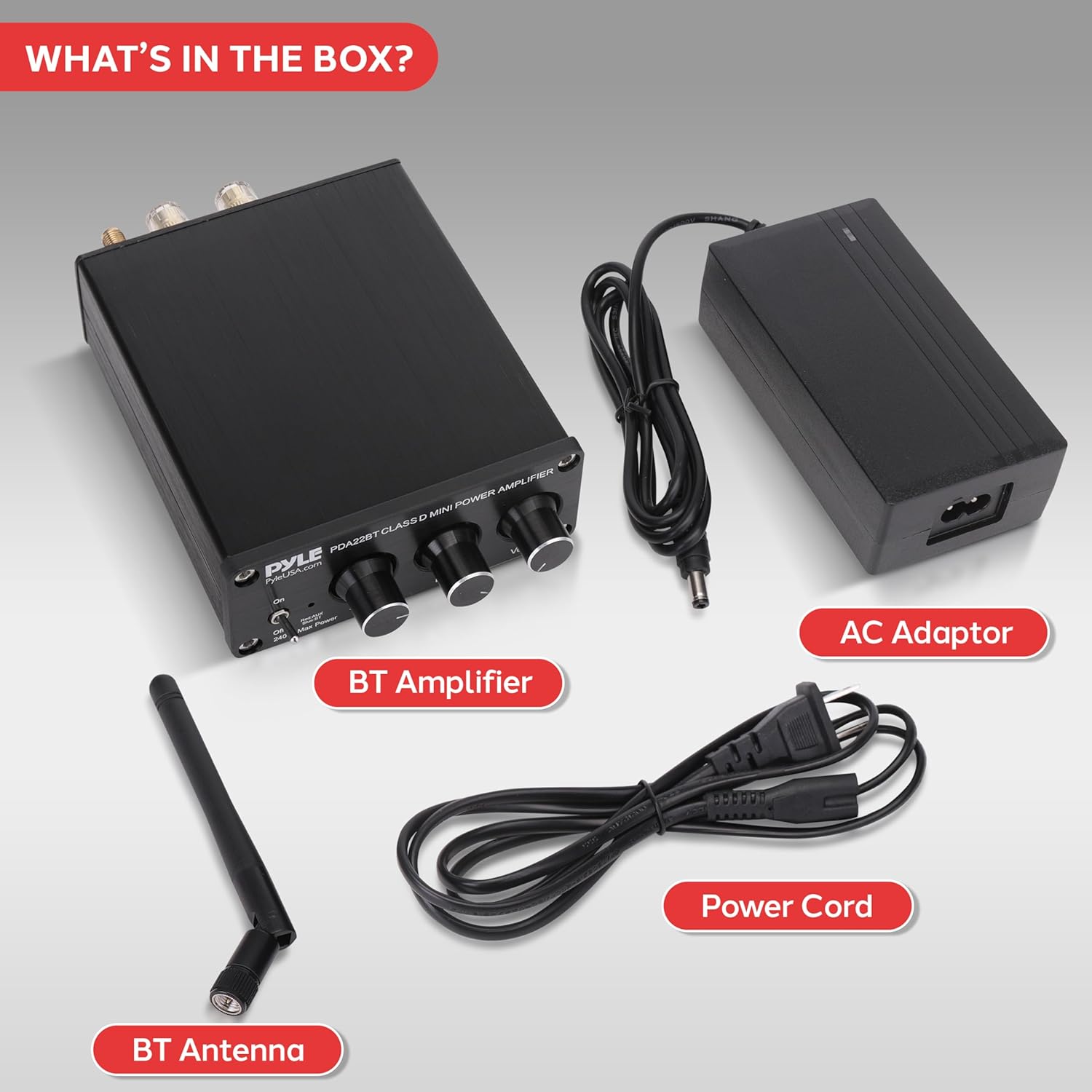
Figure 3.1: All components included in the Pyle PDA22BT amplifier package: the amplifier unit, power adapter, AC power cord, and Bluetooth antenna.
4. Product Overview
4.1 Front Panel Controls
- On/Off Switch: Toggles the amplifier power.
- Red/AUX/BT Indicator: Illuminates red for AUX input, blue for Bluetooth mode.
- Treble Control: Adjusts the high-frequency output.
- Bass Control: Adjusts the low-frequency output.
- Volume Control: Adjusts the overall output volume.
4.2 Rear Panel Connections
- AUX IN (RCA L/R): Connect external audio sources such as CD players, tuners, or tape decks.
- Main Speakers (Banana Plug Terminals L/R): Connect your passive speakers.
- BT ANT.: Port for connecting the Bluetooth antenna.
- DC 12-24V 4.5A Power Input: Connect the provided power adapter.

Figure 4.1: Detailed diagram showing the front panel controls and rear panel connections of the Pyle PDA22BT amplifier.
5. Setup
5.1 Connecting Speakers
- Ensure the amplifier is turned off.
- Connect your passive speakers to the Main Speakers banana plug terminals on the rear panel. Ensure correct polarity (+ to + and - to -) for each speaker.

Figure 5.1: Illustration of connecting speaker cables with banana plugs to the amplifier's main speaker terminals.
5.2 Connecting Audio Sources (RCA)
- Connect your external audio device (e.g., CD player, tuner) to the AUX IN (RCA L/R) ports on the rear panel using an RCA cable.
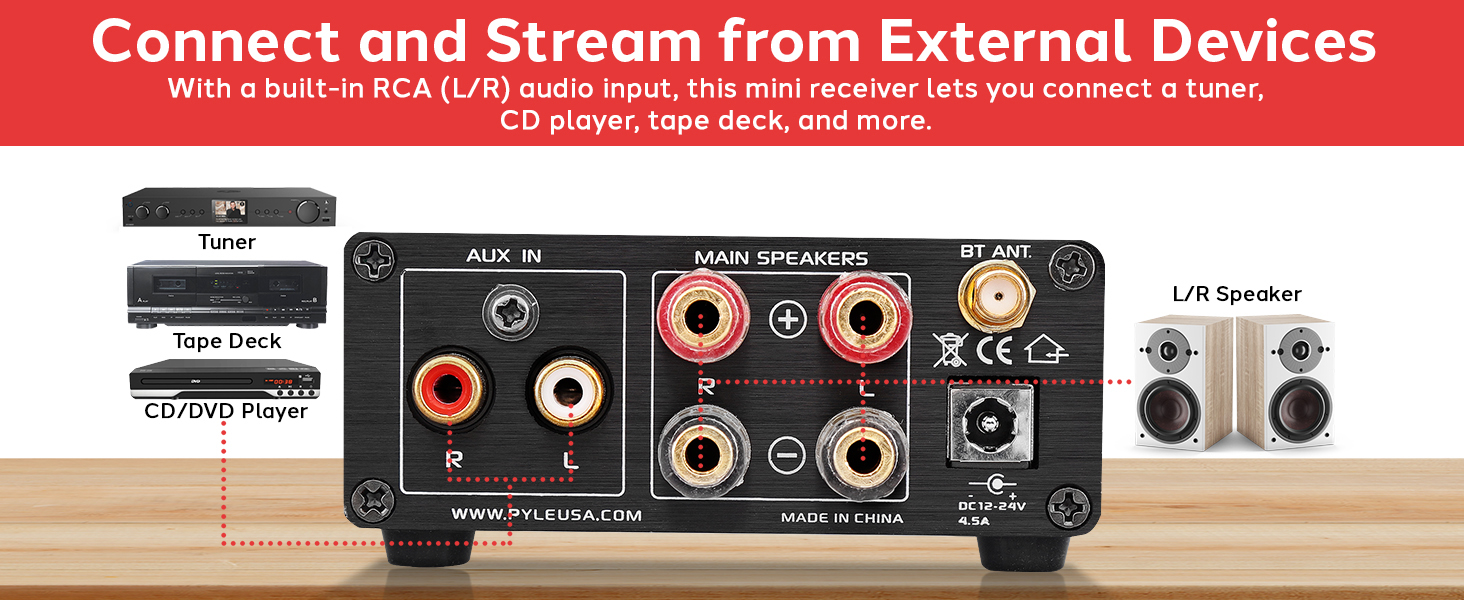
Figure 5.2: Example setup showing how to connect external audio devices like a tuner, tape deck, or CD/DVD player to the amplifier's RCA input.
5.3 Attaching Bluetooth Antenna
- Screw the provided Bluetooth antenna into the BT ANT. port on the rear panel. Ensure it is securely tightened for optimal signal reception.
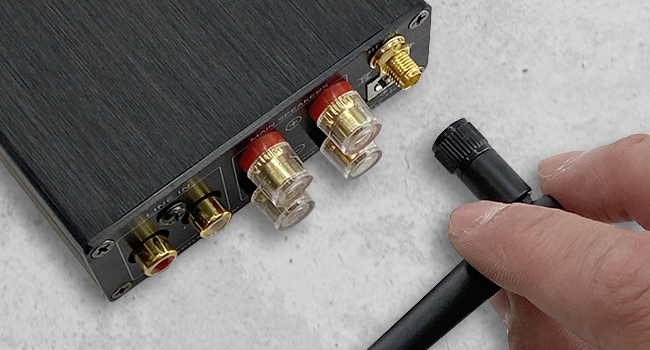
Figure 5.3: A hand attaching the Bluetooth antenna to the designated port on the rear of the amplifier.
5.4 Connecting Power
- Connect the provided 24V/4.5A power adapter to the DC 12-24V 4.5A Power Input on the rear panel.
- Plug the AC power cord into a wall outlet.
6. Operating Instructions
6.1 Powering On/Off
Press the On/Off Switch on the front panel to turn the amplifier on or off. The indicator light will illuminate when the unit is powered on.
6.2 Adjusting Volume, Bass, and Treble
Use the rotary knobs on the front panel to adjust the audio output:
- Rotate the Volume knob clockwise to increase volume, counter-clockwise to decrease.
- Rotate the Bass knob to adjust the low-frequency response.
- Rotate the Treble knob to adjust the high-frequency response.

Figure 6.1: A hand demonstrating the adjustment of the volume knob on the amplifier's front panel.
6.3 Bluetooth Pairing
- Turn on the amplifier. The indicator light will flash blue, indicating it is in Bluetooth pairing mode.
- On your Bluetooth-enabled device (smartphone, tablet, computer), search for available Bluetooth devices.
- Select 'PyleUSA' or 'PDA22BT' from the list of devices.
- Once connected, the indicator light on the amplifier will turn solid blue. You can now stream audio wirelessly to the amplifier.

Figure 6.2: A smartphone displaying a music player interface, wirelessly connected to the Pyle PDA22BT amplifier via Bluetooth for audio streaming.
6.4 AUX Input Usage
When an RCA cable is connected to the AUX IN ports, the amplifier will automatically switch to AUX input mode, and the indicator light will turn red. Play audio from your connected external device.
7. Maintenance
Proper maintenance ensures the longevity and performance of your amplifier.
- Cleaning: Use a soft, dry cloth to wipe the exterior of the amplifier. Do not use liquid cleaners or aerosols.
- Ventilation: Ensure the ventilation openings are free from dust and debris.
- Storage: If storing the amplifier for an extended period, disconnect it from power and store it in a cool, dry place.
8. Troubleshooting
If you encounter issues with your Pyle PDA22BT amplifier, refer to the following common problems and solutions:
| Problem | Possible Cause | Solution |
|---|---|---|
| No power | Power cord not connected; Power outlet not working; Amplifier switch off | Check power connections; Try a different outlet; Ensure amplifier is switched on |
| No sound output | Speakers not connected correctly; Volume too low; Incorrect input selected; Audio source issue | Check speaker wiring polarity; Increase volume; Ensure correct input (Bluetooth/AUX) is active; Verify audio source is playing |
| Bluetooth not connecting | Device too far; Amplifier not in pairing mode; Interference | Move device closer to amplifier; Ensure amplifier indicator is flashing blue; Turn off other Bluetooth devices nearby |
| Distorted sound | Volume too high; Speaker impedance mismatch; Poor audio source quality | Reduce volume; Ensure speakers are 2-8 Ohm; Test with a different audio source |
9. Specifications
Technical specifications for the Pyle PDA22BT Compact Home Audio Amplifier:
| Feature | Specification |
|---|---|
| Power Output | 240 Watts (Peak) |
| Speaker Impedance | 2 - 8 Ohm |
| Frequency Response | 20Hz - 20KHz |
| Bluetooth Version | 5.0 |
| Bluetooth Wireless Range | Up to 30 ft. (10m) |
| Product Dimensions (L x W x H) | 3.0" x 9.75" x 8.5" inches |
| Item Weight | 1.81 lbs. |
| Power Supply | DC 24V/4.5A |

Figure 9.1: The Pyle PDA22BT amplifier with its key dimensions (length, width, height) indicated.
10. Warranty & Support
For warranty information and technical support, please refer to the warranty card included with your product or visit the official Pyle website at www.pyleusa.com. You can find FAQs, product registration, and contact information for customer service there.


