
1. Important Safety Instructions
Please read these instructions carefully before operating the appliance and retain them for future reference. Failure to follow these instructions may result in electric shock, fire, or serious injury.
- Always ensure the appliance is connected to a grounded power outlet with the correct voltage.
- Do not operate the appliance with a damaged cord or plug.
- Keep the appliance away from heat sources, direct sunlight, and flammable materials.
- Ensure proper ventilation around the unit. Do not block air inlets or outlets.
- Do not insert objects into the air vents.
- This appliance contains R290 refrigerant, which is flammable. Handle with care and ensure the appliance is not damaged during transport or installation.
- Only qualified personnel should service or repair the appliance.
- Unplug the appliance before cleaning or performing any maintenance.
2. Product Overview
The De'Longhi Pinguino PAC EL110 ERF is a versatile mobile air conditioner designed to provide cooling and dehumidification for your indoor spaces. It features Wi-Fi connectivity for smart control via an app or voice assistants, an intuitive LED display, and operates quietly.

This image shows the front of the De'Longhi Pinguino PAC EL110 ERF mobile air conditioner, highlighting its sleek white design and integrated control panel.

An angled perspective of the De'Longhi Pinguino PAC EL110 ERF, showcasing its compact form factor and side handles for easy portability.
2.1. Components and Accessories
The unit comes with several accessories necessary for its operation and installation.
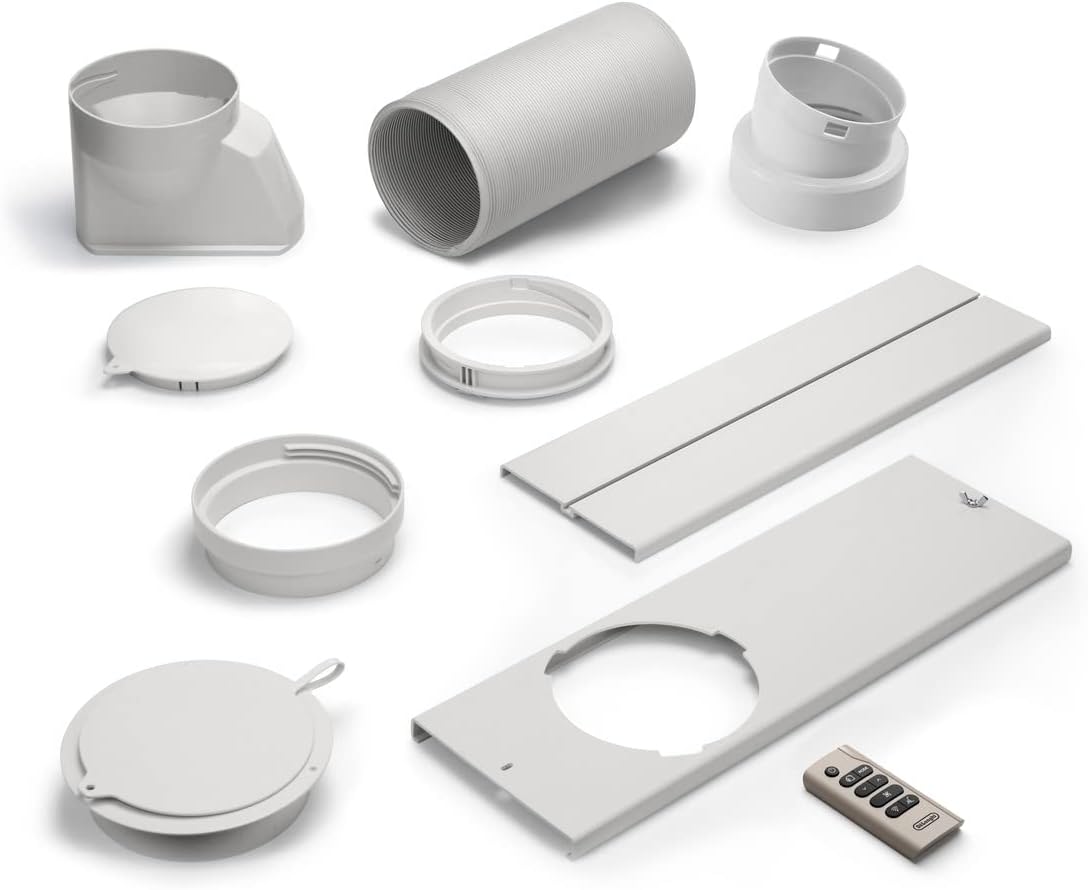
Various accessories are displayed, including the exhaust hose, window kit components, and remote control, essential for proper installation and operation of the air conditioner.
2.2. Control Panel
The intuitive LED display provides clear visibility of settings and room temperature.

This detailed view focuses on the intuitive LED display and touch controls of the Pinguino PAC EL110 ERF, including mode selection, fan speed, and Wi-Fi indicator.
3. Setup
Follow these steps for the initial setup of your mobile air conditioner.
3.1. Unpacking and Positioning
- Carefully remove the appliance from its packaging.
- Place the unit on a flat, stable surface, ensuring there is at least 30 cm (12 inches) of clear space around the unit for proper airflow.
- Avoid placing the unit in direct sunlight or near heat-generating appliances.
3.2. Exhaust Hose Installation
The exhaust hose is crucial for expelling hot air outside the room.
- Attach the exhaust hose connector to the back of the air conditioner.
- Extend the exhaust hose and connect the window adapter to the other end.
- Open a window or sliding door and place the window adapter securely in the opening. Use the provided window kit to seal the opening as much as possible to prevent hot air from re-entering the room.
- Ensure the exhaust hose is as short and straight as possible to maximize efficiency. Avoid kinks or sharp bends.

The air conditioner is shown positioned in a living room, demonstrating its discreet presence and how it integrates into a home environment while providing cooling comfort.
4. Operating Instructions
Learn how to use the various functions of your De'Longhi Pinguino PAC EL110 ERF.
4.1. Powering On/Off
- Press the Power button on the control panel or remote control to turn the unit on or off.
4.2. Mode Selection
Press the Mode button to cycle through the available operating modes:
- Cooling Mode (❄️): Provides powerful cooling. Adjust the desired temperature using the Up/Down arrows.
- Dehumidifying Mode (💧): Reduces humidity in the room without significant cooling.
- Fan Mode (💨): Circulates air without cooling. Select fan speed (Low, Medium, High) using the fan speed button.
4.3. Fan Speed Adjustment
In Cooling or Fan mode, press the Fan Speed button to select between Low, Medium, and High fan speeds. For quiet operation, select the lowest speed.
4.4. ECO Real Feel Technology
This feature automatically adjusts cooling and fan speed to achieve optimal comfort while minimizing energy consumption. Activate it via the control panel or app.
4.5. Wi-Fi Connectivity and Smart Control
The PAC EL110 ERF can be controlled remotely via Wi-Fi.
- Download the official De'Longhi app on your smartphone.
- Follow the in-app instructions to connect your air conditioner to your home Wi-Fi network.
- Once connected, you can control the unit from anywhere, set schedules, and monitor room conditions.
- The unit is compatible with Alexa and Google Assistant for voice control. Refer to the app for integration instructions.
5. Maintenance
Regular maintenance ensures optimal performance and longevity of your air conditioner.
5.1. Air Filter Cleaning
The air filter should be cleaned regularly (every two weeks or more often depending on usage) to prevent dust buildup and maintain efficiency.
- Unplug the appliance from the power outlet.
- Locate and remove the air filter (usually at the back or side of the unit).
- Clean the filter using a vacuum cleaner to remove dust. For heavy dirt, wash it gently with lukewarm water and a mild detergent.
- Allow the filter to dry completely before reinserting it into the unit.
5.2. Water Drainage
During dehumidification or in very humid conditions, water will collect inside the unit. The unit has an automatic evaporation system, but manual drainage may be required if the internal tank fills up.
- When the water tank is full, the unit will stop operating and display an indicator.
- Unplug the appliance.
- Place a shallow pan or container under the drainage outlet (usually at the bottom rear of the unit).
- Remove the drain plug and allow all water to drain out.
- Replace the drain plug securely.
5.3. Storage
When storing the unit for an extended period:
- Drain all accumulated water.
- Clean the air filter.
- Unplug the unit and coil the power cord.
- Store the unit in a cool, dry place, preferably covered to protect it from dust.
6. Troubleshooting
If you encounter issues with your air conditioner, refer to the following common problems and solutions.
| Problem | Possible Cause | Solution |
|---|---|---|
| Unit does not turn on | No power; Power cord not plugged in; Circuit breaker tripped. | Check power connection; Reset circuit breaker. |
| Unit is not cooling effectively | Air filter clogged; Exhaust hose not properly installed or kinked; Room too large; Doors/windows open. | Clean air filter; Ensure exhaust hose is straight and sealed; Close doors/windows; Consider unit capacity for room size. |
| Water leakage | Drain plug loose; Internal water tank full. | Ensure drain plug is secure; Drain water from the unit. |
| Unit is noisy | Fan speed too high; Unit not on a level surface; Obstruction in fan. | Reduce fan speed; Place unit on a level surface; Check for obstructions. |
| Wi-Fi connection issues | Incorrect Wi-Fi password; Router too far; Network interference. | Verify password; Move unit closer to router; Restart router and unit; Consult app for specific troubleshooting. |
If the problem persists after trying these solutions, please contact customer support.
7. Specifications
Key technical specifications for the De'Longhi Pinguino PAC EL110 ERF mobile air conditioner.
| Specification | Value |
|---|---|
| Brand | De'Longhi |
| Model | PAC EL110 ERF |
| Cooling Capacity | 11000 BTU (British Thermal Unit) |
| Refrigerant | R290 |
| Energy Efficiency Class | A |
| Energy Efficiency Ratio (EER) | 2.6 |
| Sound Power Level (Cooling) | 64 dB |
| Dimensions (D x W x H) | 45P x 75l x 41H centimeters |
| Voltage | 220 Volts |
| Special Feature | Dust filter, Wi-Fi, Alexa/Google Assistant Compatible |
7.1. Energy Label and Product Data Sheet
For detailed energy information and product specifications, refer to the official energy label and product data sheet.

The official EU energy label for the PAC EL110 ERF, indicating its energy efficiency class A, cooling capacity of 2.9 kW, and sound power level of 64 dB.

A technical product data sheet in French, providing detailed specifications such as refrigerant type (R290), energy efficiency ratio (EER), and power consumption.
For more information, visit the official EPREL database: https://eprel.ec.europa.eu/qr/1133122
8. Warranty and Support
De'Longhi products are manufactured to the highest quality standards and are covered by a limited warranty. Please refer to the warranty card included with your product for specific terms and conditions.
8.1. Customer Support
For technical assistance, troubleshooting, or warranty claims, please contact De'Longhi customer support:
- Email: eprel.team@delonghigroup.com
- Phone: +3904224131
- Address: LODOVICO SEITZ 47, 31100 TREVISO, Italy