
Oster GCSTBS5002-057
Oster Steam Iron GCSTBS5002-057 User Manual
Model: GCSTBS5002-057
Introduction
This manual provides instructions for the safe and efficient operation, maintenance, and troubleshooting of your Oster Steam Iron, model GCSTBS5002-057. Please read all instructions carefully before using the appliance and retain this manual for future reference.
Important Safety Instructions
When using electrical appliances, basic safety precautions should always be followed to reduce the risk of fire, electric shock, and injury to persons, including the following:
- Read all instructions before use.
- Use the iron only for its intended use.
- To protect against the risk of electric shock, do not immerse the iron in water or other liquids.
- The iron should always be turned to OFF before plugging or unplugging from the outlet. Never yank cord to disconnect from outlet; instead, grasp plug and pull to disconnect.
- Do not allow cord to touch hot surfaces. Let iron cool completely before putting away. Loop cord loosely around iron when storing.
- Always disconnect iron from electrical outlet when filling with water or emptying and when not in use.
- Do not operate iron with a damaged cord or if the iron has been dropped or damaged. To avoid the risk of electric shock, do not disassemble the iron. Contact qualified service personnel for examination and repair. Incorrect reassembly can cause a risk of electric shock when the iron is used.
- Close supervision is necessary for any appliance being used by or near children. Do not leave iron unattended while connected or on an ironing board.
- Burns can occur from touching hot metal parts, hot water, or steam. Use caution when you turn a steam iron upside down – there may be hot water in the reservoir.
- The iron must be used and rested on a stable surface.
- When placing the iron on its stand, ensure that the surface on which the stand is placed is stable.
- This appliance is not intended for use by persons (including children) with reduced physical, sensory or mental capabilities, or lack of experience and knowledge, unless they have been given supervision or instruction concerning use of the appliance by a person responsible for their safety.
- Children should be supervised to ensure that they do not play with the appliance.

Product Overview
The Oster Steam Iron GCSTBS5002-057 is designed for efficient garment care with its non-stick soleplate and steam functions. Familiarize yourself with the components before use.

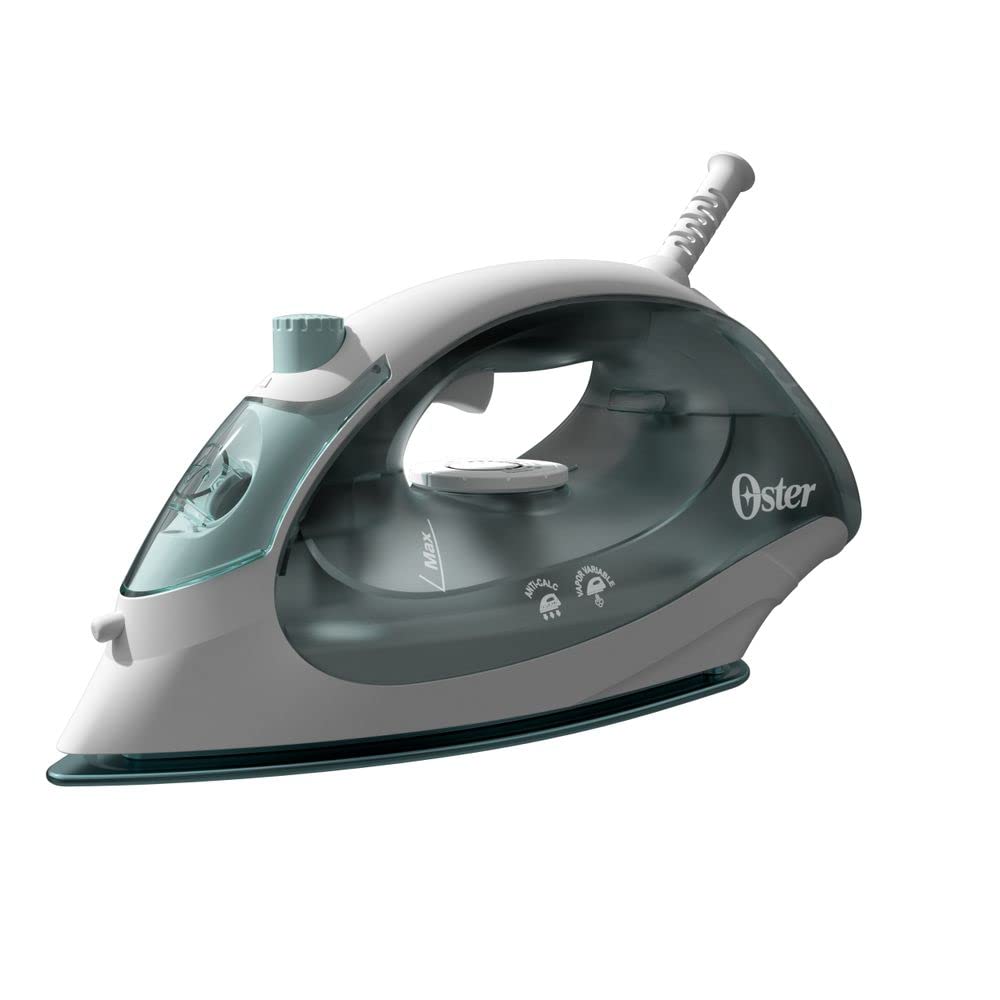
Key Features:
- Non-Stick Soleplate: High-quality non-stick coating for smooth gliding over fabrics.
- 25 Steam Vents: Ensures efficient steam distribution for effective wrinkle removal.
- Compact Design: Ergonomic and lightweight for comfortable use.
- 200ml Water Tank: Sufficient capacity for extended ironing sessions.
- Spray Button: Releases a fine mist to moisten stubborn wrinkles.
- Anti-Calc Filter: Helps prevent mineral buildup for prolonged performance.
Setup and First Use
- Unpacking: Carefully remove the iron from its packaging. Retain packaging for storage or disposal.
- Initial Cleaning: Wipe the soleplate with a soft, damp cloth to remove any manufacturing residues.
- Filling the Water Tank:
- Ensure the iron is unplugged and cool.
- Open the water filler cap.
- Fill the water tank (up to 200ml) with tap water. Distilled or demineralized water is recommended to prevent mineral buildup, especially in hard water areas.
- Close the water filler cap securely.
- Power Connection: Plug the iron into a 220V electrical outlet. Ensure the outlet matches the iron's voltage requirements.
Operating Instructions
Temperature Control:
- Turn the temperature control dial to the desired setting based on the fabric type. Refer to garment care labels for recommended ironing temperatures.
- Allow the iron to heat up. The indicator light will turn off when the set temperature is reached.
Dry Ironing:
- Set the steam control to the "Dry" or "No Steam" position.
- Adjust the temperature according to the fabric.
- Once heated, iron garments as needed.
Steam Ironing:
- Ensure the water tank is filled.
- Set the temperature control to a steam-appropriate setting (usually indicated on the dial, typically for cotton, linen, etc.). Steam function is not recommended for low-temperature settings.
- Once the iron reaches the set temperature, adjust the steam control to the desired steam level.
- Move the iron over the fabric. The steam will help remove wrinkles.
Spray Function:
- Press the spray button to release a fine mist of water onto stubborn wrinkles. This can be used during both dry and steam ironing.
After Ironing:
- Turn the temperature dial to the "OFF" or minimum setting.
- Unplug the iron from the electrical outlet.
- Allow the iron to cool completely before storing.
Care and Maintenance
Cleaning the Soleplate:
- Ensure the iron is unplugged and completely cool.
- Wipe the soleplate with a soft, damp cloth. For stubborn stains, use a mild, non-abrasive cleaner specifically designed for iron soleplates.
- Do not use abrasive scouring pads or harsh chemicals, as these can damage the non-stick coating.
Draining the Water Tank:
- After each use, or before storing for an extended period, empty any remaining water from the tank.
- Open the water filler cap and invert the iron over a sink to drain.
Storage:
- Store the iron upright on its heel rest in a cool, dry place.
- Do not wrap the power cord tightly around the iron; coil it loosely to prevent damage.
Troubleshooting
| Problem | Possible Cause | Solution |
|---|---|---|
| Iron does not heat up. | Not plugged in; power outlet faulty; temperature dial set to OFF. | Check power connection; test outlet with another appliance; turn temperature dial to desired setting. |
| No steam produced. | Water tank empty; temperature too low for steam; steam control set to dry. | Fill water tank; set temperature to steam-appropriate level; adjust steam control. |
| Water leaks from soleplate. | Water tank overfilled; temperature too low for steam; iron not hot enough before steam function activated. | Do not overfill; ensure temperature is set correctly for steam; wait for indicator light to turn off before using steam. |
| Soleplate is dirty. | Residue from fabrics or starch buildup. | Clean soleplate as per "Care and Maintenance" section. |
If the problem persists after attempting these solutions, please contact customer support.
Specifications
| Model Number | GCSTBS5002-057 |
| Brand | Oster |
| Power | 1400 watts |
| Voltage | 220 Volts |
| Dimensions (L x W) | 24.3 cm x 11.5 cm |
| Water Tank Capacity | 200 ml |
| Soleplate Material | Stainless Steel with Non-Stick Coating |
| Special Features | Anti-stick, Compact, Anti-calc filter |
| Components Included | 1 Steam Iron, 1 Warranty Certificate, 1 Instruction Manual |
| GTIN/UPC | 053891160308 |
Warranty Information
This Oster Steam Iron, model GCSTBS5002-057, comes with a 12-month warranty against manufacturing defects from the date of purchase. Please retain your proof of purchase for warranty claims.
The warranty does not cover:
- Damage caused by improper use, negligence, or accident.
- Damage resulting from unauthorized repairs or modifications.
- Normal wear and tear.
- Commercial use.
For detailed warranty terms and conditions, please refer to the included Warranty Certificate.
Customer Support
For technical assistance, service, or warranty inquiries, please contact Oster customer support. Contact information can typically be found on the official Oster website or on the warranty certificate included with your product.
Please have your model number (GCSTBS5002-057) and proof of purchase ready when contacting support.
Related documentsGCSTBS5002-057


Ask a question about this manual
Ask about setup, troubleshooting, compatibility, parts, safety, or missing instructions. Manuals+ will review the question and use this page’s manual context to help answer it.