
1. Introduction
Thank you for choosing the AKASO Brave 7 Action Camera. This manual provides essential information for setting up, operating, and maintaining your camera. The Brave 7 features 4K/60fps video, 20MP photos, IPX8 waterproof rating, 6-axis image stabilization, and voice control, designed to capture your adventures with clarity and ease.
The AKASO Brave 7 is a versatile action camera suitable for various activities, from extreme sports to casual recording. Its robust design and advanced features ensure high-quality capture in diverse environments.
2. Setup
2.1. Battery Installation and Charging
The AKASO Brave 7 comes with two 1350mAh lithium-ion batteries. To install a battery:
- Locate the battery compartment on the bottom of the camera.
- Slide the latch to open the compartment cover.
- Insert the battery with the contacts facing inward, ensuring correct orientation.
- Close the compartment cover securely until the latch clicks.
To charge the batteries, use the included USB cable and charger. The camera supports charging via a USB power adapter (not included).

Image: The 1350mAh rechargeable Li-ion battery pack for the AKASO Brave 7 camera.
2.2. MicroSD Card Installation
A microSDXC card is required for storing photos and videos. The camera supports cards up to 64GB. For optimal performance, use a Class 10, U3, or V60 speed class microSDXC card.
- Locate the microSD card slot on the side of the camera.
- Insert the microSD card with the label facing the front of the camera until it clicks into place.
- To remove, gently push the card until it springs out.
Important: Format the microSD card in the camera before first use and periodically to ensure stable recording and prevent data corruption.
2.3. Powering On/Off
To power on the camera, press and hold the Power/Mode button for approximately 3 seconds. The camera will turn on, and the screen will light up. To power off, press and hold the Power/Mode button again for 3 seconds.
3. Operating Instructions
3.1. Basic Operation: Video and Photo Modes
The AKASO Brave 7 offers various modes for capturing your content.
- Video Recording: The camera supports up to 4K resolution at 60 frames per second (fps). In video mode, press the Shutter button to start recording. Press it again to stop.
- Photo Capture: Capture high-resolution 20MP still images. In photo mode, press the Shutter button to take a picture.

Image: The AKASO Brave 7 camera displaying its 4K60fps video and 20MP photo capabilities.
3.2. Dual Screens and Touch Control
The Brave 7 features both a rear 2-inch touch screen and a front display. You can switch between the front and rear views as needed. The rear touch screen allows for intuitive navigation through menus and settings, as well as playback of recorded content.
3.3. Waterproofing
The AKASO Brave 7 camera body is designed to be waterproof up to 10 meters (33 feet) without an additional case, thanks to its IPX8 rating. For deeper dives or extended underwater use, a separately sold waterproof case is required, which extends the waterproof capability up to 40 meters (131 feet).

Image: The AKASO Brave 7 camera submerged in water, highlighting its IPX8 waterproof design.
3.4. Image Stabilization and Horizon Correction
The camera incorporates 6-axis Electronic Image Stabilization (EIS) to reduce blur and shakiness in your footage, providing smoother video even during dynamic activities. Additionally, the Horizon Correction feature automatically detects and corrects camera tilt, ensuring your horizon remains level in recordings.
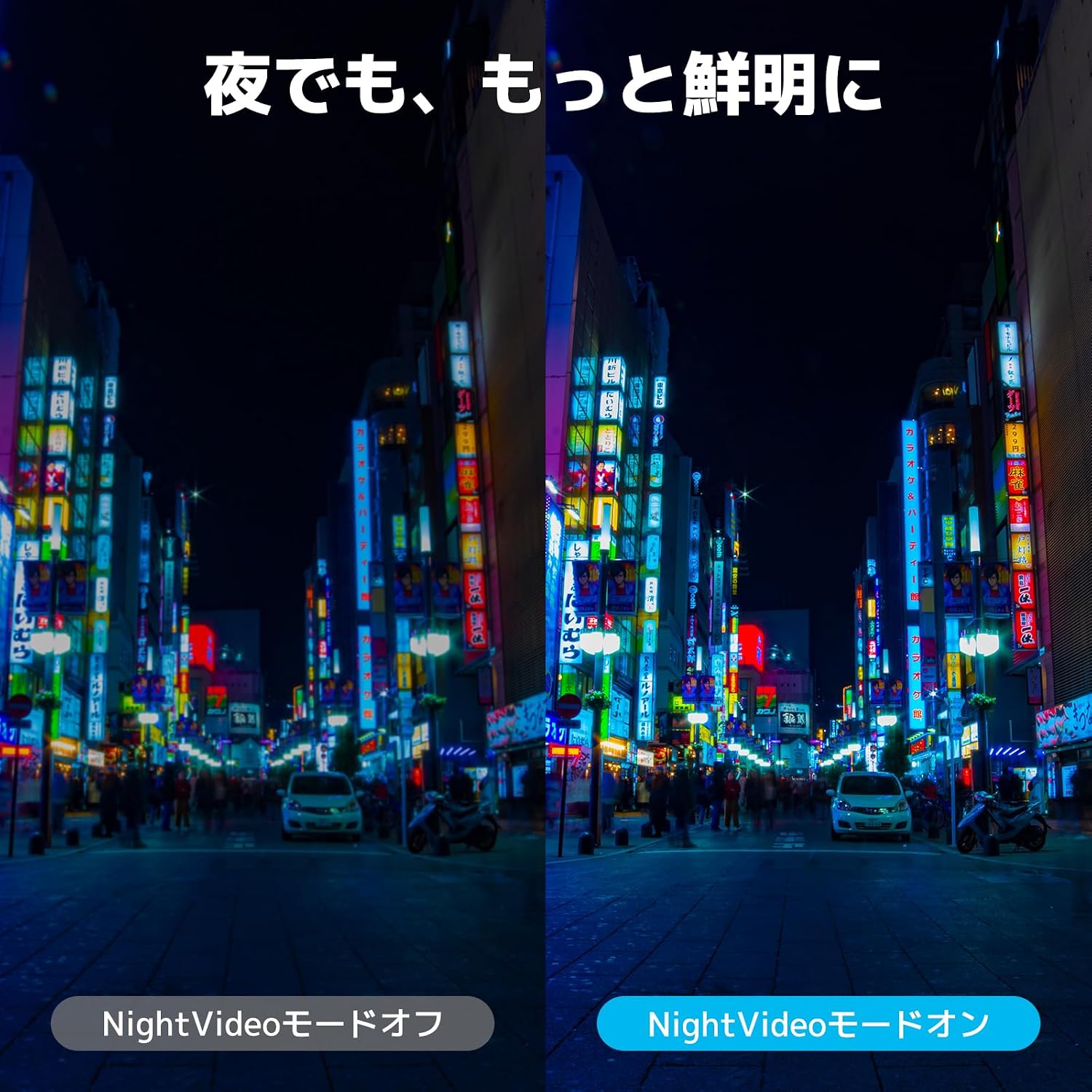
Image: A visual comparison showing the effectiveness of 6-axis image stabilization (EIS) in reducing blur.

Image: A visual comparison demonstrating how Horizon Correction keeps the video level.
3.5. Voice Control
The Brave 7 supports voice commands for hands-free operation. Simply speak commands like "AKASO Video Start," "AKASO Wi-Fi On," or "AKASO Photo" to control your camera. Refer to the camera's detailed instructions for a comprehensive list of available voice commands.

Image: A user interacting with the AKASO Brave 7 using voice commands.
3.6. Wind Noise Reduction
The camera features a wind noise reduction function to minimize unwanted audio interference from wind, resulting in clearer sound recordings, especially in outdoor environments. The camera also supports external microphones (AKASO compatible microphones only) for enhanced audio quality.

Image: A visual representation of the wind noise reduction technology in action, showing sound waves being suppressed.
3.7. Night Video Mode
The Night Video mode is designed to improve video clarity and detail in low-light conditions, allowing you to capture better footage even in dark environments.

Image: A side-by-side comparison showing the improved clarity and brightness when Night Video Mode is enabled.
3.8. Pre-Rec Function
The Pre-Rec function ensures you never miss a moment. When activated, the camera continuously buffers video, and when you press the shutter button, it saves the footage from up to 10 seconds before the button press, capturing unexpected events.

Image: A visual explanation of the Pre-Rec feature, showing how it captures footage from before the record button is pressed.
3.9. Wi-Fi Connectivity
Connect your AKASO Brave 7 to the AKASO GO app on your smartphone via Wi-Fi. This allows for remote control of the camera, live preview of your shots, and easy transfer of photos and videos to your device.

Image: The AKASO Brave 7 camera wirelessly connected to a smartphone, demonstrating Wi-Fi functionality.
4. Maintenance
- Lens Care: Keep the camera lens clean using a soft, lint-free cloth. Avoid touching the lens with your fingers to prevent smudges.
- Storage: Store the camera in a cool, dry place away from direct sunlight and extreme temperatures.
- Water Exposure: After using the camera in water, rinse it with fresh water and dry it thoroughly. Ensure all port covers and the battery compartment are securely closed before water exposure.
- Battery Care: Remove batteries if the camera will not be used for an extended period. Store batteries in a cool, dry place.
5. Troubleshooting
- Camera does not power on: Ensure the battery is fully charged and correctly inserted. Try using a different charged battery.
- Recording stops unexpectedly: Check if the microSD card is a Class 10, U3, or V60 card and is formatted. The camera may also stop recording if it overheats; allow it to cool down.
- Poor video/photo quality: Ensure the lens is clean. Check your resolution and frame rate settings. Ensure there is adequate lighting.
- Wi-Fi connection issues: Make sure Wi-Fi is enabled on the camera and your smartphone. Ensure your smartphone is within range. Restart both devices if necessary.
- Voice control not responding: Speak clearly and ensure the camera's microphone is not obstructed. Check the voice control settings in the camera menu.
For issues not covered here, please refer to the detailed online manual or contact customer support.
6. Specifications
| Feature | Specification |
|---|---|
| Brand | AKASO |
| Model Name | Brave7 |
| Video Capture Resolution | 4K |
| Photo Sensor Technology | CMOS |
| Flash Memory Type | micro SDXC Card |
| Video Capture Format | H.264, H.265 |
| Supported Audio Format | AAC, MP3 |
| Screen Size | 2 Inches |
| Connectivity Technology | Wi-Fi |
| Color | Gray |
| Special Features | 4K60FPS, Pre-REC, Touch Screen, Anti-shake, Wind Noise Reduction |
| Waterproof Type | Water Resistant (IPX8) |
| Image Stabilization | Yes (Digital) |
| Form Factor | Compact |
| Number of Batteries | 2 Lithium Ion batteries (included) |
| Lens Type | Zoom, Wide Angle |
| Focus Feature | Autofocus |
| Display Max Resolution | 4K |
| Flash Memory Speed Class | C10, U3, V60 |
| Digital Zoom | 4X |
| Motor Type | Digital |
| Video Camera Type | Action Camera |
| Batteries Included | Yes |
| Image Capture Speed | 30 fps |
| Shooting Function | Sports |
| Aspect Ratio | 16:9 |
| Supported Image Format | JPEG, RAW (DNG) |
| File Format | Video: H.264, H.265; Photo: JPEG, JPEG+DNG |
| GTIN | 810082445077 |
7. Warranty and Support
7.1. Warranty Information
The AKASO Brave 7 Action Camera comes with a 12-month warranty from the date of purchase. This warranty covers manufacturing defects and ensures the product functions as intended under normal use. Please retain your proof of purchase for warranty claims.
7.2. Customer Support
For any questions, technical assistance, or issues encountered during the use of your AKASO Brave 7, please contact AKASO customer service. You can typically find contact information on the official AKASO website or through the retailer where you purchased the product.


