
Introduction
The TOZO T5 Bluetooth Headphones are true wireless earbuds designed for an active lifestyle, featuring a secure earhook design, intuitive touch controls, and high-fidelity stereo sound. This manual provides detailed instructions for setting up, operating, maintaining, and troubleshooting your TOZO T5 headphones to ensure optimal performance and longevity.
What's in the Box
- TOZO T5 True Wireless Earbuds (Left and Right)
- Charging Case
- USB Charging Cable
- Multiple Sizes of Eartips
- User Manual
Setup
1. Charging the Earbuds and Charging Case
Before first use, ensure both the earbuds and the charging case are fully charged. Place the earbuds into the charging case. The indicator lights on the earbuds will show charging status. The charging case can be charged via a USB-C cable or wirelessly using a compatible wireless charger.

The TOZO T5 charging case supports wireless charging, providing convenience and extended playtime up to 30 hours.
2. One-Step Pairing
The TOZO T5 earbuds feature a one-step pairing process for quick and easy connection to your device.
- Take both earbuds out of the charging case. They will automatically power on and enter pairing mode.
- On your device (smartphone, tablet, computer), open the Bluetooth settings.
- Search for "TOZO-T5" in the list of available devices and select it to connect.
- Once connected, you will hear a confirmation tone, and the earbuds will be ready for use.
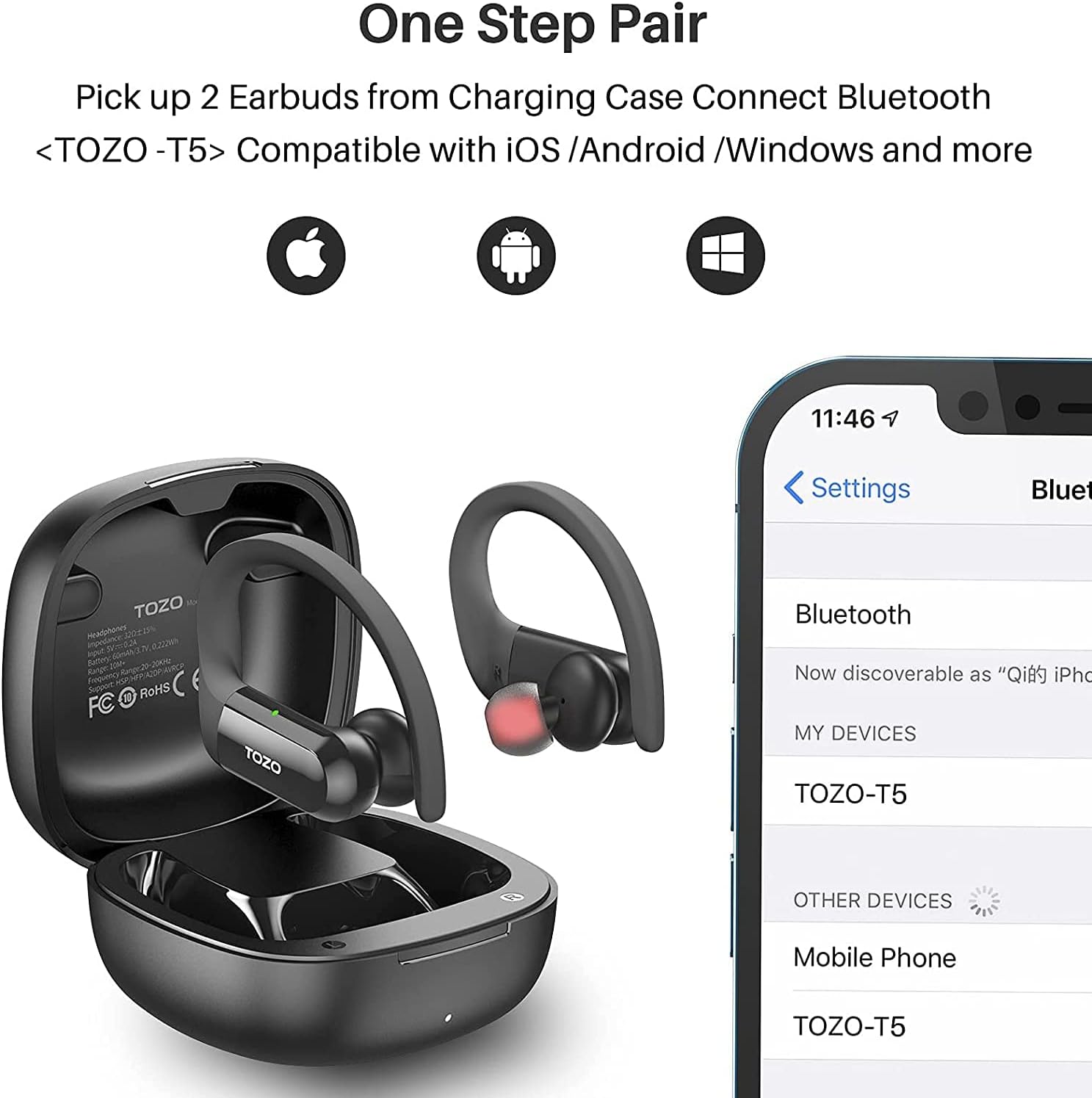
The TOZO T5 earbuds are compatible with iOS, Android, and Windows devices, offering seamless one-step pairing.
3. Proper Fit and Comfort
Achieving a secure and comfortable fit is crucial for sound quality and stability, especially during physical activity. The TOZO T5 earbuds come with flexible earhooks and various eartip sizes to ensure a personalized fit.
- Select the Right Eartips: Experiment with the different eartip sizes provided to find the pair that creates a snug seal in your ear canal. A good seal enhances bass response and noise isolation.
- Position the Earhook: Gently place the earbud into your ear, then guide the flexible earhook over the back of your ear. Adjust the earhook until it rests comfortably and securely, holding the earbud in place.
- Adjust for Comfort: Rotate the earbud slightly to ensure it sits comfortably in your ear canal without causing pressure points. The earhook should provide stability without feeling tight.

The flexible earhooks and various ear tip sizes ensure a comfortable and stable fit, ideal for sports and active use.
Operating the Earbuds
Touch Controls
The TOZO T5 earbuds feature intuitive touch controls on the outer surface of each earbud, allowing you to manage music playback, calls, and voice assistant activation without needing to access your connected device.

Easily control your playlist and calls with simple touch gestures on the earbuds.
| Action | Control |
|---|---|
| Play/Pause | Single tap (X1) on either earbud |
| Next Song | Double tap (X2) on the Right earbud |
| Previous Song | Double tap (X2) on the Left earbud |
| Volume Up | Triple tap (X3) on the Right earbud |
| Volume Down | Triple tap (X3) on the Left earbud |
| Answer/Hang Up Call | Single tap (X1) on either earbud |
| Reject Call | Press and hold (2 seconds) on either earbud |
| Activate Voice Assistant (Siri/Google Assistant) | Press and hold (2 seconds) on either earbud |
Sound Quality
The TOZO T5 earbuds are engineered to deliver HiFi stereo sound with enhanced bass, providing a rich audio experience for music, podcasts, and calls. They feature 12mm large speaker drivers, which contribute to a powerful and clear sound output.

Experience high-fidelity stereo sound with the 12mm large speaker drivers, designed to reproduce detailed audio.
Maintenance
Cleaning Your Earbuds
Regular cleaning helps maintain sound quality and hygiene. Use a soft, dry, lint-free cloth to wipe the earbuds and charging case. For the eartips, remove them from the earbuds and clean with a mild soap solution if necessary, then rinse thoroughly and dry completely before reattaching. Avoid using abrasive materials or harsh chemicals.
Water Resistance
The TOZO T5 earbuds are designed with a waterproof rating, making them sweatproof and suitable for workouts and outdoor activities. While they can withstand sweat and light rain, they are not intended for swimming or submersion in water. Ensure the earbuds are dry before placing them back into the charging case to prevent damage.
Troubleshooting
If you encounter issues with your TOZO T5 headphones, refer to the following common solutions:
- Earbuds Not Pairing/Connecting:
Ensure Bluetooth is enabled on your device. Place both earbuds back into the charging case, close the lid, wait a few seconds, then take them out again to re-enter pairing mode. If the issue persists, try forgetting "TOZO-T5" from your device's Bluetooth list and re-pairing. - Only One Earbud Playing Sound:
Place both earbuds back into the charging case. Ensure they are properly seated and charging. Take them out simultaneously. If the problem continues, try resetting the earbuds (refer to the full manual for specific reset instructions if available, or try holding the touch area for an extended period while out of the case). - Charging Issues:
Check the charging cable and power source. Ensure the charging contacts on both the earbuds and the case are clean and free of debris. For wireless charging, ensure the case is correctly positioned on the charging pad. - Low Volume or Poor Sound Quality:
Adjust the volume on both your device and the earbuds. Ensure the eartips provide a proper seal in your ear canal. Clean any earwax or debris from the earbud nozzles. - Touch Controls Unresponsive:
Ensure your fingers are clean and dry. Sometimes a quick reset by placing earbuds back in the case can resolve temporary unresponsiveness.
For further assistance, please refer to the official TOZO support channels.
Specifications
| Feature | Detail |
|---|---|
| Model Name | T5 |
| Item Model Number | T5002 |
| Connectivity Technology | Bluetooth 5.0, Wireless |
| Wireless Communication Technology | Bluetooth |
| Ear Placement | In Ear |
| Form Factor | In Ear |
| Earpiece Shape | Hook |
| Control Type | Media Control, Touch |
| Audio Driver Size | 12 Millimeters |
| Frequency Range | 20 Hz - 20,000 Hz |
| Battery Life | 6 Hours (earbuds), up to 30 hours with charging case |
| Water Resistance Level | Waterproof (Sweatproof) |
| Material | Silicone |
| Item Weight | 6.7 ounces |
| Manufacturer | TOZO |
Warranty and Support
TOZO products typically come with a manufacturer's warranty. For specific warranty details, registration, or to initiate a support request, please visit the official TOZO website or contact their customer service directly. Keep your purchase receipt as proof of purchase for warranty claims.
Official TOZO Website: www.tozostore.com


