Introduction
Welcome to the user manual for your ZZN Wireless Earbuds ZT02. This guide provides essential information for setting up, operating, and maintaining your earbuds to ensure optimal performance and longevity. Please read this manual carefully before using the product.
What's in the Box
Your ZZN ZT02 Wireless Earbuds package includes the following items:
- ZZN ZT02 Wireless Earbuds (Left and Right)
- Charging Case
- USB-C Charging Cable
- Ear Caps Set (Small, Medium, Large sizes)
- User Manual

This image displays the complete contents of the ZZN ZT02 Wireless Earbuds package, including the earbuds, charging case, USB-C cable, various ear cap sizes, and the user manual.
This video provides a visual guide to unboxing your ZZN ZT02 Wireless Earbuds, showcasing all included components and their initial presentation within the packaging.
Product Overview
Familiarize yourself with the different parts and functions of your ZZN ZT02 Wireless Earbuds.
Earbuds
- MFB Button (Multi-Function Button)
- Volume Button
- Microphone
- Ear Hook
- Earphone LED Indicator
Charging Case
- USB-C Charging Port
- Charging Case LED Indicator

This diagram highlights the key features of the earbuds and charging case, including button locations, charging port, and LED indicators.
Setup
Initial Charge
Before first use, ensure the earbuds and charging case are fully charged.
- Remove the red insulation stickers from the earbuds if present.
- Place both earbuds into the charging case.
- Connect the USB-C cable to the charging case and a power source.
- The charging case LED indicator will show charging status. A full charge takes approximately 3 hours.
This image shows the earbuds inside their charging case, highlighting the red insulation stickers that need to be removed before initial use.
Pairing
The earbuds will automatically enter pairing mode when taken out of the charging case.
- Open the charging case and take out both earbuds. They will automatically power on and enter pairing mode.
- On your device (smartphone, tablet, etc.), go to Bluetooth settings.
- Search for "ZT02" in the list of available devices.
- Select "ZT02" to connect. A voice prompt will confirm successful pairing.

This image illustrates the simple one-step pairing process, showing the earbuds ready for connection to a mobile device via Bluetooth.
Operating Instructions
Wearing the Earbuds
- Choose a pair of suitable ear caps (S, M, L) for a comfortable and secure fit.
- Gently hang the ear hooks over your ears.
- Push the earphones slowly into your ear canal.
- Rotate the earphones to fit snugly.

This image demonstrates how to correctly wear the earbuds, emphasizing the secure fit provided by the ear hooks and the importance of selecting the right ear tip size.
Basic Functions
| Function | Action |
|---|---|
| Power On | Open charging case or press MFB for 3 seconds |
| Power Off | Place in charging case or press MFB for 5 seconds |
| Play/Pause | Click MFB once |
| Answer Call | Click MFB once |
| Hang Up Call | Click MFB once |
| Reject Call | Hold MFB for 1 second |
| Volume Up | Click Volume Up button |
| Volume Down | Click Volume Down button |
| Next Song | Hold MFB for 1 second (Right earbud) |
| Previous Song | Hold MFB for 1 second (Left earbud) |
| Activate Voice Assistant (Siri) | Double click MFB |
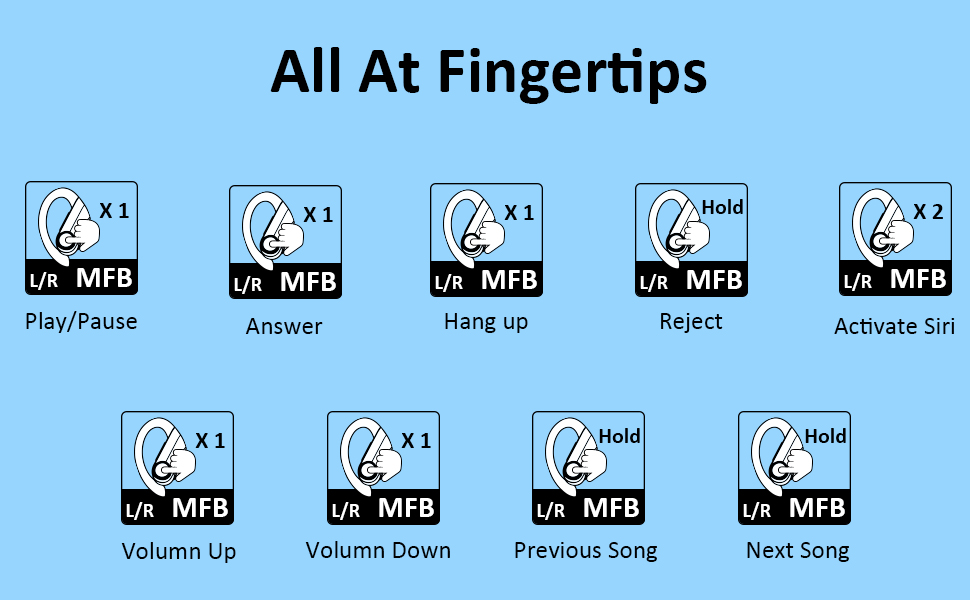
This image provides a comprehensive overview of all touch and button controls on the earbuds, explaining how to manage calls, music playback, and voice assistant activation.
Maintenance
To ensure the longevity and optimal performance of your ZZN ZT02 Wireless Earbuds, please follow these maintenance guidelines:
- Keep the earbuds and charging case clean and dry.
- Avoid exposing the product to extreme temperatures, direct sunlight, or high humidity.
- Do not use harsh chemicals or strong detergents to clean the earphones. Use a soft, dry cloth.
- If the earbuds are unused for over 2 weeks, please recharge them periodically to maintain battery health.
- Keep away from children and pets.

This image illustrates the IPX7 waterproof capability of the earbuds, showing them resistant to splashes and sweat, making them suitable for sports and workouts.
Troubleshooting
If you encounter any issues with your ZZN ZT02 Wireless Earbuds, refer to the following common problems and solutions:
Common Issues
- Cannot hear sound: Ensure the earbuds are connected to your device and the volume is turned up on both the earbuds and your device. Check if the earbuds are properly seated in your ears.
- Poor sound quality/muffled sound: Adjust the volume on your phone and earphones. Make sure there is no radio or Wi-Fi interference nearby.
- Connection unstable: Ensure the earbuds are within 10 meters of your device. Avoid obstacles between the earbuds and your device.
- Earbuds not charging: Check if the red insulation stickers have been removed. Ensure the charging cable is securely connected and the power source is active.
Resetting the Earbuds
If issues persist, you can try resetting the earbuds:
- Power off the earphones.
- Press and hold the MFB button for 10 seconds until the LED indicator flashes.
- Place the earbuds back into the charging case and close it.
- Take them out again to re-pair with your device.
Specifications
| Feature | Detail |
|---|---|
| Model Name | ZT02 |
| Connectivity Technology | Bluetooth 5.0, Wireless |
| Wireless Communication Technology | Bluetooth |
| Included Components | Charging Case |
| Age Range (Description) | Adult |
| Material | Silicone |
| Specific Uses For Product | Sports and Exercise |
| Charging Time | 3 Hours |
| Control Type | Media Control |
| Cable Feature | Without Cable |
| Water Resistance Level | Waterproof |
| Unit Count | 1 Count |
| Control Method | Touch |
| Number of Items | 1 |
| Battery Life | 30 Hours |
| Bluetooth Range | 10 Meters |
| Earpiece Shape | In Ear |
| UPC | 754988969407 |
| Manufacturer | ZZN |
| Product Dimensions | 4.72 x 4.72 x 1.97 inches |
| Item Weight | 5.6 ounces |
| ASIN | B09LHHX8V2 |
| Item model number | ZZN ZT02 |
| Batteries | 3 Lithium Polymer batteries required. (included) |
| Date First Available | November 10, 2021 |
| Brand | ZZN |
| Color | Black |
| Ear Placement | In Ear |
| Form Factor | In Ear |
| Noise Control | Active Noise Cancellation |

This image provides a visual summary of the earbuds' battery capacity and playback time, including quick charge information.
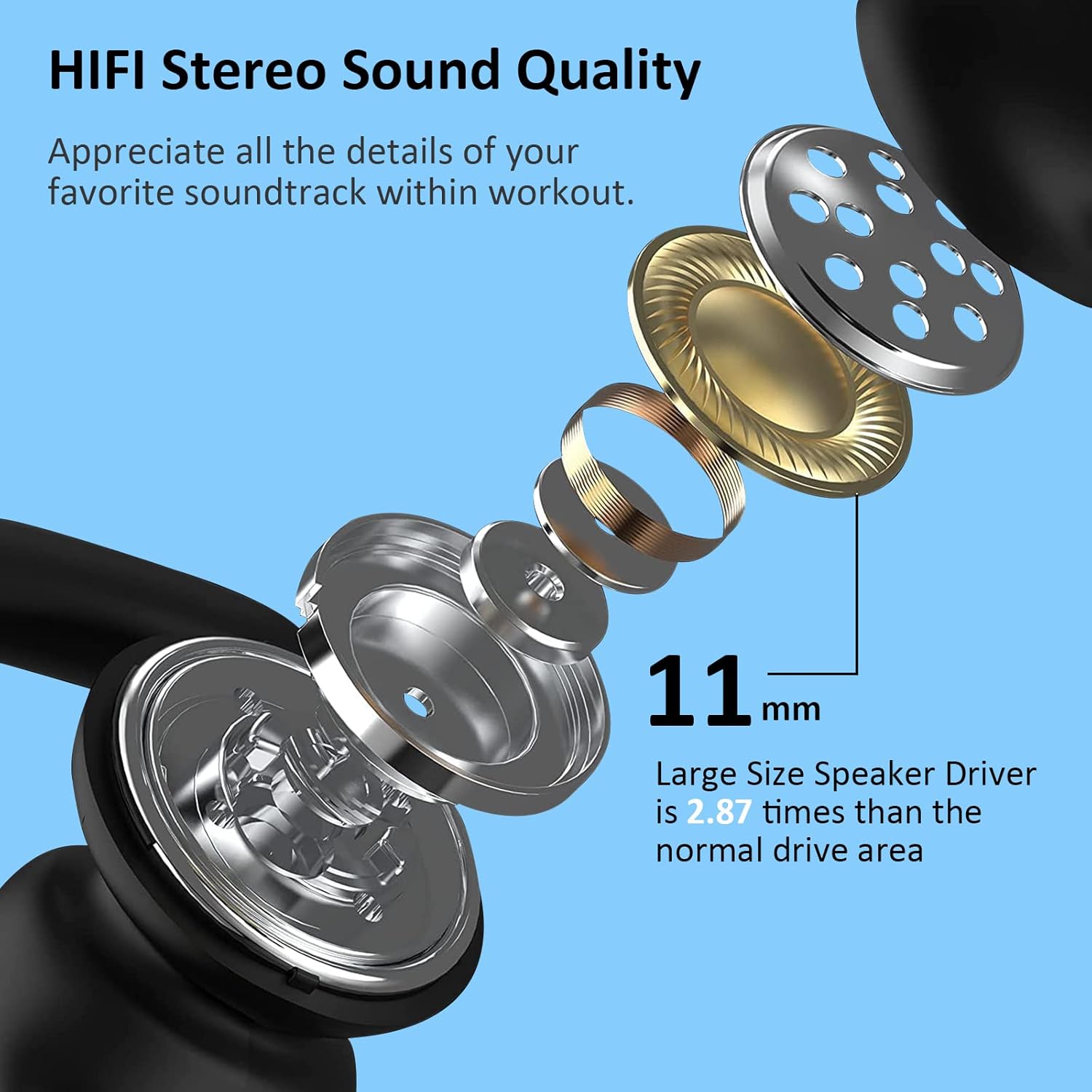
This image illustrates the internal components of the earbud, highlighting the 11mm large speaker driver responsible for high-fidelity stereo sound.
Warranty and Support
For warranty information, technical support, or customer service inquiries, please refer to the contact details provided on the product packaging or visit the official ZZN website.
You can also visit the ZZN Store on Amazon for more product information and support.


