
1. Introduction
This manual provides essential instructions for the safe and efficient operation of your GHB Camera, model BM-5AXG101. This camera is designed exclusively for use with the GHB 5-inch Baby Monitor (model BM-5AXG101). Please read this manual thoroughly before installation and use, and retain it for future reference.
2. Safety Information
To ensure safe operation and prevent damage, observe the following precautions:
- Keep the camera and its power adapter out of reach of children.
- Do not place the camera or cables within 1 meter (3 feet) of the baby's crib or playpen to avoid strangulation hazards.
- Use only the provided power adapter. Using unauthorized adapters may cause damage or fire.
- Do not expose the camera to water, moisture, or extreme temperatures.
- Avoid placing the camera in direct sunlight or near heat sources.
- Do not attempt to open or repair the camera. Refer all servicing to qualified personnel.
3. Package Contents
Verify that all items are present in your package:
- GHB Camera Unit (BM-5AXG101)
- Power Adapter for Camera
- User Manual (this document)
4. Product Overview
Familiarize yourself with the camera's components:
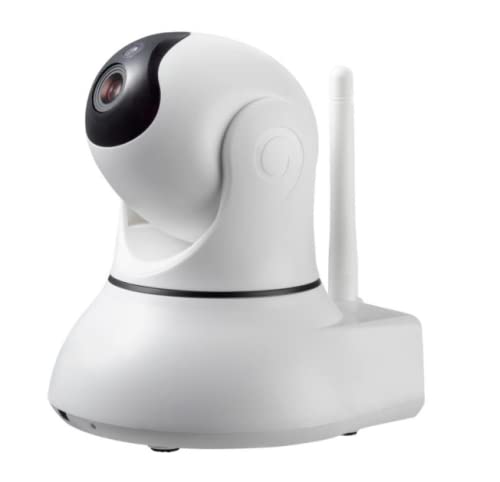
Image showing the GHB BM-5AXG101 camera unit, designed for use with the 5-inch baby monitor.
- Camera Lens: Captures video feed.
- Infrared LEDs: For night vision functionality.
- Microphone: Picks up audio from the baby's room.
- Speaker: For two-way talk function (if supported by monitor).
- Pairing Button: Used to connect the camera to the monitor unit.
- Power Input: Connects to the power adapter.
- Temperature Sensor: Monitors room temperature.
5. Setup
5.1 Powering the Camera
- Connect the small end of the power adapter to the Power Input port on the back of the camera.
- Plug the other end of the power adapter into a standard electrical outlet.
- The camera will power on automatically.
5.2 Pairing the Camera with the Monitor
This camera is pre-paired with the GHB 5-inch Baby Monitor (BM-5AXG101) at the factory. If you need to re-pair or add an additional camera, follow these steps:
- Ensure both the camera and the monitor unit are powered on.
- On the monitor unit, navigate to the "Camera Settings" or "Add Camera" menu (refer to your monitor's manual for specific steps).
- Select an available camera channel (e.g., CAM 2, CAM 3, CAM 4).
- When prompted by the monitor, press and hold the Pairing Button on the back of the camera for approximately 3-5 seconds.
- The monitor should display a "Paired" confirmation message and begin showing the camera's video feed.
5.3 Camera Placement
- Place the camera on a flat surface or mount it securely on a wall, ensuring a clear view of the baby's crib.
- Maintain a distance of at least 1 meter (3 feet) from the baby's crib to prevent strangulation hazards from the power cable.
- Adjust the camera angle manually to achieve the desired viewing area.
6. Operating
Once the camera is set up and paired, its operation is primarily controlled through the GHB 5-inch Baby Monitor unit. Refer to your monitor's instruction manual for detailed operating procedures, including:
- Viewing live video feed.
- Using two-way talk.
- Adjusting volume and brightness.
- Activating night vision.
- Monitoring room temperature.
- Switching between multiple cameras (if applicable).
7. Maintenance
- Cleaning: Disconnect the camera from power before cleaning. Use a soft, dry cloth to wipe the camera lens and body. Do not use abrasive cleaners or solvents.
- Storage: If storing the camera for an extended period, disconnect it from power and store it in a cool, dry place.
- Cable Management: Regularly check power cables for any signs of damage. Replace damaged cables immediately.
8. Troubleshooting
| Problem | Possible Cause | Solution |
|---|---|---|
| No video/audio on monitor | Camera not powered on; Camera not paired; Out of range. | Ensure camera is plugged in. Re-pair the camera (Section 5.2). Move camera closer to monitor. |
| Poor video quality | Low light; Lens obstruction; Weak signal. | Ensure adequate lighting or night vision is active. Clean the camera lens. Reduce distance between camera and monitor. |
| Camera not pairing | Incorrect pairing procedure; Camera already paired to another channel. | Follow pairing steps carefully (Section 5.2). Try pairing to a different available channel on the monitor. |
9. Specifications
- Model: BM-5AXG101 (Camera Unit)
- Compatibility: Exclusively with GHB 5-inch Baby Monitor BM-5AXG101
- Power Input: DC 5V/1A (Typical for such devices, specific adapter details not provided)
- Dimensions: Approximately 17 x 14.4 x 11.7 cm (6.7 x 5.7 x 4.6 inches)
- Weight: Approximately 510 grams (1.12 lbs)
- Operating Frequency: 2.4 GHz FHSS
- Operating Temperature: 0°C - 40°C (32°F - 104°F)
10. Warranty and Support
GHB products are designed for reliability and performance. For warranty information, please refer to the warranty card included with your original GHB 5-inch Baby Monitor package or visit the official GHB website. For technical support or service inquiries, please contact GHB customer service through the contact information provided on their official website or your purchase documentation.
Please note: This camera is an accessory and its warranty is typically covered under the main baby monitor unit.


