
Introduction
This manual provides detailed instructions for the proper installation, operation, and maintenance of the Elecbee M12 8-Pin A-Coded Male Socket. This connector is engineered for reliable and secure electrical connections in demanding industrial environments.
- M12 8-Pin A-Coded Male Socket: Designed for precise and secure connections in industrial automation, control systems, and signal transmission applications.
- Straight Back-Mount Design: Facilitates easy installation onto panels or enclosures, offering a stable and clean attachment point for cable connections.
- 0.2M Cable Length: Ideal for short-distance connections in confined spaces, minimizing cable clutter.
- Solder-Termination: Ensures secure and reliable wiring for stable electrical performance even in high-vibration or harsh environments.
- Waterproof Construction: With a waterproof design, this M12 connector can withstand exposure to moisture and dust, making it suitable for outdoor or rugged industrial applications requiring durable connectivity.
Safety Information
Adhere to the following safety guidelines during installation and operation to prevent injury or damage to equipment.
- Always disconnect power to the system before performing any installation, wiring, or maintenance on the connector.
- Ensure proper grounding of all connected equipment to prevent electrical shock.
- Use only appropriate tools for installation to avoid damaging the connector or associated cables.
- Verify all electrical connections are secure and correctly insulated before applying power.
- Do not exceed the specified voltage and current ratings of the connector.
Product Overview
The Elecbee M12 Male Socket is a robust, waterproof connector designed for industrial applications requiring reliable signal transmission. It features an 8-pin A-coded male interface and a straight back-mount design for seamless panel integration.
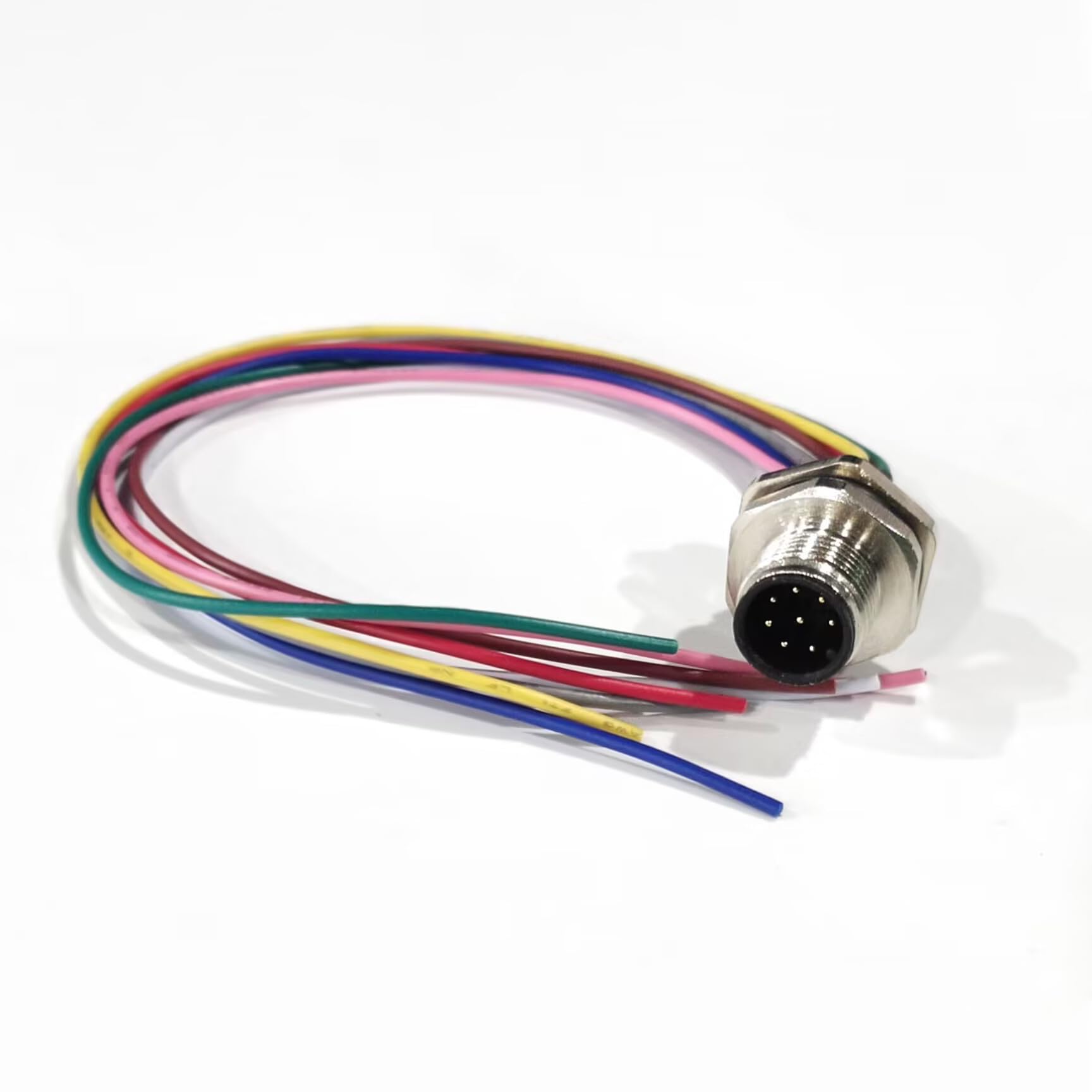
Image: The Elecbee M12 Male Socket with its pre-attached 0.2M multi-colored cable, showcasing the 8-pin male interface and the back-mount threading.

Image: Detailed technical drawing illustrating the dimensions, pin assignment (P1(M12 male) with pin 1 white, pin 2 brown, etc.), and construction components of the M12 Male Socket.
Installation
Follow these steps for proper installation of the M12 Male Socket.
- Panel Mounting:
- Identify the desired mounting location on your panel or enclosure. Refer to the technical drawing in the Product Overview section for recommended panel cut-out dimensions.
- Insert the threaded portion of the M12 socket through the prepared hole from the front of the panel.
- Secure the connector from the rear using the provided nut, ensuring a tight fit to maintain the waterproof seal.

Image: A side view of the M12 connector, highlighting the threaded section and the sealing ring designed for secure panel mounting.
- Wiring (Solder Termination):
- The connector comes with a 0.2-meter cable with pre-stripped ends.
- Identify the correct wire for each pin according to the pin assignment diagram (refer to the technical drawing in the Product Overview section).
- Carefully solder each wire to its corresponding connection point. Ensure strong, clean solder joints.
- Insulate each solder joint if necessary, though the connector's design provides some protection.

Image: The rear of the M12 connector, illustrating the individual wires soldered to their respective pins, protected by heat shrink tubing.
- Connection Verification: After wiring, visually inspect all connections for proper soldering and insulation before applying power.
Operation
The Elecbee M12 Male Socket functions as a passive electrical connector. Its operation involves establishing and maintaining a secure connection with a compatible M12 female connector.
- Mating: Align the M12 male socket with the corresponding M12 female connector. Ensure the A-coding aligns correctly to prevent damage to the pins.
- Securing: Gently push the connectors together and then tighten the coupling nut on the female connector until it is finger-tight. Avoid overtightening, as this can damage the threads or sealing elements.
- Signal Transmission: Once securely connected, the connector facilitates the reliable transmission of electrical signals or power between the connected devices.
Maintenance
Regular maintenance ensures the longevity and reliable performance of your M12 connector.
- Cleaning: Periodically inspect the connector for dirt, dust, or debris. Clean the contact pins and mating surfaces using a soft, lint-free cloth and a suitable electrical contact cleaner.
- Inspection: Check for any signs of physical damage, such as cracks, bends, or corrosion on the connector body, pins, and cable.
- Waterproof Seal: Ensure the sealing ring (O-ring) is intact and free from cracks or damage, especially if the connector is used in wet or dusty environments. Replace if necessary to maintain the IP67 rating.
- Cable Integrity: Inspect the attached cable for cuts, abrasions, or kinks that could compromise signal integrity or safety.
Troubleshooting
Refer to the table below for common issues and their potential solutions.
| Issue | Possible Cause | Solution |
|---|---|---|
| No Signal/Intermittent Connection | Loose connection | Ensure the coupling nut of the mating connector is fully tightened. |
| No Signal/Intermittent Connection | Damaged pins or contacts | Inspect pins for bending, corrosion, or debris. Replace connector if damaged. |
| No Signal/Intermittent Connection | Improper wiring | Verify wire connections against the pin assignment diagram. Correct any miswired connections. |
| Water Ingress | Damaged or improperly seated sealing ring | Inspect and replace the sealing ring if damaged. Ensure the connector is tightly mounted to the panel. |
| Difficulty Mating | Misalignment or debris | Ensure correct A-coding alignment. Clean mating surfaces to remove any obstructions. |
Specifications
Key technical specifications for the Elecbee M12 8-Pin A-Coded Male Socket:
| Feature | Detail |
|---|---|
| Connector Type | M12 Male Socket, A-Coded, 8-Pin |
| Mounting Type | Straight Back-Mount |
| Cable Length | 0.2 Meters |
| Termination | Solder |
| Waterproof Rating | IP67 |
| Package Dimensions | 3.54 x 2.76 x 0.67 inches |
| Item Weight | 0.634 ounces |
| Manufacturer | Elecbee |
| Date First Available | November 9, 2021 |
Official Product Videos
The following videos provide additional visual guidance and information about Elecbee M12 connectors.
Video: "Elecbee M12 Series connectors" - This video provides an overview of the Elecbee M12 series connectors, demonstrating their design and application in various industrial settings.
Video: "ELECBEE M12 Male Socket A Coded 8Pin Straight Back Mount for Cable 0.2M Solder Waterproof Connector" - A detailed video showcasing the specific M12 Male Socket, its features, and potential uses.
Warranty Information
This product is covered by a standard return policy. For specific warranty details, please refer to the purchase documentation or contact customer support. A 30-day return period is typically offered for this product.
Customer Support
For technical assistance, troubleshooting, or warranty inquiries, please contact Elecbee customer support.
Manufacturer: Shenzhen Renhotec Technology Electronics Co., Ltd
For further assistance, visit the Elecbee Store on Amazon.