
Introduction
Thank you for choosing the Mistral MSF1650R 16-inch Stand Fan. This manual provides important information regarding the assembly, operation, maintenance, and troubleshooting of your new fan. Please read it thoroughly before use and retain it for future reference.
Important Safety Instructions
- Always ensure the fan is placed on a stable, level surface to prevent it from tipping over.
- Do not operate the fan with a damaged cord or plug. If the cord is damaged, it must be replaced by the manufacturer, its service agent, or similarly qualified persons to avoid a hazard.
- Unplug the fan from the power outlet before cleaning, assembling, or disassembling parts.
- Keep fingers, pencils, or any other objects out of the fan guard when it is operating.
- Do not use the fan near water or in excessively humid environments.
- This appliance is not intended for use by persons (including children) with reduced physical, sensory or mental capabilities, or lack of experience and knowledge, unless they have been given supervision or instruction concerning use of the appliance by a person responsible for their safety.
- Children should be supervised to ensure that they do not play with the appliance.
Product Components
Familiarize yourself with the main parts of your Mistral MSF1650R stand fan.
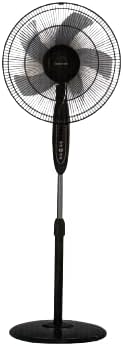
Figure 1: Front view of the Mistral MSF1650R 16-inch Stand Fan, showing the fan head, control panel, adjustable stand, and round base.

Figure 2: The Mistral MSF1650R stand fan accompanied by its remote control, illustrating the convenience of remote operation.
- Front Guard
- Fan Blade (5 ABS blades)
- Rear Guard
- Motor Housing
- Control Panel
- Adjustable Stand Pole
- Base
- Remote Control
Assembly Instructions
Follow these steps to assemble your stand fan:
- Attach the Base: Place the stand pole onto the base and secure it using the provided screw and washer from underneath the base.
- Install the Rear Guard: Position the rear guard onto the motor housing, ensuring it aligns with the locating pins. Secure it with the guard nut.
- Mount the Fan Blade: Slide the fan blade onto the motor shaft, aligning the notch on the blade with the pin on the shaft. Secure it with the blade cap, turning it counter-clockwise.
- Attach the Front Guard: Place the front guard onto the rear guard, aligning the clips. Secure the guards together using the guard ring and clip, ensuring it is tightly fastened around the perimeter.
- Adjust Height: Loosen the height adjustment knob on the stand pole, extend or retract the pole to the desired height, and then tighten the knob securely.
Operating Instructions
Your Mistral MSF1650R fan can be operated via the control panel on the fan body or the remote control.
Control Panel Functions:
- ON/OFF Button: Press to turn the fan on or off.
- SPEED Button: Press repeatedly to cycle through fan speeds: Low, Medium, High.
- MODE Button: Press to select between Normal, Natural, and Sleep modes.
- TIMER Button: Press to set the operating timer (up to 7.5 hours). Each press adds 0.5 hours.
- OSC (Oscillation) Button: Press to start or stop the fan head oscillating horizontally.
Remote Control Functions:
The remote control duplicates all functions available on the fan's control panel for convenient operation from a distance.
- Ensure batteries are correctly inserted into the remote control.
- Point the remote control towards the fan's receiver when operating.
- Buttons on the remote correspond to the functions described above (ON/OFF, SPEED, MODE, TIMER, OSC).
Maintenance and Cleaning
Regular cleaning will help maintain the fan's performance and extend its lifespan.
- Unplug Before Cleaning: Always disconnect the fan from the power supply before attempting any cleaning or maintenance.
- Clean Exterior Surfaces: Wipe the fan's exterior surfaces with a soft, damp cloth. Do not use abrasive cleaners or solvents.
- Clean Fan Blades and Guards: To clean the fan blades and inside the guards, you may need to carefully remove the front guard. Use a soft cloth or a vacuum cleaner with a brush attachment to remove dust. Ensure all parts are dry before reassembling.
- Storage: If storing the fan for an extended period, cover it to protect it from dust and store it in a dry, cool place.
Troubleshooting
Refer to the table below for common issues and their solutions.
| Problem | Possible Cause | Solution |
|---|---|---|
| Fan does not turn on. | No power supply. Fan not plugged in. Power button not pressed. | Check power outlet. Ensure plug is fully inserted. Press the ON/OFF button. |
| Weak airflow. | Fan speed set too low. Dust accumulation on blades/guards. | Increase fan speed. Clean fan blades and guards as per maintenance instructions. |
| Fan makes unusual noise. | Loose parts. Obstruction in fan blades. | Ensure all assembly screws and nuts are tight. Unplug and check for any foreign objects. |
| Remote control not working. | Dead batteries. Obstruction between remote and fan. | Replace batteries. Ensure clear line of sight to the fan's receiver. |
Specifications
Technical details for the Mistral MSF1650R 16-inch Stand Fan.

Figure 3: Detailed specifications of the Mistral MSF1650R stand fan, including dimensions, power, and features.
| Model | MSF1650R |
| Fan Blade | 5 ABS Fan Blade |
| Voltage | 220-240V ~ 50Hz |
| Power | 55W |
| Air Volume | 66.49 m³/min |
| Max Air Flow | 3.45 m/s |
| Product Dimensions | 45 x 15 x 57 cm (D x W x H) |
| Max Height | 1.3m (Adjustable) |
| Net Weight | 5.85 kg |
| Special Features | Adjustable Height, Remote Controlled, 7.5 Hours Timer, 3 Speed Selection, Normal/Natural/Sleep Modes |
Warranty and Support
For warranty information or technical support, please refer to the warranty card included with your purchase or contact Mistral customer service. Keep your proof of purchase for warranty claims.
For further assistance, please visit the official Mistral website or contact their authorized service centers.


