
MEIKEE ASTA042
MEIKEE 42W RGBW Wall Washer Light Bar Instruction Manual
Model: ASTA042
Important Safety Information
Please read this manual carefully before installation and operation. Keep it for future reference. Failure to follow these instructions may result in electric shock, fire, or other hazards.
- Ensure the power supply is disconnected before installation or maintenance.
- This product is rated IP66 waterproof, suitable for outdoor use. However, do not submerge the light bar in water.
- Use only the provided power cord and remote control.
- Do not attempt to disassemble or modify the light bar. This will void the warranty and may cause damage or injury.
- Keep the remote control away from children.
Package Contents
Verify that all items listed below are included in your package:
- MEIKEE 42W RGBW Wall Washer Light Bar (with US plug and 1.5m extension power cord)
- Remote Controllers (2 units)
- User Manual (this document)
- Screw Bags (2 units, containing expansion nails, screws, and M5 Hex Screw Key)
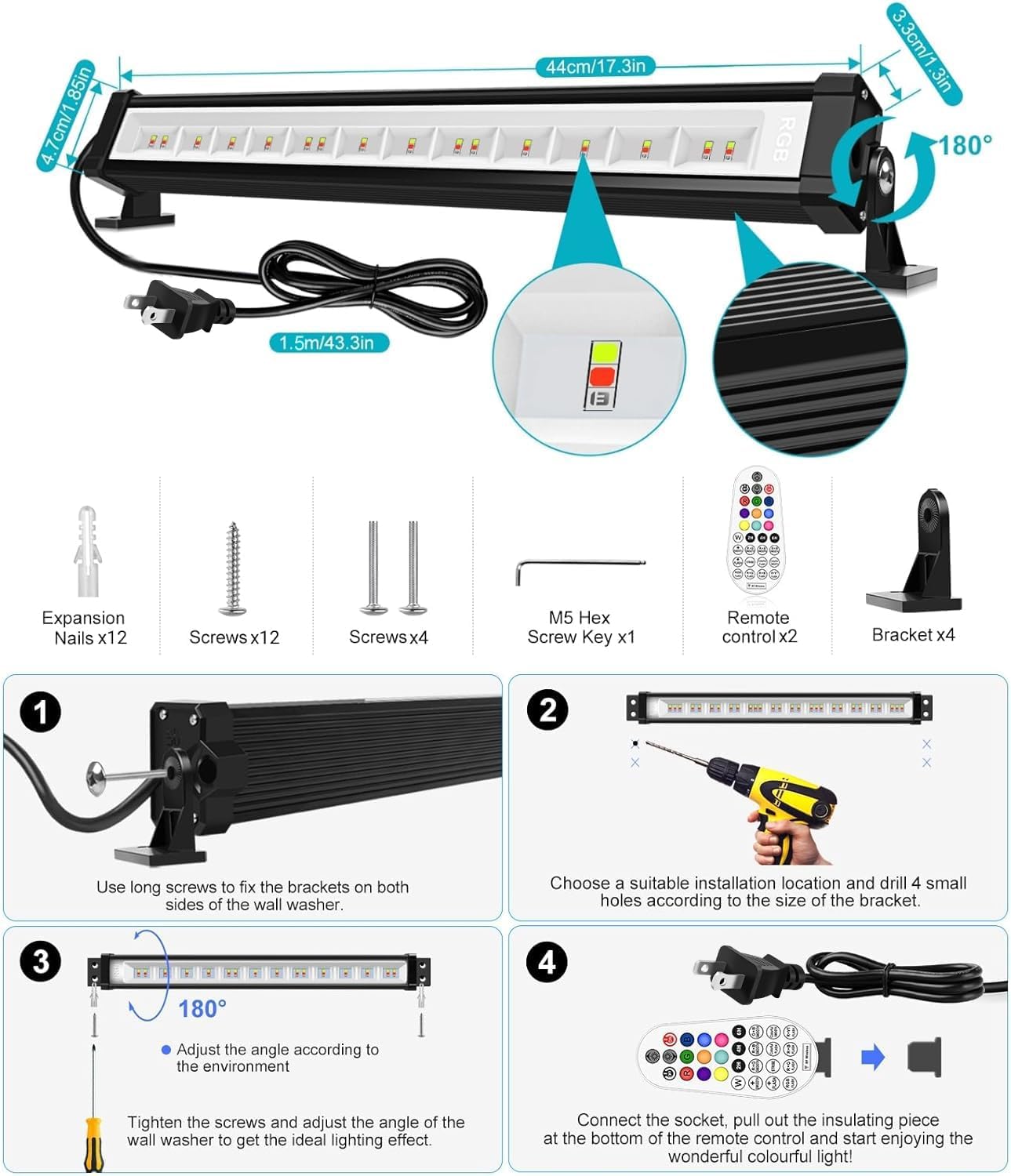
Image: Package contents including the light bar, remote controls, and mounting hardware. Also shows a diagram of the installation process.
Setup
Installation
The MEIKEE Wall Washer Light Bar offers two primary installation methods: wall-mounted or ground-inserted. Choose the method best suited for your application.
Mounting Options:
- Wall Mounted: Ideal for illuminating walls, facades, or architectural features.
- Ground Inserted: Suitable for landscape lighting, highlighting garden features, or pathways.
Installation Steps:
- Attach the brackets to both sides of the wall washer light using the provided long screws.
- Select a suitable installation location. Drill four small holes according to the size of the bracket.
- Adjust the angle of the light bar (up to 180 degrees) to achieve the desired lighting effect. Tighten the screws to secure the angle.
- Connect the light bar to a power outlet. Before first use, remove the insulating piece from the remote control's battery compartment.
Image: Step-by-step installation guide for the MEIKEE Wall Washer Light.

Image: Outdoor installation example highlighting the IP66 waterproof feature and adjustable stands.
Operating Instructions
The MEIKEE Wall Washer Light Bar is controlled using the included RF wireless remote control. The remote has a control distance of approximately 8-12 meters and can operate through walls.
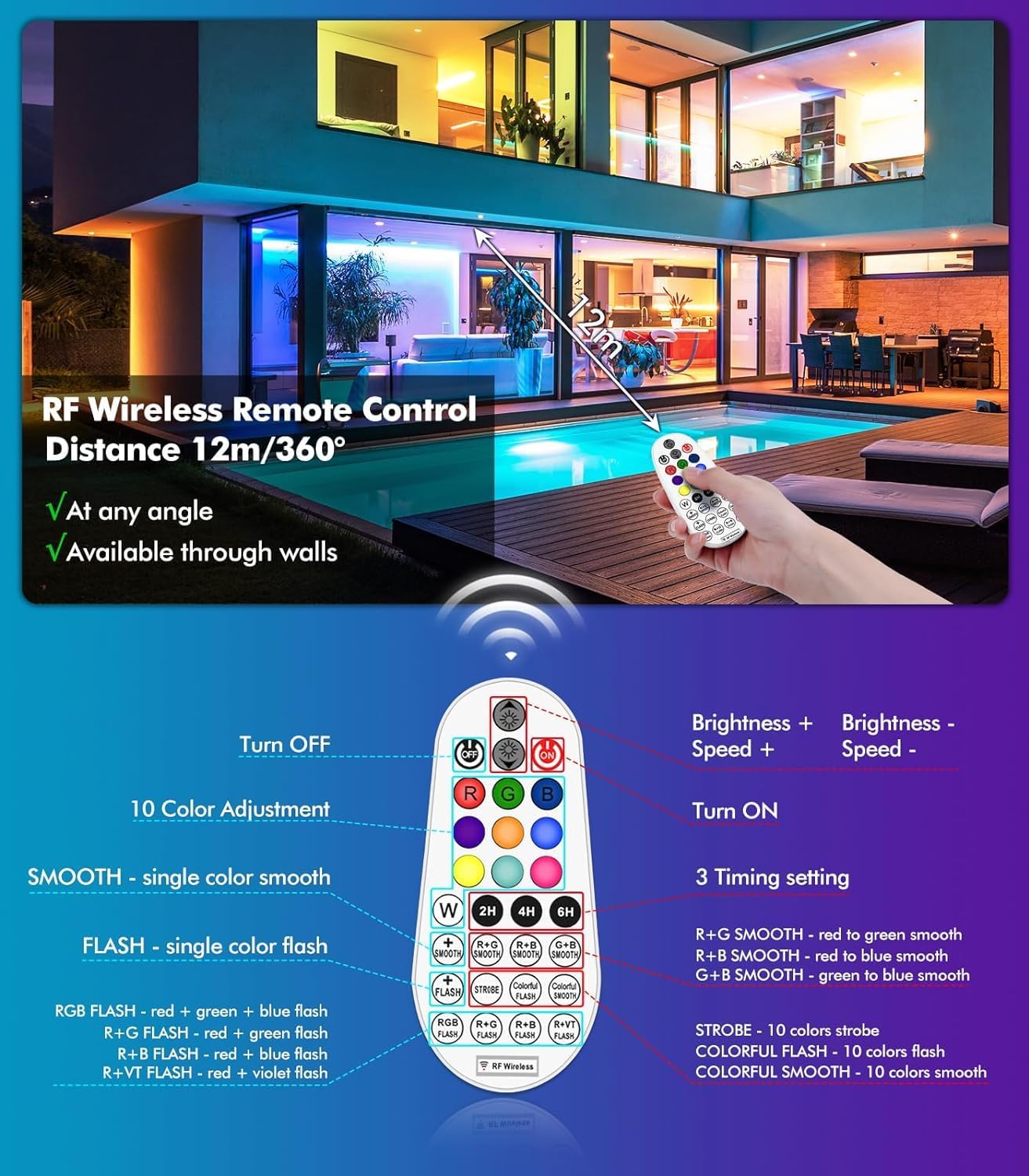
Image: Overview of the remote control and its functions.
Remote Control Functions:
- Power On/Off: Use the red power button to turn the light on or off.
- Color Selection: Choose from 10 single colors (Red, Green, Blue, White, Orange, Purple, Yellow, Cyan, Pink, Light Blue) using the dedicated color buttons.
- Brightness Adjustment: Adjust the brightness in 6 levels (25%, 40%, 55%, 70%, 85%, 100%) using the 'W+' and 'W-' buttons. These buttons also adjust the speed of dynamic modes.
- Dynamic Modes: Select from 12 working modes, including:
- SMOOTH (single color smooth transition)
- FLASH (single color flash)
- STROBE (10 colors strobe)
- COLORFUL FLASH (10 colors flash)
- COLORFUL SMOOTH (10 colors smooth transition)
- RGB FLASH (Red+Green+Blue flash)
- R+G FLASH (Red+Green flash)
- R+B FLASH (Red+Blue flash)
- R+VT FLASH (Red+Violet flash)
- R+G SMOOTH (Red to Green smooth transition)
- R+B SMOOTH (Red to Blue smooth transition)
- G+B SMOOTH (Green to Blue smooth transition)
- Timing Function: Set the light to automatically turn off after 2, 4, or 6 hours using the '2H', '4H', '6H' buttons. Note: This function is not remembered after power cycle; it must be set each time.
- Memory Function: The light bar will remember your last color or mode setting when turned on again via the remote control, eliminating the need to reset it.
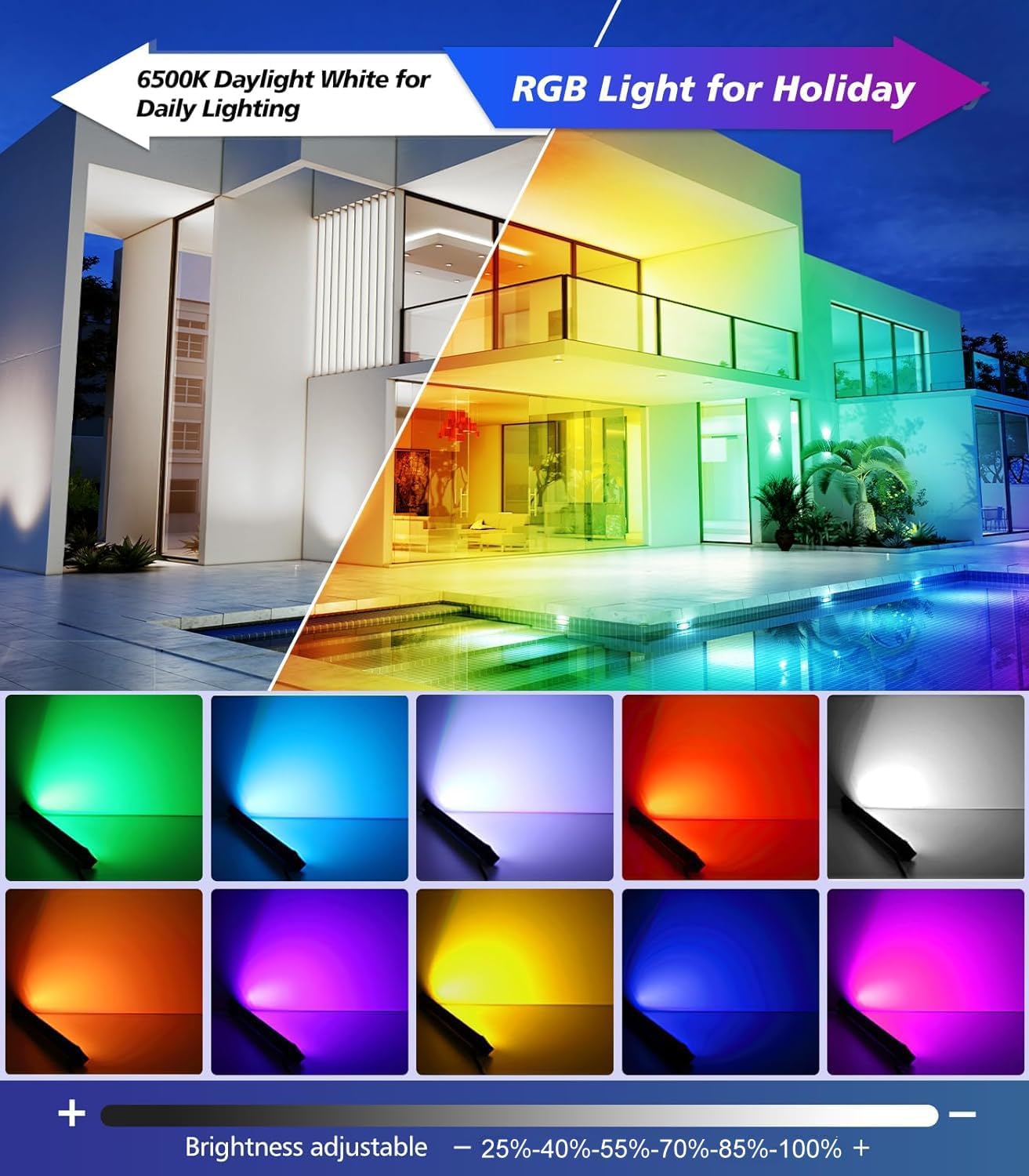
Image: Examples of static color options and their application.

Image: Illustration of the 12 dynamic lighting modes available.

Image: Explanation of the timing function.
Official Product Videos:
MEIKEE 42W RGB Color Changing Washer Strip Light with Remote
Video: This video demonstrates the MEIKEE 42W RGB Wall Washer Light in action, showcasing its color-changing capabilities and remote control operation. It highlights various static colors and dynamic modes.
MEIKEE 42W RGB Wall Washer Lights with Remote Control
Video: An official product video illustrating the features and functionality of the MEIKEE 42W RGB Wall Washer Lights, including remote control usage and different lighting effects.
Maintenance
Cleaning
- Ensure the light is unplugged before cleaning.
- Wipe the exterior of the light bar with a soft, damp cloth. Do not use abrasive cleaners or solvents.
- Regularly check for any debris or dirt accumulation on the light surface, especially if installed outdoors.
Storage
- If storing the light for an extended period, disconnect it from power and store it in a cool, dry place.
- Keep the original packaging for protection during storage.
Troubleshooting
Common Issues and Solutions:
| Issue | Possible Cause | Solution |
|---|---|---|
| Light does not turn on. | No power, remote control battery dead, or insulating tab still in remote. | Check power connection. Replace remote control batteries (4 AAA batteries required, included). Remove the plastic insulating tab from the remote's battery compartment. |
| Remote control not responding. | Remote control battery dead or out of range. | Replace remote control batteries. Ensure you are within the 8-12 meter operating range. |
| Multiple lights change color simultaneously when only one is intended. | All lights operate on the same RF frequency. | This is a design characteristic. All MEIKEE 42W RGBW Wall Washer Lights controlled by the same remote will respond simultaneously. Individual control of multiple units with a single remote is not possible. |
| Light color or mode does not save. | Timing function was used, which does not save settings. | The timing function (2H/4H/6H) is a one-time setting. For persistent settings, use the regular power on/off via remote, which utilizes the memory function. |
Specifications
| Feature | Detail |
|---|---|
| Model Number | ASTA042 |
| Part Number | RFLB04201 |
| Power Source | Corded Electric |
| Voltage | 120 Volts |
| Wattage | 42 Watts |
| Brightness | 3350 Lumens |
| Light Source Type | LED (RGBW) |
| Color | RGB (Red, Green, Blue) |
| Material | Acrylonitrile Butadiene Styrene (ABS) |
| Finish Type | Powder Coated |
| Shape | Rectangular |
| Product Dimensions | 16.85"L x 4.25"W x 2.17"H |
| Item Weight | 2.34 Pounds |
| Mounting Type | Wall Mount |
| Bulb Features | RGBW color changing, 12 working modes, remote control, IP66 waterproof |
| Number of Light Sources | 2 |
| Remote Control Batteries | 4 AAA batteries (included) |
| Special Features | 10 Single Colors with Adjustable Brightness, 12 Working Modes with Adjustable Speed, Dimmable RGBW Washer Strip Light Bar with Remote, RGBW Color Changing Wall Washer Lights, Timing and Memory Function and IP66 Waterproof |
| Light Direction | Adjustable |
| Plug Format | A- US style |
Warranty and Customer Support
Warranty Information
MEIKEE products are covered by a 2-year warranty from the date of purchase. This warranty covers manufacturing defects and malfunctions under normal use.
Customer Support
For any questions, technical assistance, or warranty claims, please contact MEIKEE customer support. You can reach us via email through Amazon or by using the email address provided in your product packaging. We aim to respond within 24 hours.
For more information and to explore other MEIKEE products, please visit the MEIKEE Store on Amazon.
Ask a question about this manual
Ask about setup, troubleshooting, compatibility, parts, safety, or missing instructions. Manuals+ will review the question and use this page’s manual context to help answer it.