Introduction
This manual provides comprehensive instructions for the VINABTY ERF2F60G Voice Remote Control. This remote is designed as a replacement for various Hisense Smart Android TV models, offering standard remote functions and integrated voice control capabilities. Please read this manual carefully to ensure proper setup and operation.
Setup
1. Battery Installation
The VINABTY ERF2F60G remote control requires two AAA batteries for operation. Follow these steps to install them:
- Locate the battery compartment cover on the back of the remote control.
- Slide the cover downwards or press the latch and lift to open the compartment.
- Insert two new AAA batteries, ensuring the positive (+) and negative (-) terminals align correctly with the markings inside the compartment.
- Replace the battery compartment cover by sliding it back into place until it clicks securely.

The back of the remote control is shown, highlighting the battery compartment cover. This is where two AAA batteries are inserted for operation.
2. Initial Pairing (for Voice Functionality)
For the voice control feature to work, the remote may need to be paired with your Hisense Smart Android TV. If the remote does not respond or voice commands are not recognized after battery installation, follow your TV's specific pairing instructions. Generally, this involves:
- Ensure your TV is powered on.
- Navigate to the TV's settings menu (often under Remotes & Accessories or Bluetooth Settings).
- Select the option to add a new device or pair a new remote.
- Press and hold the OK button and the Volume Down button simultaneously on the remote for a few seconds until a pairing indicator appears on the TV screen or the remote's LED flashes.
- Follow any on-screen prompts to complete the pairing process.
Note: Specific pairing steps may vary slightly depending on your Hisense TV model and Android TV version. Refer to your TV's user manual for precise instructions.
Operating Instructions
The VINABTY ERF2F60G remote control provides intuitive access to your Hisense Smart Android TV's features. Below are the primary functions:

This image displays the front of the VINABTY ERF2F60G remote control, showing all buttons including the power, number pad, navigation, volume, channel, and dedicated app buttons for Netflix, YouTube, and Google Play. The microphone button for voice control is also visible.
- Power Button (●): Turns the TV on or off.
- INPUT Button: Selects the input source (HDMI, AV, etc.).
- Number Pad (0-9): Directly enters channel numbers.
- GUIDE / Info Buttons: Accesses the TV program guide or displays information about the current content.
- Navigation Pad (Up, Down, Left, Right, OK): Navigates through menus and confirms selections.
- Back (↶) / Home (⌂) Buttons: Returns to the previous screen or goes to the TV's home screen.
- Subtitle Button: Toggles subtitles on or off.
- Volume Up/Down (VOL +/-): Adjusts the TV's volume.
- Mute Button (🔇): Mutes or unmutes the TV's audio.
- Channel Up/Down (CH +/-): Changes the TV channel.
- Media Control Buttons (Play/Pause, Fast Forward, Rewind, Stop): Controls media playback.
- Dedicated App Buttons (Netflix, YouTube, Google Play): Provides quick access to these streaming applications.
Voice Control Function
The ERF2F60G remote features a voice control button for hands-free operation and search. To use this feature:
- Press and hold the Microphone Button (🎙) located below the Home button.
- While holding the button, speak your command clearly into the remote. For example, you can say "Open Netflix," "Search for action movies," or "What's the weather?"
- Release the button once you have finished speaking. The TV will process your command.

This image focuses on the microphone button located on the VINABTY ERF2F60G remote control, indicating its function for voice commands. A visual representation of the voice assistant's active state is also depicted.
Maintenance
Battery Replacement
Replace the AAA batteries when the remote's performance degrades or it stops responding. Always replace both batteries at the same time with new ones. Do not mix old and new batteries, or different types of batteries.
Cleaning
To clean the remote control, use a soft, dry cloth. For stubborn dirt, slightly dampen the cloth with water or a mild, non-abrasive cleaner. Avoid using harsh chemicals or abrasive materials, as these can damage the remote's surface or internal components.
Troubleshooting
- Remote not responding:
- Check if the batteries are correctly installed with the correct polarity.
- Replace the batteries with new AAA batteries.
- Ensure there are no obstructions between the remote and the TV's infrared receiver.
- If it's a paired remote, try re-pairing it with the TV (refer to the "Initial Pairing" section).
- Voice control not working:
- Ensure the remote is properly paired with your TV for voice functionality.
- Speak clearly and hold the microphone button while speaking.
- Check your TV's internet connection, as voice commands often require online processing.
- Verify that the TV's voice assistant settings are enabled.
- Buttons are sticky or unresponsive:
- Clean the remote control as described in the Maintenance section.
- Avoid spilling liquids on the remote.
Specifications
| Model Number | ERF2F60G |
| Brand | VINABTY |
| Product Dimensions | 8 x 2 x 0.7 inches (20.32 x 5.08 x 1.78 cm) |
| Item Weight | 2.9 ounces (82.2 grams) |
| Batteries Required | 2 x AAA (not included) |
| Special Feature | Voice Search |
| Color | Black |
| Max Number of Supported Devices | 1 |
| Compatible Devices | Television |
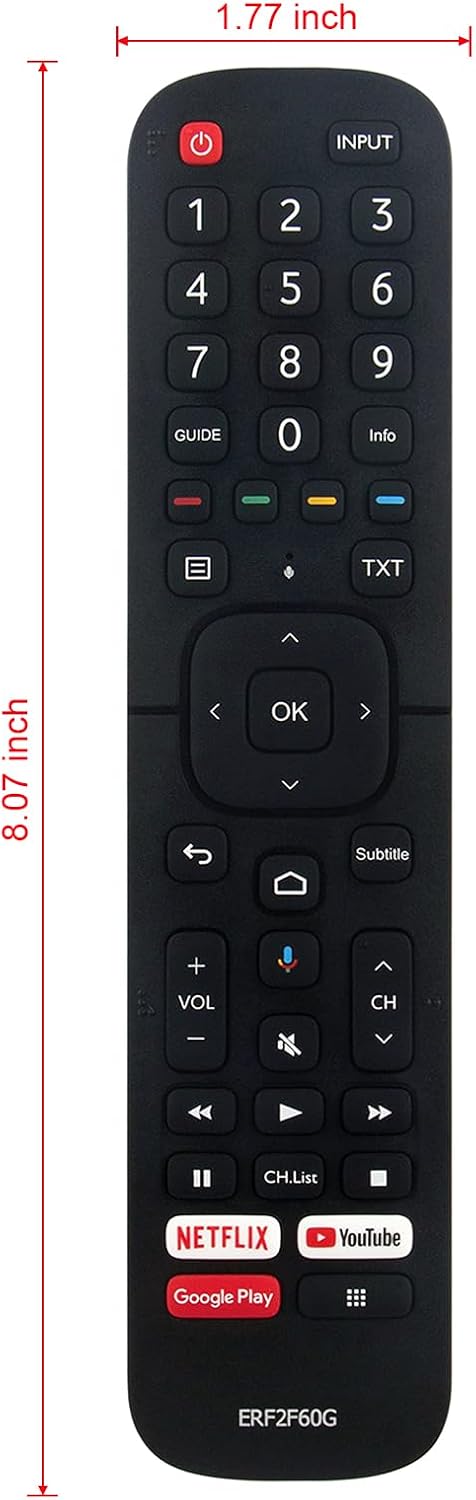
The remote control is displayed with its approximate dimensions: 8.07 inches in length and 1.77 inches in width, providing a clear understanding of its physical size.
Compatible Hisense Smart Android TV Models:
This remote control is compatible with a wide range of Hisense Smart Android TV models, including but not limited to:
- 32A56E, 40A56E, ERF2B60H
- 55Q7G, 65Q7G, 75Q7G, 50Q8G, 65Q8G, 75Q8G
- 50H8G, 55H8G, 75H8G, 55H9G, 65H9G
- 55Q9G, 65Q9G
- 32H5500F, 32H5520F, 32H5530F, 32H5540F
- 40H5609, 40H5500F, 40H5520F, 40H5530F, 40H5540F
- 32H5550F, 32H5560F, 32H5570F, 32H5580F, 32H5590F
- 40H5550F, 40H5560F, 40H5570F, 40H5580F, 40H5590F
- 32H56G, 40H56G, 50Q7G
- 65H9F, 55H9F, 55H8F, 65H8F, 50H8F
- 43H6570F, 50H6570F, 55H6570F, 65H6570
- 55H9020F, 55H9030F, 55H9040F, 55H9050F, 55H9070F
- 55H9F1, 65H9F1
- 65H9020F, 65H9030F, 65H9040F, 65H9050F, 65H9070F
- 65H8030F, 65H8050F, 65H8090F
- 55H8030F, 55H8050F, 55H8090F
- 55Q9809, 55H9809, 65Q9809, 65H9809
- 55H8809, 65H8809, H6590, 43H6590F
- 50H8G, 55H8G, 65H8G, 65H6570F
- 55Q8G, 55Q8G, 65Q8G, 75Q8G
- 50H6510G, 55H6510G, 65H6510G, 75H6510G, 85H6510G
- 55A6501EU, 65A6501EU, 50A6501EU
- 55U6EU, 65U6EU, HU100L5, HU120L5
Warranty
This product is typically covered by a standard manufacturer's warranty against defects in materials and workmanship. Please refer to the retailer's return policy or contact the seller for specific warranty details and duration. Keep your purchase receipt as proof of purchase.
Support
For further assistance or technical support, please contact the retailer or the manufacturer directly. You may find contact information on the product packaging or the seller's website. When contacting support, please have your product model number (ERF2F60G) and purchase details ready.
