
Introduction
This manual provides comprehensive instructions for the safe and effective operation of your HANMATEK HO102 2-in-1 Handheld Digital Oscilloscope and Multimeter. Please read this manual thoroughly before using the device to ensure proper functionality and to prevent damage or injury. Keep this manual for future reference.
Safety Information
Always observe the following safety precautions when operating the HANMATEK HO102:
- Do not operate the device if it appears damaged or if the casing is open.
- Ensure proper probe connections before applying power to the circuit under test.
- Do not exceed the maximum input voltage ratings for both oscilloscope (CAT III 600V) and multimeter (750 VAC / 1000 VDC) inputs.
- Use only the provided accessories or approved replacements.
- Avoid operating in wet or damp conditions.
- Refer to local safety regulations and standards for electrical testing.
Product Overview
The HANMATEK HO102 is a compact, portable instrument combining the functions of a digital oscilloscope and a true RMS multimeter. It features a 3.5-inch TFT display and a user-friendly interface.
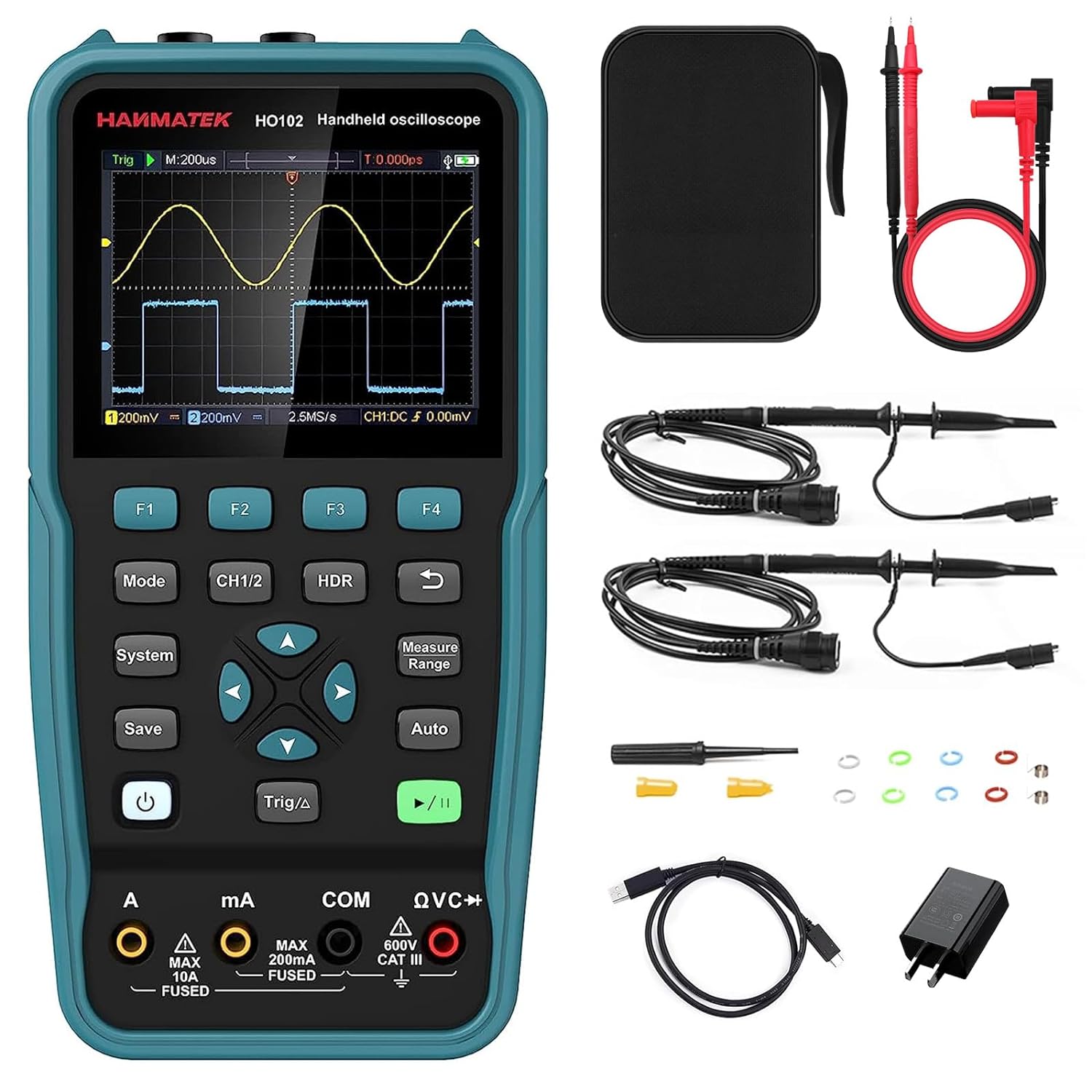
Figure 1: HANMATEK HO102 device and standard accessories.
Device Layout and Controls
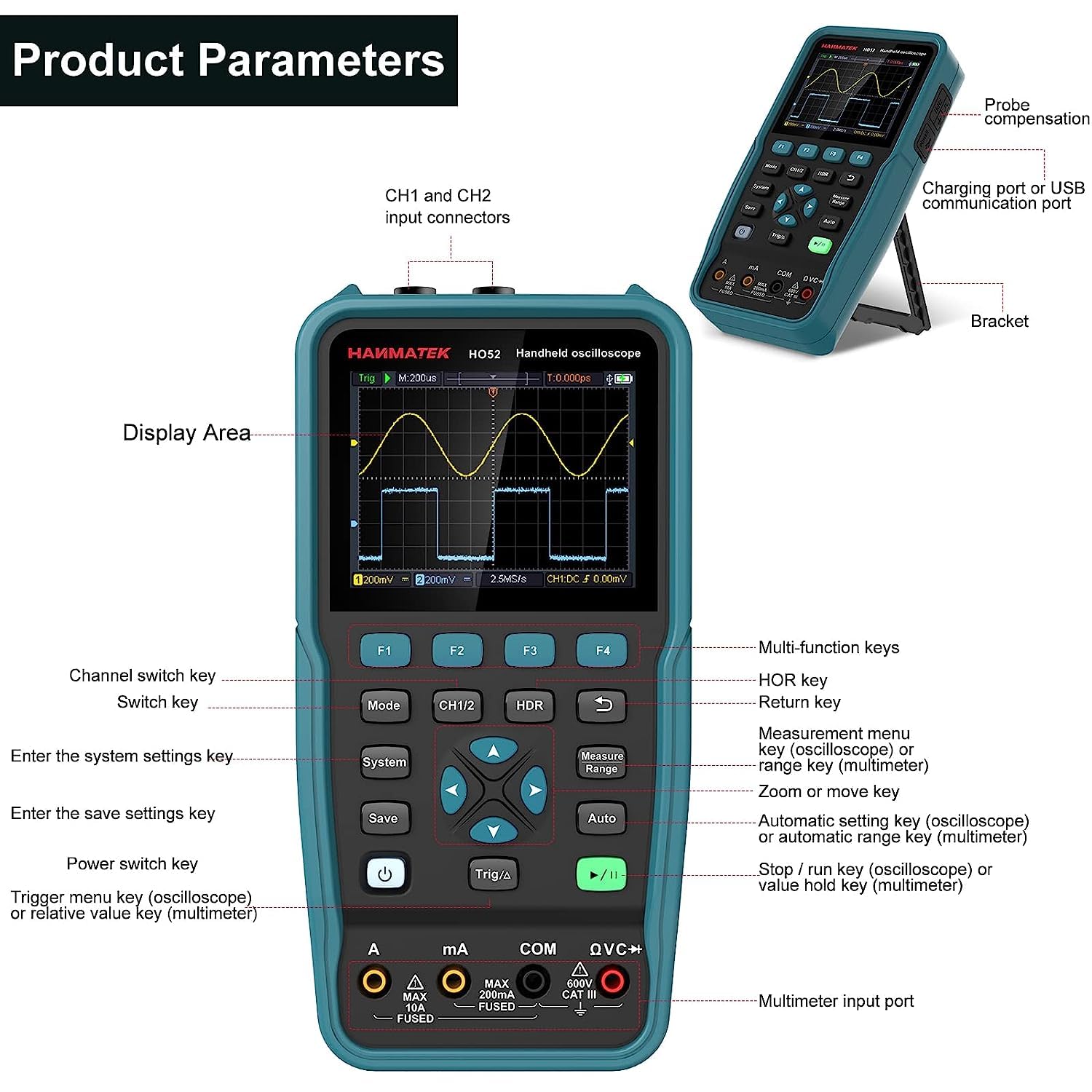
Figure 2: Front panel and side view with key components labeled.
- Display Area: 3.5-inch TFT screen for waveform and measurement display.
- F1-F4 Keys: Multi-function keys, context-sensitive.
- Mode Key: Switches between Oscilloscope and Multimeter modes.
- CH1/2 Key: Channel switch key for oscilloscope.
- HDR Key: Horizontal range key.
- System Key: Enters system settings menu.
- Save Key: Saves current settings or waveforms.
- Power Switch Key: Turns the device on/off.
- Trigger/Δ Key: Trigger menu key (oscilloscope) or relative value key (multimeter).
- Navigation Keys (Up, Down, Left, Right, Enter): For menu navigation and parameter adjustment.
- Measure/Range Key: Measurement menu key (oscilloscope) or range key (multimeter).
- Auto Key: Automatic setting key (oscilloscope) or automatic range key (multimeter).
- Run/Stop Key: Starts/stops waveform acquisition (oscilloscope) or hold key (multimeter).
- Multimeter Input Ports (A, mA, COM, QVC+): For multimeter lead connections.
- CH1 and CH2 Input Connectors: BNC connectors for oscilloscope probes.
- Charging Port / USB Communication Port: USB Type-C port for charging and PC connection.
- Bracket: Kickstand for desktop use.
Setup
Initial Charging
Before first use, fully charge the device using the provided USB Type-C cable and power adapter. The charging port is located on the side of the unit.
Probe Connection
Connect the oscilloscope probes to the CH1 and CH2 BNC input connectors. For multimeter functions, connect the multimeter leads to the appropriate input ports (A, mA, COM, QVC+).
Power On/Off
Press and hold the Power key to turn the device on or off.
Operating Instructions
Switching Modes
Press the Mode key to toggle between Oscilloscope mode and Multimeter mode.
Oscilloscope Mode
In Oscilloscope mode, the device displays real-time waveforms. Key features include:
- Bandwidth: Up to 50 MHz.
- Sample Rate: 125 MSa/s (real-time).
- Channels: Dual channel operation.
- Waveform Refresh Rate: Up to 10,000 Wfms/s.
- Record Length: Up to 8K.
Basic Waveform Display
Connect the oscilloscope probe to the circuit under test. Press the Auto key for automatic waveform scaling and triggering. This function provides a quick and convenient way to display stable waveforms.
Figure 3: Example of waveform display in Oscilloscope mode.
Adjusting Settings
Use the navigation keys to adjust vertical (voltage) and horizontal (time) scales. The CH1/2 key switches between channels. The HDR key adjusts the horizontal range.
Triggering
Press the Trig/Δ key to access trigger settings. Adjust trigger level, mode, and source to stabilize the waveform display.
Measurements
Press the Measure/Range key to access automatic measurement functions. The device supports four automatic measurement functions and cursor measurements for precise analysis.
XY Function
The XY function allows for displaying Lissajous figures, useful for phase difference measurements between two signals.
Multimeter Mode
In Multimeter mode, the device functions as a 4 1/2 digit true RMS multimeter with 20,000 counts. It supports various electrical measurements:
- Voltage (AC/DC)
- Current (AC/DC)
- Resistance
- Diode Test
- Continuity Test
- Capacitance
Performing Measurements
Connect the multimeter leads to the appropriate input ports based on the desired measurement. Press the Auto key for automatic ranging, or use the Measure/Range key to manually select the range.

Figure 4: Example of voltage measurement in Multimeter mode.
Read Hold and Relative Measurement
Use the Run/Stop key to hold the current reading. The Trig/Δ key activates the relative measurement function, displaying the difference from a stored reference value.
Memory Functions
The HO102 allows saving and recalling various data types:
- 4 sets of parameters.
- 4 reference waveforms.
- 4 images (screenshots).
- 4 sets of waveforms in CSV format.
Press the Save key to store data. Saved reference waveforms can be displayed alongside live measurements for comparison.

Figure 5: Comparing a live waveform with a stored reference waveform.
PC Connection and Data Transfer
Connect the HO102 to a computer using the USB Type-C cable. The device will be recognized as a USB flash drive, allowing you to access and transfer stored images and CSV waveform data for further analysis.

Figure 6: HANMATEK HO102 connected to a PC for data transfer and analysis.
Software for this product can be downloaded from: https://bit.ly/3kQe4wQ
Auto-Calibration Function
The device includes an auto-calibration function to maintain measurement accuracy. Refer to the system settings menu for initiating this process.
Maintenance
Cleaning
Clean the device with a soft, dry cloth. Do not use abrasive cleaners or solvents. Ensure the device is powered off before cleaning.
Battery Care
The built-in Lithium-ion battery provides approximately 6 hours of continuous operation on a full charge. For optimal battery life, avoid fully discharging the battery frequently and store the device in a cool, dry place when not in use for extended periods.
Storage
Store the device and its accessories in the provided carrying bag to protect them from dust and physical damage.
Troubleshooting
| Problem | Possible Cause | Solution |
|---|---|---|
| Device does not power on. | Low battery or no charge. | Connect to power adapter and charge for at least 30 minutes. |
| Unstable or no waveform display. | Incorrect probe connection, improper trigger settings, or signal out of range. | Check probe connections. Press Auto key. Adjust trigger level and time/voltage scales. |
| Multimeter readings are inaccurate. | Incorrect lead connection, wrong measurement range, or device needs calibration. | Verify lead connections. Use Auto range or select appropriate manual range. Perform auto-calibration. |
| Device not recognized by PC. | Faulty USB cable or port, or driver issue. | Try a different USB cable or port. Ensure the device is powered on. Check PC device manager. |
Specifications
| Feature | Detail |
|---|---|
| Model | HO102 |
| Display | 3.5-inch TFT Color Display |
| Oscilloscope Bandwidth | 50 MHz |
| Oscilloscope Channels | 2 |
| Real-time Sample Rate | 125 MSa/s |
| Waveform Refresh Rate | 10,000 Wfms/s |
| Record Length | 8K |
| Multimeter Digits | 4 1/2 (20,000 counts) |
| Max Multimeter Input Voltage | 750 VAC / 1000 VDC |
| Battery | 1 Lithium-ion (included) |
| Battery Life | Approx. 6 hours |
| Power Consumption | < 3W |
| Interface | USB Type-C |
| Dimensions (L x W x H) | 19.9 x 3.9 x 10 cm (7.83 x 1.54 x 3.94 inches) |
| Weight | 1.04 kg (2.29 lbs) |
| Compliance | CE, RoHS |
Package Contents
The HANMATEK HO102 package includes:
- 1 x HANMATEK HO102 2-in-1 Digital Oscilloscope and Multimeter
- 1 x Carrying Bag
- 2 x Oscilloscope Probes
- 1 x Power Adapter
- 1 x USB Type-C Cable
- 1 x Multimeter Test Leads
- 1 x User Manual
- 1 x Calibration Pen
- 1 x CD (containing software)

Figure 7: All items included in the HANMATEK HO102 product package.
Warranty and Support
For warranty information and technical support, please refer to the official HANMATEK website or contact your local distributor. Keep your purchase receipt as proof of purchase.


