
CATLINK PRO-X LUXURY
CATLINK Self-Cleaning Cat Litter Box User Manual
Model: PRO-X LUXURY
Introduction
The CATLINK Self-Cleaning Cat Litter Box (Luxury Pro-X) is an advanced automatic litter box designed to simplify pet care for multiple cats. It features intelligent health monitoring, app control, and triple odor control, providing a clean and hygienic environment for your feline companions. This manual provides essential information for setup, operation, maintenance, and troubleshooting to ensure optimal performance and longevity of your device.

Figure 1: CATLINK Self-Cleaning Cat Litter Box (Luxury Pro-X) with app interface and included trash bags.
Setup Guide
- Unboxing: The litter box arrives fully assembled. Carefully remove it from the packaging.
- Placement: Place the unit on a flat, stable surface. Avoid placing it on carpets to prevent sensor interference.
- Power Connection: Plug the power adapter into a wall outlet.
- Litter Filling: Fill the spherical chamber with clumping cat litter. Ensure the litter level does not exceed the MAX line to prevent waste. The unit is compatible with most types of clumping litter, including bentonite, mineral, mixed, and tofu litter.
- App Connection: Download the CATLINK Exclusive APP from your device's app store. Follow the in-app instructions to connect the litter box to your home Wi-Fi network (2.4 GHz only). This enables health monitoring, remote control, and alerts.
- Initial Cycle: After setup, press the button on the unit or use the app to initiate an initial cleaning cycle.

Figure 2: The CATLINK litter box is compatible with various types of clumping cat litter.
Operating Instructions
Cleaning Modes:
- Automatic Cleaning: The unit automatically detects when a cat has used the litter box and initiates a cleaning cycle after a set delay (recommended 15 minutes for optimal clumping).
- Manual Cleaning: Press the clean button on the unit or use the app to start a cleaning cycle at any time.
- Scheduled Cleaning: Set specific cleaning times via the mobile application.
- Empty Cycle: Use this mode to completely empty the litter from the spherical chamber into the waste bin for full litter changes or deep cleaning.
App-Controlled Features:
- Health Monitoring: The app provides 24/7 real-time tracking and offers health reports including weight, litter box usage frequency, temperature & humidity, and waste tracking. This data is available for 7 days and up to 12 months.
- Multi-Cat Recognition: The unit uses weight sensors to identify different cats based on their weight. Note: It may not distinguish between cats with a weight difference of less than 400 grams. Suitable for cats weighing between 3.5 and 22 pounds.
- Remote Control: Adjust settings, initiate cleaning cycles, and receive alerts directly from your smartphone.
- Litter/Consumable Alerts: Receive notifications when it's time to refill litter or change the trash bag.
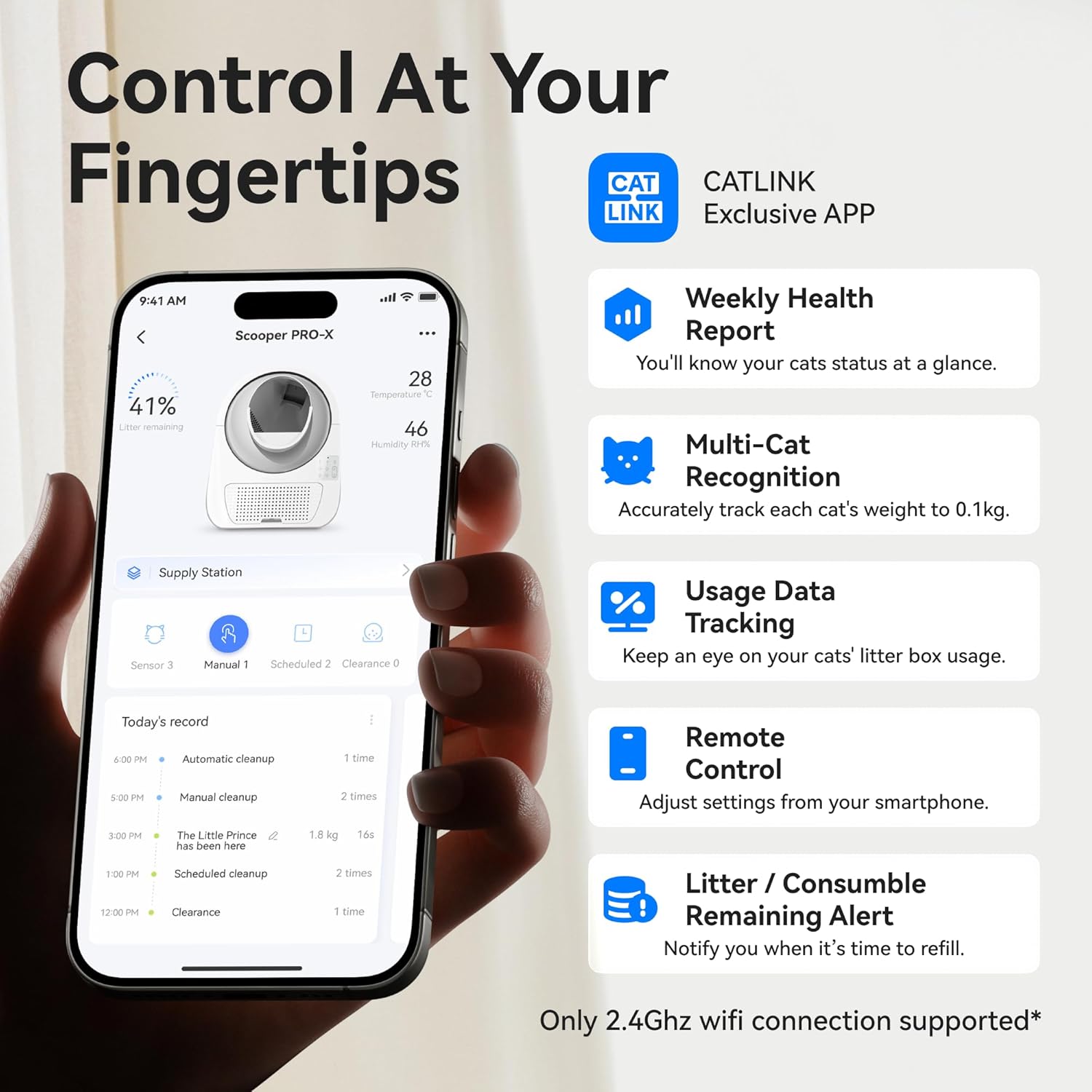
Figure 3: The CATLINK Exclusive APP provides comprehensive control and health monitoring features.
Video 1: Official product video demonstrating the CATLINK automatic litter box in action, highlighting its features and benefits.
Maintenance
- Waste Bin Emptying: The 13-liter waste bin can hold up to 7 days of waste for 2 cats. The app will alert you when the bin is full. Simply pull out the drawer, tie the trash bag, and replace it with a new one.
- Deep Cleaning: The entire ball chamber is designed for easy disassembly and thorough cleaning. It can be washed with water. Ensure all components are completely dry before reassembly.
- Odor Control: The unit is equipped with a carbon filter to eliminate odors. Replace the carbon filter periodically for optimal odor control.
- Sensor Cleaning: Regularly wipe down the radar and infrared sensors to ensure accurate detection and safe operation.

Figure 4: The litter box features deep cleaning capabilities and effective odor control.
Troubleshooting
| Problem | Possible Cause | Solution |
|---|---|---|
| Unit not cleaning automatically. | Sensors are obstructed or dirty. Cat weight is outside the supported range. | Clean sensors. Ensure cat weight is between 3.5 and 22 pounds. Check app settings for automatic cleaning mode. |
| Odor persists. | Carbon filter needs replacement. Waste bin is full. | Replace carbon filter. Empty waste bin. |
| App connection issues. | Incorrect Wi-Fi password. Not connected to 2.4 GHz Wi-Fi. | Verify Wi-Fi password. Connect to a 2.4 GHz network. Restart the unit and app. |
| Litter sticking to the chamber. | Insufficient clumping time. Type of litter used. | Increase automatic cleaning delay. Ensure you are using high-quality clumping litter. |
| Unit stops during operation. | Cat detected during cleaning (safety feature). Obstruction in the mechanism. | This is a safety feature. The unit will resume once the cat leaves. Check for and remove any obstructions. |

Figure 5: The litter box incorporates multiple safety features to protect your pet.
Specifications
| Feature | Detail |
|---|---|
| Model Name | CL-06 (PRO-X LUXURY) |
| Dimensions (LxWxH) | 23.62" x 22.83" x 27.95" |
| Item Weight | 22 Pounds |
| Waste Bin Capacity | 13 Liters |
| Material | Acrylonitrile Butadiene Styrene (ABS) |
| Supported Cat Weight | 3.5 - 22 pounds |
| Connectivity | Wi-Fi (2.4 GHz only) |
| Odor Control | Carbon Filter (90% odor elimination) |
| Safety Features | Radar, Infrared Sensors, Pinch-free design |
Warranty and Support
The CATLINK Self-Cleaning Cat Litter Box comes with a 1 Year Warranty. If you encounter any issues or require assistance, please contact CATLINK customer support. They are committed to providing professional solutions within 24 hours.
For further assistance, you may refer to the official CATLINK website or the support section within the CATLINK Exclusive APP.
Related documentsPRO-X LUXURY


Ask a question about this manual
Ask about setup, troubleshooting, compatibility, parts, safety, or missing instructions. Manuals+ will review the question and use this page’s manual context to help answer it.