
Introduction
This manual provides essential information for the safe and efficient operation of your briidea Salt Chlorine Generator. This system is designed to convert salt into chlorine, providing a consistent and comfortable sanitization method for above-ground pools up to 15,000 gallons. Please read all instructions carefully before installation and use.
Safety Information
- Always disconnect power before performing any service or maintenance.
- Ensure proper electrical grounding according to local codes.
- Keep the control unit dry and protected from direct weather exposure.
- Do not operate the system if any part is damaged or leaking.
- Keep chemicals, including pool salt, out of reach of children and pets.
- Always wear appropriate personal protective equipment (PPE) when handling pool chemicals.
Package Contents
Verify that all items are present in your package:
- briidea Salt Chlorine Generator Control Unit
- Electrolytic Cell
- Connection Hoses
- Hose Clamps
- Power Cord
- Instruction Manual (this document)
Setup and Installation
1. Unpacking
Carefully remove all components from the packaging. Inspect for any signs of damage. If any parts are missing or damaged, contact customer support immediately.
2. Placement
Mount the control unit in a dry, shaded area, away from direct sunlight and rain. Ensure it is easily accessible for operation and maintenance. The unit should be installed after the pool filter pump.
3. Connecting the System
The briidea Salt Chlorine Generator integrates into your pool's existing filtration system. Water flows from the pool, through the filter pump, then through the salt chlorine generator, and finally back to the pool.
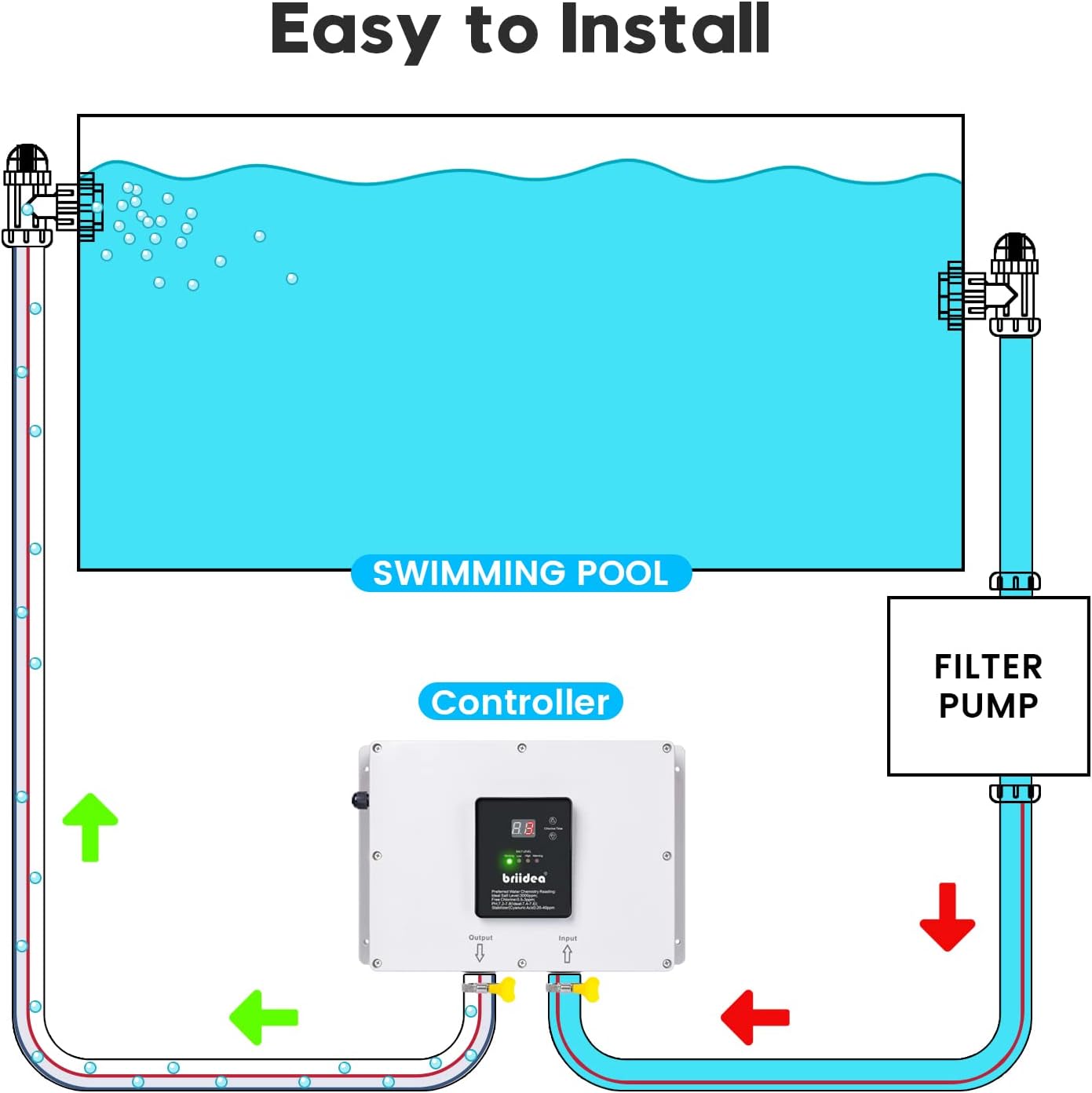
Connect the hoses as follows:
- Connect the hose from the filter pump's output to the Input port of the briidea Salt Chlorine Generator.
- Connect the hose from the Output port of the briidea Salt Chlorine Generator back to the pool return line.
- Secure all hose connections with the provided clamps to prevent leaks.

4. Adding Salt to the Pool
Before operating the generator, ensure your pool has the correct salt level. The ideal salt level is approximately 3000 ppm (parts per million). Use a reliable salt test kit to measure your pool's current salt concentration. Add pool-grade salt gradually, allowing it to dissolve completely before retesting. Refer to the manufacturer's guidelines for the specific amount of salt needed based on your pool volume.
Operating Instructions
1. Initial Startup
- Ensure the pool pump is running and water is flowing through the generator.
- Plug in the briidea Salt Chlorine Generator. The control panel will illuminate.
- The unit will display the current salt level and status indicators (Working, Low, High, Warning).
2. Water Chemistry Readings
The control panel provides indicators for salt level and chlorine time. For optimal performance and water quality, maintain the following parameters:
- Ideal Salt Level: 3000 ppm
- Free Chlorine: 0.5-3 ppm
- pH: 7.2-7.8 (Ideal: 7.4-7.6)
- Stabilizer (Cyanuric Acid): 20-40 ppm
3. Chlorine Production Adjustment
Use the 'Chlorine Time' button on the control panel to adjust the operating duration of the generator. This controls the amount of chlorine produced. Start with a moderate setting and adjust based on pool usage, sunlight exposure, and chlorine test results. Monitor your pool's chlorine levels regularly with a test kit.
Maintenance
1. Cell Cleaning
The electrolytic cell may accumulate scale over time, reducing its efficiency. Inspect the cell periodically (e.g., monthly) and clean it as needed. To clean, disconnect power, remove the cell, and soak it in a diluted acid solution (e.g., muriatic acid diluted 1:4 with water) until the scale dissolves. Rinse thoroughly with fresh water before reinstallation. Always follow safety precautions when handling acids.
2. General Care
- Keep the control unit and connections clean and free from debris.
- Regularly check all hose connections for leaks and tighten clamps if necessary.
- Ensure adequate water flow through the system when operating.
Troubleshooting
If you encounter issues with your briidea Salt Chlorine Generator, refer to the following common problems and solutions:
| Problem | Possible Cause | Solution |
|---|---|---|
| "Warning" light illuminated | Incorrect salt level, low water flow, or dirty cell. | Check salt level and adjust. Ensure pool pump is running and filter is clean. Clean the electrolytic cell. |
| "Low Salt" light illuminated | Salt concentration below optimal range. | Add pool-grade salt to the pool according to manufacturer guidelines and allow it to dissolve. Retest water. |
| "High Salt" light illuminated | Salt concentration above optimal range. | Partially drain pool water and refill with fresh water to dilute salt. Retest water. |
| No chlorine production | Low salt, dirty cell, insufficient run time, or faulty cell. | Verify salt level, clean cell, increase chlorine production time. If issues persist, contact support. |
| Water leaking from unit | Loose connections, damaged hoses, or internal component failure. | Inspect all hose connections and tighten clamps. Check hoses for cracks or damage. If leaking from within the unit, discontinue use and contact customer support. |
Note on Videos: No official seller-provided videos were available for embedding in this manual. Customer-submitted videos often highlight specific issues, but for official troubleshooting, please refer to the instructions above or contact customer support.
Specifications
- Model: B09L6RQDBJ
- Maximum Pool Capacity: Up to 15,000 Gallons
- Package Dimensions: 16.42 x 14.06 x 6.54 inches
- Item Weight: 9.33 pounds
- Ideal Salt Level: 3000 ppm
- Recommended Free Chlorine: 0.5-3 ppm
- Recommended pH: 7.2-7.8
- Recommended Stabilizer (Cyanuric Acid): 20-40 ppm
Warranty and Support
For warranty information, technical support, or to purchase replacement parts, please contact briidea customer service. Refer to the product packaging or the official briidea website for current contact details. Keep your proof of purchase for warranty claims.