
1. Introduction
This user manual provides detailed instructions for the operation and maintenance of the Godox TT685II Flash for Canon EOS cameras. The TT685II is a versatile speedlite designed to offer advanced lighting control, featuring E-TTL II autoflash compatibility, a built-in 2.4G wireless X system, and various flash modes to enhance your photographic capabilities. Please read this manual thoroughly before using the product to ensure proper and safe operation.
2. Safety Information
- Do not disassemble or modify the flash unit. High voltage components inside pose an electric shock hazard.
- Keep the flash unit dry. Do not expose it to rain, moisture, or high humidity.
- Avoid direct eye exposure to the flash. The intense light can cause temporary visual impairment.
- Use only specified batteries (4 AA batteries). Incorrect battery types or improper installation can lead to leakage or explosion.
- Do not operate the flash in the presence of flammable gases or liquids.
- Turn off the flash unit and disconnect it from the camera before cleaning or maintenance.
- Store the flash unit in a cool, dry place away from direct sunlight and extreme temperatures.
3. Product Overview
The Godox TT685II flash unit is designed with user-friendly controls and a robust build. Below are the main components and their functions.

Figure 3.1: Godox TT685II Flash unit and its standard accessories. This image displays the flash unit, a protective carrying case, a small stand for off-camera use, and the printed instruction manual.

Figure 3.2: Key features of the Godox TT685II Flash. This illustration points out the flash's capabilities including Automatic Light Metering (TTL), Wireless System, Stable Output, High Speed Sync (HSS), Fast Recycle Time, and the Quick Release Hot Shoe mechanism.
3.1. Controls and Display
- LCD Panel: Displays current settings, flash mode, power output, zoom, and battery status.
- Function Buttons (F1-F4): Context-sensitive buttons for menu navigation and setting adjustments.
- Select Dial: Used to navigate menus and change values.
- Mode Button: Cycles through flash modes (TTL, Manual, Multi).
- Zoom Button: Adjusts the flash head's zoom coverage.
- Test Button/Flash Indicator: Fires a test flash and indicates flash readiness.
- ON/OFF Switch: Powers the unit on or off.
4. Setup
4.1. Battery Installation
The Godox TT685II requires four (4) AA batteries for operation.
- Open the battery compartment cover located on the side of the flash unit.
- Insert four AA batteries according to the polarity indicators (+ and -) inside the compartment. Ensure correct orientation to prevent damage.
- Close the battery compartment cover securely.

Figure 4.1: Battery compartment and external power option. This image illustrates the placement of four AA batteries within the flash unit and also shows the optional PB960 external lithium-ion power pack.
4.2. Mounting on Camera
To mount the TT685II flash onto your Canon EOS camera's hot shoe:
- Slide the flash's mounting foot into the camera's hot shoe.
- Engage the quick-release lock by pushing it forward until it clicks into place. This secures the flash firmly to the camera.
- To remove, disengage the quick-release lock and slide the flash off.
5. Operating Instructions
5.1. Power On/Off
Slide the ON/OFF switch to the "ON" position to power on the flash. Slide it to "OFF" to power off.
5.2. Flash Modes
Press the MODE button to cycle through the available flash modes:
- E-TTL II Autoflash Mode: The flash automatically determines the appropriate power output for correct exposure.
- Manual (M) Mode: Allows you to manually set the flash power output from 1/1 (full power) to 1/128 in 1/3 stop increments.
- Multi (Stroboscopic) Mode: Fires a series of rapid flashes to capture multiple movements of a subject in a single photograph.
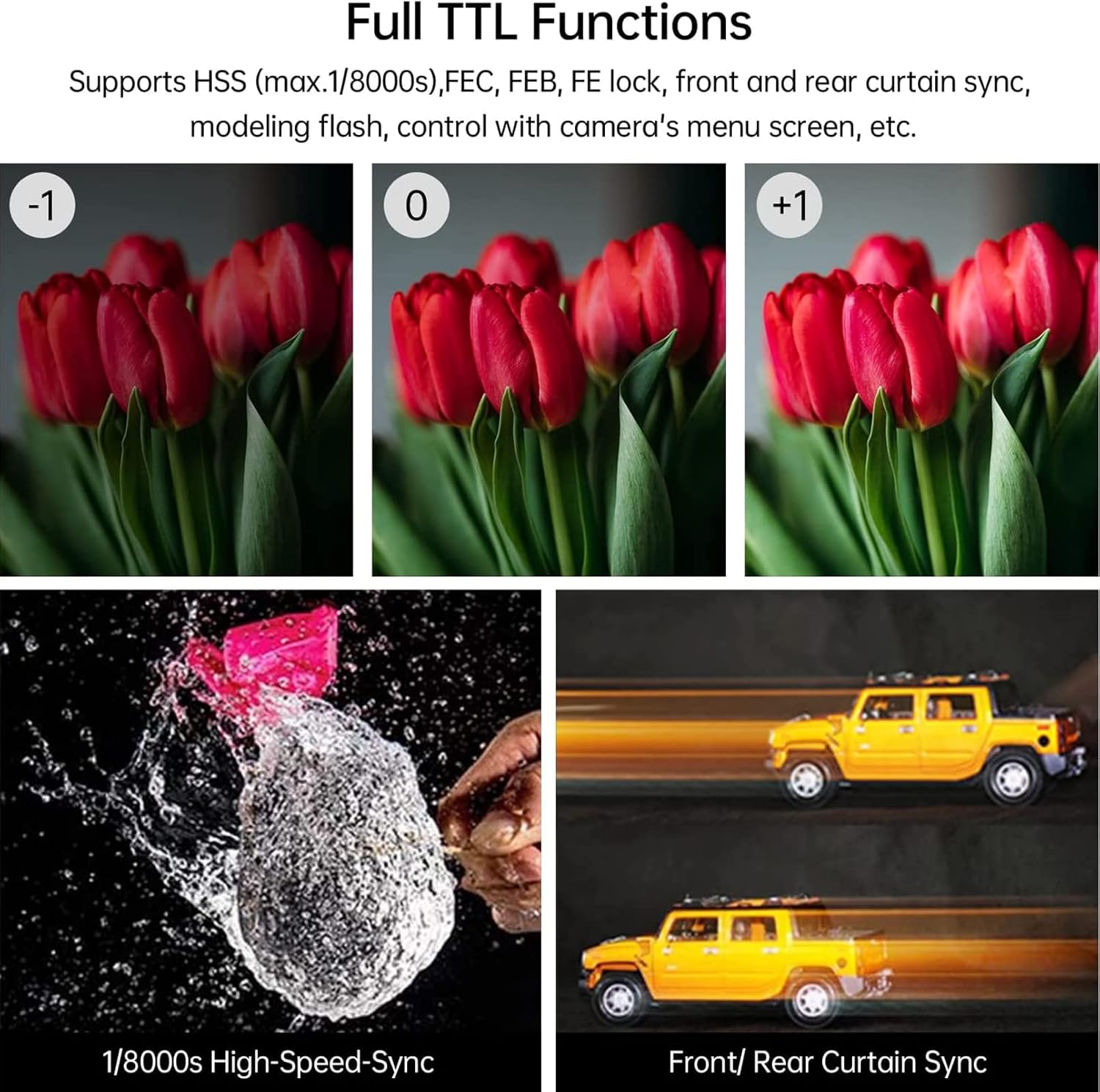
Figure 5.1: Demonstrations of Full TTL Functions. This image illustrates the flash's capabilities such as High-Speed Sync (HSS) at 1/8000s for freezing fast motion and Front/Rear Curtain Sync for creative light trails.
5.3. TCM Instant Conversion
The TCM (TTL Converted to Manual) function allows for instant conversion of a TTL exposure value into a manual power setting. This enhances shooting efficiency by providing a starting point for manual adjustments.

Figure 5.2: TCM Function on the LCD display. The image highlights the TCM button on the flash's control panel, which facilitates quick conversion from TTL to manual mode.
5.4. 2.4G Wireless X System
The TT685II features a built-in Godox 2.4G wireless X system, enabling it to function as both a transmitter and receiver. This allows for seamless integration with other Godox X system flashes and triggers (sold separately) for remote control and multi-flash setups.

Figure 5.3: Godox 2.4G Wireless X System in action. This image shows the TT685II flash unit alongside a Godox XProS trigger, demonstrating their compatibility for wireless flash control.

Figure 5.4: Transmitter & Receiver Flash setup. This diagram explains how the TT685II can act as both a master unit (triggering other flashes like V1, AD200Pro, AD300Pro) and a slave unit (being triggered by X1, X2, XPro, V1, or another TT685II).
5.5. Bounce Angle and Zoom Coverage
The flash head offers a broader tilt angle from -7° to 120° and is rotatable in 330°, providing flexible bounce flash angles. The zoom range of 20-200mm ensures broad and even light distribution.

Figure 5.5: Broader Bounce Angle. This diagram illustrates the vertical tilt range (-7° to 120°) and horizontal rotation range (0° to 330°) of the flash head, allowing for versatile light positioning.

Figure 5.6: Wide Light Coverage. This image demonstrates the flash's ability to cover focal lengths from 20mm to 200mm, ensuring comprehensive illumination for various lens types.
5.6. External Power Supply
The TT685II includes a power port for connecting an external lithium-ion power pack, such as the Godox PB960 (sold separately). This significantly boosts flash performance, recycle times, and provides extended shooting duration.

Figure 5.7: External Power Supply in use. This image shows the TT685II flash connected to a PB960 external power pack, illustrating its use in a professional photography setting for enhanced speed and power.
6. Maintenance
- Cleaning: Use a soft, dry cloth to clean the flash unit. For stubborn dirt, a slightly damp cloth can be used, followed by a dry one. Do not use solvents or abrasive cleaners.
- Battery Care: Remove batteries if the flash will not be used for an extended period to prevent leakage.
- Storage: Store the flash in its protective case in a cool, dry, and dust-free environment. Avoid extreme temperatures and high humidity.
- Hot Shoe Protection: Keep the hot shoe clean and free of debris to ensure proper electrical contact with the camera.
7. Troubleshooting
| Problem | Possible Cause | Solution |
|---|---|---|
| Flash does not fire. |
|
|
| Flash output is inconsistent or too weak/strong. |
|
|
| Wireless triggering issues. |
|
|
8. Specifications
| Feature | Detail |
|---|---|
| Model | TT685II Flash for Canon |
| Compatible Mountings | Canon EOS |
| Flash Sync Speed | 1/8000s (High-Speed Sync) |
| Power Output | 1/1 to 1/128 (22 steps) |
| Zoom Range | 20-200mm (Auto/Manual) |
| Bounce Angle (Vertical) | -7° to 120° |
| Bounce Angle (Horizontal) | 0° to 330° |
| Wireless System | Godox 2.4G Wireless X System (Transmitter & Receiver) |
| Batteries | 4 AA batteries (not included) |
| Item Weight | 1.26 pounds |
| Dimensions | 8.07 x 3.62 x 3.39 inches |
9. Warranty and Support
For warranty information and technical support, please refer to the official Godox website or contact your local distributor.
An official user manual in PDF format can be downloaded from: Godox TT685II User Manual (PDF)
Visit the official GODOX Store on Amazon for more products and information: GODOX Amazon Store