
suitU B09L4JQSLF
suitU Handheld Cordless Wet & Dry Vacuum Cleaner Instruction Manual
Model: B09L4JQSLF
1. Product Overview
The suitU Handheld Cordless Wet & Dry Vacuum Cleaner is designed for efficient cleaning in various environments, including homes and vehicles. It features a powerful 120W motor providing 12000Pa suction, a high-efficiency HEPA filter system, and a rechargeable battery for cordless operation.
Key features include:
- 12000Pa Powerful Suction: Equipped with a 120W high-power motor for effective debris, dust, and pet hair pickup.
- Long-lasting Power: Features a 3*2000 mAh lithium-ion battery, offering up to 35 minutes of runtime on lower suction and 15 minutes on higher suction after a 3-4 hour charge.
- Lightweight and Portable: Designed for easy maneuverability, making it suitable for cleaning stairs, kitchens, cars, and hard-to-reach areas.
- Wet & Dry Capability: Capable of vacuuming both solid debris and liquid spills.
- 2-in-1 Functionality: Easily converts between an upright stick vacuum and a handheld vacuum cleaner.

Image 1.1: The suitU Handheld Cordless Wet & Dry Vacuum Cleaner shown in both stick and handheld modes, alongside its included attachments.

Image 1.2: Visual representation of the vacuum's ability to clean both dry debris (like pet food) and wet spills (like liquids).
2. Package Contents
Please verify that all items listed below are included in your package:
- 1 x Vacuum Cleaner (Main Host)
- 1 x Adjustable Metal Tube
- 1 x Floor Brush
- 1 x Long Flat Nozzle (Crevice Nozzle)
- 1 x Small Brush (Brush Nozzle)
- 1 x Extension Hose
- 1 x Auxiliary Connector
- 1 x USB Charging Cable
- 1 x User Manual
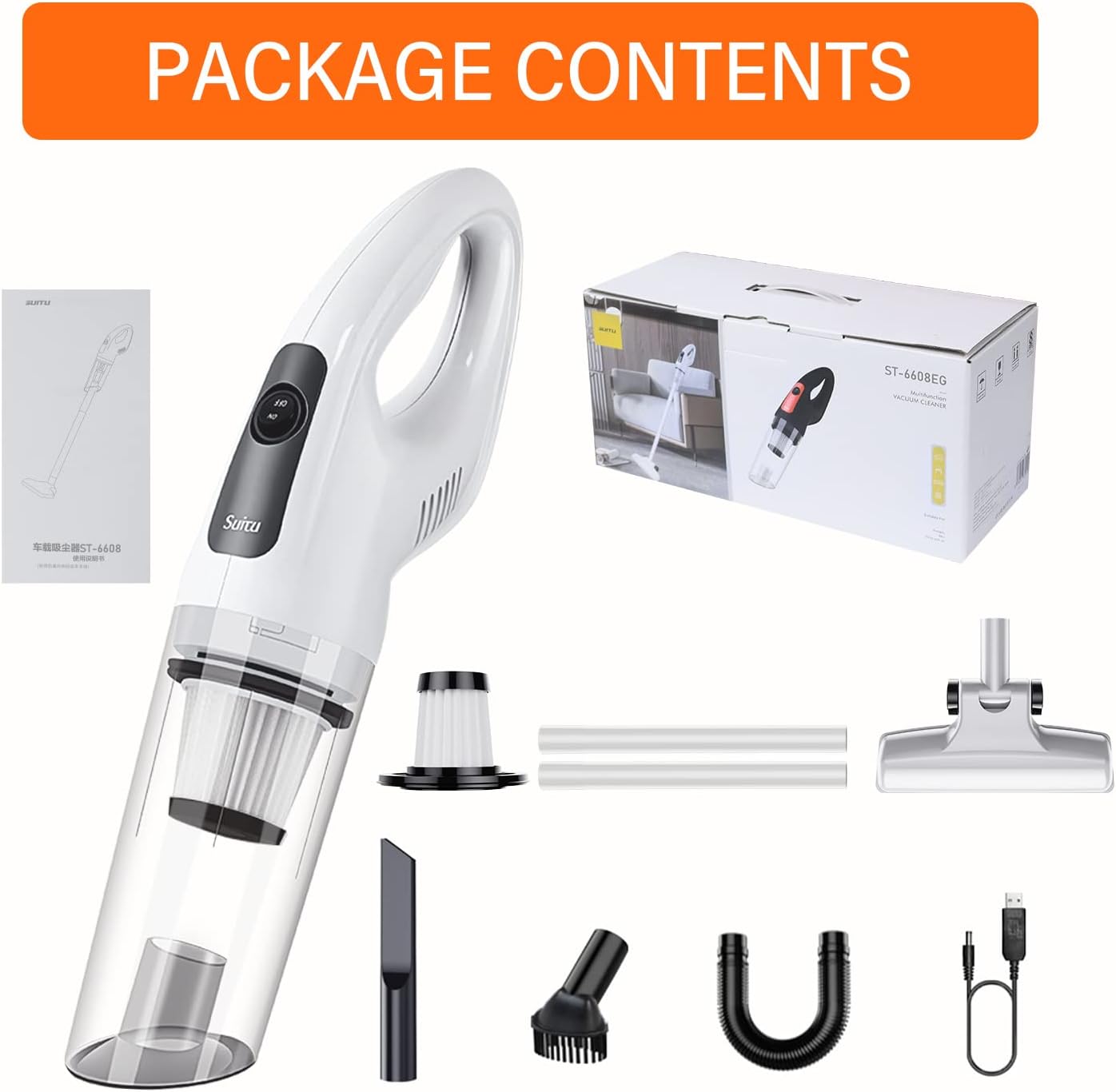
Image 2.1: Contents of the product package, showing the vacuum unit, attachments, and accessories.
3. Setup
Before first use, ensure the vacuum is fully charged.
- Charging the Battery:
- Connect the USB charging cable to the vacuum's charging port and to a suitable USB power adapter (not included).
- The charging indicator light will show red during charging and turn green when fully charged.
- A full charge typically takes approximately 3-4 hours.
- Assembling Attachments:
- For handheld use, directly attach the desired nozzle (Flat Crevice Nozzle or Brush Nozzle) to the vacuum's suction inlet.
- For stick vacuum use, connect the adjustable metal tube to the main vacuum unit, then attach the floor brush to the other end of the metal tube.
- The extension hose and auxiliary connector can be used with various nozzles for extended reach or specific cleaning tasks.
4. Operating Instructions
Follow these steps for effective cleaning:
- Power On/Off: Locate the power switch on the vacuum cleaner. Press it to turn the unit on. Press it again to turn it off.
- Select Suction Level: The vacuum may have different suction levels. Refer to the device's controls to adjust as needed. Higher suction is suitable for stubborn debris, while lower suction conserves battery life.
- Choose the Right Nozzle:
- Flat Crevice Nozzle: Ideal for narrow gaps, corners, and hard-to-reach areas (e.g., car seats, sofa crevices).
- Brush Nozzle: Suitable for cleaning delicate surfaces, upholstery, and pet hair.
- Floor Brush with Extension Tube: For general floor cleaning, converting the unit into a stick vacuum.
- Extension Hose: Provides flexibility for cleaning awkward angles or inside vehicles.
- Begin Cleaning: Move the vacuum slowly over the surface to be cleaned, allowing the suction to pick up debris. For wet spills, ensure the dustbin is empty and clean before use, and empty it immediately after vacuuming liquids.
- Monitor Battery: The charging indicator light will provide feedback on battery status. Recharge when the battery is low to avoid interruption.

Image 4.1: Demonstrates the handheld vacuum's power and its effectiveness against various types of debris.

Image 4.2: The vacuum being used in stick configuration to clean elevated surfaces, highlighting its lightweight design.

Image 4.3: The vacuum in use on a carpet, illustrating its role in maintaining a clean living space.

Image 4.4: Examples of the vacuum's application in cleaning car interiors, sofas, and pet areas.
5. Maintenance
Regular maintenance ensures optimal performance and extends the life of your vacuum cleaner.
- Emptying the Dustbin:
- After each use, or when the dustbin is full, detach it from the main unit.
- Empty the collected debris into a waste bin.
- Cleaning the Filter:
- The vacuum is equipped with a high-efficiency HEPA filter. Remove the filter from the dustbin.
- Tap the filter gently to dislodge dust. For a more thorough cleaning, rinse the filter under running water.
- Important: Ensure the filter is completely dry before reinserting it into the vacuum. Using a wet filter can damage the motor.
- Cleaning the Main Unit and Attachments:
- Wipe the exterior of the vacuum and attachments with a soft, damp cloth.
- Do not use harsh chemicals or abrasive cleaners.
- Storage:
- Store the vacuum cleaner and its accessories in a cool, dry place, away from direct sunlight and moisture.
6. Troubleshooting
If you encounter issues with your vacuum cleaner, refer to the following common problems and solutions:
- Vacuum does not turn on:
- Ensure the battery is fully charged.
- Check that the power switch is pressed firmly.
- Low suction power:
- Empty the dustbin if it is full.
- Clean or replace the HEPA filter. A clogged filter significantly reduces suction.
- Check for blockages in the nozzle, extension tube, or main suction inlet.
- Ensure all attachments are securely connected.
- Battery not charging:
- Verify the USB charging cable is properly connected to both the vacuum and the power source.
- Ensure the USB power adapter is functional.
- Check for any damage to the charging cable or port.
- Unusual noise during operation:
- Turn off the vacuum and check for any foreign objects lodged in the brush roll (if applicable) or suction path.
- Ensure the dustbin and filter are correctly installed.
If the problem persists after attempting these solutions, please contact customer support.
7. Specifications
| Feature | Specification |
|---|---|
| Brand | suitU |
| Model | B09L4JQSLF |
| Rated Power | 120W |
| Vacuum Degree | 12000Pa |
| Rated Speed | 36000rpm |
| Battery Capacity | 3*2000mAh (6000mAh total) Lithium-ion |
| Charging Method | USB |
| Charging Time | Approx. 3-4 hours |
| Runtime | Up to 35 minutes (low suction), 15 minutes (high suction) |
| Noise Level | ≤78dB |
| Filter Type | HEPA |
| Color | White |
| Item Weight | 454 g |
| Capacity | 1.3 Pounds |
8. Warranty and Support
For warranty information or technical support, please refer to the documentation included with your purchase or contact the manufacturer directly. Keep your proof of purchase for any warranty claims.
Related documentsB09L4JQSLF


Ask a question about this manual
Ask about setup, troubleshooting, compatibility, parts, safety, or missing instructions. Manuals+ will review the question and use this page’s manual context to help answer it.