1. Introduction
This user manual provides detailed instructions for the installation, operation, and maintenance of your Zapco ST-2000XM II Mono Class D Bass Amplifier. Please read this manual thoroughly before attempting to install or operate the amplifier to ensure proper function and safety.
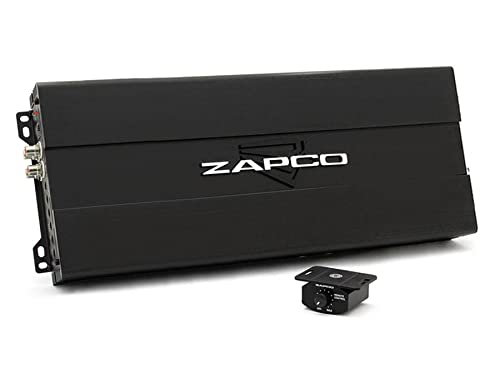
Image 1.1: The Zapco ST-2000XM II Mono Class D Bass Amplifier shown with its included remote bass knob.
2. Safety Information
- Always disconnect the vehicle's battery before performing any electrical work.
- Ensure proper grounding to prevent electrical hazards.
- Do not expose the amplifier to moisture or extreme temperatures.
- Use appropriate gauge wiring for power, ground, and speaker connections as specified in the installation section.
- Consult a professional installer if you are unsure about any part of the installation process.
- Mount the amplifier securely to prevent movement during vehicle operation.
3. Package Contents
Verify that all items are present in the package:
- Zapco ST-2000XM II Mono Class D Bass Amplifier
- Remote Bass Knob
- Mounting Hardware (screws, washers)
- User Manual (this document)
4. Setup and Installation
4.1 Mounting the Amplifier
The Zapco ST-2000XM II is designed for surface mount installation. Choose a secure, well-ventilated location in your vehicle, away from direct sunlight, heat sources, and moisture. Ensure there is adequate airflow around the amplifier's heatsink fins for optimal cooling.

Image 4.1: Side view of the amplifier, highlighting the heatsink design for efficient heat dissipation.
4.2 Wiring Connections
Proper wiring is crucial for performance and safety. Refer to the diagram below for connection points.
- Power (+12V): Connect to the positive terminal of the vehicle's battery via a fuse holder (fuse not included, recommended size based on amplifier power output).
- Ground (GND): Connect to a clean, unpainted metal surface on the vehicle's chassis. Ensure a solid, low-resistance connection.
- Remote (REM): Connect to the remote turn-on output of your head unit or a switched 12V source.
- Speaker Output: Connect your subwoofer(s) to the speaker terminals. Observe correct polarity (+ to + and - to -).
- RCA Input: Connect RCA cables from your head unit's subwoofer or full-range pre-outs to the amplifier's RCA input.
- RCA Output (Bridge): Use this output to daisy-chain the audio signal to another amplifier.

Image 4.2: Detailed view of the power (+12V), remote (REM), and ground (GND) terminals.

Image 4.3: View of the RCA input/output connections and various control knobs.
5. Operating the Amplifier
5.1 Initial Power-Up
After all connections are made, reconnect the vehicle's battery. The amplifier's power indicator light should illuminate. If it does not, refer to the Troubleshooting section.
5.2 Adjusting Controls
- GAIN (Input Level): Adjust this knob to match the output voltage of your head unit. Start with the gain at minimum and slowly increase it until the desired volume is achieved without distortion.
- LPF (Low Pass Filter): This filter allows only frequencies below the set point to pass through to the subwoofer. Adjust between 40Hz and 180Hz to blend with your main speakers.
- SUB SONIC Filter: This high-pass filter removes extremely low frequencies (below 17Hz) that are inaudible but can waste amplifier power and potentially damage subwoofers.
- BASS FREQ (Bass Boost Frequency): Adjust the center frequency for the bass boost.
- Remote Bass Knob: Provides convenient control over the subwoofer output level from the driver's seat.
6. Maintenance
The Zapco ST-2000XM II amplifier requires minimal maintenance. Keep the amplifier clean and free of dust and debris. Periodically check all wiring connections to ensure they are secure and free from corrosion. Do not use harsh chemicals or abrasive cleaners on the amplifier's surface.
7. Troubleshooting
| Problem | Possible Cause | Solution |
|---|---|---|
| No Power / Amplifier Not Turning On | Blown fuse, loose power/ground/remote wire, faulty remote turn-on signal. | Check fuse, verify all power connections are secure, test remote wire for 12V when head unit is on. |
| No Sound Output | Loose RCA cables, incorrect gain setting, speaker wires disconnected, amplifier in protect mode. | Check RCA connections, adjust gain, verify speaker wiring, check for shorted speaker wires. |
| Distorted Sound | Gain set too high, incorrect LPF setting, poor ground connection, damaged speaker. | Reduce gain, adjust LPF, ensure solid ground, inspect speaker for damage. |
| Amplifier Overheating / Protect Mode | Insufficient ventilation, impedance too low, prolonged high volume. | Ensure proper airflow, check speaker impedance, reduce volume, allow amplifier to cool. |
8. Specifications
| Feature | Detail |
|---|---|
| Model Number | ST-2000XM II |
| Brand | Zapco |
| Number of Channels | 1 (Mono) |
| Mounting Type | Surface Mount |
| Voltage | 5 Volts |
| Package Dimensions | 23.2 x 7.3 x 3 inches; 11.4 Pounds |
| First Available Date | November 13, 2021 |
9. Warranty and Support
For warranty information and technical support, please contact Zapco directly. Details can typically be found on the manufacturer's official website or through your authorized dealer. Keep your proof of purchase for warranty claims.
Manufacturer: Zapco
Website: Visit the Zapco Store on Amazon