
Boompods BAGO
Boompods Bassline GO True Wireless Earbuds
User Manual
Model: BAGO
1. Introduction
Thank you for choosing the Boompods Bassline GO True Wireless Earbuds. This manual provides essential information for setting up, operating, and maintaining your earbuds to ensure optimal performance and longevity. Please read this manual thoroughly before use.

Image: Boompods Bassline GO True Wireless Earbuds, showcasing their sleek black design.
2. Package Contents
Ensure all items are present in your package:
- Boompods Bassline GO True Wireless Earbuds (Left and Right)
- Charging Case
- USB-A to USB-C Charging Cable
- User Manual (this document)
3. Setup
3.1. Charging the Earbuds and Case
Before first use, fully charge the earbuds and the charging case. The charging case provides additional battery life for your earbuds on the go.
- Place the earbuds into the charging case, ensuring they are correctly seated.
- Connect the USB-C charging cable to the charging port on the case and the other end to a USB power source (e.g., wall adapter, computer USB port).
- The indicator lights on the case will show the charging status. Once fully charged, the lights will indicate completion or turn off.
A full charge provides up to 7 hours of playback for the earbuds, with the charging case extending total battery life to approximately 23 hours.

Image: Boompods Bassline GO earbuds inside their charging case, illustrating the charging process and extended battery life.
3.2. Bluetooth Pairing
Follow these steps to pair your earbuds with your device:
- Open the charging case. The earbuds will automatically enter pairing mode.
- On your device (smartphone, tablet, laptop), enable Bluetooth.
- Search for available Bluetooth devices and select "Boompods Bassline GO" from the list.
- Once connected, you will hear an audible confirmation, and the indicator lights on the earbuds will change.
The earbuds feature Bluetooth 5.0 for a fast and stable wireless connection.
4. Operating the Earbuds
4.1. Touch Controls
The Boompods Bassline GO earbuds utilize sensitive touch controls for various functions:
| Action | Function |
|---|---|
| Single Tap (Left/Right Earbud) | Play/Pause Music, Answer/End Call |
| Double Tap (Right Earbud) | Next Track |
| Double Tap (Left Earbud) | Previous Track |
| Triple Tap (Left/Right Earbud) | Activate Voice Assistant |
| Long Press (Right Earbud) | Volume Up |
| Long Press (Left Earbud) | Volume Down |
| Long Press (during incoming call) | Reject Call |
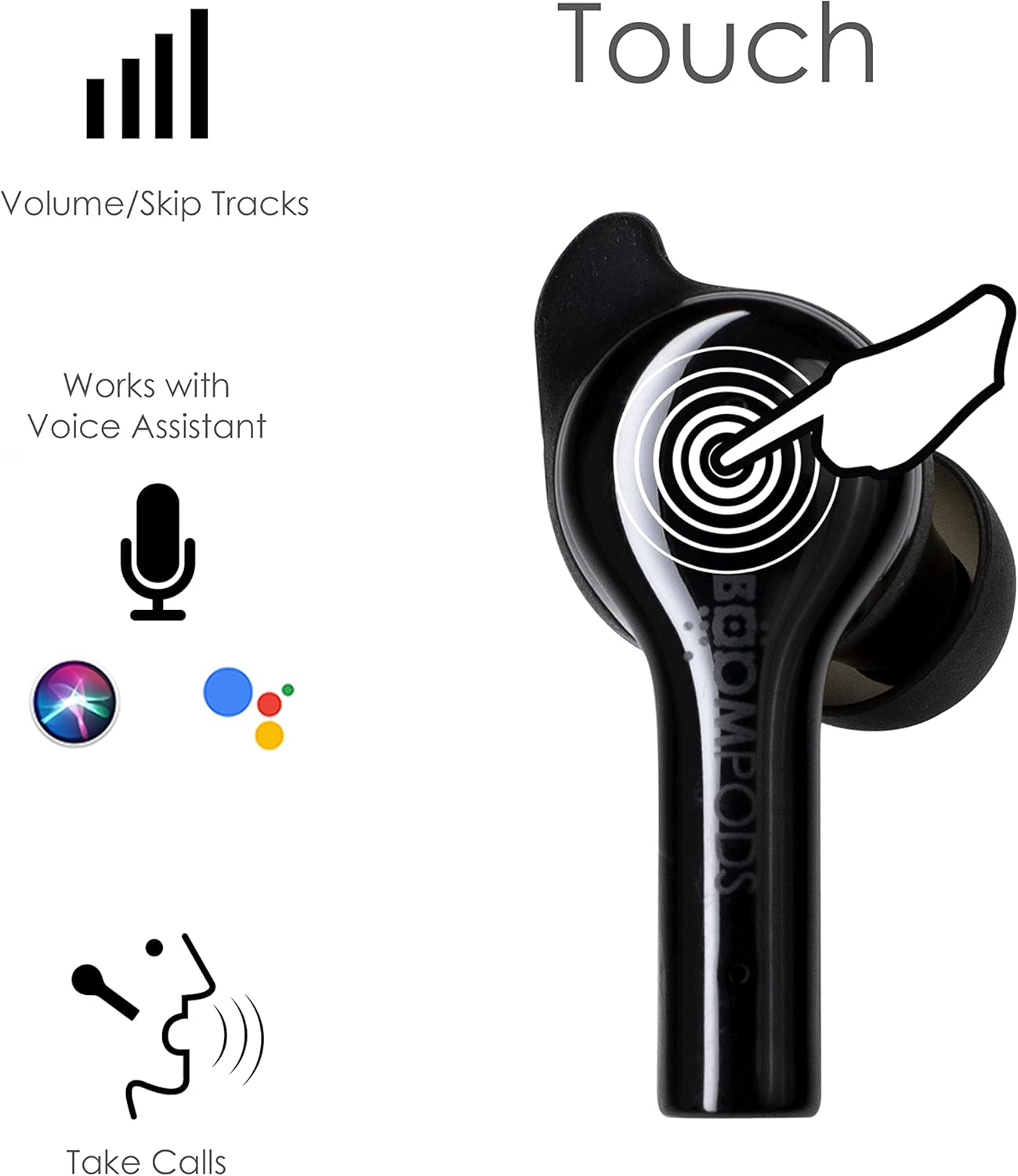
Image: Diagram illustrating the touch control areas on the Boompods Bassline GO earbuds for various functions.
4.2. Voice Assistant
The earbuds support voice assistant activation (e.g., Siri, Google Assistant). Triple tap either earbud to activate your device's voice assistant for hands-free control.
4.3. Making Calls
The Boompods Bassline GO features an ENC (Environmental Noise Cancellation) microphone, perfectly positioned to capture your voice while reducing background noise for crystal-clear phone calls.
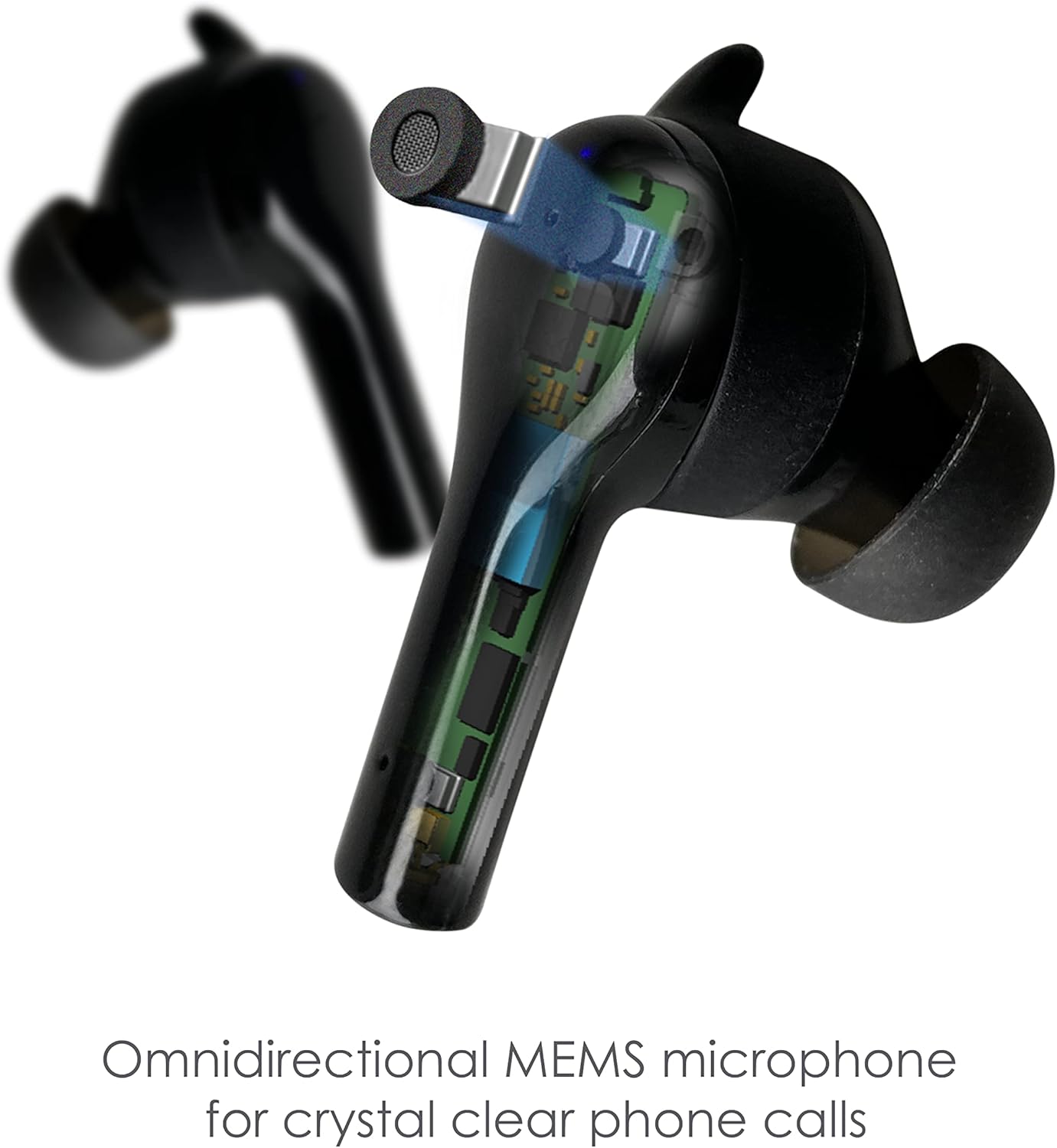
Image: Detailed view of the Boompods Bassline GO earbud, highlighting the omnidirectional MEMS microphone for clear calls.
4.4. Secure Fit and IPX4 Rating
The earbuds are designed for a secure and comfortable in-ear fit, suitable for various activities. They also boast an IPX4 water resistance rating, making them resistant to splashes and sweat, ideal for workouts or outdoor use.

Image: A person wearing the Boompods Bassline GO earbuds, demonstrating their secure fit during active use.
5. Maintenance
To ensure the longevity and optimal performance of your Boompods Bassline GO earbuds, follow these maintenance guidelines:
- Cleaning: Regularly clean the earbuds and charging case with a soft, dry, lint-free cloth. Do not use abrasive cleaners or solvents. Gently remove any earwax or debris from the ear tips and speaker mesh using a small, soft brush or cotton swab.
- Storage: When not in use, store the earbuds in their charging case to protect them from dust and damage. Store the case in a cool, dry place away from direct sunlight and extreme temperatures.
- Charging: Avoid fully depleting the battery for extended periods. Charge the earbuds and case regularly, even if not in frequent use, to maintain battery health.
- Water Exposure: While IPX4 rated for splash resistance, do not submerge the earbuds in water or expose them to heavy rain. Dry them thoroughly if they get wet.
6. Troubleshooting
If you encounter issues with your Boompods Bassline GO earbuds, refer to the following common solutions:
6.1. Earbuds Not Pairing/Connecting
- Ensure both earbuds are charged.
- Turn off Bluetooth on your device and turn it back on.
- Forget/delete "Boompods Bassline GO" from your device's Bluetooth list and attempt to pair again.
- Place both earbuds back into the charging case, close the lid, wait a few seconds, then open the lid to re-initiate pairing mode.
6.2. No Sound or Low Volume
- Check the volume level on both your earbuds (via touch controls) and your connected device.
- Ensure the earbuds are properly seated in your ears.
- Clean any debris from the earbud speaker mesh.
- Try disconnecting and reconnecting the earbuds to your device.
6.3. Charging Issues
- Ensure the USB-C cable is securely connected to both the case and the power source.
- Try a different USB-C cable or power adapter.
- Ensure the charging contacts on the earbuds and inside the case are clean and free of debris.
7. Specifications
| Feature | Detail |
|---|---|
| Model Name | Bassline GO |
| Model Number | BAGO |
| Connectivity Technology | Wireless (Bluetooth 5.0) |
| Ear Placement | In-Ear |
| Control Type | Touch Control |
| Microphone | ENC (Environmental Noise Cancellation) |
| Water Resistance | IPX4 |
| Battery Life (Earbuds) | Up to 7 hours per charge |
| Total Playtime (with Case) | Up to 23 hours |
| Charging Port | USB-C |
| Frequency Range | 20 Hz - 20,000 Hz |
| Compatible Devices | Smartphones, tablets, laptops, gaming consoles, smart speakers, car audio systems |
| Color | Black |
8. Warranty and Support
Warranty information for the Boompods Bassline GO earbuds is not explicitly provided within the product details. For specific warranty terms and conditions, please refer to the official Boompods website or contact their customer support directly.
For further assistance or technical support, please visit the official Boompods website or contact their customer service team through the contact information provided on their site.
Related documentsBAGO


Ask a question about this manual
Ask about setup, troubleshooting, compatibility, parts, safety, or missing instructions. Manuals+ will review the question and use this page’s manual context to help answer it.