1. Introduction
The RegiisJoy Pandora's Box 78S is an advanced retro arcade game console designed for an immersive gaming experience. Featuring the H3 chip and a 128GB memory card, this system offers smooth operation and extensive customization options. Enjoy a vast library of 32,000 games, including 161 3D titles, with support for up to 4 players. Key functionalities include in-game cheating, one-button fighting combos, game search, save, load, and delete features, along with favorite and recently played lists.

Image 1.1: Key features of the Pandora's Box 78S, including game cheating, search, one-click combo, 12 category navigation, 3D games, save/load, hide/pause, multi-color backlight, 1280x720 Full HD output, 1-4 player support, one-key language switch, and customizable buttons.
2. Package Contents
Verify that all items listed below are included in your package:
- RegiisJoy Pandora's Box 78S Arcade Game Console (Player 1 Unit)
- Player 2 Unit (Split Controller)
- User's Guide
- HDMI Cable
- VGA Cable
- USB Cable
- Connection Cable (for Player 1 and Player 2 units)
- Power Adapter
- Replacement Buttons (x2)
- Detachable Joysticks (x2)

Image 2.1: The package includes the main console, a secondary controller, various connection cables (HDMI, VGA, USB, inter-controller), a power adapter, and spare parts.
Video 2.1: This video demonstrates the unboxing and shows the various components included in the package, such as the main console, secondary controller, and all necessary cables for connection.
3. Setup
Follow these steps to set up your RegiisJoy Pandora's Box 78S console:
- Attach Joysticks: Screw the detachable joysticks onto both Player 1 and Player 2 units.
- Connect Player Units: Use the provided connection cable to link the Player 1 and Player 2 units.
- Connect to Display: Connect the Player 1 unit to your TV, monitor, or projector using either the HDMI cable for high-definition output or the VGA cable. Ensure your display device is set to the corresponding input channel.
- Power Connection: Plug the power adapter into the Player 1 unit and then into a power outlet.
- Power On: Flip the power switch on the Player 1 unit to the 'ON' position. The backlight on the controllers will illuminate, indicating the system is ready.

Image 3.1: Connection diagram illustrating how to link the two player units and connect the main unit to a display via HDMI or VGA, and to power.

Image 3.2: A visual guide demonstrating the physical connections for power, HDMI, and the inter-controller cable.
Video 3.1: This video provides a visual demonstration of connecting the joysticks, power, and HDMI cable to the console, and linking the two player units.
4. Operating Instructions
4.1 Game Selection
The console features a user-friendly interface with 12 grid classifications for easy game navigation. You can quickly find games using the search function, access recently played titles, or browse your favorite list.

Image 4.1: The main game selection screen, categorized for easy browsing of the extensive game library.
4.2 Game Features
- Cheat Function: Utilize the newly added in-game cheating function for a different gaming experience.
- One-Button Combo: Execute powerful fighting combos with a single button press (Start+A).
- Save/Load/Delete Games: Pause, save, load, or delete game progress as needed.
- Favorite List: Add your preferred games to a favorite list for quick access.

Image 4.2: The in-game pause menu, allowing players to save or load their game progress.
4.3 Player Configuration
- Multi-Player Support: The system supports 3-4 player games with the addition of 2 external USB controllers.
- Customizable Buttons: Personalize button layouts and controller settings using the key behind the console.
- Language Settings: Adjust the system language (English, Spanish, Korean, Chinese).
- Difficulty Levels: Modify game difficulty to suit your preference.

Image 4.3: The key customization screen, allowing users to remap buttons for Player 1 and Player 2.
4.4 System Settings
Access the system configuration menu to adjust various console settings, including audio volume and display options.
- Volume Control: Adjust the volume using the dedicated knob on the Player 1 unit. You can also turn off built-in speaker volume and use TV sound or headphones.
- Backlight Switch: Control the multi-color backlighting of the joysticks and buttons.
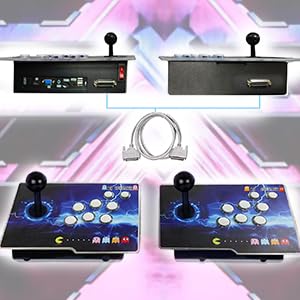
Image 4.4: The system configuration menu provides options for various game and display settings.
5. Maintenance
- Protective Film: The console surface has a transparent protective film that can be peeled off for a flawless pattern.
- Cleaning: Use a soft, dry cloth to clean the console surface. Avoid abrasive cleaners or solvents.
- Storage: Store the console in a cool, dry place away from direct sunlight and extreme temperatures.
6. Troubleshooting
- System Malfunctions: For common system malfunctions, reset the machine by removing and re-inserting the memory card.
- No Display: Ensure the TV or monitor is switched to the correct HDMI or VGA input channel. Check all cable connections.
- Controller Not Responding: Verify that the connection cable between Player 1 and Player 2 units is securely attached. If using additional USB controllers, ensure they are properly connected.
- Audio Issues: Check the volume knob on the Player 1 unit and your TV/monitor's volume settings.
7. Specifications
| Feature | Detail |
|---|---|
| Product Dimensions | 12.4"L x 8.6"W x 2.6"H |
| Controller Type | Button Control, Joystick |
| Screen Size (Recommended) | 25 Inches (for optimal viewing) |
| Power Source | Battery Powered (internal) / AC Adapter |
| Hardware Interface | HDMI, VGA, USB |
| Age Range (Description) | Adult (Recommended: 12 years and up) |
| Display Type | LCD or LED (compatible) |
| Material | Metal |
| Memory Storage Capacity | 128 GB TF Card (for games) |
| Form Factor | Split Console |
| Item Weight | 8.48 pounds |
| Manufacturer | RegiisJoy |
8. Warranty and Support
RegiisJoy offers a replacement card service for system malfunctions. For any questions or further support regarding your product, please visit the official RegiisJoy website or contact customer service through the seller's page on Amazon.
Seller: RegiisJoy
Seller Store: Visit the RegiisJoy Store


