
1. Introduction
This manual provides detailed instructions for the proper setup, operation, and maintenance of your FEELWORLD T7 Plus 7-inch 3D LUT On-Camera Field Monitor. Please read this manual thoroughly before using the product to ensure optimal performance and to prevent damage.
The FEELWORLD T7 Plus is a professional 7-inch Full HD on-camera monitor designed for filmmakers and videographers. It features a durable aluminum alloy housing, a 1920x1200 IPS display, 4K HDMI input/output, and advanced monitoring tools such as 3D LUT, Waveform, Histogram, and Vectorscope to enhance your workflow and image analysis.
2. Product Overview
The FEELWORLD T7 Plus monitor offers a clear and detailed view of your footage with its 7-inch IPS screen, providing a 1920x1200 resolution and a wide 160-degree viewing angle. Its robust aluminum alloy frame ensures durability while maintaining a lightweight profile, making it suitable for various shooting environments.

Figure 2.1: FEELWORLD T7 Plus monitor on a camera rig, highlighting its professional monitoring features.
Key features include:
- 7-inch Full HD IPS Display: 1920x1200 resolution with 160° wide viewing angle.
- 4K HDMI Input/Output: Supports 4K HDMI signals up to 30Hz.
- Professional Monitoring Tools: 3D LUT, Waveform, Histogram, Vectorscope, Peaking Focus Assist, False Colors, Exposure, Zoom, Anamorphic Mode, Image Flip, and more.
- Durable Construction: Rugged aluminum alloy housing, 18mm thickness, 320g weight.
- Flexible Power Options: Supports F970 battery plate (standard) and optional D28S/D54, LP-E6, U60 battery plates, or DC power adapter.
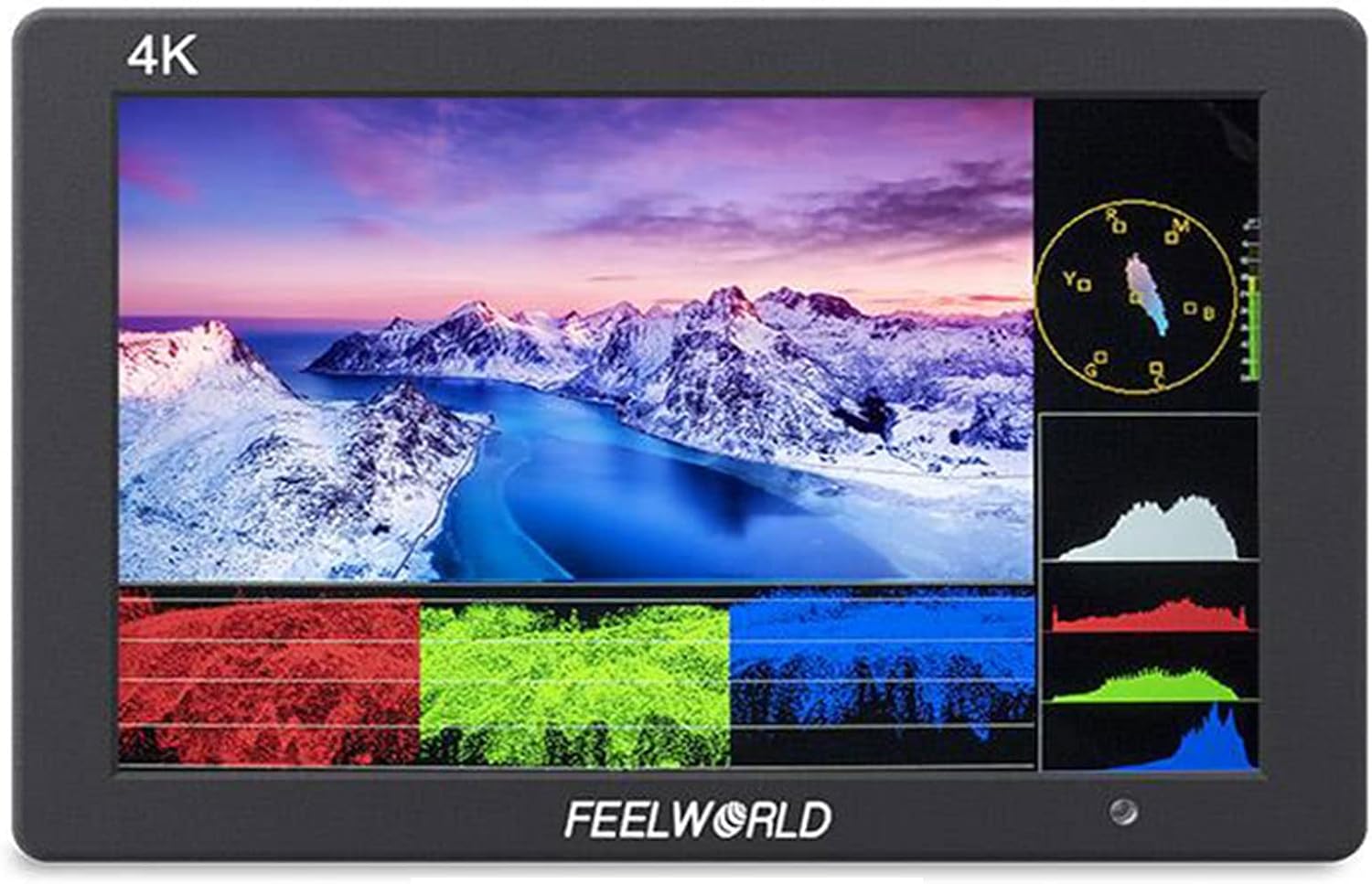
Figure 2.2: Monitor display showcasing advanced monitoring tools.
3. Package Contents
Please check the contents of your package to ensure all items are present:
- 1 × FEELWORLD T7 Plus Monitor
- 1 × Mini HDMI Cable
- 1 × USB Adapter Cable
- 1 × Sunshade
- 1 × Mini Hot Shoe Mount + Hex Wrench
- 1 × F970 Battery Plate (pre-installed)
- 1 × Operation Manual (this document)

Figure 3.1: Included accessories with the FEELWORLD T7 Plus monitor.
4. Setup
4.1 Powering the Monitor
The T7 Plus offers flexible power options:
- Battery Power: The monitor comes with a standard F970 battery plate. Optional battery plates (D28S/D54, LP-E6, U60) can be purchased separately to accommodate different battery types. Ensure the battery is fully charged before use.
- DC Power Adapter: An optional DC 12V power adapter can be used for continuous power.
Important: When turning off the monitor, always press the power button first. Do not disconnect the power cable directly without powering down the unit.

Figure 4.1: Battery plate options and DC power input.
4.2 Mounting the Monitor
Attach the included Mini Hot Shoe Mount to the 1/4"-20 thread socket on the bottom of the monitor. Secure the hot shoe mount to your camera's hot shoe or a compatible rig.
4.3 Connecting HDMI
Use the provided Mini HDMI cable to connect your camera's HDMI output to the HDMI IN port on the monitor. The monitor supports 4K HDMI signals up to 30Hz. You can also use the HDMI OUT port to loop through the signal to another device.

Figure 4.2: Monitor ports and control buttons.
5. Operating
5.1 Basic Controls
The monitor features several buttons for navigation and function control:
- Power Button: Turns the monitor on/off.
- Menu Button: Accesses the main menu.
- Navigation Buttons (< / >): Used to navigate through menu options and adjust settings.
- F1/F2 Buttons: Customizable function buttons for quick access to frequently used features.
5.2 Monitoring Functions
The T7 Plus includes a suite of professional monitoring tools:
- 3D LUT: Apply custom 3D Look-Up Tables for accurate color calibration and preview.
- Waveform: Displays the luminance levels of your video signal, helping to ensure proper exposure.
- Histogram: Shows the distribution of tones (blacks, mid-tones, whites) in your image.
- Vectorscope: Visualizes the color information of your video signal, aiding in color correction.
- Peaking Filter: Highlights sharp edges in the image to assist with precise focus.
- False Colors: Assigns specific colors to different exposure levels, making it easy to identify overexposed or underexposed areas.
- Exposure (Zebras): Displays zebra patterns over areas exceeding a set luminance threshold.
- Zoom-in: Magnifies a portion of the image for critical focus checks.
- Anamorphic Mode: De-squeezes anamorphic footage for proper viewing.
- Image Flip: Flips the image horizontally, vertically, or both, useful for various mounting orientations.
6. Maintenance
6.1 Cleaning
- Use a soft, dry cloth to clean the monitor's housing.
- For the screen, use a microfiber cloth specifically designed for electronics displays. If necessary, dampen the cloth slightly with a screen cleaning solution. Avoid harsh chemicals or abrasive materials.
6.2 Storage
When not in use, store the monitor in a cool, dry place, away from direct sunlight and extreme temperatures. Use the provided sunshade or a protective case to prevent scratches to the screen.
6.3 Firmware Upgrades
The monitor features a USB UPGRADE port for firmware updates. Periodically check the FEELWORLD official website for the latest firmware versions and instructions to ensure your monitor has the most current features and bug fixes.

Figure 6.1: USB UPGRADE port for firmware updates.
7. Troubleshooting
If you encounter issues with your FEELWORLD T7 Plus monitor, please refer to the following common problems and solutions:
- No Power:
- Ensure the battery is fully charged and correctly inserted, or the DC power adapter is securely connected.
- Press and hold the power button for a few seconds to turn on the monitor.
- No Signal:
- Verify that the HDMI cable is securely connected to both the camera's output and the monitor's HDMI IN port.
- Check the camera's output settings to ensure HDMI output is enabled and configured correctly.
- Try a different HDMI cable to rule out cable issues.
- Distorted Image / Incorrect Colors:
- Check the monitor's display settings (e.g., color temperature, brightness, contrast).
- If 3D LUT is enabled, ensure the correct LUT is applied for your footage.
- Verify the input signal resolution matches the monitor's supported resolutions.
- Buttons Not Responding:
- Power cycle the monitor (turn off, then on again).
- Ensure no debris is obstructing the buttons.
If the problem persists after attempting these solutions, please contact FEELWORLD customer support for further assistance.
8. Specifications
The following table details the technical specifications of the FEELWORLD T7 Plus monitor:

Figure 8.1: Monitor dimensions and port layout.
| Feature | Specification |
|---|---|
| Brand | FEELWORLD |
| Model | T7 Plus |
| Display Size | 7 inches |
| Resolution | 1920x1200 IPS |
| Viewing Angle | 160 Degrees |
| Material | Aluminum Alloy |
| Connectivity Technology | Wired (HDMI) |
| Video Capture Resolution | 1080p, 4K (up to 30Hz) |
| Power Source | Battery Powered (F970 standard), DC 12V |
| Item Weight | 0.91 Kilograms (2.01 pounds) |
| Package Dimensions | 8.7 x 6.46 x 3.35 inches |
| Included Components | Monitor, Mini HDMI Cable, USB Adapter Cable, Sunshade, Mini Hot Shoe Mount+Hex Wrench, F970 Battery Plate, Operation Manual |
9. Warranty and Support
For warranty information and technical support, please refer to the warranty card included with your product or visit the official FEELWORLD website. You may also contact the seller directly for assistance with product-related inquiries.