Introduction
Welcome to the user manual for your Joyroom JR-FT1 Pro Smartwatch. This guide provides essential information on setting up, operating, and maintaining your device to ensure optimal performance. The JR-FT1 Pro is a full touch screen smartwatch featuring IP67 waterproofing, real-time heart rate detection, blood oxygen monitoring, sleep analysis, and various sports modes.
Please read this manual carefully before using your smartwatch and retain it for future reference.
Setup Guide
Package Contents
- Joyroom JR-FT1 Pro Smartwatch
- Magnetic Charging Cable
- User Manual
Charging the Smartwatch
Before first use, fully charge your smartwatch. Connect the magnetic charging cable to the charging contacts on the back of the watch and plug the USB end into a standard USB power adapter (not included) or a computer USB port.
The watch screen will display the charging status. A full charge typically takes approximately 2 hours. The device offers a 7-day service life and up to 15 days of standby time on a single charge.

The smartwatch is easily charged using its magnetic charging cable, indicating battery status on the screen.
App Installation and Pairing
- Download the App: Scan the QR code in the manual or search for the companion app (e.g., "Joyroom Fit" or similar, refer to packaging for exact name) on your smartphone's app store (App Store for iOS, Google Play Store for Android).
- Register/Log In: Open the app and follow the on-screen instructions to create an account or log in.
- Enable Bluetooth: Ensure Bluetooth is enabled on your smartphone.
- Pair Device: In the app, navigate to the device section and select "Add Device" or "Pair Device." Choose "JR-FT1 Pro" from the list of available devices.
- Confirm Pairing: Follow any prompts on both your phone and smartwatch to confirm the pairing. Once connected, the watch will synchronize data with the app.
Operating Your Smartwatch
Basic Navigation
- Touch Screen: The JR-FT1 Pro features a full touch screen for intuitive control.
- Swipe Up/Down: Access quick settings or notifications.
- Swipe Left/Right: Navigate through different functions and widgets (e.g., heart rate, steps, weather).
- Tap: Select an item or confirm an action.
- Side Button: Typically used to return to the home screen or power on/off the device.
Customizing Watch Faces
Personalize your smartwatch by choosing from various customized dial plates. You can select and apply new watch faces directly from the smartwatch or through the companion app on your smartphone.
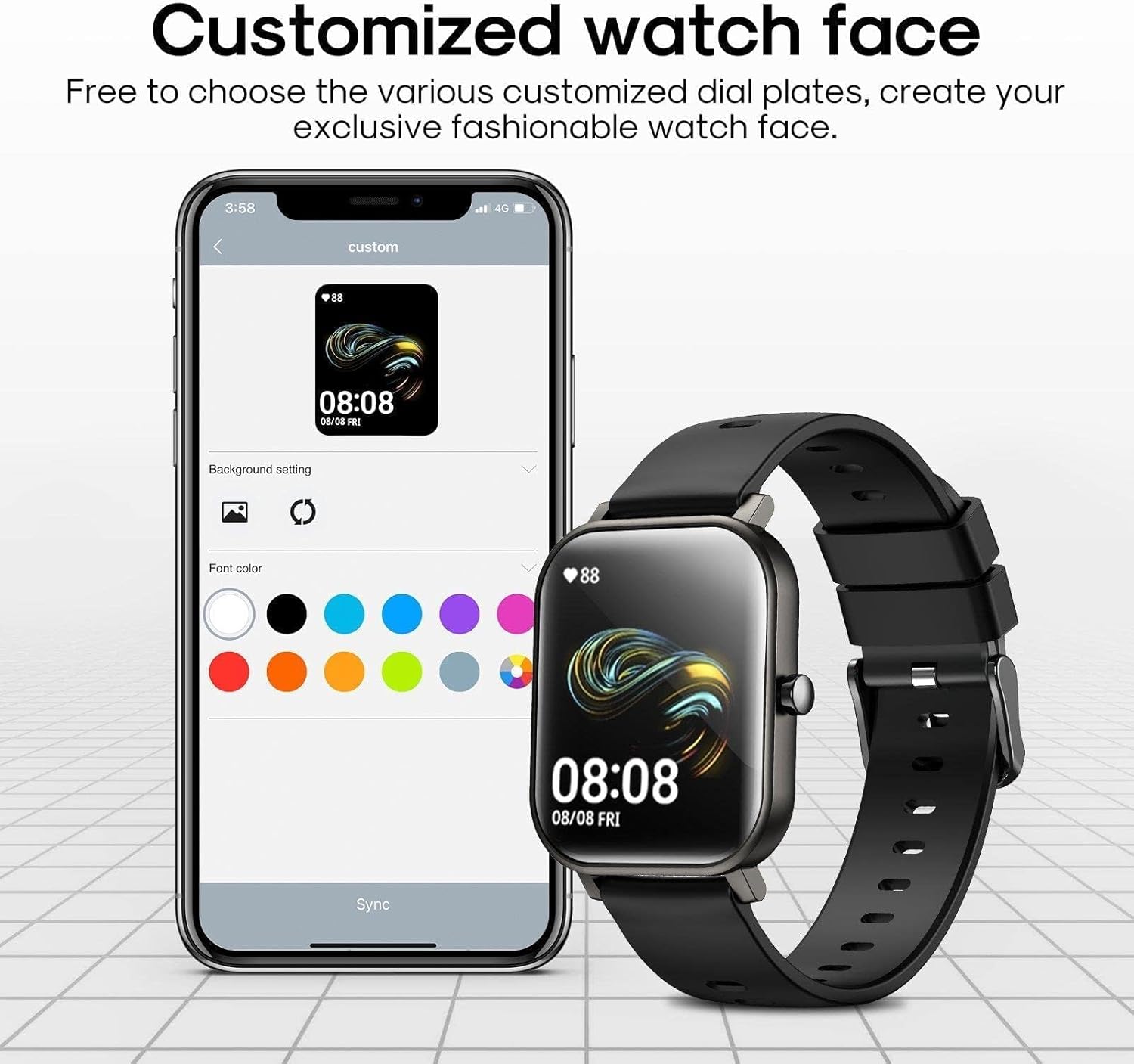
The smartwatch allows for extensive customization of watch faces through its companion application, offering various styles and color options.
Notifications
Once paired with your smartphone, the JR-FT1 Pro can provide call and message information synchronously. Notifications will be displayed clearly on the screen to remind you. Ensure notification permissions are enabled in both your phone's settings and the companion app.
Health Monitoring
The smartwatch offers comprehensive health monitoring features:
- Heart Rate Monitoring: Real-time heart rate detection provides continuous monitoring throughout the day.
- Blood Oxygen Detection: The device can perform real-time blood oxygen level measurements.
- Sleep Analysis: It records effective data on deep and light sleep times, providing insights into your sleep patterns.
For accurate readings, ensure the watch is worn snugly on your wrist, about one finger's width from your wrist bone.
Sports Modes
The JR-FT1 Pro supports 24 different sports modes, allowing you to track various physical activities. Select the desired sport mode from the watch's menu to record data such as duration, calories burned, and heart rate during your workout.

The Joyroom JR-FT1 Pro Smartwatch supports 24 distinct sports modes, enabling comprehensive tracking of various physical activities.
Maintenance and Care
Cleaning
Regularly clean your smartwatch and strap to prevent skin irritation and maintain device hygiene. Use a soft, damp cloth to wipe the screen and strap. Avoid using harsh chemicals or abrasive materials.
Waterproofing (IP67)
The Joyroom JR-FT1 Pro Smartwatch is rated IP67 waterproof. This means it is protected against dust ingress and can withstand immersion in water up to 1 meter for 30 minutes. It is suitable for daily use, such as washing hands or light rain exposure.
Important: The IP67 rating does not guarantee protection against hot water, steam, or prolonged immersion. Avoid wearing the watch in saunas, hot showers, or during diving activities. Do not press buttons while the watch is submerged in water.

With an IP67 waterproof rating, the Joyroom JR-FT1 Pro Smartwatch is protected against immersion in water up to 1 meter for 30 minutes.
Troubleshooting
If you encounter issues with your smartwatch, refer to the following common problems and solutions:
- Watch not turning on: Ensure the watch is fully charged. Connect it to the charger for at least 30 minutes.
- Unable to pair with smartphone:
- Ensure Bluetooth is enabled on your phone and the watch is within range.
- Restart both your phone and the smartwatch.
- Check if the app has necessary permissions enabled in your phone's settings.
- Try unpairing and re-pairing the device through the app.
- Inaccurate health data:
- Ensure the watch is worn correctly, snugly on your wrist, not too loose or too tight.
- Clean the sensor on the back of the watch.
- Avoid excessive movement during measurements.
- Notifications not appearing:
- Verify that notifications are enabled in the companion app and your phone's system settings.
- Ensure the watch is connected to your phone via Bluetooth.
If the problem persists, consult the support section or contact customer service.
Product Specifications
| Feature | Specification |
|---|---|
| Model Name | JR-FT1Pro |
| Brand | Joyroom |
| Connectivity Technology | Bluetooth |
| Wireless Communication Standard | Bluetooth |
| Operating System | Android (Compatible) |
| Special Features | Waterproof (IP67) |
| Screen Size | 58 Millimeters |
| Shape | Oval |
| GPS | No GPS |
| Product Dimensions | 18.6 x 9.8 x 3.4 cm; 210 g |
| Manufacturer | Shenzhen Nito Power Source Technology Co. Ltd. |
Warranty and Support Information
Your Joyroom JR-FT1 Pro Smartwatch comes with a standard manufacturer's warranty. Please refer to the warranty card included in your package for specific terms and conditions, including the warranty period and coverage details.
For technical support, troubleshooting assistance, or warranty claims, please contact Joyroom customer service through their official website or the contact information provided on your product packaging. Ensure you have your product model number (JR-FT1Pro) and proof of purchase available when contacting support.
For more information, visit the official Joyroom website or refer to the contact details provided with your purchase.


