
1. Introduction
Welcome to the instruction manual for your Defunc True Basic Wireless Bluetooth 5.2 Earbuds. These earbuds are designed to provide a comfortable and seamless audio experience with powerful sound, touch controls, and robust water resistance. This manual will guide you through the setup, operation, maintenance, and troubleshooting of your new earbuds to ensure optimal performance and longevity.
2. What's in the Box
- Defunc True Basic Black Earbuds (Left and Right)
- Charging Case
- USB-C Charging Cable
- Silicone Ear Tips with Wings (for stability and comfort)
3. Product Overview
The Defunc True Basic earbuds feature a sleek design and are built for superior sound and comfort. They incorporate a unique MultiTip design for optimal fit and sound delivery.
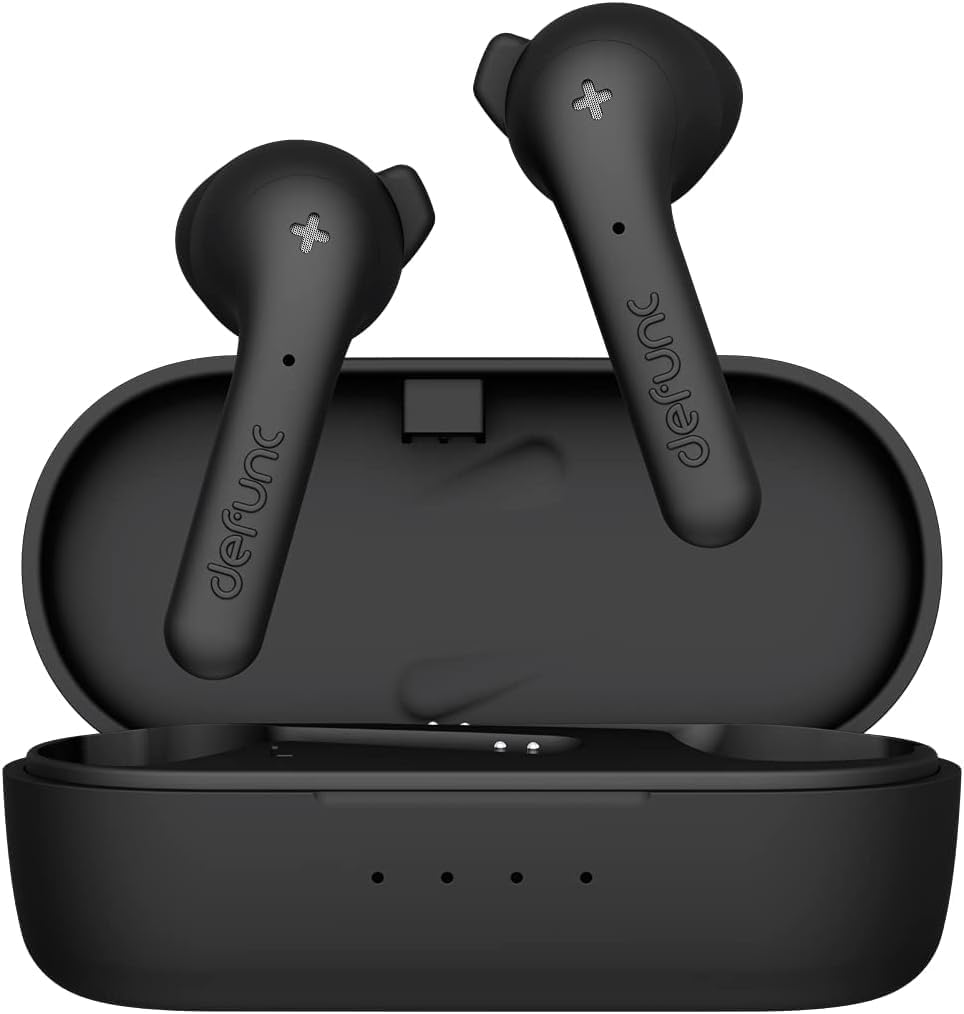
Figure 3.1: Defunc True Basic Earbuds in their charging case.

Figure 3.2: Side view of the Defunc True Basic Earbuds, highlighting their ergonomic shape.
Key Features:
- Superior Sound & Comfort: Designed for long-lasting comfortable listening and seamless sound.
- MultiTip Design: A hybrid earbud tip based on consumer insight for music, communication, and sports.
- IPX4 Water & Sweat Resistant: Protected from splashing water and dripping sweat from any direction.
- Extended Playtime: Up to 22 hours of total playtime with the charging case.
- Fast Charging: Quick charging capabilities for minimal downtime.
- Bluetooth 5.2: Seamless and stable connection with Pure Voice Bone Conductor Technology and Environmental Noise Cancellation (ENC).
- Easy Touch Control: Intuitive touch controls on both earbuds for calls, volume, and track control.
4. Setup
4.1 Initial Charging
Before first use, fully charge your Defunc True Basic earbuds and charging case.
- Place both earbuds into the charging case.
- Connect the USB-C charging cable to the port on the charging case and plug the other end into a compatible USB power source.
- The indicator lights on the case will show the charging status. The earbuds will fully charge in approximately 1.5 hours, and the case in 2 hours.
4.2 Pairing with Your Device
Follow these steps to pair your earbuds with your Bluetooth-enabled device:
- Ensure earbuds are fully charged and placed in the charging case.
- Open the charging case. The earbuds will automatically enter pairing mode, indicated by flashing lights.
- On your device (smartphone, tablet, etc.), go to Bluetooth settings and turn Bluetooth ON.
- Search for "Defunc True Basic" in the list of available devices and select it to connect.
- Once connected, the earbud indicator lights will stop flashing. You are now ready to use your earbuds.
Note: The earbuds support Bluetooth 5.2 Dual Mode for a stable and efficient connection.
5. Operating Instructions
Your Defunc True Basic earbuds feature intuitive touch controls on both earbuds for easy management of your audio and calls.
5.1 Touch Controls
| Action | Control |
|---|---|
| Play/Pause Music | Single tap on either earbud |
| Next Track | Double tap right earbud |
| Previous Track | Double tap left earbud |
| Answer/End Call | Single tap on either earbud |
| Reject Call | Press and hold either earbud |
| Activate Voice Assistant | Triple tap on either earbud |
| Volume Up | Press and hold right earbud |
| Volume Down | Press and hold left earbud |
5.2 Power On/Off
- Power On: The earbuds will automatically power on when removed from the charging case.
- Power Off: Place the earbuds back into the charging case and close the lid. They will automatically power off and begin charging.
6. Maintenance
Proper maintenance ensures the longevity and optimal performance of your earbuds.
- Cleaning: Regularly clean the earbuds and charging case with a soft, dry, lint-free cloth. Avoid using harsh chemicals or abrasive materials.
- Ear Tips: Remove and clean the silicone ear tips periodically with water and mild soap. Ensure they are completely dry before reattaching.
- Water Resistance (IPX4): The earbuds are IPX4 rated, meaning they are resistant to splashing water and sweat. Do not submerge them in water or expose them to strong jets of water. Dry them thoroughly if they get wet.
- Storage: When not in use, store the earbuds in their charging case to protect them and keep them charged.
7. Troubleshooting
If you encounter any issues with your earbuds, try the following solutions:
| Problem | Solution |
|---|---|
| Earbuds not pairing | Ensure earbuds are charged. Turn off and on your device's Bluetooth. Forget "Defunc True Basic" from your device's Bluetooth list and re-pair. |
| Only one earbud working | Place both earbuds back in the case, close the lid, then open it again. Ensure both earbuds have sufficient charge. |
| Low volume or poor sound quality | Adjust volume on both earbuds and your device. Ensure ear tips are properly seated in your ears. Clean ear tips and earbud grilles. |
| Earbuds not charging | Ensure the charging cable is securely connected. Try a different USB port or power adapter. Clean the charging contacts on both earbuds and the case. |
| Connection drops frequently | Ensure your device is within the Bluetooth range (10 meters). Avoid obstacles between your device and earbuds. Reduce interference from other wireless devices. |
8. Specifications
| Feature | Detail |
|---|---|
| Model Name | True Basic |
| Model Number | D4271 |
| Connectivity Technology | Wireless (Bluetooth 5.2) |
| Noise Control | Passive Noise Cancellation, ENC (Environmental Noise Cancellation) |
| Water Resistance Level | IPX4 (Water Resistant) |
| Active Playtime | 5 hours |
| Phone Call Time | 3 hours |
| Standby Time | 50 hours |
| Total Playtime (with case) | 22 hours |
| Earbud Charging Time | 1.5 hours |
| Case Charging Time | 2 hours |
| Charging Port | USB-C |
| Control Method | Touch |
| Speaker Dimensions | 13 mm 25Ω +/- 15% |
| Frequency Range | 2402 - 2480 MHz |
| Item Weight | 1.41 ounces (40 Grams) |
| Product Dimensions | 2.36 x 2.36 x 0.98 inches |
9. Safety Information
Please read and follow these safety guidelines to prevent damage to the product or injury:
- Do not attempt to repair the earbud. A faulty repair may lead to fire, electronic breakdown, or a damaged product.
- Do not use the earbud in an environment where the temperature is below 32°F (0°C) or above 113°F (45°C).
- Avoid using a device indicator light near the eyes of children and animals.
- Do not use the earbud in thunderstorm weather to avoid abnormal earbud behavior and the risk of shock.
10. Warranty and Support
For warranty information or technical support, please refer to the contact details provided on the product packaging or visit the official Defunc website. Keep your proof of purchase for warranty claims.
