1. Introduction
This manual provides instructions for the installation and maintenance of the Deenkee DK600/DK600MAX Robotic Vacuum Cleaner Replacement Kit. Regular replacement of these components is essential to maintain the optimal cleaning performance and longevity of your robotic vacuum cleaner.
2. Package Contents
The Deenkee DK600/DK600MAX Robotic Vacuum Cleaner Replacement Kit typically includes the following items. Please verify all components are present upon opening the package.
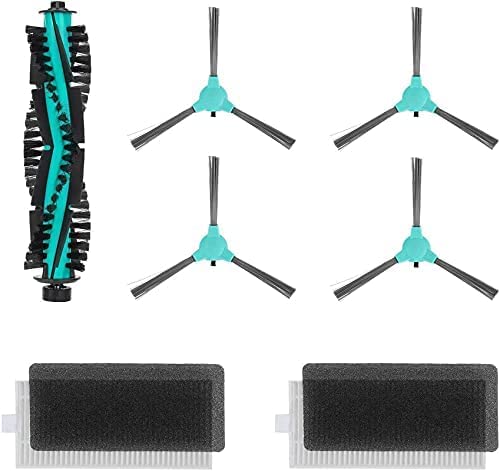
Image 1: Contents of the Deenkee DK600/DK600MAX Replacement Kit. This kit typically includes a main rolling brush, multiple side brushes, and HEPA filters, designed to restore your robot vacuum's cleaning efficiency.
- Main Rolling Brush: 1 unit
- Side Brushes: 2-4 units (depending on kit configuration)
- HEPA Filters: 2-3 units (depending on kit configuration)
- Cleaning Tool: 1 unit (for brush and filter maintenance)
3. Compatibility
This replacement kit is specifically designed for use with the following Deenkee Robotic Vacuum Cleaner models:
- Deenkee DK600
- Deenkee DK600MAX
Using this kit with incompatible models may result in improper fit or reduced performance.
4. Installation Instructions
Before installing any replacement parts, ensure your robotic vacuum cleaner is powered off and disconnected from its charging base.
4.1. Replacing the Main Rolling Brush
- Turn the robot vacuum upside down on a flat surface.
- Locate the brush guard cover, usually secured by two tabs or screws.
- Press the tabs or unscrew the screws to remove the brush guard cover.
- Lift out the old main rolling brush.
- Clean any hair or debris from the brush compartment.
- Insert the new main rolling brush, ensuring the square and hexagonal ends align with their respective slots.
- Replace the brush guard cover and secure it.
4.2. Replacing the Side Brushes
- Turn the robot vacuum upside down.
- Locate the side brushes, typically held by a single screw each.
- Use a screwdriver to remove the screw holding the old side brush.
- Gently pull off the old side brush.
- Align the new side brush with the post and press it down.
- Secure the new side brush with the screw. Repeat for all side brushes.
4.3. Replacing the HEPA Filters
- Open the dustbin compartment on your robot vacuum.
- Remove the dustbin from the robot.
- Open the dustbin cover to access the filter compartment.
- Remove the old HEPA filter and foam filter (if applicable).
- Discard the old filters.
- Insert the new HEPA filter into the designated slot, ensuring it is seated correctly.
- Close the dustbin cover and reinsert the dustbin into the robot vacuum.
5. Maintenance and Care
To ensure optimal performance and extend the lifespan of your replacement parts, regular cleaning and maintenance are recommended.
- Main Rolling Brush: Clean weekly. Use the provided cleaning tool to remove hair and debris tangled around the brush.
- Side Brushes: Inspect weekly and clean as needed. Remove any tangled hair or debris. Replace if bristles are bent or damaged.
- HEPA Filters: Tap out dust weekly. Do not wash HEPA filters with water, as this can damage the filter material. Replace every 2-3 months, or more frequently depending on usage and pet hair presence.
- Dustbin: Empty after each use. Wash the dustbin with water if necessary, ensuring it is completely dry before reinserting.
6. Troubleshooting Common Issues
If you encounter issues after replacing parts, consider the following:
- Brush not spinning: Ensure the main rolling brush and side brushes are correctly installed and free from obstructions. Check that the brush guard cover is securely fastened.
- Reduced suction: Verify that the HEPA filter is clean and correctly seated in the dustbin. Ensure the dustbin is empty and properly installed.
- Unusual noises: Check all brushes for tangled hair or debris. Ensure all parts are securely in place.
7. Specifications
| Feature | Detail |
|---|---|
| Brand | Deenkee |
| Compatible Models | DK600, DK600MAX |
| Filter Type | HEPA |
| Item Weight | 5 ounces (approximate for kit) |
| Package Dimensions | 8.82 x 5.51 x 1.61 inches |
| UPC | 671227797280 |
8. Warranty and Support
For information regarding warranty coverage or technical support for your Deenkee robotic vacuum cleaner and its replacement parts, please refer to the original product manual that came with your robotic vacuum or visit the official Deenkee website.


