
Kunray 48V 2000W Brushless DC Motor Controller
Kunray 48V 2000W Brushless DC Motor Controller User Manual
Introduction
This manual provides detailed instructions for the installation, operation, and maintenance of your Kunray 48V 2000W Brushless DC Motor Controller. Please read this manual thoroughly before use to ensure proper function and safety.

Image: Kunray 48V 2000W Brushless DC Motor Controller with various wiring harnesses.
Product Overview
The Kunray 48V 2000W Brushless DC Motor Controller is designed for high-power electric applications such as e-bikes, scooters, mini motorcycles, and go-karts. It features a robust aluminum alloy construction and advanced control capabilities.
Key Features:
- Voltage Compatibility: Operates with 48V-60V systems, ensuring compatibility with both 48V and 60V motors (battery and motor voltage must match).
- High Power Output: Rated at 2000 watts with a 45 amp limit current, suitable for demanding applications.
- Advanced Design: Equipped with 24 high-quality MOSFETs and chips for reliable performance.
- User-Friendly Installation: All connectors are clearly labeled for straightforward setup.
- Multi-functional Control: Includes features such as three-speed control, reverse function, display output, headlight control, and hard-boot/soft-boot options.

Image: Label on the controller showing nominal voltage, rated current, rated power, and phase angle.
Specifications
| Parameter | Value |
|---|---|
| Brand | Kunray |
| Nominal Voltage | 48V - 60V |
| Rated Power | 2000 Watts |
| Protect Voltage | 42 Volts |
| Limit Current | 45 Amps |
| Phase Degree | 120 Degrees |
| Material | Aluminum Alloy |
| Dimensions | Approximately 205mm x 115mm x 60mm (8.1 x 4.5 x 2.4 inches) |
| Weight | Approximately 1430g (3.15 lbs) |
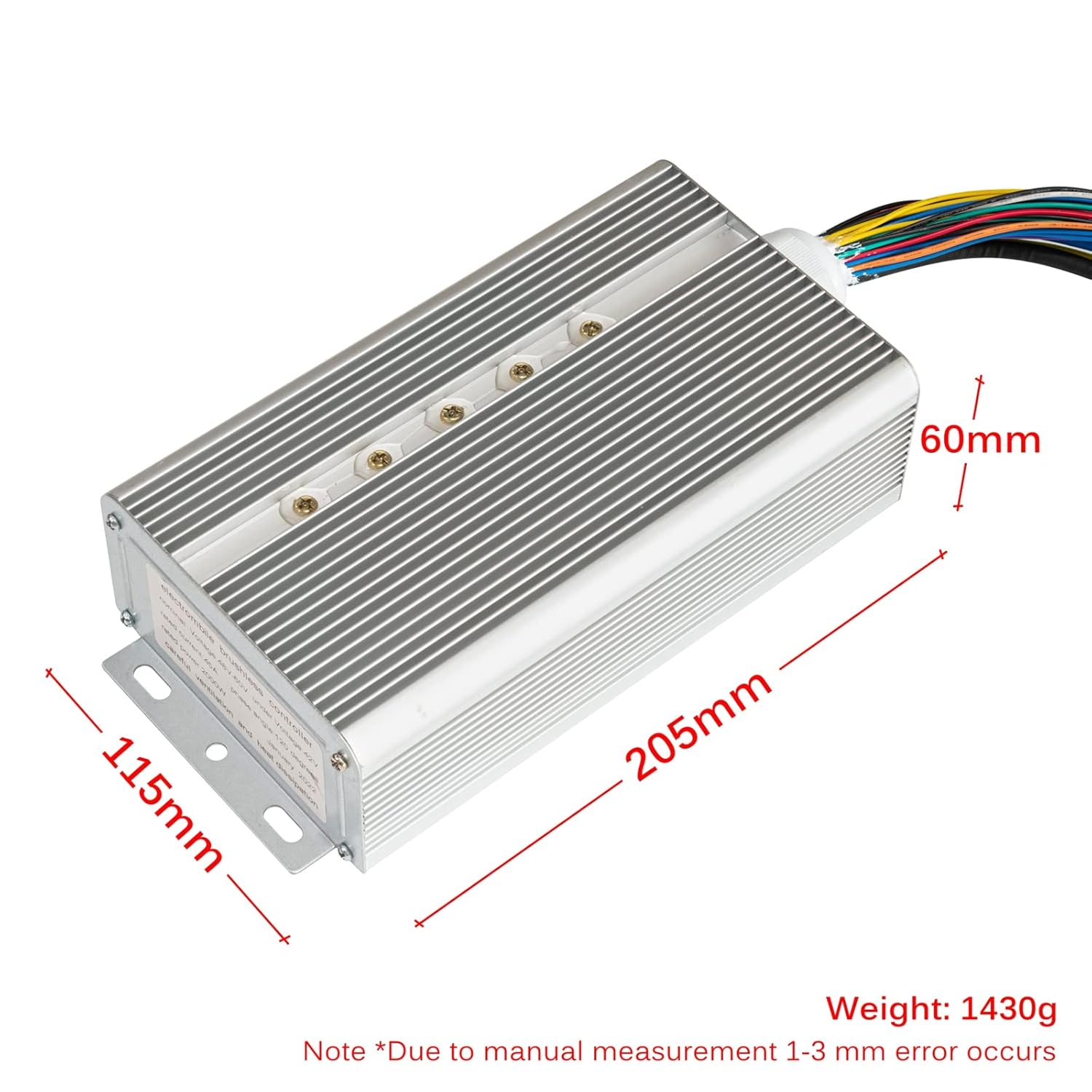
Image: The controller with dimensions labeled: 205mm length, 115mm width, 60mm height, and a weight of 1430g.
Safety Information
General Safety Guidelines:
- Always read the installation instructions carefully before operation to prevent damage to the device or injury.
- Avoid touching the motor during use, as it may become hot and cause burns.
- This device is intended for off-road use only. Verify and comply with all local laws and regulations regarding electric vehicles and their components before riding.
- Kunray is not responsible for any consequences resulting from unlawful use.
- Always yield to pedestrians and adhere to traffic regulations. Be aware that riding on sidewalks may be prohibited in certain areas.
- This product is not a toy. Keep it out of reach of children.

Image: A yellow warning label detailing motor safety operation, including risks like mechanical damage, electric shock, squeeze collision, object strike, and other injuries. It advises reading instructions carefully.
Setup and Installation
Proper installation is critical for the safe and efficient operation of your motor controller. Refer to the wiring diagram below and follow the instructions carefully.

Image: Detailed wiring diagram for the Kunray motor controller, showing labeled connectors for Battery, Motor Phase, Throttle, Low Level Brake, Hall, Reverse, Head Light, Charge Port, Hard Boot, Display, E-Lock, and 3 Speed.
Wiring Connections:
Each connector on the controller is labeled. Ensure all connections are secure and correctly matched.
- Battery +/-: Connect to your 48V or 60V battery pack. Ensure correct polarity (red for positive, black for negative).
- Motor Phase: Connect the three motor phase wires (typically blue, green, yellow) from the controller to the corresponding motor phase wires.
- Throttle: Connect to the throttle assembly for speed control.
- Low Level Brake: Connect to the brake levers. This signal cuts power to the motor when brakes are applied.
- Hall: Connect the Hall sensor wires from the motor to the controller. These provide feedback on motor position.
- Reverse: Connect to a switch for engaging the reverse function.
- Head Light: Connect to the headlight power supply.
- Charge Port: Connect to the charging port for battery charging (if applicable and supported by your system).
- Hard Boot: This connection may enable a hard-start feature. Consult your motor/vehicle documentation for specific use.
- Display: Connect to a compatible display unit for showing speed, battery level, and other parameters. This connection is specifically designed for phase displays.
- E-Lock: Connect to an electronic lock or ignition switch to control power to the controller.
- 3 Speed (L M H): Connect to a three-speed switch to select low, medium, or high-speed modes.
Important: Before making any connections, ensure the battery is disconnected. Double-check all wiring before applying power.
Operating Instructions
Once the controller is correctly installed and all connections are verified:
- Power On: Turn on the E-Lock or ignition switch to power the controller.
- Throttle Control: Gently twist the throttle to engage the motor and control speed.
- Speed Selection: Use the 3-speed switch (if installed) to select your desired speed mode (Low, Medium, High).
- Reverse Function: Activate the reverse switch (if installed) to engage reverse motion. Ensure the area behind you is clear before reversing.
- Headlight: Activate the headlight switch (if installed) to turn on the headlight.
- Braking: Apply brakes as needed. The low-level brake connection will cut motor power for safety.
Maintenance
To ensure the longevity and optimal performance of your Kunray motor controller:
- Regular Inspection: Periodically check all wiring connections for looseness or damage.
- Cleanliness: Keep the controller free from dust, dirt, and moisture. Use a dry, soft cloth for cleaning.
- Heat Dissipation: Ensure the controller's aluminum casing has adequate ventilation for heat dissipation. Do not obstruct cooling fins.
- Avoid Overloading: Do not exceed the rated power and current limits of the controller.
- Storage: If storing the vehicle for an extended period, disconnect the battery.
Troubleshooting
This section provides solutions to common issues. For problems not listed here, contact customer support.
| Problem | Possible Cause | Solution |
|---|---|---|
| Motor does not start | No power to controller | Check battery connection and E-Lock/ignition switch. Ensure battery is charged. |
| Motor runs intermittently | Loose wiring connection | Inspect all wiring, especially throttle, Hall sensor, and motor phase connections. |
| Motor runs but no speed control | Throttle issue | Check throttle wiring and functionality. |
| Controller gets excessively hot | Overload or insufficient ventilation | Reduce load on the motor. Ensure controller has adequate airflow and cooling. |
| Incorrect speed or erratic behavior | Hall sensor or display wiring issue | Verify Hall sensor and display connections. Ensure display is compatible. |
Warranty and Support
For any issues, questions, or support needs regarding your Kunray 48V 2000W Brushless DC Motor Controller, please contact Kunray customer service. Our team is dedicated to providing assistance and resolving any concerns you may have.
Please refer to your purchase documentation for specific warranty terms and conditions.
Related documents48V 2000W Brushless DC Motor Controller

Ask a question about this manual
Ask about setup, troubleshooting, compatibility, parts, safety, or missing instructions. Manuals+ will review the question and use this page’s manual context to help answer it.