1. Product Overview
The Xiaomi AX3000 Router is a high-performance WiFi 6 Gigabit router designed for robust home networking. It features dual-frequency support (2.4GHz and 5GHz) and advanced technologies like Mesh networking for comprehensive coverage.
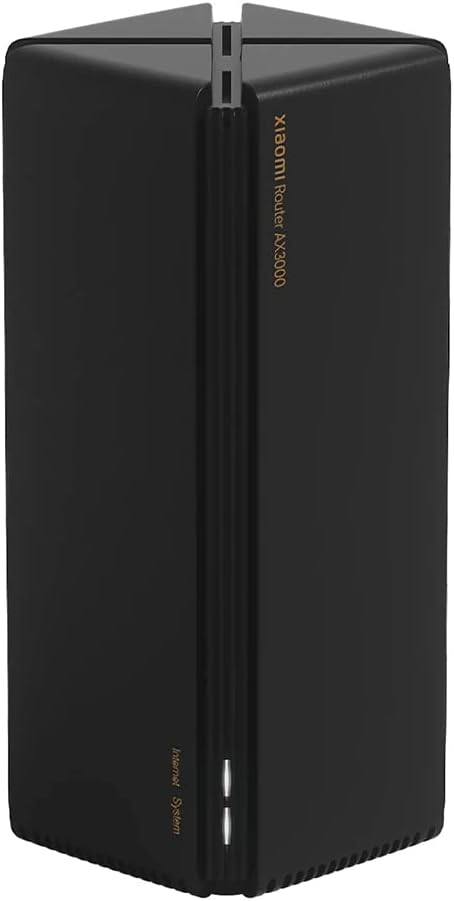
Figure 1: Front view of the Xiaomi AX3000 Router, showcasing its sleek black design and vertical orientation.
Key Features:
- Powerful WiFi 6 (802.11ax): Delivers up to 3000Mbps theoretical maximum rate for fast and efficient wireless connectivity.
- Dual-Band Support: Operates on both 2.4GHz (up to 574Mbps) and 5GHz (up to 2402Mbps) frequencies, with 160MHz bandwidth on 5GHz for higher speeds.
- Mesh Networking: Supports seamless roaming and full house coverage by combining multiple routers.
- 256MB Large Memory: Enables stable connection for up to 128 devices simultaneously.
- 4 Independent Signal Amplifiers: Enhances signal coverage and strength, improving penetration through walls.
- OFDMA Technology: Improves multi-device simultaneous transmission efficiency, reducing latency.
- Qualcomm Chip: Provides stable and reliable performance with an independent network acceleration engine.
- Xiaomi Easy Connect: Simplifies connecting Xiaomi smart devices to the network.

Figure 2: Overview of the Xiaomi AX3000 Router's main features, including its 3000Mbps wireless rate, 256MB memory, 160MHz bandwidth, hidden antennas, and Mesh networking capabilities.

Figure 3: Illustration of WiFi6 benefits for large homes, showing 360° signal coverage from four hidden antennas, signal amplification for wall penetration, and seamless Mesh networking.

Figure 4: Details on the 3000Mbps wireless rate, 5G 160MHz high bandwidth, and OFDMA multi-device simultaneous transmission for the Xiaomi AX3000 Router.

Figure 5: Information on Xiaomi Easy Connect for quick device pairing and the 256MB large memory supporting stable connections for up to 128 devices.

Figure 6: Overview of the router's technical support features like Beamforming, BSS Coloring, WPA3, and IPv6, alongside rigorous quality testing procedures.

Figure 7: Details on the Next Generation Qualcomm Chip for stable operation, the independent network acceleration engine, and the cool dark cube design for effective heat dissipation.
2. Setup Guide
2.1 Package Contents
Before you begin, ensure all items are present in the package:
- 1 x Xiaomi AX3000 Router
- 1 x User Manual (this document)
- 1 x Network Cable
- 1 x Power Adapter (CN-plug)
2.2 Physical Connection
- Power Connection: Connect the provided power adapter to the router's power input interface and plug it into a power outlet.
- WAN Connection: Connect one end of the network cable to the WAN port (labeled 10/100/1000M Adaptive WAN) on the router. Connect the other end to your modem or main internet source.
- LAN Connection (Optional): For wired devices, connect them to any of the three LAN ports (labeled 10/100/1000M Adaptive LAN) on the router using network cables.
2.3 Initial Configuration
After physical connections are made, the router will power on. Wait for the System Indicator and Internet Indicator LEDs to stabilize. The System Indicator should be solid blue, and the Internet Indicator should be solid blue or green, indicating a successful connection.
To configure the router:
- Connect to Router: Connect your computer or mobile device to the router's default Wi-Fi network. The default SSID (network name) and password are usually found on a sticker on the bottom of the router.
- Access Web Interface: Open a web browser and enter the default router IP address (e.g.,
192.168.31.1ormiwifi.com) into the address bar. - Follow On-Screen Prompts: The setup wizard will guide you through setting up your internet connection, Wi-Fi network name (SSID), and password. It is recommended to change the default Wi-Fi password for security.
- Xiaomi Home App (Optional): For easier management and advanced features, download the Xiaomi Home app (available on Android and iOS) and add your router.
3. Operating Instructions
3.1 Wi-Fi Connectivity
- Connecting Devices: Search for your Wi-Fi network name (SSID) on your device and enter the password you set during initial configuration.
- Dual-Band Operation: The router broadcasts both 2.4GHz and 5GHz networks. For older devices or wider coverage, use 2.4GHz. For newer devices requiring higher speeds and less interference, use 5GHz.
- Xiaomi Easy Connect: For compatible Xiaomi smart devices, use the Xiaomi Home app's Easy Connect feature to quickly add them to your network without manual password entry.
3.2 Mesh Networking
The Xiaomi AX3000 Router supports Mesh networking for seamless whole-home Wi-Fi coverage. This allows multiple compatible Xiaomi routers to work together as a single network.
- Adding Mesh Nodes: Place additional compatible Xiaomi Mesh routers in areas with weak Wi-Fi signals.
- Mesh Button: Press the "Mesh Button" on both the main router and the new Mesh node to initiate the pairing process. Refer to the specific Mesh node's manual for detailed pairing instructions.
- Seamless Roaming: Devices will automatically switch to the strongest signal as you move around your home, ensuring uninterrupted connectivity.
3.3 Advanced Settings (Web Interface/App)
Access the router's web interface or the Xiaomi Home app for advanced settings:
- Wireless Security: Configure WPA-PSK/WPA2-PSK/WPA3-SAE encryption, manage wireless access control (black/white lists), and hide your SSID.
- Network Acceleration: Utilize the independent network acceleration engine for optimized performance, especially for gaming or streaming.
- Parental Controls: Manage internet access times and content for connected devices.
- Firmware Updates: Regularly check for and install firmware updates to ensure optimal performance and security.
4. Maintenance
- Placement: Place the router in a central location, away from obstructions, large metal objects, and other electronic devices that may cause interference.
- Cleaning: Keep the router clean and free from dust. Use a soft, dry cloth for cleaning. Do not use liquid cleaners or aerosols.
- Ventilation: Ensure the router's ventilation slots are not blocked to allow for proper natural heat dissipation.
- Firmware Updates: Regularly check for and apply firmware updates through the router's web interface or the Xiaomi Home app. Updates often include performance improvements, security patches, and new features.
- Rebooting: Periodically rebooting the router (unplugging the power for 10 seconds and plugging it back in) can help resolve minor connectivity issues and improve performance.
5. Troubleshooting
5.1 No Internet Connection
- Check Cables: Ensure the network cable from your modem is securely connected to the router's WAN port.
- Check Indicators: Verify that the Internet Indicator LED on the router is solid blue or green. If it's off or blinking, there might be an issue with your internet service provider (ISP) connection.
- Reboot Devices: Power cycle your modem first, then the router. Wait a few minutes for both to fully restart.
- ISP Issue: If the problem persists, contact your Internet Service Provider.
5.2 Slow Wi-Fi Speed or Weak Signal
- Router Placement: Move the router to a more central location, away from walls, large furniture, and electronic devices that can cause interference.
- Interference: Other wireless devices (cordless phones, microwaves, Bluetooth devices) can interfere. Try changing the Wi-Fi channel in the router settings.
- Band Selection: For devices closer to the router and requiring higher speeds, ensure they are connected to the 5GHz network.
- Mesh Network: Consider adding compatible Xiaomi Mesh nodes to extend coverage in larger homes.
- Device Compatibility: Ensure your devices support Wi-Fi 6 (802.11ax) to fully utilize the router's capabilities.
5.3 Cannot Access Router Settings
- Correct IP Address: Ensure you are using the correct IP address (e.g.,
192.168.31.1) or domain (miwifi.com). - Network Connection: Verify your device is connected to the router's Wi-Fi network or via an Ethernet cable to a LAN port.
- Reset Router: If you forgot your password or cannot access settings, press and hold the "System Reset" button on the router for about 5-10 seconds until the System Indicator blinks. This will restore factory default settings, and you will need to reconfigure the router.
6. Specifications
| Feature | Detail |
|---|---|
| Brand | Xiaomi |
| Model | AX3000 |
| CPU | IPQ5000 Dual Core Processor 1.0GHz |
| Network Throttle Motor | Single Core 1.0GHz |
| RAM | 256MB |
| 2.4G Wi-Fi | 2x2 (IEEE 802.11ax protocol, max 574Mbps) |
| 5G Wi-Fi | 2x2 160MHz (IEEE 802.11ax protocol, max 2402Mbps) |
| Antenna | 4* integrated product antenna |
| Heat Dissipation | Natural heat dissipation |
| Interfaces | 1 * 10/100/1000M Adaptive WAN port, 3 * 10/100/1000M Adaptive LAN Ports |
| LED Indicators | 1 * System Indicator, 1 * Internet Indicator |
| Buttons | 1 * System Reset, 1 * Mesh Button |
| IEEE Protocol | 802.11a/b/g/n/ac/ax, 802.3/3u/3ab |
| Wireless Security | WPA-PSK/WPA2-PSK/WPA3-SAE, wireless access control, SSID hiding, smart anti-scratch network |
| Operating System | MiWiFi ROM (based on OpenWRT) |
| Management App | Support Web, Android, iOS |
| Operating Temperature | 0 ~ 40 °C (32 ~ 104 °F) |
| Working Humidity | 10% ~ 90% RH (non-condensing) |
| Dimensions (Package) | 11.81 x 3.94 x 3.94 inches |
| Item Weight | 1.76 pounds |
7. Warranty and Support
7.1 Warranty Information
Xiaomi products typically come with a limited warranty. Please refer to the warranty card included in your product packaging or visit the official Xiaomi website for detailed warranty terms and conditions specific to your region. Keep your purchase receipt as proof of purchase for warranty claims.
7.2 Customer Support
For technical assistance, troubleshooting, or product inquiries, please contact Xiaomi customer support through their official website or the contact information provided in your product documentation. You can also visit the Xiaomi Store on Amazon for more product information and resources.


