
1. Introduction
Thank you for choosing the Realspace Trazer 56" W Computer Desk with Storage Shelves. This manual provides essential information for the safe assembly, operation, and maintenance of your new desk. Please read these instructions carefully before beginning assembly and retain them for future reference.
The Realspace Trazer desk is designed to organize your workspace efficiently. It features a sturdy metal frame, a durable particleboard top with a paper laminate finish, and three shelves for storage. The design includes adjustable shelving for versatile use, such as accommodating a CPU or larger items.

Image 1.1: Fully assembled Realspace Trazer Computer Desk.
2. Safety Information
- Read All Instructions: Ensure you understand all assembly steps and safety warnings before proceeding.
- Two-Person Assembly: This product is heavy and/or oversized. It may require more than one person to handle and assemble safely to prevent injury or damage.
- Use Correct Tools: Ensure you have all necessary tools as specified in the assembly guide. Do not use power tools unless explicitly instructed, as they may overtighten fasteners and damage the product.
- Stable Surface: Assemble the desk on a clean, flat, and stable surface to prevent scratching or damage to the product or your floor.
- Secure All Fasteners: Ensure all screws, bolts, and other fasteners are tightened securely before using the desk. Periodically check and re-tighten as needed.
- Weight Capacity: Do not exceed the maximum weight recommendations for the desktop or shelves. Overloading can cause instability and damage. The maximum weight recommendation is 58.4 pounds.
- Children and Pets: Keep children and pets away from the assembly area. Small parts can be a choking hazard.
- Placement: Place the desk on a level floor. Avoid placing it near heat sources, direct sunlight, or in damp environments.
3. Package Contents
Before beginning assembly, verify that all parts are present and undamaged. Refer to the detailed parts list included in your product packaging. Typically, your package will include:
- Desktop Panel
- Shelf Panels (3)
- Metal Frame Components
- Assembly Hardware (screws, bolts, connectors, adjustable feet)
- Assembly Tools (if included, otherwise standard household tools like a screwdriver may be required)
If any parts are missing or damaged, do not proceed with assembly. Contact customer support for assistance.
4. Setup and Assembly
Follow the step-by-step instructions provided in the separate assembly guide included with your product. The general assembly process involves:
- Unpack and Identify Parts: Carefully remove all components from the packaging. Lay them out on a soft, clean surface to prevent scratches. Identify each part using the provided parts list.
- Assemble the Frame: Connect the metal frame components according to the diagrams. Ensure all connections are secure but do not fully tighten screws until the frame is complete.
- Attach Shelf Panels: Install the three shelf panels into the designated slots or onto the frame. Note that one shelf is removable for adjustable storage.
- Attach Desktop Panel: Secure the main desktop panel to the top of the assembled frame.
- Final Tightening: Once all components are in place and aligned, fully tighten all screws and bolts.
- Leveling: Adjust the feet at the bottom of the desk to ensure it is stable and level on your floor.

Image 4.1: Dimensional diagram of the Realspace Trazer desk, showing overall measurements and shelf placement.
5. Operating Instructions
The Realspace Trazer desk is designed for straightforward use in home or office environments.
- Desktop Use: Place your computer, monitor, and other work essentials on the main desktop surface. The durable laminate finish is designed to resist scratches and splashes.
- Storage Shelves: Utilize the three integrated shelves to store office accessories, books, or other items.
- Adjustable Shelving: One of the shelves is removable, allowing you to create extra space for larger items like a CPU tower or tall binders. To adjust, carefully lift and reposition the shelf as needed. Ensure it is securely seated before placing items on it.
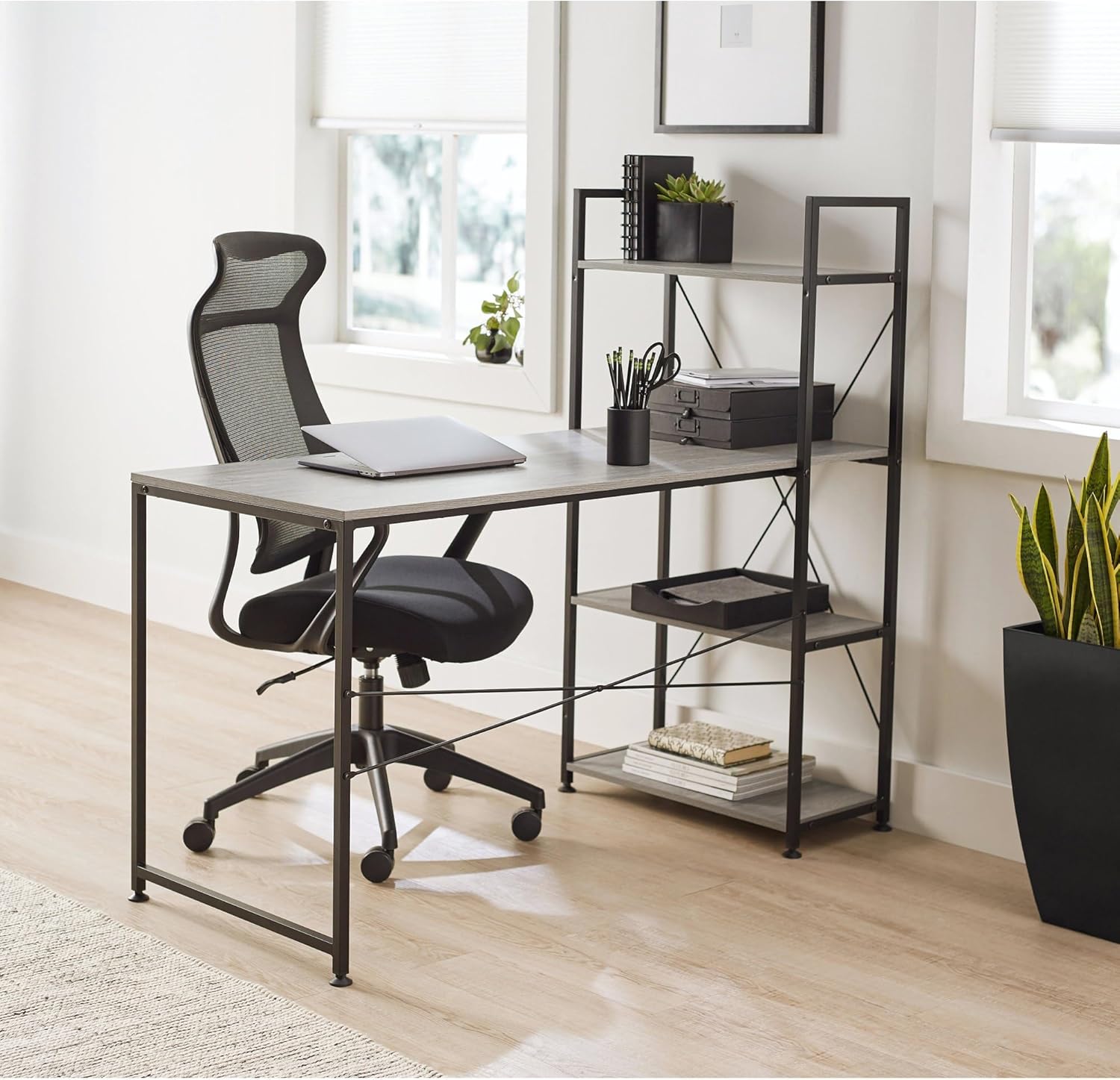
Image 5.1: Realspace Trazer desk in use, showcasing storage and desktop space.
6. Maintenance
Proper care will ensure the longevity and appearance of your Realspace Trazer desk.
- Cleaning: Wipe surfaces with a soft, damp cloth. Avoid abrasive cleaners or harsh chemicals, which can damage the laminate finish.
- Spills: Clean up spills immediately to prevent staining or damage to the particleboard.
- Fasteners: Periodically check all screws and bolts to ensure they remain tight. Re-tighten as necessary to maintain stability.
- Avoid Extreme Conditions: Do not expose the desk to extreme temperatures or humidity, as this can cause warping or damage to the materials.

Image 6.1: Close-up view of the desk's laminate surface, highlighting its texture and finish.
7. Troubleshooting
| Problem | Possible Cause | Solution |
|---|---|---|
| Desk is wobbly or unstable. | Loose fasteners; uneven floor. | Check and tighten all screws and bolts. Adjust the leveling feet at the bottom of the desk. |
| Missing parts or damaged components. | Packaging error; shipping damage. | Do not proceed with assembly. Contact customer support immediately for replacement parts. |
| Difficulty assembling. | Incorrect step order; misaligned parts. | Review the assembly guide carefully. Ensure parts are oriented correctly. Seek assistance if needed, especially for heavy components. |
8. Specifications
- Brand: Realspace
- Model Name: Trazer
- Desk Design: Computer Desk
- Color: Gray
- Style: Modern
- Product Dimensions (D x W x H): 59.4" x 27.2" x 4.8" (Note: This appears to be package dimensions. Assembled dimensions are approximately 56" W based on product title and images.)
- Item Weight: 58.4 Pounds
- Base Material: Engineered Wood
- Top Material Type: Metal (Note: Product description states Particleboard with paper laminate finish for top, metal for frame. This specification might refer to the frame material.)
- Finish Type: Laminated
- Number of Shelves: 3 (with adjustable/removable feature)
- Maximum Weight Recommendation: 58.4 Pounds
- Required Assembly: Yes
- Manufacturer: OFFICE DEPOT
- UPC: 735854734879
- ASIN: B09KP345NV
9. Warranty and Support
This Realspace Trazer desk comes with a 1-year limited manufacturer's warranty. This warranty covers defects in materials and workmanship under normal use. Please refer to the warranty card included with your product for full terms and conditions.
For technical support, missing parts, or warranty claims, please contact the retailer where you purchased the product or the manufacturer directly. Keep your proof of purchase for warranty validation.
