
Winix 9800
Winix 9800 4-Stage True HEPA Air Purifier with WiFi and PlasmaWave Instruction Manual
Model: 9800
Brand: Winix
Introduction
This manual provides essential information for the safe and efficient operation of your Winix 9800 4-Stage True HEPA Air Purifier. Please read thoroughly before use and retain for future reference.
The Winix 9800 features a comprehensive 4-stage air purification system designed to remove airborne particles as small as 0.003 microns. It incorporates PlasmaWave® Technology, Smart Sensors for air quality monitoring, Auto Mode for efficient operation, and a Sleep Mode for quiet performance. WiFi connectivity allows for remote control and monitoring via the Winix Smart App.
Product Features
- 4-Stage Air Purification System: Effectively captures 99.99% of airborne particles as small as 0.003 microns.
- PlasmaWave® Technology: Assists in reducing airborne bacteria and viruses.
- Smart Sensors: Detect and monitor ambient air quality, providing visual feedback.
- Auto Mode: Automatically adjusts fan speed based on detected air quality for optimal efficiency.
- Sleep Mode: Activates automatically in darkened rooms for quiet, energy-efficient operation.
- WiFi Connectivity: Enables control and monitoring via the Winix Smart App.
- Coverage Area: AHAM Verifide for rooms up to 500 sq ft. Cleans rooms up to 2,420 sq ft in 1 hour.
Filtration System Components
- Washable Fine Mesh Pre-Filter: The first line of defense against larger airborne particles, extending the life of subsequent filters.
- Activated Carbon Filter: Reduces Volatile Organic Compounds (VOCs) and common household odors from cooking, pets, and smoke.
- True HEPA Filter: Traps 99.99% of airborne allergens including pollen, dust, smoke, pet dander, and ultrafine particles.
- PlasmaWave®: Creates hydroxyls to break down airborne pollutants at a molecular level.

Setup Guide
Unpacking
Carefully remove the air purifier from its packaging. Ensure all components are present: the main unit, washable fine mesh pre-filter, activated carbon filters, and True HEPA filter.
Filter Installation
- Open the front panel of the air purifier.
- Remove any protective packaging from all filters.
- Install the True HEPA filter first, followed by the Activated Carbon filters. Ensure correct orientation as indicated on the filters.
- Place the Washable Fine Mesh Pre-Filter on top of the other filters.
- Close the front panel securely.
Placement
Place the air purifier on a flat, stable surface. Ensure there is adequate space (at least 6-12 inches) around the unit for optimal airflow.
Power Connection
Plug the power cord into a standard electrical outlet.
Operating Instructions
Power On/Off
Press the Power button on the control panel to turn the unit on or off.
Fan Speed Control
Use the Fan Speed button to cycle through different fan speeds: Low, Medium, High, Turbo. In Auto Mode, the unit adjusts fan speed automatically.
Auto Mode
Press the Auto Mode button. The unit will automatically adjust its fan speed based on the detected air quality, indicated by the air quality sensor light.
Sleep Mode
When in Auto Mode, the unit will automatically enter Sleep Mode in a dark room, operating at a reduced fan speed for quiet operation.

PlasmaWave® Function
The PlasmaWave® function is typically on by default. To toggle it on or off, press and hold the Fan Speed and Auto Mode buttons simultaneously for 3 seconds.
WiFi Connectivity and Winix Smart App
Download the Winix Smart App from your device's app store. Follow the in-app instructions to connect your air purifier to your home WiFi network. This allows for remote control, air quality monitoring, and filter life tracking.


Maintenance
Filter Replacement Indicator
The unit features a filter replacement indicator light on the control panel. When illuminated, it signifies that the filters require replacement.

Pre-Filter Cleaning
The washable fine mesh pre-filter should be cleaned regularly (e.g., every 2-4 weeks) by vacuuming or rinsing with water. Ensure it is completely dry before reinstallation.
Activated Carbon Filter Replacement
Replace the activated carbon filters approximately every 3 months, or as indicated by the filter replacement light. These filters are not washable.
True HEPA Filter Replacement
Replace the True HEPA filter approximately every 12 months, or as indicated by the filter replacement light. This filter is not washable.
Resetting Filter Life Indicator
After replacing filters, press and hold the Filter Reset button (refer to specific model instructions if button is not clearly labeled) for 3-5 seconds until the indicator light turns off.
Troubleshooting
If you encounter issues with your Winix 9800 Air Purifier, please refer to the following common solutions:
| Problem | Possible Cause | Solution |
|---|---|---|
| Unit does not turn on | Power cord not securely plugged in; Power outage | Ensure power cord is fully inserted into outlet; Check household circuit breaker. |
| Airflow is weak | Filters are dirty or clogged; Air intake/outlet blocked | Clean or replace filters; Ensure unit is placed with adequate clearance. |
| Unusual noise | Foreign object in fan; Filters not installed correctly | Turn off and unplug unit, check for obstructions; Reinstall filters correctly. |
| Air quality indicator always blue/green (Good) despite poor air | Sensor is dirty | Clean the air quality sensor with a soft, dry cloth. |
| WiFi connection issues | Incorrect network password; Router too far; App issues | Verify WiFi password; Move unit closer to router; Restart app or unit. |
Specifications
- Brand: Winix
- Model: 9800
- Color: Black
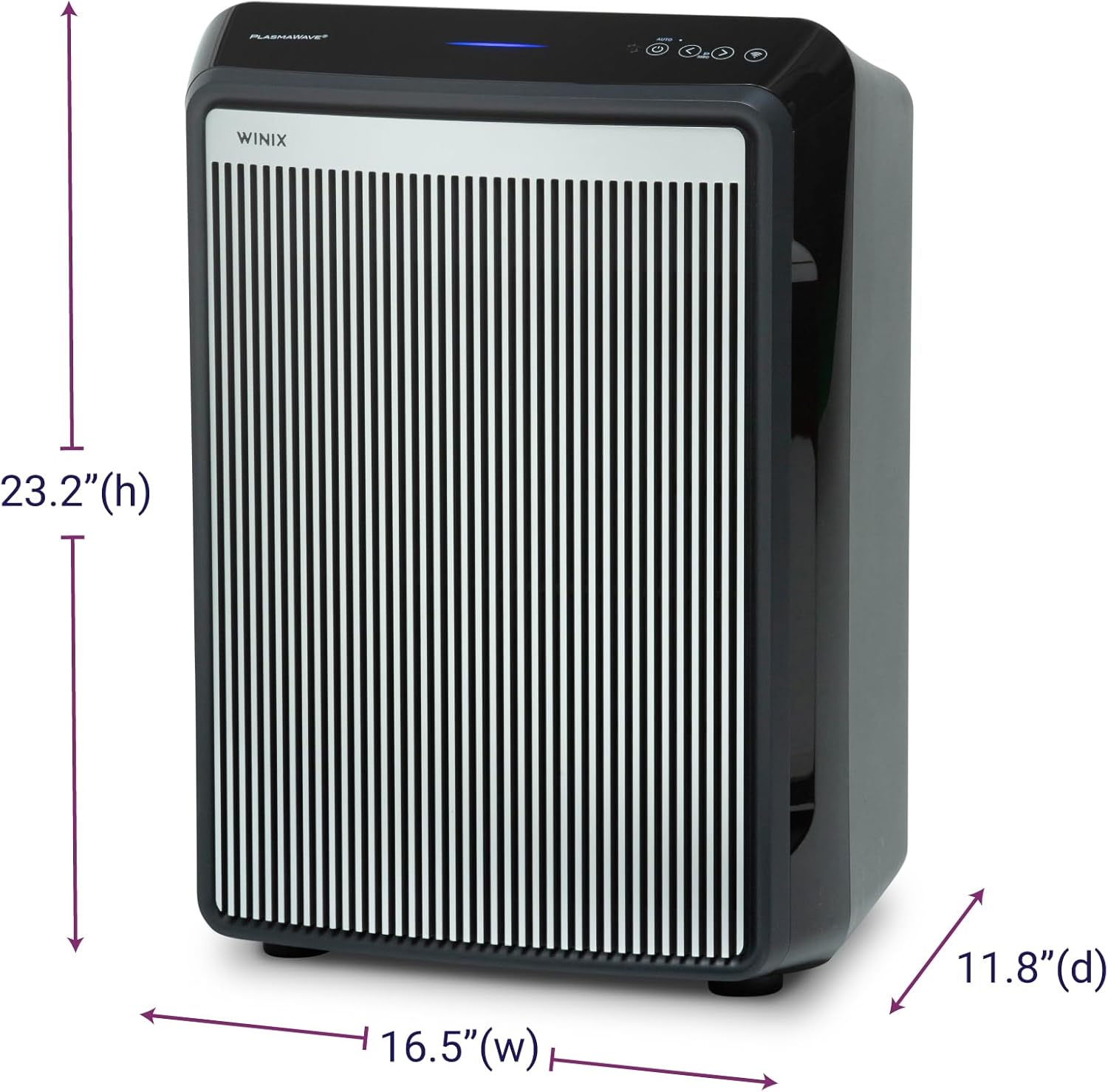
- Product Dimensions (D x W x H): 11.8" x 16.5" x 23.2"
- Item Weight: 19 pounds
- Floor Area Coverage: AHAM Verifide at 500 sq ft. Cleans up to 2,420 sq ft in 1 hour.
- Noise Level: 26.2 Decibels (lowest setting)
- Particle Retention Size: 0.003 Micron (True HEPA)
- Wattage: 95 watts
- Controller Type: Button Control, Winix Smart App (iOS, Android), Amazon Alexa
- Special Features: WiFi, 4-Stage Filtration, PlasmaWave®, Smart Sensors, Auto Mode, Sleep Mode
- Certifications: AHAM Certified, CARB Certified, UL Certified
- Included Components: True HEPA Filter (1 year supply), Activated Carbon Filters (1 year supply)
- Care Instructions: Hand Wash (Pre-filter only)
- Assembly Required: No
- Number of Pieces: 1
Warranty and Support
Warranty Information
The Winix 9800 Air Purifier comes with a 2-Year Limited Warranty. This warranty covers defects in materials and workmanship under normal use. Please retain your proof of purchase for warranty claims.
Customer Support
For technical assistance, troubleshooting, or warranty inquiries, please visit the official Winix website or contact Winix customer service. Refer to the product packaging or official website for current contact information.
Online resources and FAQs may also be available on the Winix Store Page.
Related documents9800


Ask a question about this manual
Ask about setup, troubleshooting, compatibility, parts, safety, or missing instructions. Manuals+ will review the question and use this page’s manual context to help answer it.