
1. Product Overview
The SYMYNELEC PTZ Bulb Camera is a 2K wireless security camera designed for easy installation into standard E27 light bulb sockets. It offers 360° pan/tilt functionality, human motion detection, color night vision, and two-way audio communication.
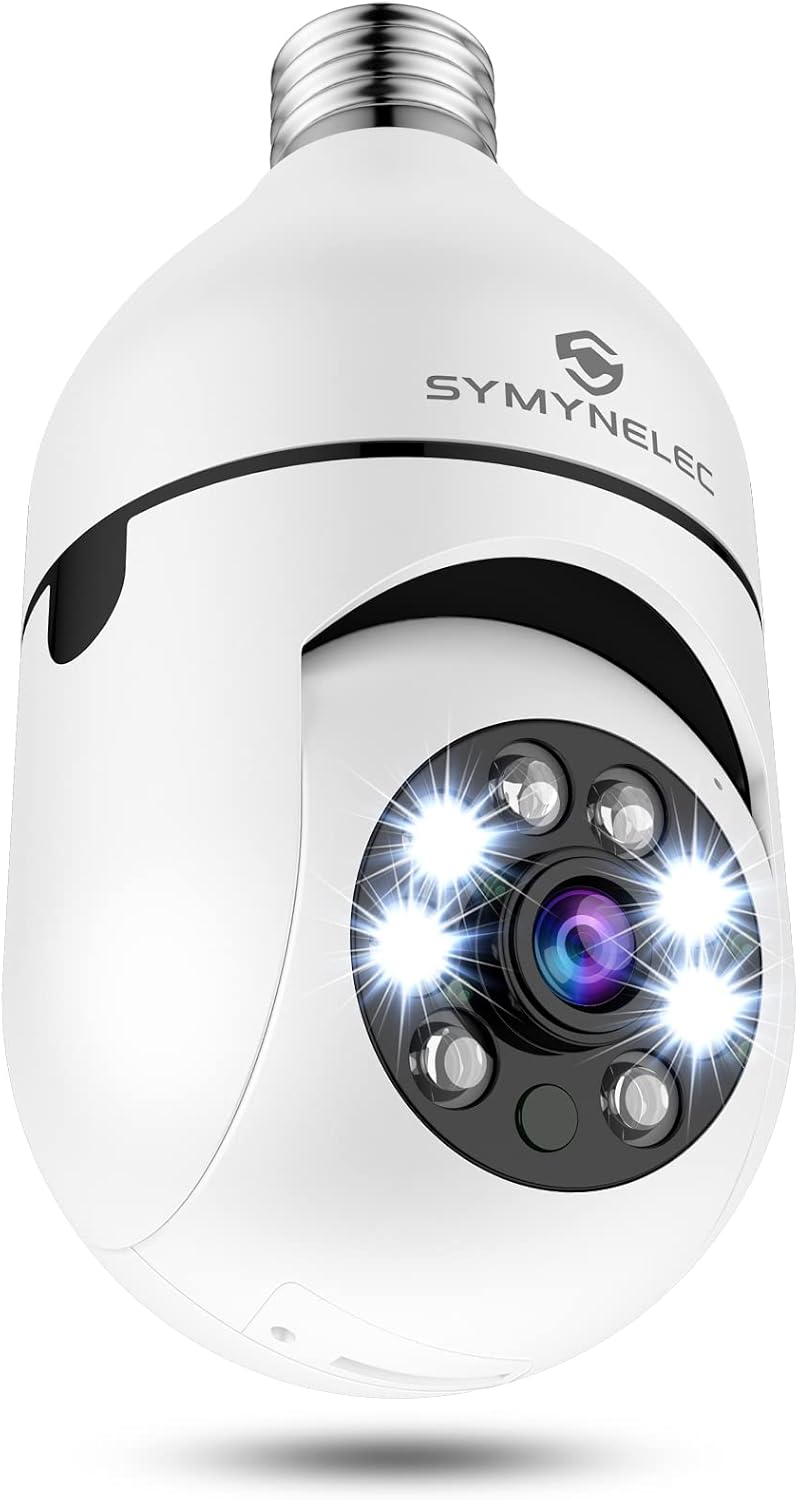
Image: Front view of the SYMYNELEC 2K Wireless WiFi Light Bulb Security Camera, highlighting its compact design and integrated camera lens with LED lights.
2. Setup Guide
2.1 What's in the Box
- SYMYNELEC PTZ Bulb Camera
- E27 Lamp Bulb Socket (for optional mounting)
- Mounting Screws
- Reset Pin
- User Manual
2.2 Pre-installation Checklist
- Ensure you have a 2.4GHz WiFi network available. 5GHz WiFi is NOT supported.
- Download the "Symynelec" app from the App Store (iOS) or Google Play (Android).
- Confirm your light bulb socket is E27 type (E26 NOT supported).
2.3 Physical Installation
- Screw the SYMYNELEC PTZ Bulb Camera into a standard E27 light bulb socket. Ensure the socket is powered off before installation.
- Once securely screwed in, turn on the power to the light bulb socket. The camera will initiate its startup sequence.

Image: A hand screwing the SYMYNELEC Light Bulb Camera into a ceiling light fixture, illustrating the ease of installation.
Video: This video demonstrates the simple process of installing the SYMYNELEC PTZ Bulb Camera into a light socket.
2.4 App Download & Device Pairing
- Open the "Symynelec" app on your smartphone.
- Register or log in to your account.
- Tap the "+" icon or "Add Device" to begin the pairing process.
- Select "Security & Video Surveillance" category, then choose "Smart Camera (Wi-Fi)".
- Follow the on-screen instructions to reset the device using the provided reset pin. Listen for a prompt tone indicating it's ready for pairing.
- Ensure your phone is connected to a 2.4GHz WiFi network. Enter your WiFi password in the app.
- The app will display a QR code. Hold your phone with the QR code approximately 15-20 cm (6-8 inches) in front of the camera lens. The camera will scan the code and emit a prompt tone upon successful connection.
- Once connected, you can name your camera and begin using it.
Video: This video provides a quick guide on connecting the light bulb camera to the app, including the reset and pairing process.
3. Operating Instructions
3.1 Live View & PTZ Control
Access the live feed of your camera through the Symynelec app. Use the on-screen controls to pan (355° horizontally) and tilt (120° vertically) the camera, providing a comprehensive 360-degree view of the monitored area.

Image: Illustrates the 355° pan and 120° tilt capabilities of the camera, showing a wide field of view controlled via the app.
3.2 Motion Detection & Tracking
The camera features human motion detection with adjustable sensitivity. When motion is detected, the camera can:
- Send real-time notifications to your phone.
- Trigger an alarm siren.
- Automatically light up.
- Track the movement of detected objects/people and save the motion video.

Image: Depicts the camera's motion detection capabilities, showing an alert being sent to a smartphone when a person is detected.
3.3 Two-Way Audio
Utilize the built-in microphone and speaker for two-way communication. This allows you to speak to individuals near the camera or deter unwanted visitors.

Image: Illustrates the two-way talk functionality, showing a child speaking into a phone and a person interacting with the camera.
3.4 Night Vision
The camera provides 2K Full HD video quality and features upgraded infrared LEDs and sensors for night vision up to 33 ft. It supports both infrared (black and white) and color night vision modes. Lights can automatically activate upon detection of movement.

Image: Compares the visual output of IR (infrared) mode and Color mode for night vision, showing the clarity in different lighting conditions.
3.5 Recording & Storage
The camera supports continuous 24/7 recording. Footage can be stored locally on a Micro SD card (up to 128GB, FAT32 format required) or via optional cloud storage services.

Image: Shows the camera with an inserted Micro SD card, indicating local storage capability, alongside icons for cloud storage.
3.6 Smart Home Integration
The SYMYNELEC PTZ Bulb Camera is compatible with Alexa and Google Assistant for voice control and integration into your smart home ecosystem.
4. Maintenance
4.1 Cleaning
To maintain optimal performance, gently wipe the camera lens and exterior with a soft, dry cloth. Avoid using harsh chemicals or abrasive materials.
4.2 Firmware Updates
The Symynelec app will notify you of any available firmware updates. It is recommended to keep your camera's firmware updated for improved performance and security.
4.3 Resetting the Device
If you encounter issues or need to re-pair the camera, use the provided reset pin to press and hold the reset button on the camera for approximately 5 seconds until you hear a prompt tone.
5. Troubleshooting
- Connectivity Issues: Ensure your WiFi network is 2.4GHz. The camera does not support 5GHz WiFi. Place the camera within 10 meters of your WiFi router for optimal signal.
- SD Card Not Recognized: Ensure the Micro SD card is formatted to FAT32. The camera supports up to 128GB. Remove and reinsert the card.
- No Prompt Tone During Setup: Verify the camera is powered correctly. If no tone is heard after resetting, try resetting again or contact support.
- Night Vision Clarity: Avoid installing the camera inside glass fixtures, as this can significantly affect night vision performance.
6. Specifications
| Feature | Detail |
|---|---|
| Video Capture Resolution | 2K 3MP |
| Connectivity Technology | 2.4GHz WiFi (5GHz NOT supported) |
| Pan/Tilt Angle | 355° Horizontal, 120° Vertical |
| Night Vision Range | Up to 10 Meters (33 ft) |
| Storage | Max 128GB FAT32 Micro SD Card (Not included), Cloud Storage (Optional) |
| Power Source | AC/DC (110V~240V) |
| Mounting Type | E27 Bulb Socket Only |
| Compatible Devices | Android & iOS Smartphone, PC Web |
| Dimensions | 2.76 x 2.76 x 5.91 inches |
| Item Weight | 9.6 ounces |
7. Warranty and Support
7.1 Warranty Information
Your Symynelec product is backed by a 1-year warranty from the purchase date. For more information on repairs, exchanges, and other policies, please visit symynelec.com.
7.2 Customer Support
For any questions regarding connection, installation, functionality, or other inquiries, please feel free to contact us. Our technicians are available for professional live chat service and lifetime technical support.
Please send all inquiries through the Contact Form on our website or email us at service@symynelec.com.


