
Introduction
This manual provides essential instructions for the safe and effective operation, setup, maintenance, and troubleshooting of your ESAB EMP 210 Multi-Process Welder. Please read this manual thoroughly before using the equipment to ensure proper function and safety.

Figure 1: The ESAB EMP 210 Multi-Process Welder shown with its complete set of accessories, including MIG gun, TIG torch, electrode holder, ground clamp, gas regulator, and welding wire spool. This image illustrates the comprehensive package provided for various welding applications.
Safety Precautions
Always prioritize safety when operating welding equipment. Failure to follow safety guidelines can result in serious injury or death. Refer to relevant safety standards and regulations in your region.
- Wear appropriate personal protective equipment (PPE), including welding helmet, gloves, protective clothing, and safety shoes.
- Ensure adequate ventilation to avoid inhaling welding fumes.
- Protect bystanders from arc rays and sparks.
- Never weld near flammable materials.
- Ensure proper grounding of the welding machine.
- Disconnect power before performing any maintenance or changing consumables.
Setup
1. Unpacking and Inspection
Carefully remove the welder and all accessories from the packaging. Inspect for any shipping damage. Report any damage to your supplier immediately.
2. Power Connection
The ESAB EMP 210 operates on both 120V and 230V AC power. The machine automatically detects the input voltage. Ensure the power source is properly rated for the welder's requirements.
- 120V Operation: Use a dedicated 20A circuit.
- 230V Operation: Use a dedicated 30A circuit.
3. Gas Connection (MIG/TIG)
For MIG and TIG welding, connect the appropriate shielding gas cylinder (e.g., Argon, C25) to the regulator provided. Attach the gas hose from the regulator to the gas inlet on the rear of the welder.
4. Welding Lead Connections
Connect the ground clamp to the appropriate terminal on the welder and secure it to the workpiece. Connect the MIG gun, TIG torch, or electrode holder to their respective terminals as required for the chosen welding process.

Figure 2: A top-down view of the ESAB EMP 210 welder, highlighting its compact design and integrated handle for portability. This perspective shows the overall form factor of the unit, which is designed for easy transport and setup.
Operating Instructions
The ESAB EMP 210 offers MIG, Stick (MMA), and TIG (Lift TIG) welding capabilities. Select the desired process using the control panel.
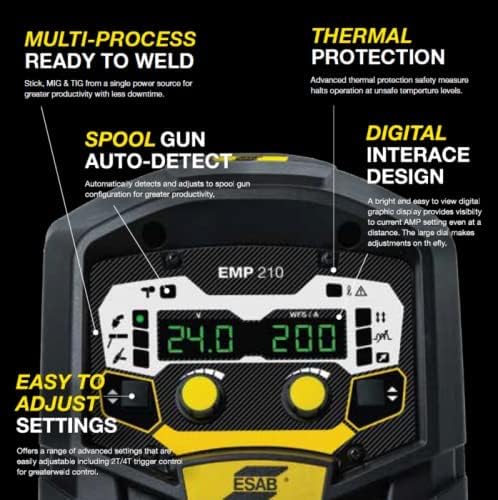
Figure 3: Detailed view of the ESAB EMP 210's digital control panel. This image shows the clear display for voltage and amperage, along with the intuitive adjustment knobs and process selection buttons, emphasizing the "Digital Interface Design" and "Easy to Adjust Settings" features.
1. Control Panel Overview
The digital interface allows for precise control over welding parameters. Use the large dial and buttons to navigate menus and adjust settings such as amperage, voltage, and wire feed speed.
2. MIG Welding (GMAW)
- Install the appropriate welding wire spool and feed it through the MIG gun.
- Select MIG mode on the control panel.
- Adjust voltage and wire feed speed according to the material thickness and wire type.
- Ensure gas flow is set correctly (typically 15-25 CFH for solid wire).
3. Stick Welding (MMA/SMAW)
- Connect the electrode holder and ground clamp.
- Select Stick mode.
- Insert the appropriate electrode into the holder.
- Adjust amperage based on electrode type and diameter.
4. TIG Welding (GTAW - Lift TIG)
- Connect the TIG torch and ground clamp.
- Select TIG mode.
- Ensure pure argon shielding gas is connected and flowing.
- Adjust amperage for the material and tungsten electrode size.
- Initiate arc using the Lift TIG method.

Figure 4: An individual performing welding operations with the ESAB EMP 210 Multi-Process Welder. The welder is visible in the background, and the operator is focused on the workpiece, demonstrating the machine in an active work environment.
Maintenance
Regular maintenance ensures the longevity and optimal performance of your ESAB EMP 210 welder.
- Daily: Clean the MIG gun nozzle, contact tip, and diffuser. Check ground clamp and cable connections.
- Weekly/Monthly: Inspect all cables for damage. Clean the wire feed mechanism. Check gas hose for leaks.
- Periodically: Use compressed air to blow dust and debris from inside the machine (ensure power is disconnected). Inspect cooling fan for obstructions.
- Replace worn consumables (contact tips, nozzles, electrodes, tungsten) as needed.
Troubleshooting
Refer to the following table for common issues and their potential solutions. If a problem persists, contact ESAB customer support.
| Problem | Possible Cause | Solution |
|---|---|---|
| No Arc | No power, poor ground connection, incorrect settings, faulty torch/electrode holder. | Check power supply, ensure solid ground, verify settings, inspect connections. |
| Poor Weld Quality | Incorrect settings, contaminated material, improper technique, worn consumables. | Adjust parameters, clean workpiece, review technique, replace consumables. |
| Wire Feeding Issues (MIG) | Incorrect tension, clogged liner, wrong contact tip, tangled wire. | Adjust drive roll tension, clean/replace liner, use correct contact tip, untangle wire. |
| Overheating (Thermal Protection) | Exceeding duty cycle, poor ventilation. | Allow machine to cool, ensure adequate airflow around the unit. |
Specifications
| Feature | Detail |
|---|---|
| Brand | ESAB |
| Model Number | 0324-0075 (EMP 210) |
| Input Voltage | 120V / 230V DC (Auto-sensing) |
| Welding Processes | MIG (GMAW), Stick (MMA/SMAW), TIG (GTAW - Lift TIG) |
| Max Output Current | 200A |
| Item Weight | 43 pounds |
| Product Dimensions | 23 x 18.5 x 18 inches |
| Date First Available | October 28, 2021 |
Warranty and Support
Warranty Information
For detailed warranty terms and conditions, please refer to the official ESAB warranty statement included with your product or visit the official ESAB website. Warranty coverage typically includes defects in materials and workmanship for a specified period from the date of purchase.
Customer Support
If you encounter any issues or have questions regarding your ESAB EMP 210 welder, please contact ESAB customer support. You can find contact information on the official ESAB website or through your authorized dealer.
ESAB Official Website: www.esab.com


