
Introduction
This manual provides detailed instructions for the setup, operation, and maintenance of your Bushnell Prime L20 Trail Camera. Designed for reliable performance in the field, the Prime L20 offers high-quality imaging and essential features for monitoring wildlife or property.
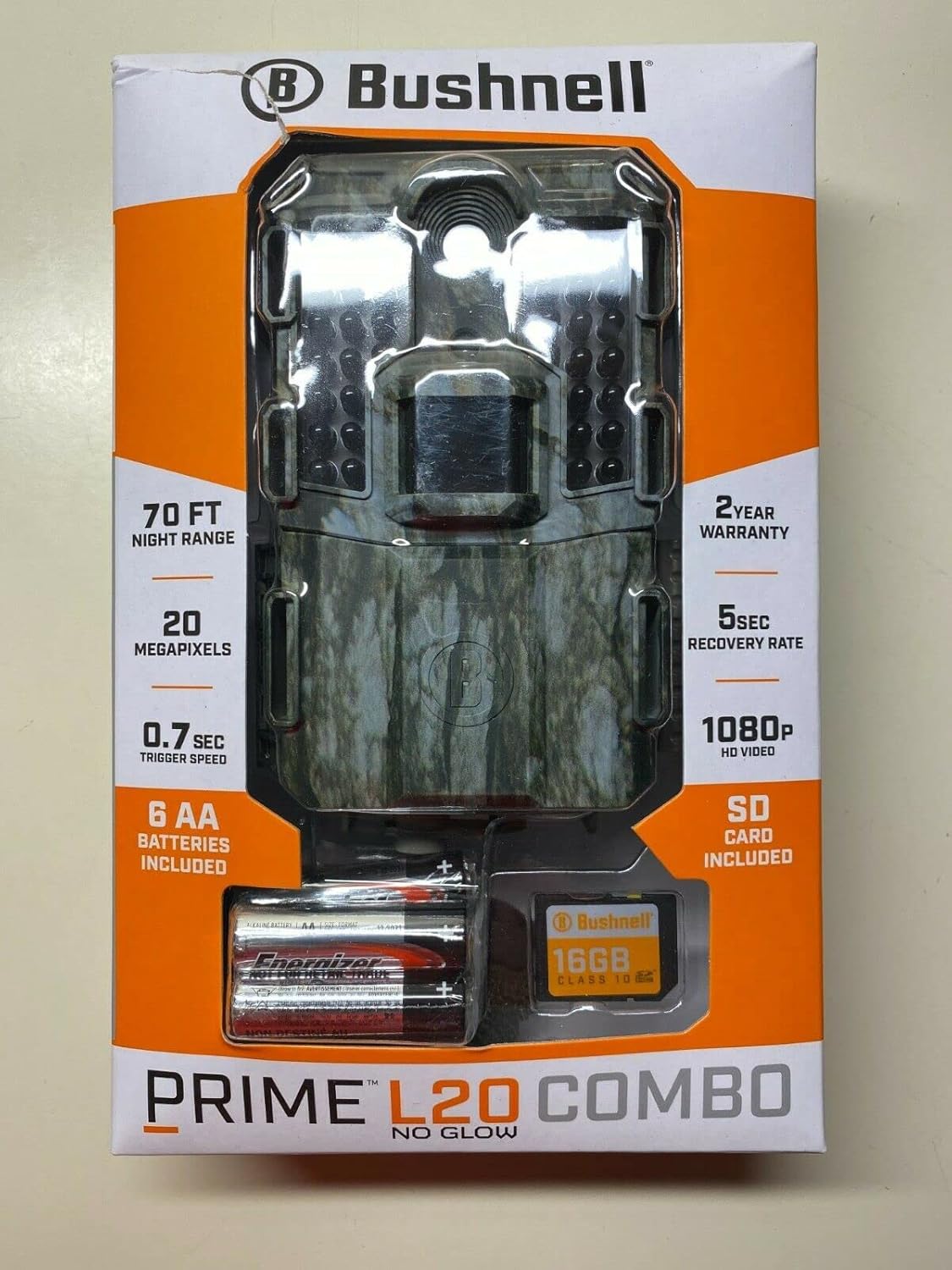
Image: The Bushnell Prime L20 Trail Camera, shown in its retail packaging. The box highlights key features such as 70 ft night range, 20 megapixels, 0.7 sec trigger speed, 6 AA batteries included, 5 sec recovery rate, 1080p HD video, and an SD card included.
Package Contents
Please verify that all items listed below are included in your package:
- Bushnell Prime L20 Trail Camera (1)
- AA Batteries (6)
- 16GB SD Card (1)

Image: A close-up view of the six Energizer AA alkaline batteries and the Bushnell 16GB Class 10 SD card included with the camera.
Features
The Bushnell Prime L20 Trail Camera is equipped with a range of features designed for optimal performance:
- 20 Megapixel (MP) Effective Still Resolution: Captures high-resolution still images.
- 1080p HD Video Capture: Records clear high-definition video.
- 0.7 Second Trigger Speed: Ensures quick capture of moving subjects.
- 5 Second Recovery Rate: Allows for rapid subsequent captures.
- 70 Feet Night Vision Range: Utilizes no-glow LED technology for discreet nighttime recording.
- Date, Time, and Temperature Stamp: Overlays essential data onto captured images and videos.
- Removable Battery Tray: Facilitates easy battery replacement.
- 1/4-20 Socket: Compatible with standard mounting brackets, including deluxe tree brackets.
- Master Lock Python Compatible: Provides security options for the camera.
- Weatherproof and Rugged (IP54): Designed to withstand various outdoor conditions.
- SD Card Slot: Supports SD and SDHC memory cards up to 32GB.
- B&W Text LCD Display: For easy navigation and setting adjustments.
- Programmable Settings: Includes Trigger Interval, Multi-Image Mode (1 or 3 images per trigger), and Video Resolution.

Image: The back of the Bushnell Prime L20 Combo box, illustrating the camera's features such as 1080p HD video, full color high-res images, date/time/temperature stamp, temperature range, removable battery tray, 1/4-20 socket, Master Lock Python compatibility, weatherproof design, and SD card slot.
Setup
Battery Installation
- Open the camera housing.
- Locate the removable battery tray.
- Insert six (6) AA batteries into the tray, ensuring correct polarity (+/-) as indicated. Energizer Alkaline or Lithium batteries are recommended for optimal performance and battery life.
- Slide the battery tray back into the camera until it clicks securely into place.
SD Card Installation
- With the camera powered off, locate the SD card slot.
- Insert the included 16GB SD card (or another compatible SD/SDHC card up to 32GB) into the slot with the label facing up, until it clicks into place.
- To remove the SD card, gently push it in until it springs out.
Mounting the Camera
The Bushnell Prime L20 features a 1/4-20 threaded socket on its base, allowing it to be mounted using various accessories such as a deluxe tree bracket or tripod. Ensure the camera is securely mounted to prevent movement and capture clear images.
Operating Instructions
Powering On/Off
- To power on, slide the power switch to the 'ON' position. The B&W text LCD display will illuminate.
- To power off, slide the power switch to the 'OFF' position.
Navigating the Menu
Use the navigation buttons (usually 'Up', 'Down', 'Left', 'Right', 'OK') to browse through the menu options displayed on the LCD screen. The 'OK' button confirms selections.
Setting Camera Modes and Parameters
Access the camera's menu to configure settings such as:
- Mode: Select between Photo, Video, or Hybrid (Photo + Video) mode.
- Image Resolution: Choose between High (20MP) or Low (5MP) for still images.
- Video Resolution: Set to 1080p for high-definition video.
- Trigger Interval: Define the delay between consecutive captures after a trigger event.
- Multi-Image Mode: Set the number of photos taken per trigger (1 or 3).
- Date/Time/Temperature Stamp: Enable or disable the overlay of this information on captures.
- Field Scan 2X: (If available in menu) Allows for time-lapse capture at preset intervals.
- GPS Geotag: (If available in menu) Records location data with captures.
After adjusting settings, ensure you save them before exiting the menu.
Maintenance
Cleaning
- Use a soft, dry cloth to clean the camera body.
- For the lens and sensor, use a lens cleaning cloth and solution specifically designed for optics. Avoid abrasive materials.
- Ensure the battery compartment and SD card slot are free from dirt and moisture.
Storage
When not in use for extended periods, remove the batteries from the camera to prevent leakage. Store the camera in a cool, dry place away from direct sunlight and extreme temperatures.
Troubleshooting
Camera Not Powering On
- Check that the batteries are inserted correctly with the proper polarity.
- Ensure batteries are fresh and fully charged.
- Verify the battery tray is fully seated.
No Images/Videos Captured
- Confirm an SD card is inserted and properly formatted.
- Check the SD card for available space.
- Ensure the camera is in the correct operating mode (Photo, Video, or Hybrid).
- Verify the trigger interval and sensitivity settings.
- Clear any obstructions from the camera's field of view or sensor.
Poor Image Quality
- Clean the camera lens with a soft, lint-free cloth.
- Ensure the camera is mounted securely to prevent blur from movement.
- Check the image resolution setting (set to 20MP for highest quality).
Specifications
| Feature | Specification |
|---|---|
| Model Number | 119930CWM |
| Effective Still Resolution | 20 MP |
| Video Capture Resolution | 1080p |
| Night Vision Range | 100 Feet (No Glow) |
| Trigger Speed | 0.7 Seconds |
| Recovery Rate | 5 Seconds |
| Flash Memory Type | SD, SDHC (up to 32GB) |
| Batteries | 6 AA batteries (included) |
| Item Dimensions (L x W x H) | 6 x 3 x 2 inches |
| Item Weight | 1.43 pounds |
| International Protection Rating | IP54 |
| Color | Camouflage |
| Connectivity Technology | Wireless (Wi-Fi) |
| UPC | 029757199317 |
Warranty and Support
Warranty Information
The Bushnell Prime L20 Trail Camera comes with a 2-year warranty, as indicated on the product packaging. Please retain your proof of purchase for warranty claims.
Manufacturer
Vista Outdoors
Proposition 65 Warning
WARNING: This product can expose you to chemicals including lead, which is known to the State of California to cause cancer and birth defects or other reproductive harm. For more information go to www.P65Warnings.ca.gov.
Further Support
For additional support, product registration, or to explore other Bushnell products, please visit the official Bushnell store:
Visit the Bushnell Store on Amazon

Image: The side of the Bushnell Prime L20 Combo box, displaying the UPC (029757199317) and model number (119930CWM), along with regulatory marks.