
1. Introduction
This manual provides detailed instructions for the installation, operation, and maintenance of your Lampa Smart Scooter Case, Model 91571. This universal smartphone holder is designed to securely attach your mobile device to a scooter handlebar, offering convenient access while riding. Please read this manual thoroughly before use to ensure proper functionality and safety.
2. Safety Information
- Ensure the holder is securely mounted to the scooter handlebar before placing a smartphone inside.
- Verify that the smartphone is firmly seated within the case and the case is properly attached to the mount.
- Do not operate your smartphone while riding. Always pull over to a safe location if you need to interact with your device.
- Regularly check all mounting points for tightness and wear. Loose components can lead to the device detaching during use.
- Avoid exposing the case to extreme temperatures or direct sunlight for prolonged periods, as this may damage your smartphone or the case material.
- This product is designed for scooters. Do not attempt to mount it on other vehicles or surfaces unless explicitly stated as compatible.
3. Package Contents
The Lampa Smart Scooter Case package includes the following components:
- Smart Scooter Case (main unit)
- Handlebar Mounting Bracket
- Mounting Plate for Case

Image 3.1: All components of the Lampa Smart Scooter Case, including the smartphone case, the separate mounting plate, and the handlebar attachment.
4. Setup
4.1. Attaching the Handlebar Mounting Bracket
- Select a suitable position on your scooter's handlebar. Ensure it does not obstruct your view or interfere with steering.
- Open the clamp of the handlebar mounting bracket.
- Place the bracket around the handlebar and tighten the screw until it is firmly secured. Do not overtighten.
4.2. Attaching the Mounting Plate to the Case
The mounting plate typically comes pre-attached to the case. If it is separate, align the plate with the designated area on the back of the Smart Scooter Case and ensure it clicks into place securely.
4.3. Connecting the Case to the Handlebar Mount
- Align the mounting plate on the back of the Smart Scooter Case with the receiver on the handlebar mounting bracket.
- Slide the case onto the bracket until you hear a click, indicating it is locked into position.
- Gently pull on the case to confirm it is securely attached and does not wobble.

Image 4.1: The Lampa Smart Scooter Case fully assembled and mounted onto a scooter handlebar, ready for use.
5. Operating Instructions
5.1. Inserting Your Smartphone
- Unzip the Smart Scooter Case.
- Carefully place your smartphone inside the case. Ensure it fits snugly and is centered for optimal screen visibility. The interior is designed to protect your device.
- Zip the case closed completely to secure your smartphone.
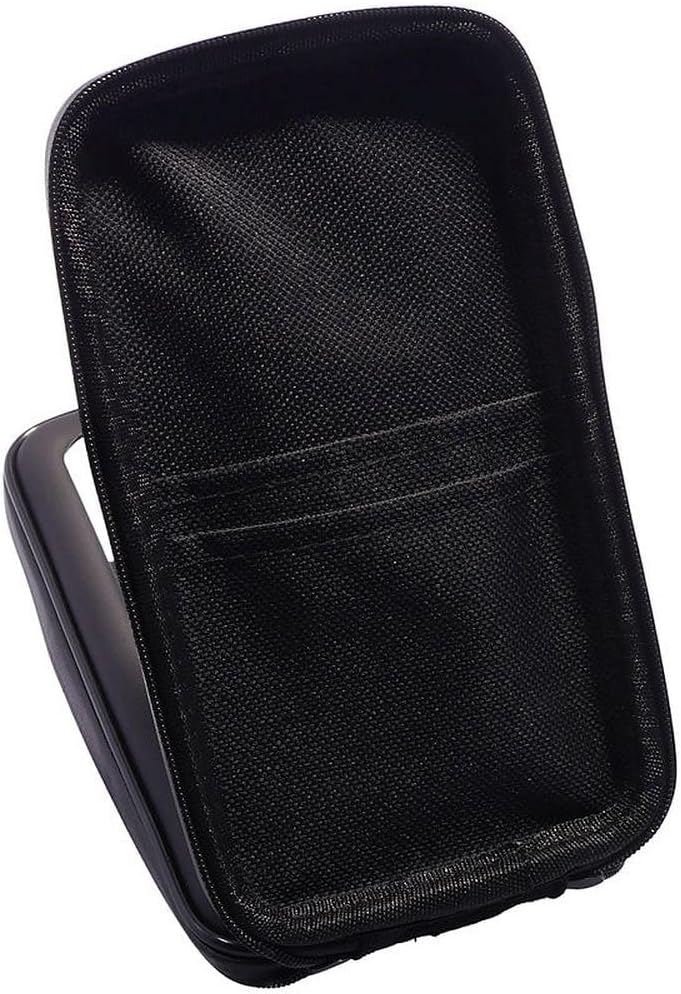
Image 5.1: An open view of the Lampa Smart Scooter Case interior, showing the soft lining and internal pockets designed to hold and protect a smartphone.
5.2. Adjusting Viewing Angle (Rotatable Feature)
The Lampa Smart Scooter Case features a rotatable design, allowing you to adjust the viewing angle of your smartphone. Gently rotate the case on its mount to achieve your desired horizontal or vertical orientation. Ensure it clicks into a stable position before riding.
6. Maintenance
- Cleaning: Wipe the exterior of the case with a soft, damp cloth. Do not use harsh chemicals or abrasive cleaners.
- Inspection: Periodically inspect the mounting bracket and case for any signs of wear, damage, or loose components. Tighten screws if necessary.
- Storage: When not in use, store the Smart Scooter Case in a cool, dry place away from direct sunlight.
7. Troubleshooting
| Problem | Possible Cause | Solution |
|---|---|---|
| Case feels loose or wobbly on the mount. | Case not fully engaged with the mounting bracket. | Ensure the case is pushed firmly onto the bracket until it clicks into place. Check for any obstructions. |
| Mounting bracket slides on the handlebar. | Bracket not tightened sufficiently. | Tighten the screw on the handlebar mounting bracket. Ensure the handlebar surface is clean and dry. |
| Smartphone does not fit inside the case. | Smartphone size exceeds case capacity. | Verify your smartphone dimensions against the product specifications. This case is designed for universal fit but extremely large phones may not fit. |
| Screen visibility is poor. | Glare or incorrect orientation. | Adjust the rotatable feature to change the viewing angle. Avoid direct sunlight if possible. |
8. Specifications
- Model Number: 91571
- Brand: Lampa
- Compatible Devices: Smartphones (Universal)
- Mounting Type: Handlebar (Scooter)
- Special Features: Rotatable
- Item Weight: 7.7 ounces (approximately 218 grams)
- Package Dimensions: 8.35 x 4.37 x 2.4 inches (approximately 21.2 x 11.1 x 6.1 cm)
- Manufacturer: lampa
- ASIN: B09KLW5DZL
9. Warranty & Support
For warranty information and customer support, please refer to the documentation provided at the time of purchase or contact your retailer. Keep your proof of purchase for any warranty claims.
